Group member management includes pulling the member list, muting group members, removing group members, granting permissions, and transferring the group ownership, which can be implemented through the methods in the TencentImSDKPlugin.v2TIMManager.getGroupManager() core class.
Getting the Group Member List
Call getGroupMemberList to get the list of members in a specified group.
When the call is successful, the response returns a list of V2TimGroupMemberFullInfo. This object contains profile information for each group member, including the user ID (userID), group card (nameCard), avatar (faceUrl), nickname (nickName), join time (joinTime), online status (isOnline), and additional attributes.
Note:
The online status field (isOnline) is only available with Pro, Pro Plus or Enterprise edition.
Due to the large number of members in AVChatRoom, retrieving the complete member list is not supported. Pro, Pro Plus or Enterprise edition can retrieve up to the most recent 1,000 members who have joined. The backend updates the group member list every 40 seconds.
Pull the information list of ordinary group members
Pulling by page (nextSeq)
In many cases, only the first page of the group member list, not the information of all the group members, needs to be displayed on the user UI. More group members need to be pulled only when the user clicks Next Page or pulls up the list page. In this case, you can use pulling by page.
Directions for pulling by page:
1. When you call getGroupMemberList for the first time, set nextSeq to 0 (indicating to pull the group member list from the beginning). Up to 50 group member objects can be pulled at a time.
2. After the group member list is pulled successfully for the first time, the V2TIMGroupMemberInfoResult callback of getGroupMemberList will contain nextSeq (field for the next pull):
If nextSeq is 0, all the group members have been pulled.
If nextSeq is greater than 0, there are more group members that can be pulled. This doesn't mean that the next page of the member list will be pulled immediately. In common communications software, a paged pull is often triggered by a swipe operation.
3. When the user continues to pull up the group member list, if there are more members that can be pulled, you can continue to call the getGroupMemberList API and pass in the nextSeq parameter (the value is from the V2TIMGroupMemberInfoResult object returned by the last pull) for the next pull.
The group owner or admin can call muteGroupMember and set muteTime (in seconds) to mute a group member. If muteTime is set to 120, the member is muted for 120 seconds.
If a group member is muted, message sending will fail, and an error code will be reported. To unmute the member, set muteTime to 0.
The muting timestamp is stored in the muteUntil field of the group member information. Note that muteUntil indicates the end time for muting a group member.
After a group member is muted, all the group members (including the muted member) will receive the onMemberInfoChanged callback.
Note
The group owner can mute/unmute the admin and ordinary group members. The admin can mute/unmute ordinary group members.
Muting the entire group
The group owner or admin can also call the muteAllGroupMembers API to mute the entire group by setting the isMute field to true. The entire group can be muted for an unlimited period of time.
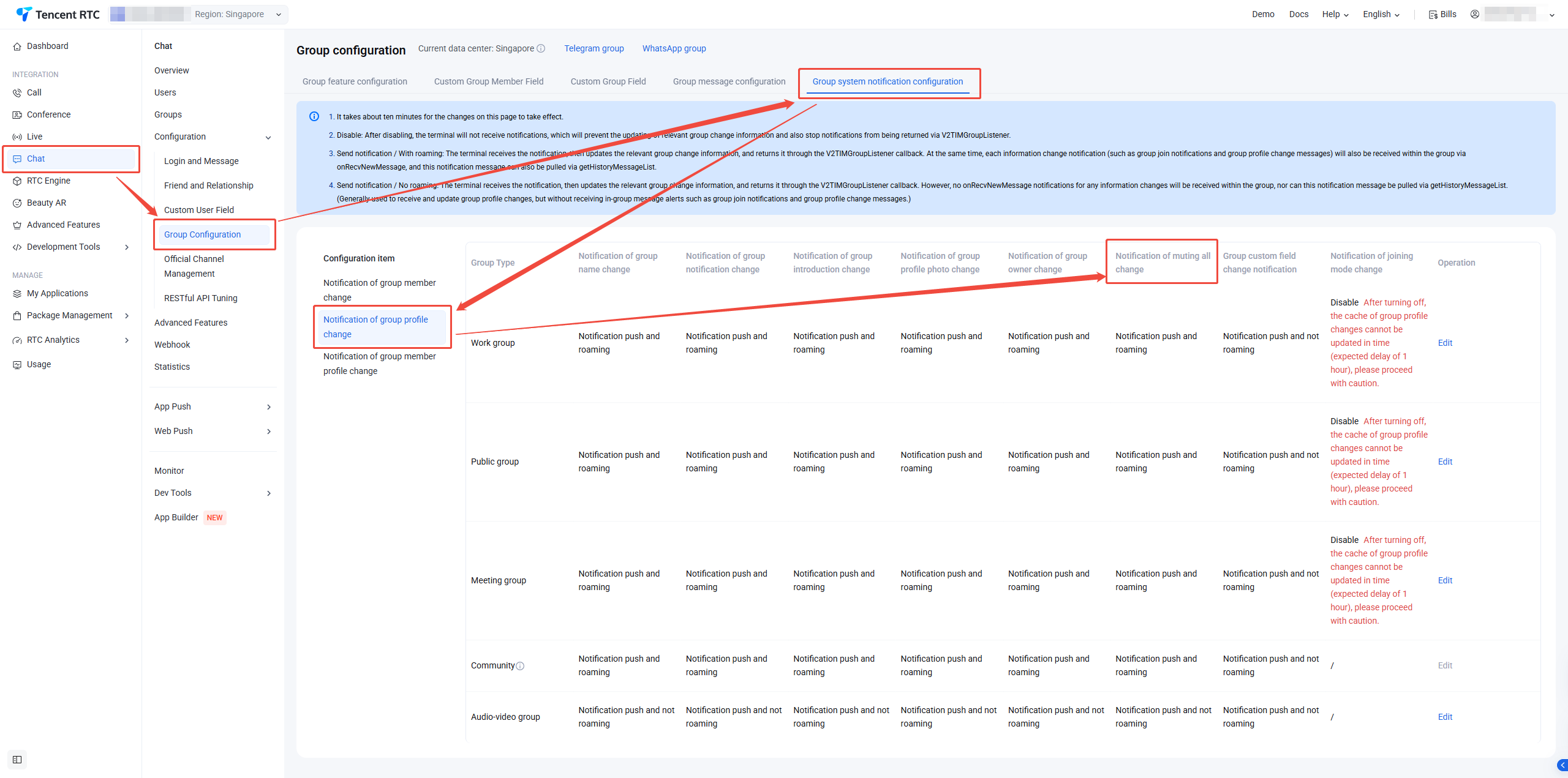
This notification is disabled by default. To enable it, you can log in to the Console to modify the relevant settings. Configuration path: Applications > Your App > Chat > Configuration > Group Configuration > Group system notification configuration > Notification of group profile change > Notification of muting all change.
Note:
Only the group owner can mute the admin.
Sample code:
// Mute the group member `userB` for 1 minute
final result =await TencentImSDKPlugin.v2TIMManager.getGroupManager().muteGroupMember(
groupID:'your_group_id',
userID:'userB',
seconds:60
);
// Mute all members
final result =await TencentImSDKPlugin.v2TIMManager.getGroupManager().muteAllGroupMembers(
The group owner or admin can call the kickGroupMember API to remove a specified ordinary group member from the group.
After the ordinary group member is removed, all the members (including the removed member) will receive the onMemberKicked callback.
As an audio-video group (AVChatRoom) can be joined freely, there is no API for removing a group member from an audio-video group (AVChatRoom). You can use muteGroupMember to mute a specified member to implement similar controls.
Note:
Only the group owner can remove the admin from the group.
Sample code:
final result =await TencentImSDKPlugin.v2TIMManager.getGroupManager().kickGroupMember(
groupID:'your_group_id',
memberList:['target_user_id']
);
Setting an Admin
The group owner can call setGroupMemberRole to set a group member in a public group (Public) or meeting group (Meeting) as the admin.
An ordinary member set as the admin has the admin permission to perform the following operations:
Modify the basic group profile.
Remove an ordinary member from the group
Mute an ordinary member (prevent the member from speaking during a specified period of time)
The group owner can call transferGroupOwner to transfer the group ownership to a group member.
After the group ownership is transferred, all the group members will receive the onGroupInfoChanged callback. Here, the type of V2TIMGroupChangeInfo is V2TIMGroupChangeInfo.V2TIM_GROUP_INFO_CHANGE_TYPE_OWNER, and the value is the UserID of the new group owner.
Sample code:
final result =await TencentImSDKPlugin.v2TIMManager.getGroupManager().transferGroupOwner(