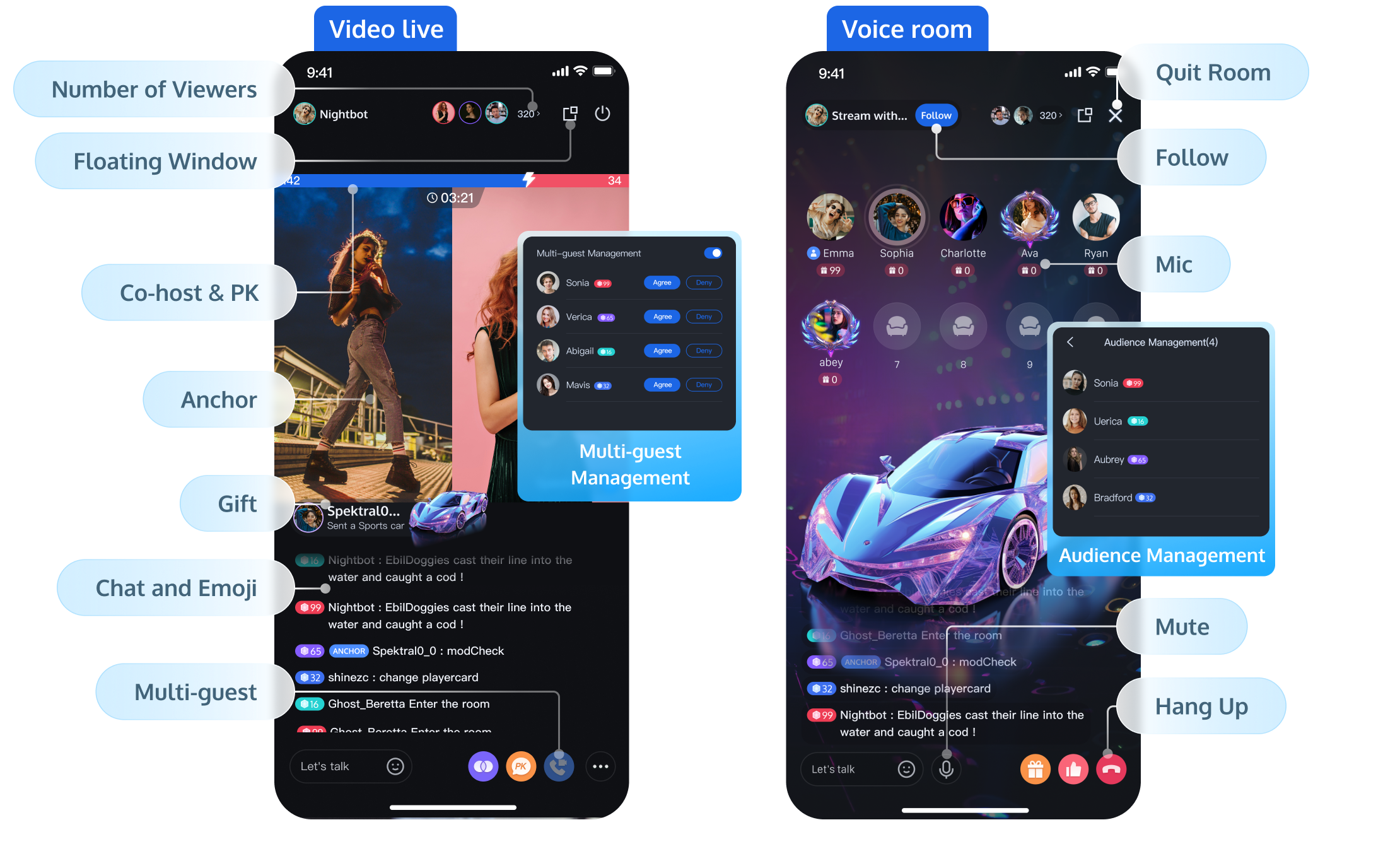
In the live streaming room, to enhance the atmosphere and quickly attract followers, the anchor can invite anchors from other live streaming rooms to engage in mic connecting or online PK. The audience in the mic-connected live streaming room can listen to or watch the interaction of multiple anchors at the same time, which can increase the fun of interactive live streaming and stimulate the audience's desire to rank and give gifts. Below are three specific implementations of different cross-room PK mic-connection solutions.
Regular Cross-room Mic-connection PK Solution
Use Cases
A simple cross-room mic-connection scenario for two or more rooms with a small number of anchors.
Scheme Principle
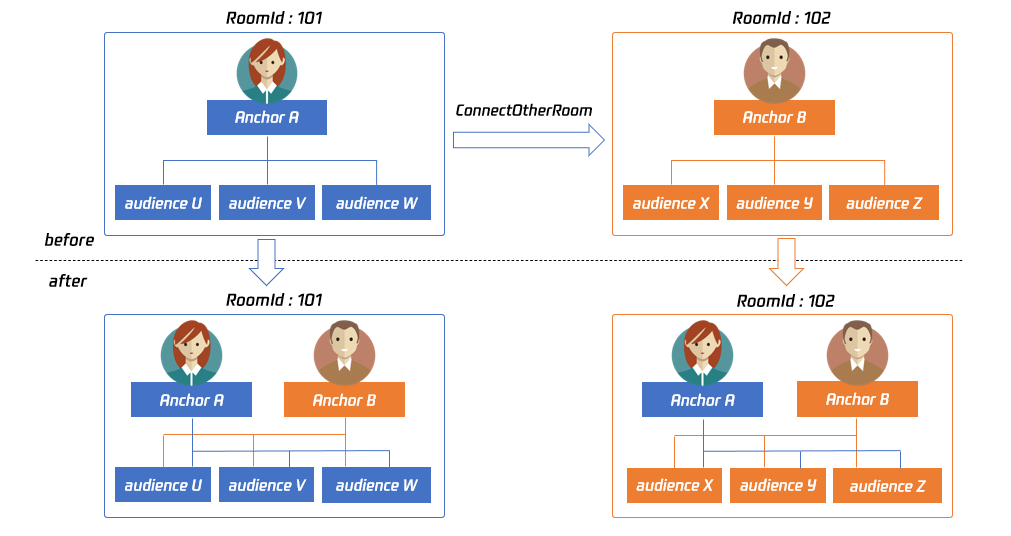
By default, only users in the same room can have audio and video communication, and the audio and video streams between different rooms are isolated. Through cross-room mic-connection, the audio and video stream of an anchor in another room can be published in the current room, while the audio and video stream of the current anchor will also be published in the target anchor's room. This allows anchors in different rooms to share audio and video streams across rooms, enabling audiences in each room to watch the audio and video of both anchors.
Implementation Process
When Anchor A in Room "101" establishes a cross-room call with Anchor B in Room "102" through ConnectOtherRoom:
Users in room 101 will receive two event callbacks from anchor B: onRemoteUserEnterRoom(B) and onUserVideoAvailable(B,true). Therefore, users in room 101 can subscribe to the audio and video of anchor B.
Users in room 102 will receive two event callbacks from anchor A: onRemoteUserEnterRoom(A) and onUserVideoAvailable(A,true). Therefore, users in room 102 can subscribe to the audio and video of anchor A.
Note:
For single-anchor cross-room PK between two rooms, only one anchor needs to call ConnectOtherRoom to establish the cross-room connection. Please do not call it in both directions.
Anchors can establish cross-room connections with multiple room anchors by calling ConnectOtherRoom multiple times. Currently, a single anchor can connect with up to 9 other room anchors.
Real-time cross-room mic interaction
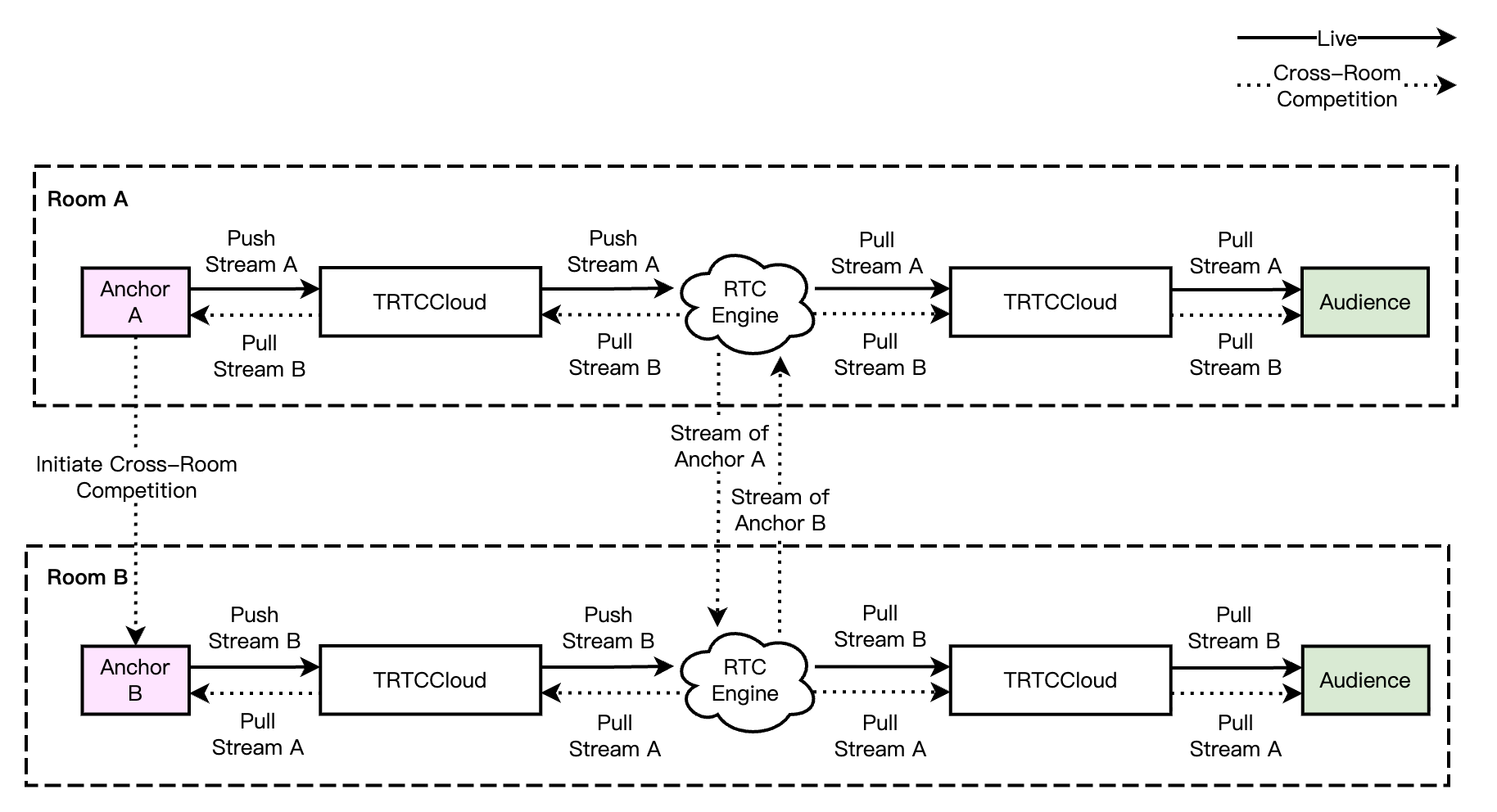
In an RTC scenario, the cross-room competition process is straightforward. Anchors and cross-room competition anchors mutually pull RTC single streams, and the audience simultaneously pulls the RTC single streams of both anchors and cross-room competition anchors. The audience can independently control the subscription logic of the media streams of anchors and cross-room connecting anchors. The real-time interactive cross-room call process is shown in the diagram below.
Note:
In real-time interactive cross-room competition scenes, audiences in the room can independently control the logic of subscribing to the media streams of cross-room connecting anchors, or it can be changed by the room owner to change the uplink capability of a cross-room anchor in their rooms.
Sample Code
1. Either party initiates the cross-room mic-connection PK.
// userId: The user ID of the anchor in the other room you want to initiate the cross-room link-up
// errCode: Error code. ERR_NULL indicates the request is successful
// errMsg: Error message
}
Note:
Both local and remote users participating in the cross-room competition must be in the anchor role and must have audio or video uplink capabilities.
For single-anchor cross-room PK between two rooms, only one anchor needs to call ConnectOtherRoom to establish the cross-room connection. Please do not call it in both directions.
2. All users in both rooms will receive a callback indicating that the audio and video streams from the PK anchor in the other room are available.
Either the initiator or the receiver of the cross-room mic-connection PK can call DisconnectOtherRoom to end the cross-room mic-connection PK.
Server-Side Cross-Room Mic-Connection PK Solution
Use Cases
Multiple rooms PK, each room has multiple anchors pure server-side cross-room mic-connection scenario.
Scheme Principle
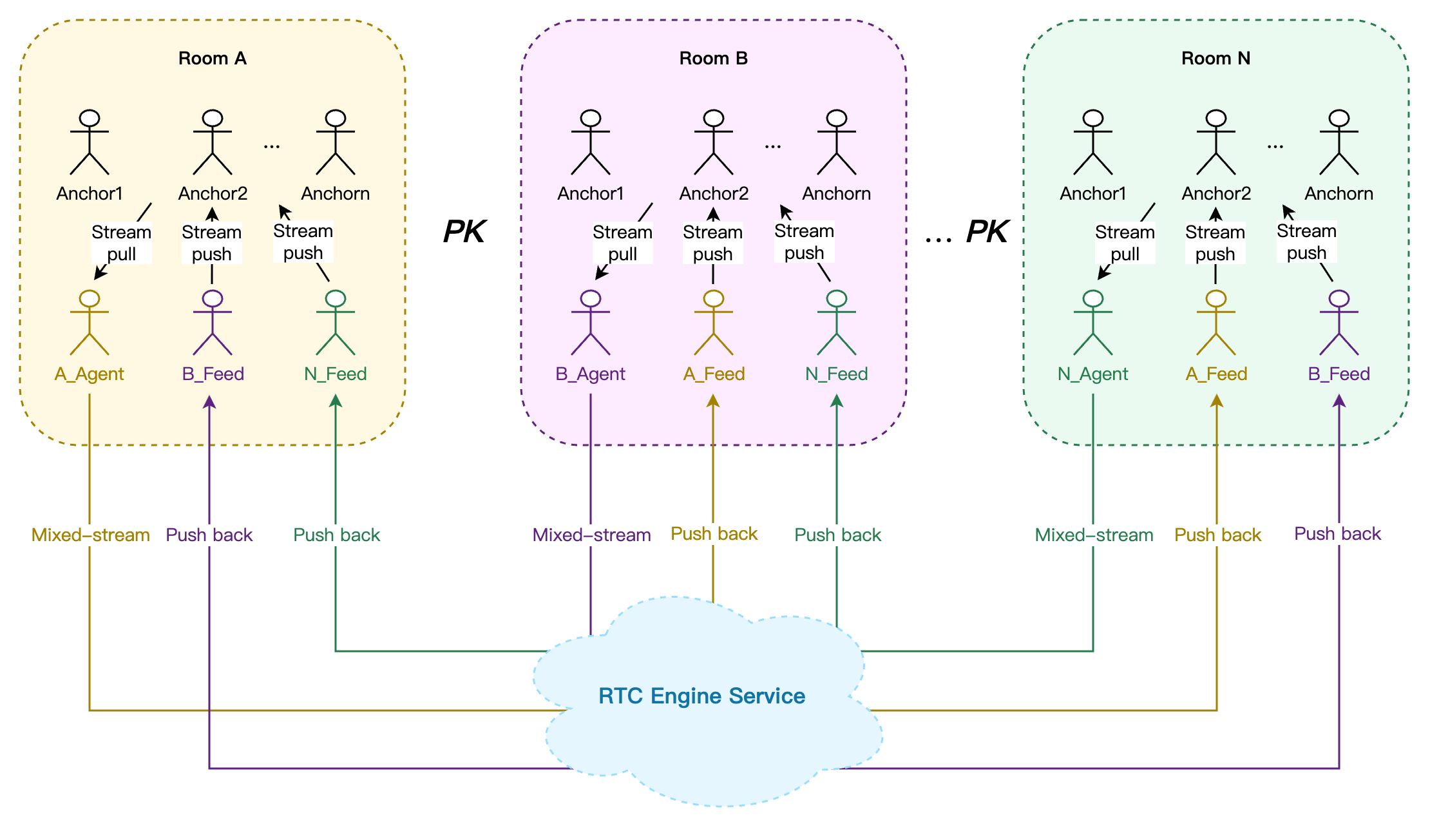
The server initiates multiple mixed-stream forwarding tasks. Each forwarding task pulls an Agent robot user into its RTC Engine room to pull the stream and simultaneously pulls one or more Feed robot users to push the mixed audio and video stream back to other RTC Engine rooms participating in the cross-room PK and mic connection. This way, users in different rooms can subscribe to the mixed-stream pusback audio and video streams of other rooms, realizing cross-room PK and mic connection.
Implementation Process
Real-Time Cross-Room Mic Interaction
1. Host of Room A initiates a cross-room PK request (business signaling) to Host of Room B and Host of Room N.
2. Host of Room B and Host of Room N agree to the cross-room PK request (business signaling).
3. The business backend simultaneously starts N mixed-stream pushing room tasks StartPublishCdnStream.
Task 1: A_Agent robot receives the media stream of Room A's host, and after mixed-streaming by the RTC Engine backend, A_Feed robot pushes it back to Room B and Room N.
Task 2: B_Agent robot receives the media stream of Room B's host, and after mixed-streaming by the RTC Engine backend, B_Feed robot pushes it back to Room A and Room N.
Task N: N_Agent robot receives the media stream of Room N's host, and after mixed-streaming by the RTC Engine backend, N_Feed robot pushes it back to Room A and Room B.
4. Users in Room A, Room B, and Room N pull the mixed audio and video streams from each other and start cross-room PK.
5. When cross-room PK ends, the business backend stops the N hybrid push-back room tasks through TaskId StopPublishCdnStream.
Note:
This solution supports up to 11 rooms for cross-room PK with link-mic simultaneously, and each room supports up to 16 hosts for link-mic simultaneously.
The robot ID must not conflict with the IDs of regular users in the room, or the forwarding tasks may end abnormally if the robot user is kicked out of the RTC Engine room.
Sample Code
The following example shows the parameter body for cross-room PK hybrid push-back room tasks in a pure audio scene.
Task 1
Task 2
Task N
{
"SdkAppId":1400000000,
"RoomId":"A",
"RoomIdType":1,
"AgentParams":{
"UserId":"A_Agent",
"UserSig":"eJwtjMEKgkAUAP9lz2Hv6b40oU...",
"MaxIdleTime":50
},
"WithTranscoding":1,
"AudioParams":{
"AudioEncode":{
"Codec":0,
"SampleRate":48000,
"Channel":2,
"BitRate":64
}
},
"FeedBackRoomParams":[
{
"RoomId":"B",
"RoomIdType":1,
"UserId":"A_Feed",
"UserSig":"eJwtzEELgkAUBOD-sldD3745..."
},
{
"RoomId":"N",
"RoomIdType":1,
"UserId":"A_Feed",
"UserSig":"eJwtzEELgkAUBOD-sldD3745..."
}
]
}
{
"SdkAppId":1400000000,
"RoomId":"B",
"RoomIdType":1,
"AgentParams":{
"UserId":"B_Agent",
"UserSig":"eJwtjMEKgkAUAP9lz2Hv6b40oU...",
"MaxIdleTime":50
},
"WithTranscoding":1,
"AudioParams":{
"AudioEncode":{
"Codec":0,
"SampleRate":48000,
"Channel":2,
"BitRate":64
}
},
"FeedBackRoomParams":[
{
"RoomId":"A",
"RoomIdType":1,
"UserId":"B_Feed",
"UserSig":"eJwtzEELgkAUBOD-sldD3745..."
},
{
"RoomId":"N",
"RoomIdType":1,
"UserId":"B_Feed",
"UserSig":"eJwtzEELgkAUBOD-sldD3745..."
}
]
}
{
"SdkAppId":1400000000,
"RoomId":"N",
"RoomIdType":1,
"AgentParams":{
"UserId":"N_Agent",
"UserSig":"eJwtjMEKgkAUAP9lz2Hv6b40oU...",
"MaxIdleTime":50
},
"WithTranscoding":1,
"AudioParams":{
"AudioEncode":{
"Codec":0,
"SampleRate":48000,
"Channel":2,
"BitRate":64
}
},
"FeedBackRoomParams":[
{
"RoomId":"A",
"RoomIdType":1,
"UserId":"N_Feed",
"UserSig":"eJwtzEELgkAUBOD-sldD3745..."
},
{
"RoomId":"B",
"RoomIdType":1,
"UserId":"N_Feed",
"UserSig":"eJwtzEELgkAUBOD-sldD3745..."
}
]
}
Note:
In a pure audio scene, the RTC Engine backend will by default mix the audio streams of all hosts in the room. You can also specify the audio mixing whitelist through the audio parameter McuAudioParams.
The above introduced three different cross-room PK connection implementation schemes, each with different use cases. The following is a comparison analysis of different cross-room mic-connection schemes from four dimensions.