
Live Battles
AtomicXCore includes two primary modules: CoHostStore for cross-room co-hosting, and BattleStore for PK battles. This guide explains how to integrate both modules to support the complete workflow—from co-hosting to PK—within your live streaming application.
Overview
A full host co-hosting PK session typically involves three main stages. The overall process is illustrated below:
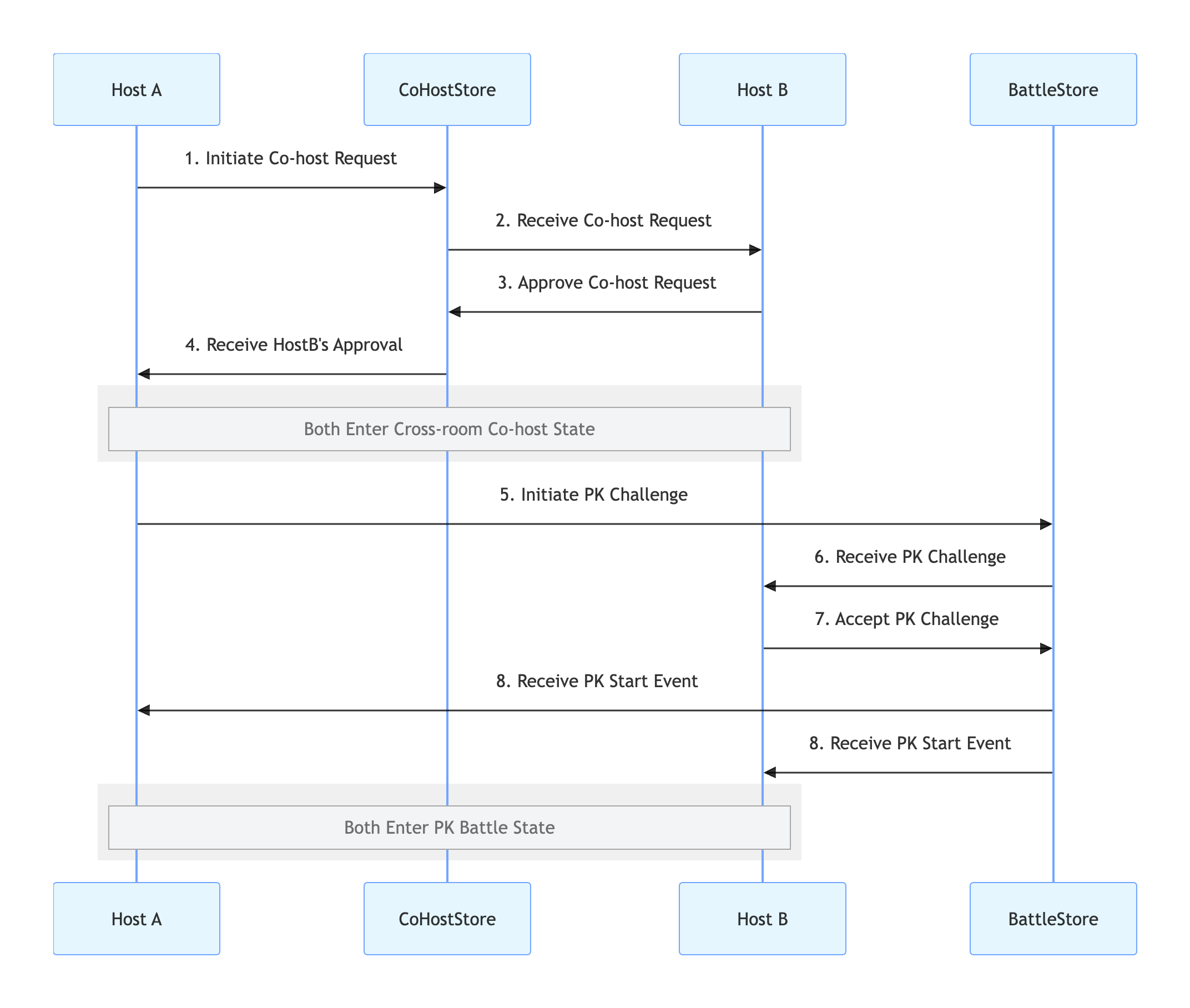
Implementation Steps
Step 1: Integrate the Component
Step 2: Implement Cross-Room Co-Hosting
This step enables both hosts’ video streams to appear in the same view. Use CoHostStore to manage cross-room co-hosting.
Inviter Implementation (Host A)
1. Send Co-Host Invitation
When Host A selects Host B in the UI and initiates a co-hosting request, call
requestHostConnection:import 'package:atomic_x_core/atomicxcore.dart';// Host A's pageclass AnchorAPage extends StatefulWidget {final String liveId;const AnchorAPage({Key? key, required this.liveId}) : super(key: key);@overrideState<AnchorAPage> createState() => _AnchorAPageState();}class _AnchorAPageState extends State<AnchorAPage> {late final CoHostStore _coHostStore;late final CoHostListener _coHostListener;@overridevoid initState() {super.initState();_coHostStore = CoHostStore.create(widget.liveId);_setupListeners();}// User clicks the "Co-Host" button and selects Host BFuture<void> inviteHostB(String targetHostLiveId) async {final layout = CoHostLayoutTemplate.hostDynamicGrid; // Select layout templateconst timeout = 30; // Timeout in secondsfinal result = await _coHostStore.requestHostConnection(targetHostLiveID: targetHostLiveId,layoutTemplate: layout,timeout: timeout,);if (result.isSuccess) {print('Co-host invitation sent, waiting for response...');} else {print('Failed to send invitation: ${result.errorMessage}');}}@overridevoid dispose() {_coHostStore.removeCoHostListener(_coHostListener);super.dispose();}}
2. Handle Invitation Results
Use
CoHostListener to receive Host B’s response:// Set up listener during _AnchorAPageState initializationvoid _setupListeners() {_coHostListener = CoHostListener(onCoHostRequestAccepted: (invitee) {print('Host ${invitee.userName} accepted your co-host invitation');},onCoHostRequestRejected: (invitee) {print('Host ${invitee.userName} rejected your invitation');},onCoHostRequestTimeout: (inviter, invitee) {print('Invitation timed out, no response from the other side');},onCoHostUserJoined: (userInfo) {print('Host ${userInfo.userName} joined the co-host session');},onCoHostUserLeft: (userInfo) {print('Host ${userInfo.userName} left the co-host session');},);_coHostStore.addCoHostListener(_coHostListener);}
Invitee Implementation (Host B)
1. Receive Co-Host Invitation
Set up
CoHostListener on Host B’s side to listen for incoming invitations:import 'package:atomic_x_core/atomicxcore.dart';// Host B's pageclass AnchorBPage extends StatefulWidget {final String liveId;const AnchorBPage({Key? key, required this.liveId}) : super(key: key);@overrideState<AnchorBPage> createState() => _AnchorBPageState();}class _AnchorBPageState extends State<AnchorBPage> {late final CoHostStore _coHostStore;late final CoHostListener _coHostListener;@overridevoid initState() {super.initState();_coHostStore = CoHostStore.create(widget.liveId);_setupListeners();}void _setupListeners() {_coHostListener = CoHostListener(onCoHostRequestReceived: (inviter, extensionInfo) {print('Received co-host invitation from host ${inviter.userName}');// _showInvitationDialog(inviter);},);_coHostStore.addCoHostListener(_coHostListener);}@overridevoid dispose() {_coHostStore.removeCoHostListener(_coHostListener);super.dispose();}}
2. Respond to Co-Host Invitation
When Host B responds in the dialog, call the appropriate method:
// Part of _AnchorBPageStateFuture<void> acceptInvitation(String fromHostLiveId) async {final result = await _coHostStore.acceptHostConnection(fromHostLiveId);if (result.isSuccess) {print('Accepted co-host invitation');} else {print('Failed to accept invitation: ${result.errorMessage}');}}Future<void> rejectInvitation(String fromHostLiveId) async {final result = await _coHostStore.rejectHostConnection(fromHostLiveId);if (result.isSuccess) {print('Rejected co-host invitation');} else {print('Failed to reject invitation: ${result.errorMessage}');}}
Step 3: Implement Host PK
Once co-hosting is active, either host can initiate a PK battle. Use BattleStore to manage PK battles.
Challenger Implementation (Host A)
1. Start PK Challenge
When Host A clicks the "PK" button, call
requestBattle:// Part of _AnchorAPageStatelate final BattleStore _battleStore;late final BattleListener _battleListener;@overridevoid initState() {super.initState();_coHostStore = CoHostStore.create(widget.liveId);_battleStore = BattleStore.create(widget.liveId);_setupListeners();_setupBattleListeners();}Future<void> startPK(String opponentUserId) async {final config = BattleConfig(duration: 300); // PK duration: 5 minutesfinal result = await _battleStore.requestBattle(config: config,userIDList: [opponentUserId],timeout: 30,);if (result.isSuccess) {print('PK request sent, battleID: ${result.battleID}');} else {print('PK request failed: ${result.errorMessage}');}}
2. Monitor PK Status
Use
BattleListener to track PK events:// Add in _AnchorAPageState's _setupBattleListeners methodvoid _setupBattleListeners() {_battleListener = BattleListener(onBattleStarted: (battleInfo, inviter, invitees) {print('PK started');},onBattleEnded: (battleInfo, reason) {print('PK ended, reason: $reason');},onUserJoinBattle: (battleID, battleUser) {print('User ${battleUser.userName} joined the PK');},onUserExitBattle: (battleID, battleUser) {print('User ${battleUser.userName} exited the PK');},);_battleStore.addBattleListener(_battleListener);}@overridevoid dispose() {_coHostStore.removeCoHostListener(_coHostListener);_battleStore.removeBattleListener(_battleListener);super.dispose();}
Opponent Implementation (Host B)
1. Receive PK Challenge
Listen for PK invitations using
BattleListener:// Add in _AnchorBPageState's _setupBattleListeners methodvoid _setupBattleListeners() {_battleListener = BattleListener(onBattleRequestReceived: (battleId, inviter, invitee) {print('Received PK challenge from host ${inviter.userName}');// Show dialog for Host B to accept or reject// _showPKChallengeDialog(battleId);},onBattleStarted: (battleInfo, inviter, invitees) {print('PK started');},onBattleEnded: (battleInfo, reason) {print('PK ended');},);_battleStore.addBattleListener(_battleListener);}
2. Respond to PK Challenge
When Host B responds, call the corresponding method:
// Part of _AnchorBPageState// User clicks "Accept Challenge"Future<void> acceptPK(String battleId) async {final result = await _battleStore.acceptBattle(battleId);if (result.isSuccess) {print('Accepted PK challenge');} else {print('Failed to accept PK: ${result.errorMessage}');}}// User clicks "Reject Challenge"Future<void> rejectPK(String battleId) async {final result = await _battleStore.rejectBattle(battleId);if (result.isSuccess) {print('Rejected PK challenge');} else {print('Failed to reject PK: ${result.errorMessage}');}}
Demo Effects
After integrating these features, you can operate as Host A and Host B to verify the workflow. For further UI customization, see the next section.
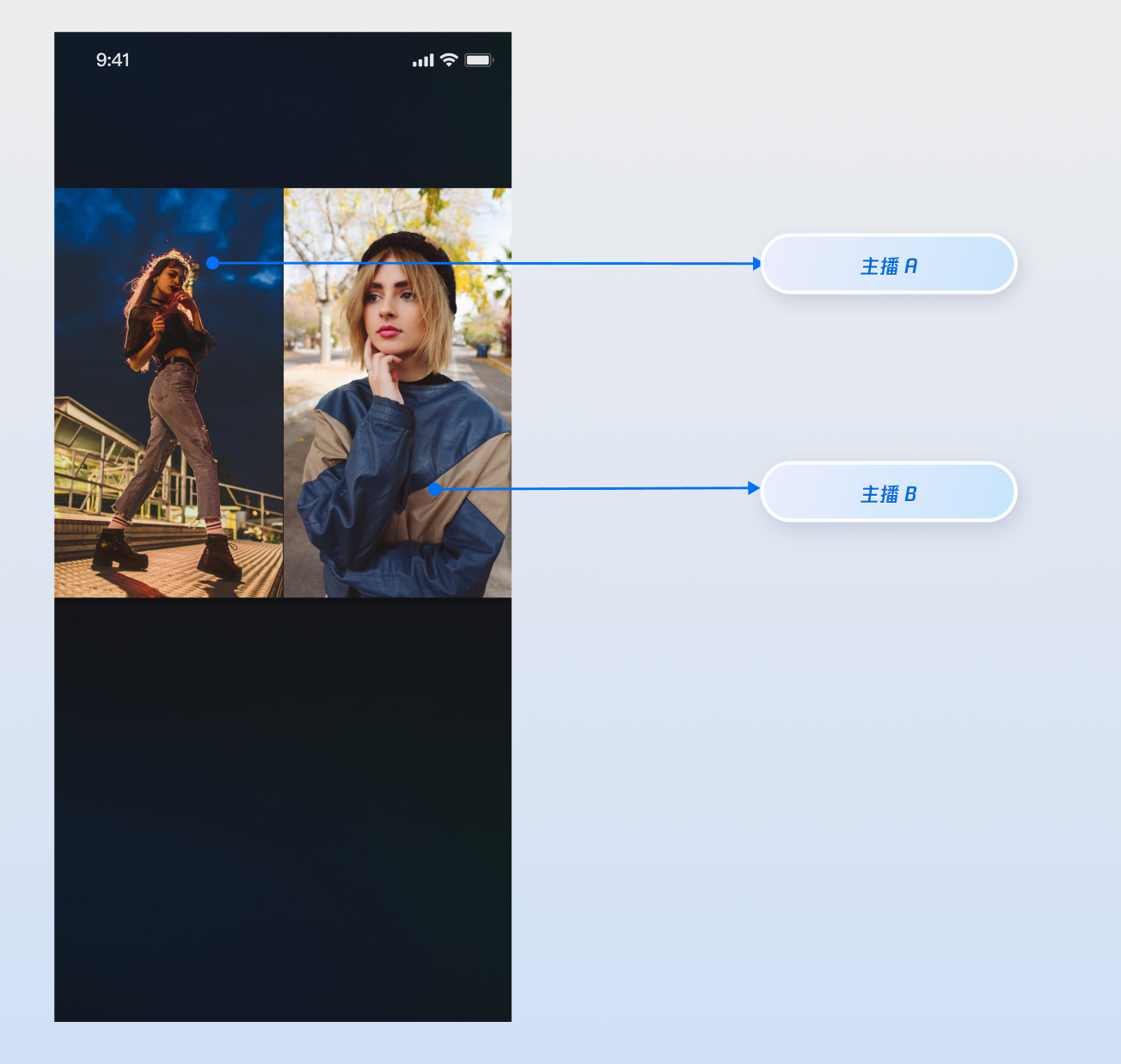
UI Customization
Leverage the slot system in the
VideoWidgetBuilder parameter of LiveCoreWidget to overlay custom widgets on the video stream. You can display nicknames, avatars, PK progress bars, or show a placeholder image when the camera is off to enhance the viewing experience.Display Nicknames on Video Streams
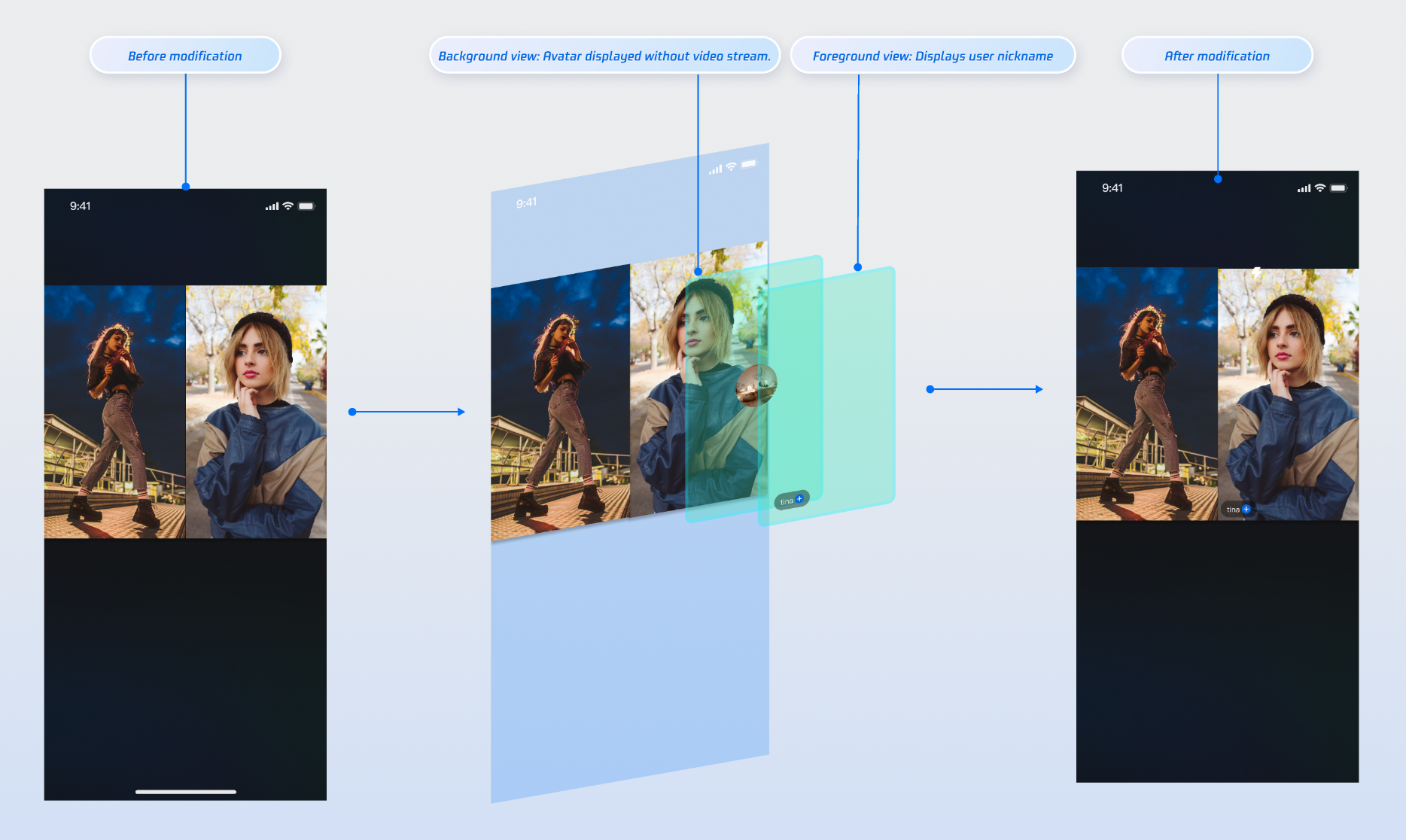
Implementation
Step 1: Create a foreground widget (
CustomCoHostForegroundView) to display user info above the video stream.Tip:
For complete implementation, see the open-source TUILiveKit files co_host_foreground_widget.dart and co_host_background_widget.dart.
import 'package:flutter/material.dart';import 'package:rtc_room_engine/rtc_room_engine.dart';/// Custom floating view for co-host info (foreground)class CustomCoHostForegroundView extends StatelessWidget {final SeatFullInfo seatInfo;const CustomCoHostForegroundView({Key? key,required this.seatInfo,}) : super(key: key);@overrideWidget build(BuildContext context) {return Container(color: Colors.transparent,child: Align(alignment: Alignment.bottomLeft,child: Container(margin: const EdgeInsets.all(5.0),padding: const EdgeInsets.symmetric(horizontal: 8, vertical: 4),decoration: BoxDecoration(color: Colors.black.withOpacity(0.5),borderRadius: BorderRadius.circular(12),),child: Text(seatInfo.userInfo.userName,style: const TextStyle(color: Colors.white,fontSize: 14,),),),),);}}
Step 2: Create a background widget (
CustomCoHostBackgroundView) to display a placeholder when the user’s video stream is unavailable.import 'package:flutter/material.dart';import 'package:rtc_room_engine/rtc_room_engine.dart';/// Custom co-host avatar placeholder view (background)class CustomCoHostBackgroundView extends StatelessWidget {final SeatFullInfo seatInfo;const CustomCoHostBackgroundView({Key? key,required this.seatInfo,}) : super(key: key);@overrideWidget build(BuildContext context) {final avatarUrl = seatInfo.userInfo.avatarUrl;return Container(decoration: BoxDecoration(color: Colors.grey[800],),child: Center(child: Column(mainAxisSize: MainAxisSize.min,children: [ClipOval(child: avatarUrl.isNotEmpty? Image.network(avatarUrl,width: 60,height: 60,fit: BoxFit.cover,errorBuilder: (context, error, stackTrace) {return _buildDefaultAvatar();},): _buildDefaultAvatar(),),const SizedBox(height: 8),Text(seatInfo.userInfo.userName,style: const TextStyle(color: Colors.white,fontSize: 12,),),],),),);}Widget _buildDefaultAvatar() {return Container(width: 60,height: 60,color: Colors.grey,child: const Icon(Icons.person, size: 40, color: Colors.white),);}}
Step 3: Use the
coHostWidgetBuilder callback in VideoWidgetBuilder to return the appropriate widget based on viewLayer.import 'package:flutter/material.dart';import 'package:atomic_x_core/atomicxcore.dart';import 'package:rtc_room_engine/rtc_room_engine.dart';/// Live page with custom co-host viewclass CustomCoHostLiveWidget extends StatefulWidget {final String liveId;const CustomCoHostLiveWidget({Key? key,required this.liveId,}) : super(key: key);@overrideState<CustomCoHostLiveWidget> createState() => _CustomCoHostLiveWidgetState();}class _CustomCoHostLiveWidgetState extends State<CustomCoHostLiveWidget> {late LiveCoreController _controller;@overridevoid initState() {super.initState();_controller = LiveCoreController.create();_controller.setLiveID(widget.liveId);}@overridevoid dispose() {_controller.dispose();super.dispose();}/// Build custom co-host viewWidget _buildCoHostWidget(BuildContext context,SeatFullInfo seatFullInfo,ViewLayer viewLayer,) {if (viewLayer == ViewLayer.foreground) {// Foreground: always on top of the video, for nickname, etc.return CustomCoHostForegroundView(seatInfo: seatFullInfo);} else {// Background: shown only when user has no video stream, for avatar placeholderreturn CustomCoHostBackgroundView(seatInfo: seatFullInfo);}}@overrideWidget build(BuildContext context) {return Scaffold(body: LiveCoreWidget(controller: _controller,videoWidgetBuilder: VideoWidgetBuilder(coHostWidgetBuilder: _buildCoHostWidget,),),);}}
Parameter Reference
Parameter | Type | Description |
seatFullInfo | SeatFullInfo | Seat info object containing detailed user data. |
seatFullInfo.userInfo.userId | String | User ID for the seat. |
seatFullInfo.userInfo.userName | String | User nickname for the seat. |
seatFullInfo.userInfo.avatarUrl | String | User avatar URL for the seat. |
viewLayer | ViewLayer | Widget layer enum: ViewLayer.foreground: foreground widget, always above the video ViewLayer.background: background widget, shown only when the user has no video stream (e.g., camera off), typically used for avatars or placeholders |
Display PK Score on Video Streams
When PK begins, you can overlay a custom widget on the opponent host’s video stream to show the value of gifts received or other PK-related data.
Demo Effect
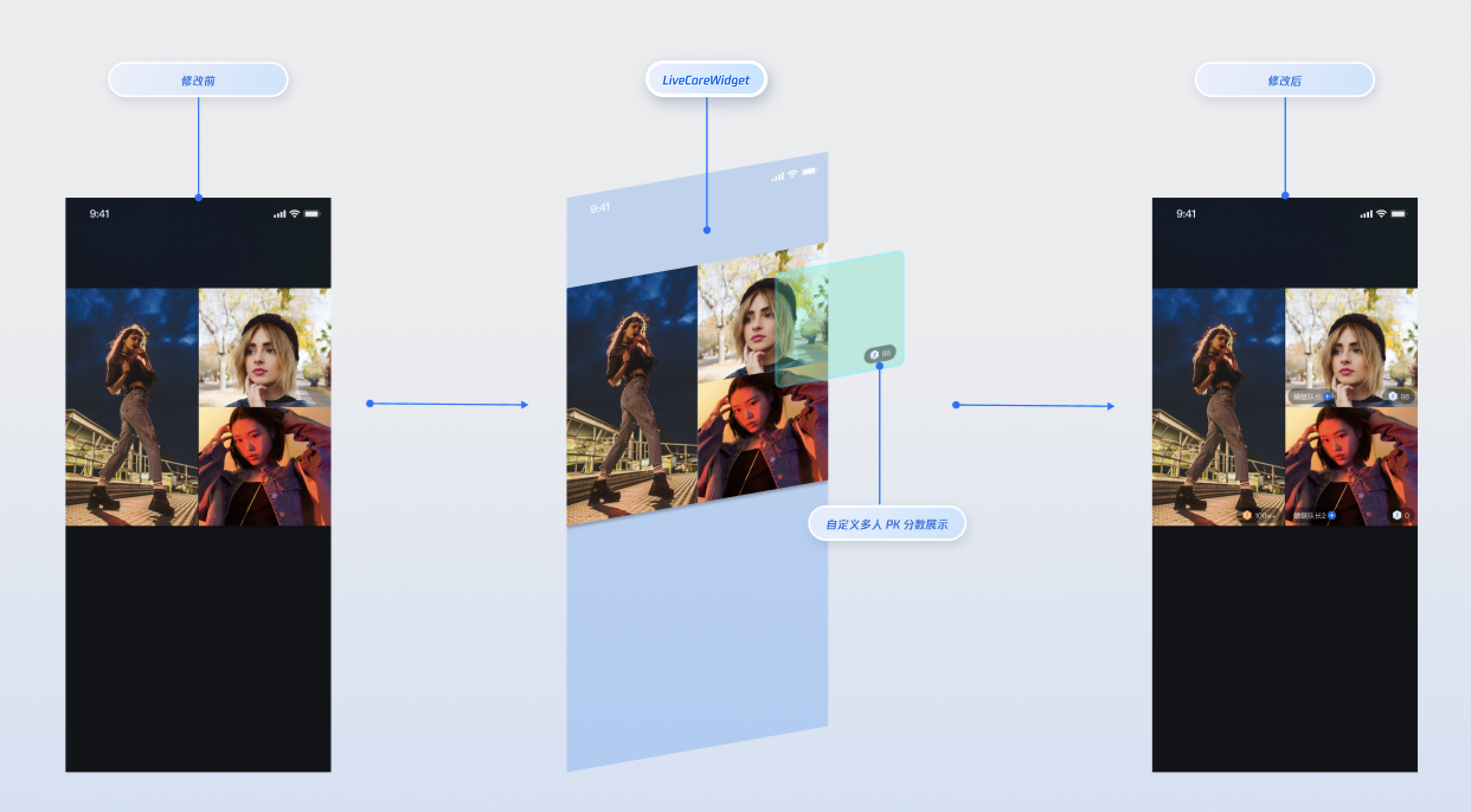
Implementation
Step 1: Create a custom PK user widget. For full implementation, see battle_member_info_widget.dart.
import 'package:flutter/material.dart';import 'package:atomic_x_core/atomicxcore.dart';import 'package:rtc_room_engine/rtc_room_engine.dart';/// Custom PK user viewclass CustomBattleUserView extends StatefulWidget {final String liveId;final TUIBattleUser battleUser;const CustomBattleUserView({Key? key,required this.liveId,required this.battleUser,}) : super(key: key);@overrideState<CustomBattleUserView> createState() => _CustomBattleUserViewState();}class _CustomBattleUserViewState extends State<CustomBattleUserView> {late final BattleStore _battleStore;late final VoidCallback _scoreChangedListener = _onScoreChanged;int _score = 0;@overridevoid initState() {super.initState();_battleStore = BattleStore.create(widget.liveId);_subscribeBattleState();}/// Subscribe to PK score changesvoid _subscribeBattleState() {_battleStore.battleState.battleScore.addListener(_scoreChangedListener);// Initialize score_updateScore(_battleStore.battleState.battleScore.value);}void _onScoreChanged() {_updateScore(_battleStore.battleState.battleScore.value);}void _updateScore(Map<String, int> battleScore) {final score = battleScore[widget.battleUser.userId] ?? 0;if (mounted && score != _score) {setState(() {_score = score;});}}@overridevoid dispose() {_battleStore.battleState.battleScore.removeListener(_scoreChangedListener);super.dispose();}@overrideWidget build(BuildContext context) {return IgnorePointer(child: Align(alignment: Alignment.bottomRight,child: Container(margin: const EdgeInsets.all(5),padding: const EdgeInsets.symmetric(horizontal: 8, vertical: 4),decoration: BoxDecoration(color: Colors.black.withOpacity(0.4),borderRadius: BorderRadius.circular(12),),child: Text('$_score',style: const TextStyle(color: Colors.white,fontSize: 14,fontWeight: FontWeight.bold,),),),),);}}
Step 2: Use the
battleWidgetBuilder callback in VideoWidgetBuilder to build your custom PK widget.import 'package:flutter/material.dart';import 'package:atomic_x_core/atomicxcore.dart';import 'package:rtc_room_engine/rtc_room_engine.dart';/// Live page with custom PK viewclass CustomBattleLiveWidget extends StatefulWidget {final String liveId;const CustomBattleLiveWidget({Key? key,required this.liveId,}) : super(key: key);@overrideState<CustomBattleLiveWidget> createState() => _CustomBattleLiveWidgetState();}class _CustomBattleLiveWidgetState extends State<CustomBattleLiveWidget> {late LiveCoreController _controller;@overridevoid initState() {super.initState();_controller = LiveCoreController.create();_controller.setLiveID(widget.liveId);}@overridevoid dispose() {_controller.dispose();super.dispose();}/// Build custom PK user viewWidget _buildBattleWidget(BuildContext context, TUIBattleUser battleUser) {return CustomBattleUserView(liveId: widget.liveId,battleUser: battleUser,);}@overrideWidget build(BuildContext context) {return Scaffold(body: LiveCoreWidget(controller: _controller,videoWidgetBuilder: VideoWidgetBuilder(battleWidgetBuilder: _buildBattleWidget,),),);}}
Parameter Reference
Parameter | Type | Description |
battleUser | TUIBattleUser | PK user info object |
battleUser.roomId | String | Room ID for the PK |
battleUser.userId | String | PK user ID |
battleUser.userName | String | PK user nickname |
battleUser.avatarUrl | String | PK user avatar URL |
battleUser.score | int | PK score |
Display PK Status on Video Streams
Demo Effect
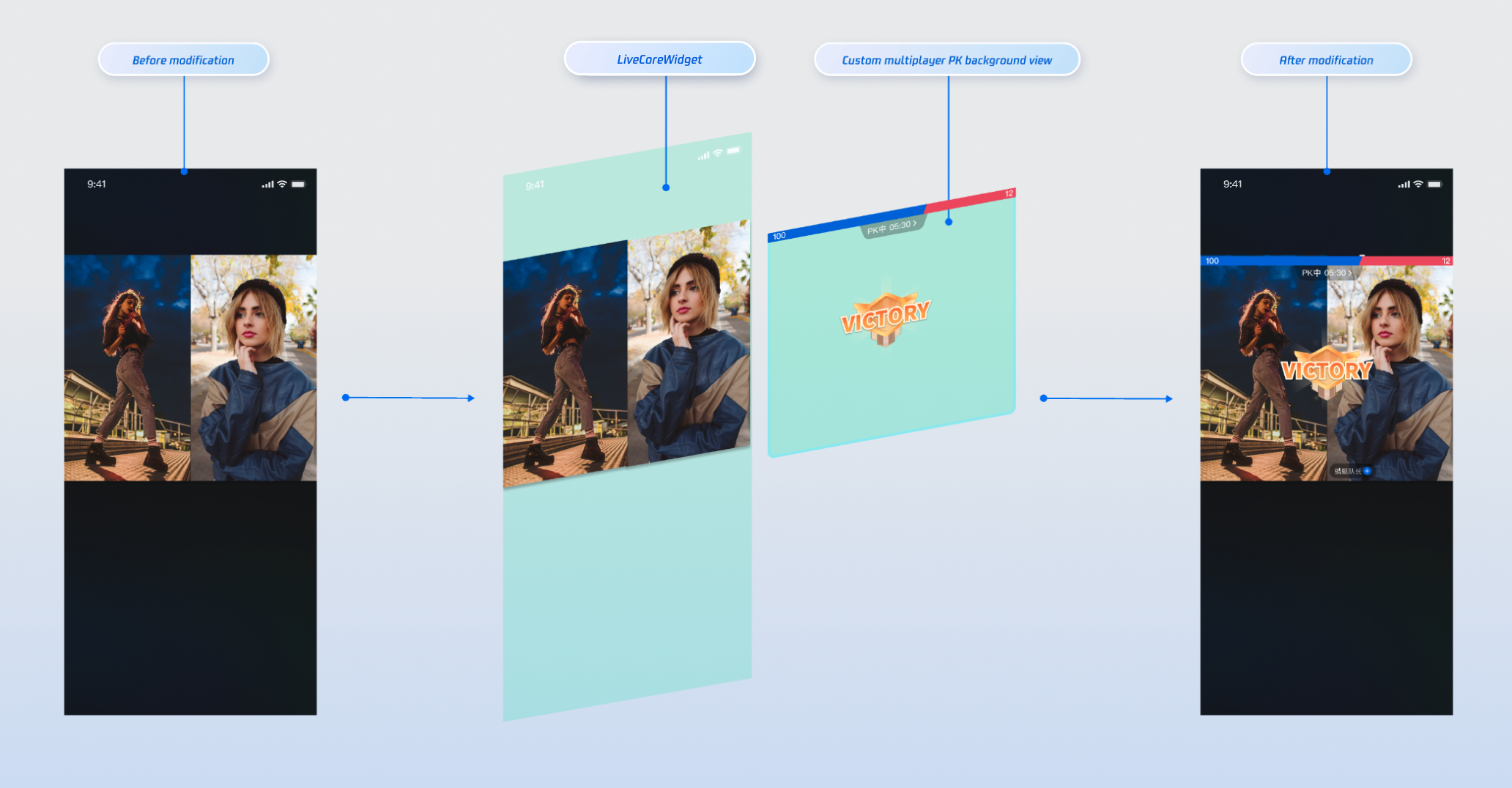
Implementation
Step 1: Create a custom PK global widget (
CustomBattleContainerView). For reference, see battle_info_widget.dart.Step 2: Use the
battleContainerWidgetBuilder callback in VideoWidgetBuilder to build your PK container widget.import 'package:flutter/material.dart';import 'package:atomic_x_core/atomicxcore.dart';/// Live page with custom PK container viewclass CustomBattleContainerLiveWidget extends StatefulWidget {final String liveId;const CustomBattleContainerLiveWidget({Key? key,required this.liveId,}) : super(key: key);@overrideState<CustomBattleContainerLiveWidget> createState() => _CustomBattleContainerLiveWidgetState();}class _CustomBattleContainerLiveWidgetState extends State<CustomBattleContainerLiveWidget> {late LiveCoreController _controller;@overridevoid initState() {super.initState();_controller = LiveCoreController.create();_controller.setLiveID(widget.liveId);}@overridevoid dispose() {_controller.dispose();super.dispose();}/// Build PK container viewWidget _buildBattleContainerWidget(BuildContext context) {// CustomBattleContainerView is your custom PK global viewreturn CustomBattleContainerView(liveId: widget.liveId);}@overrideWidget build(BuildContext context) {return Scaffold(body: LiveCoreWidget(controller: _controller,videoWidgetBuilder: VideoWidgetBuilder(battleContainerWidgetBuilder: _buildBattleContainerWidget,),),);}}
Combine Multiple Custom Views
You can customize the co-host view, PK user view, and PK container view simultaneously. Here’s an example of combining all three:
import 'package:flutter/material.dart';import 'package:atomic_x_core/atomicxcore.dart';import 'package:rtc_room_engine/rtc_room_engine.dart';/// Complete custom view live pageclass FullCustomLiveWidget extends StatefulWidget {final String liveId;const FullCustomLiveWidget({Key? key,required this.liveId,}) : super(key: key);@overrideState<FullCustomLiveWidget> createState() => _FullCustomLiveWidgetState();}class _FullCustomLiveWidgetState extends State<FullCustomLiveWidget> {late LiveCoreController _controller;@overridevoid initState() {super.initState();_controller = LiveCoreController.create();_controller.setLiveID(widget.liveId);}@overridevoid dispose() {_controller.dispose();super.dispose();}/// Build custom co-host viewWidget _buildCoHostWidget(BuildContext context,SeatFullInfo seatFullInfo,ViewLayer viewLayer,) {if (viewLayer == ViewLayer.foreground) {return CustomCoHostForegroundView(seatInfo: seatFullInfo);} else {return CustomCoHostBackgroundView(seatInfo: seatFullInfo);}}/// Build custom PK user viewWidget _buildBattleWidget(BuildContext context, TUIBattleUser userInfo) {return CustomBattleUserView(liveId: widget.liveId,battleUser: userInfo,);}/// Build PK container viewWidget _buildBattleContainerWidget(BuildContext context) {return CustomBattleContainerView(liveId: widget.liveId);}@overrideWidget build(BuildContext context) {return Scaffold(body: LiveCoreWidget(controller: _controller,videoWidgetBuilder: VideoWidgetBuilder(coHostWidgetBuilder: _buildCoHostWidget,battleWidgetBuilder: _buildBattleWidget,battleContainerWidgetBuilder: _buildBattleContainerWidget,),),);}}
Advanced Usage
Update PK Scores via REST API
In live PK scenarios, the host’s PK score is typically tied to the value of gifts received (for example, sending a "Rocket" gift increases the host’s PK score by 500). Use our REST API to update PK scores in real time.
Note:
The LiveKit backend PK scoring system is purely numeric and accumulative. Calculate PK scores according to your business logic before calling the update API. Example PK scoring rules:
Gift Type | Score Calculation Rule | Example |
Basic Gift | Gift Value × 5 | 10 CNY Gift → 50 Points |
Intermediate Gift | Gift Value × 8 | 50 CNY Gift → 400 Points |
Advanced Gift | Gift Value × 12 | 100 CNY Gift → 1200 Points |
Special Effect Gift | Fixed high score | 99 CNY Gift → 999 Points |
REST API Workflow
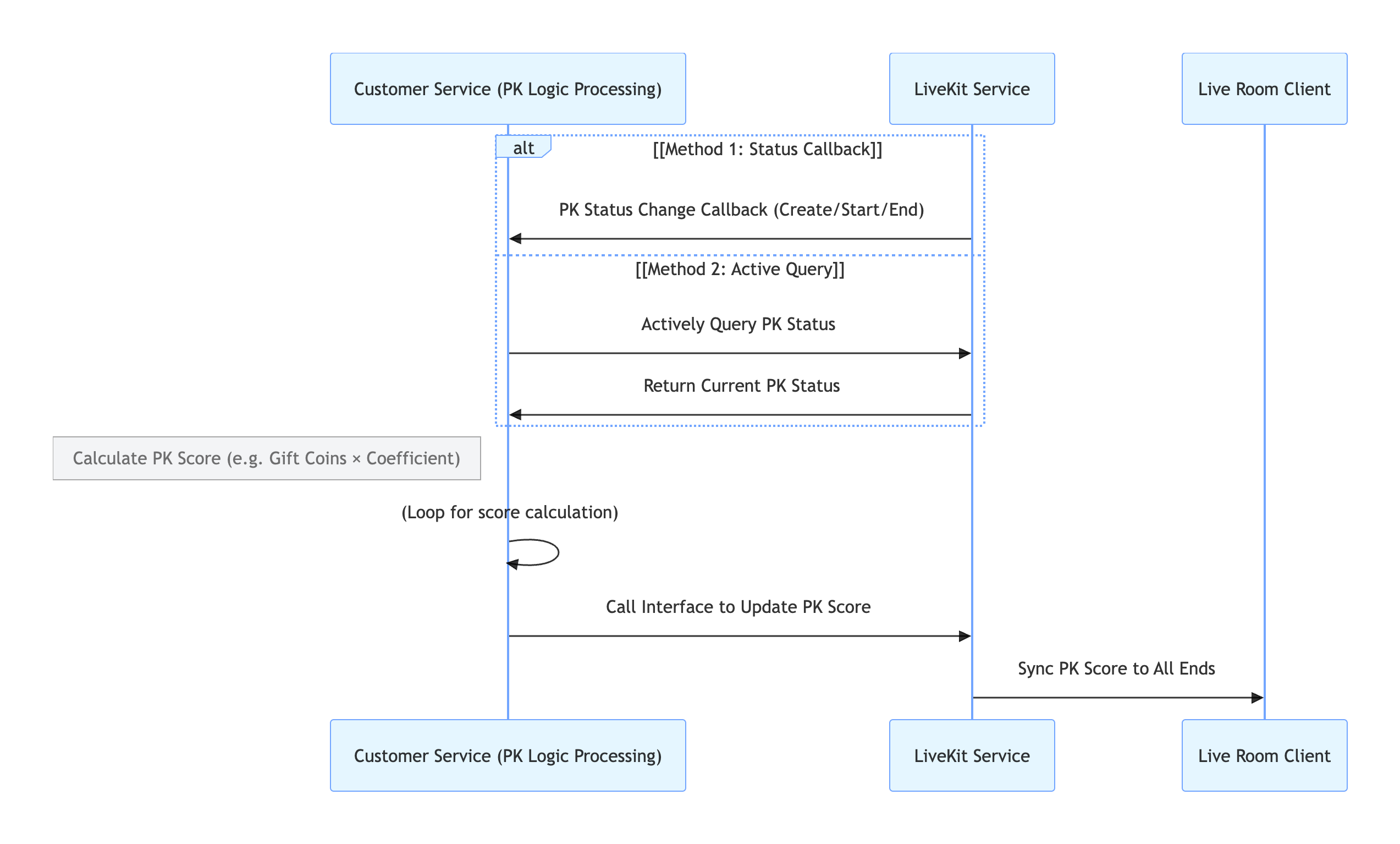
Process Overview
1. Retrieve PK Status:
Configure PK Status Callback to receive notifications from the LiveKit backend when PK starts or ends.
Alternatively, query the PK Status Query from your backend at any time.
2. Calculate PK Score: Compute the PK score increment based on your business rules.
3. Update PK Score: Call the Update PK Score to update the score in the LiveKit backend.
4. Sync to Clients: The LiveKit backend automatically syncs the updated PK score to all clients.
Related REST API Endpoints
API | Description | Request Example |
Active API - Query PK Status | Check if the current room is in PK | |
Active API - Update PK Score | Update the calculated PK score | |
Callback Configuration - PK Start Callback | Receive notification when PK starts | |
Callback Configuration - PK End Callback | Receive notification when PK ends |
API Documentation
For details on all public interfaces, properties, and methods of CoHostStore and related classes, refer to the official AtomicXCore API documentation. Key Stores used in this guide include:
Store/Component | Description | API Documentation |
LiveCoreWidget | Core component for live video display and interaction. Handles video rendering and widget management; supports host live, audience co-hosting, host co-hosting, and more. | |
LiveCoreController | Controller for LiveCoreWidget. Used to set live ID, control preview, etc. | |
VideoWidgetBuilder | Video view adapter. Customize co-host, PK user, PK container, and other video stream widgets. | |
DeviceStore | Audio/video device control: microphone (mute/unmute, volume), camera (on/off, switch, quality), screen sharing, real-time device status monitoring. | |
CoHostStore | Cross-room co-hosting for hosts. Supports multiple layout templates (dynamic grid, etc.), initiate/accept/reject co-hosting, manage co-host interaction. | |
BattleStore | Host PK battle. Initiate PK (set duration/opponent), manage PK status (start/end), sync scores, listen for battle results. |
FAQs
Why isn’t my co-host invitation received by the other host?
Confirm that
targetHostLiveId is correct and the other host’s live room is active.Check network connectivity. The invitation signal times out after 30 seconds by default.
What happens if a host disconnects or the app crashes during co-hosting or PK?
Both CoHostStore and BattleStore include heartbeat and timeout detection. If a participant exits unexpectedly, the other will be notified via events such as
onCoHostUserLeft or onUserExitBattle. You can handle these events in your UI, for example, by displaying a message like "The other side has disconnected" and ending the session.Why can PK scores only be updated via REST API?
REST API updates ensure PK scores are secure, synchronized, and scalable:
Tamper-proof and fair: Requires authentication and data validation. Each update is traceable (e.g., linked to a gift event), preventing manual changes or cheating and ensuring fair competition.
Real-time sync: Standardized formats (such as JSON) allow fast integration with gift, PK, and display systems, keeping scores in sync across hosts, audience, and backend.
Flexible rule adaptation: You can adjust business rules (gift-to-score mapping, bonus points) on the backend without frontend changes, reducing iteration costs.
How are custom views managed when added via VideoWidgetBuilder?
LiveCoreWidget automatically manages the lifecycle of views returned by
coHostWidgetBuilder, battleWidgetBuilder, and battleContainerWidgetBuilder. Manual management is not required. To handle user interactions (such as click events), simply add event handlers when creating your custom view.AtomicXCore provided CoHostStore and BattleStore, two core modules used to process cross-room connection and PK battle. This document will guide you on how to use these two tools in combination to complete the complete process from connecting line to PK in live broadcasting scenario.

