
Unity
Search Cloud Messages
Description
Cloud message search, a must-have feature to enhance the App user experience, enables users to directly find the desired content from complex information quickly and conveniently. It can also serve as an OPS tool, facilitating efficient and concise guidance to related content.
Note:
The cloud message search feature is supported only by version 7.9.5666 or later.
The cloud message search feature is only available to Pro Plus and Enterprise customers and can be used after purchasing Pro Plus and Enterprise; the Free Trial version supports a certain limit of free trial, valid for one month.
If this service is not activated, calling the interface will return the error code 60020.
Message Search Class
Message Search Parameter Class
The message search parameter class is
MessageSearchParam. When searching for messages, the SDK will execute different search logics based on this object's settings.The parameters of
MessageSearchParam are as follows:Parameter | Meaning | Description |
msg_search_param_keyword_array | Keyword list | It can contain up to five keywords. When the message sender and the message type are not specified, the keyword list must be set; in other cases, it can be left empty. |
msg_search_param_keyword_list_match_type | Match type of the keyword list | You can set it to search with "OR" logic or "AND" logic. The values are TIMKeywordListMatchType_Or and TIMKeywordListMatchType_And, respectively. By default, it uses "OR" logic. |
msg_search_param_send_identifier_array | Search for messages sent by a specified userID | Up to five are supported. |
msg_search_param_message_type_array | Set of the message types to be searched for | Leaving it empty means searching for all supported types of messages ( kTIMElem_Face and kTIMElem_GroupTips are not searchable). Refer to TIMElemType for other types. |
msg_search_param_conv_id | Search "all conversations" or "a specified conversation" | If msg_search_param_conv_id is empty, search all sessions; if msg_search_param_conv_id is not empty, search the specified session. |
msg_search_param_search_time_position | Start time for the search | The default is 0 (search from now). UTC Timestamp, in seconds. |
msg_search_param_search_time_period | A past period of time starting from the start time | The default is 0 (unlimited time range). 24 x 60 x 60 represents the past day, in seconds. |
msg_search_param_search_count | Number of search results | Number of searches, support up to 100. |
msg_search_param_search_cursor | Search cursor | Starting position, fill in an empty character string for the first time, and fill in the msg_search_result_search_cursor from the last MessageSearchResult returned for subsequent pulls. |
Message Search Result Class
The message search result class is
MessageSearchResult. The parameters are as described below:Parameter | Meaning | Description |
msg_search_result_total_count | Total number of the search result items | If a specific session is searched, the total number of messages that meet the search criteria will be returned; If all sessions are searched, the total number of sessions containing messages that meet the search criteria will be returned. |
msg_search_result_item_array | Search results list | If a specific session is searched, the returned result list will only include results from that session; If all sessions are searched, messages that meet the search criteria will be grouped by session ID, and the grouping results will be returned paginated. |
msg_search_result_search_cursor | Continue pulling the cursor | Cursor required for continuation while calling the search API |
Here,
messageSearchResultItems is a list containing MessageSearchResultItemobjects, with the parameters described as follows:Parameter | Meaning | Description |
msg_search_result_item_conv_id | Session ID | - |
msg_search_result_item_total_message_count | Number of messages | The total number of messages matching the criteria found in the current session. |
msg_search_result_item_message_array | List of messages that meet the search criteria | If a specific session is searched, msg_search_result_item_message_array contains a list of all messages meeting the search criteria within this session.If all sessions are searched, the number of messages contained in msg_search_result_item_message_array may have the following two possibilities:If the number of messages matched in a session is > 1, then msg_search_result_item_message_array is empty, and you can display "{msg_search_result_item_total_message_count} relevant records" on the UI.If the number of messages matched in a session = 1, then msg_search_result_item_message_array is the matched message, and you can display it on the UI and highlight the search keywords. |
Searching Messages in All Sessions
When a user enters keywords in the search box to search for messages, you can call
MsgSearchCloudMessages to search for messages.If you want to search within the scope of all sessions, you just need to leave
msg_search_param_conv_id in MessageSearchParam unset or set to empty.Below is the sample code:
List<string> keywordList = new List<string>();keywordList.add("abc");keywordList.add("123");MessageSearchParam searchParam = new MessageSearchParam{msg_search_param_keyword_array = keywordList,msg_search_param_conv_id = "",msg_search_param_search_count = 20,msg_search_param_search_time_position = 0,msg_search_param_search_time_period = 600,msg_search_param_search_cursor = ""};TencentIMSDK.MsgSearchCloudMessages(searchParam, (int code, string desc, MessageSearchResult result, string user_data)=>{// Process the async logic});
Searching for the Messages in the Specified Session
When a user enters keywords in the search box to search for messages, you can call
MsgSearchCloudMessages to search for messages.Below is the sample code:
List<string> keywordList = new List<string>();keywordList.add("abc");keywordList.add("123");MessageSearchParam searchParam = new MessageSearchParam{msg_search_param_keyword_array = keywordList,msg_search_param_conv_id = "c2c_user1",msg_search_param_search_count = 20,msg_search_param_search_time_position = 0,msg_search_param_search_time_period = 600,msg_search_param_search_cursor = ""};TencentIMSDK.MsgSearchCloudMessages(searchParam, (int code, string desc, MessageSearchResult result, string user_data)=>{// Process the async logic});
Typical Use Cases for the Search
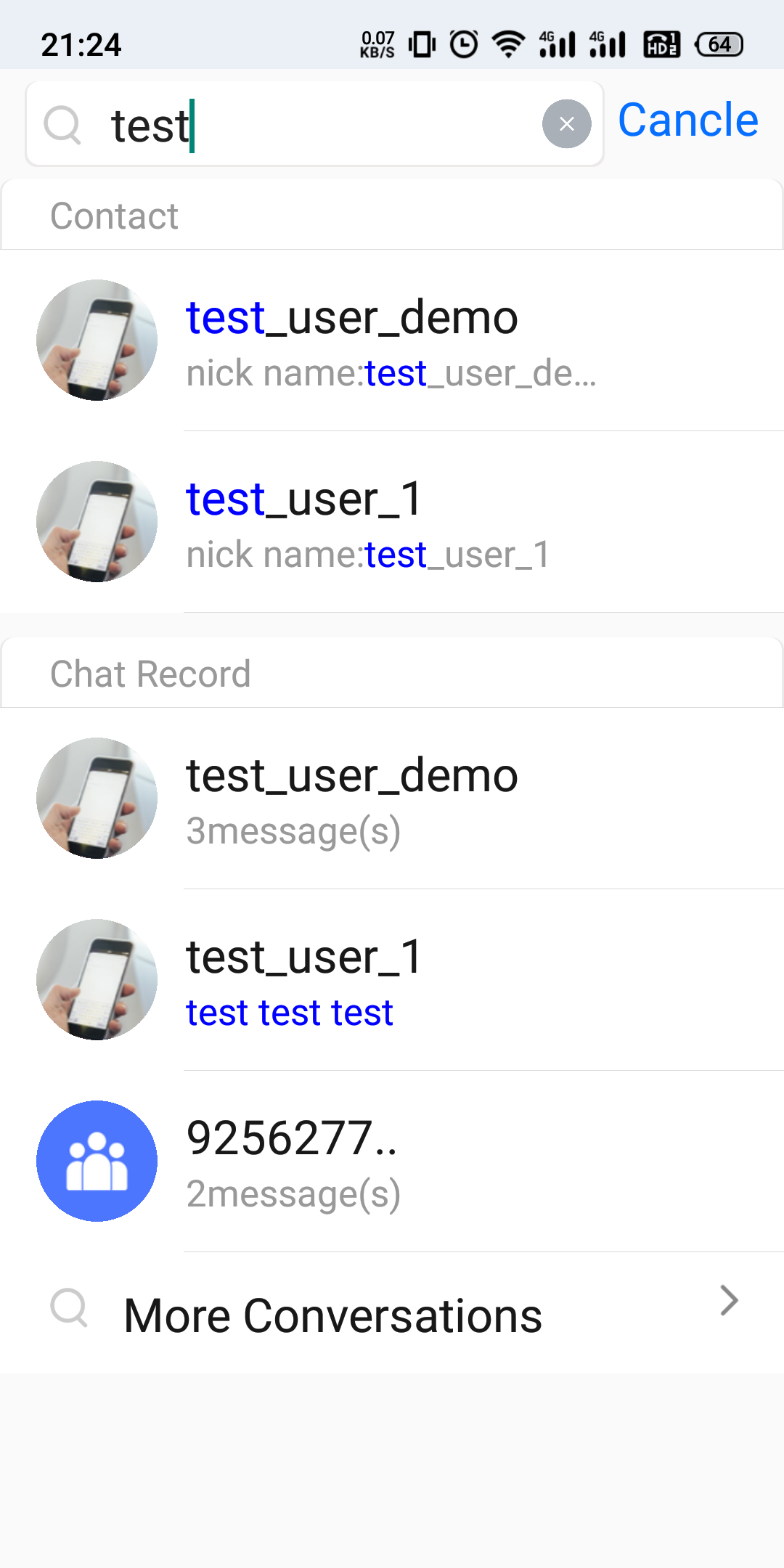
In general chat software, a search UI is usually displayed as follows:
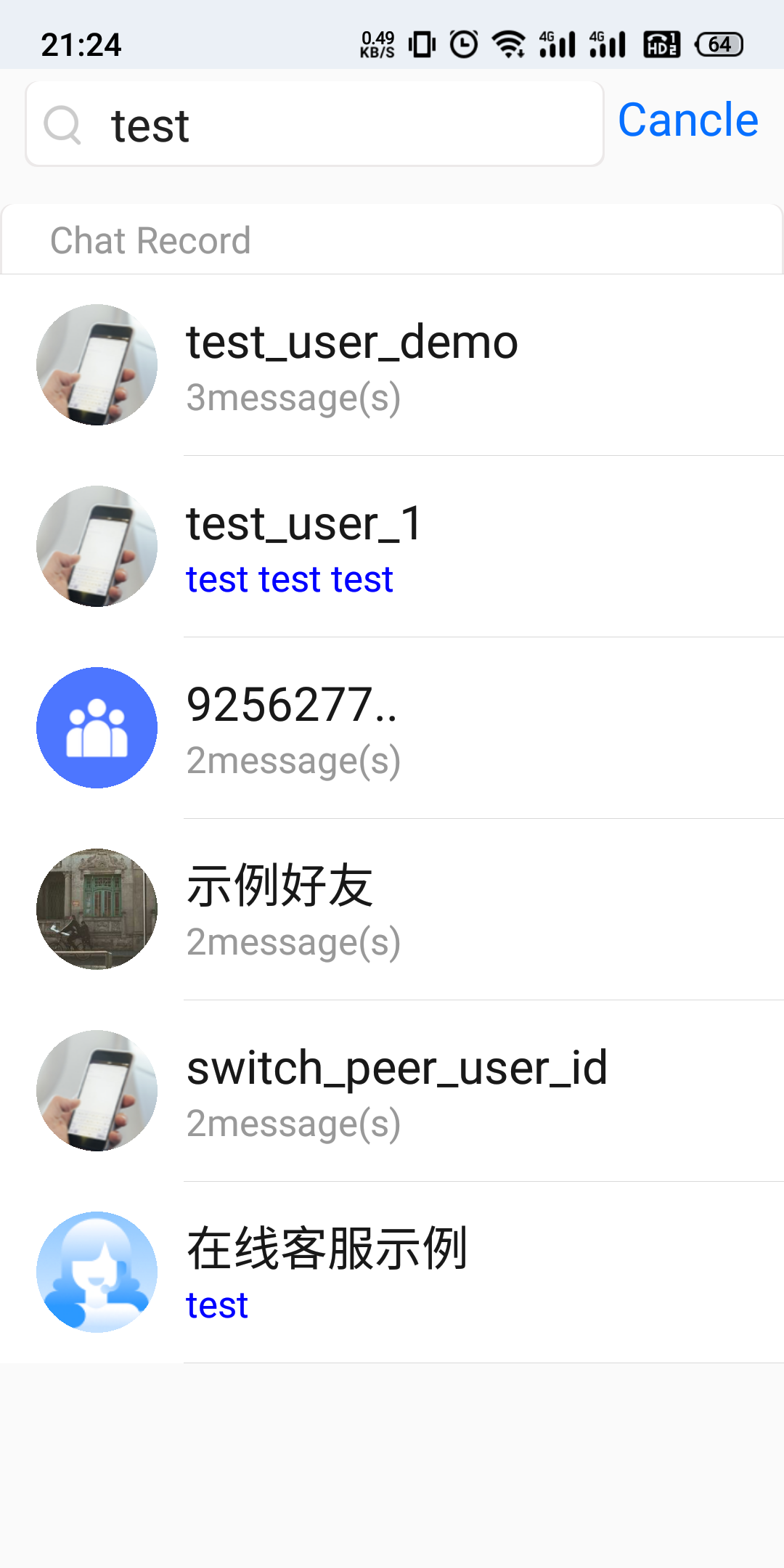
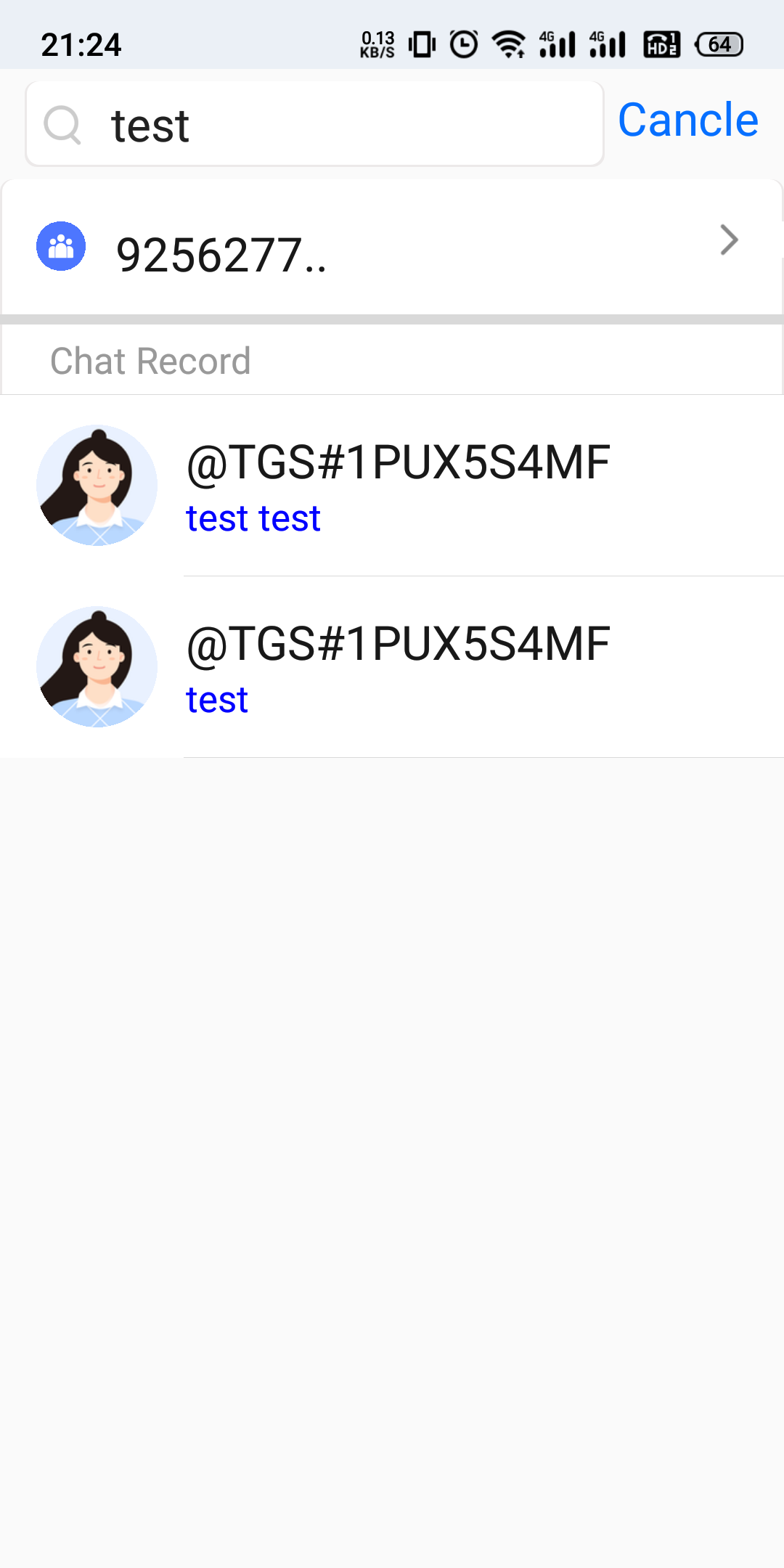
Figure 1. Chat Record | Figure 2. More Chat Record | Figure 3. Messages in the specified session |
 |  |  |
The following describes how to implement the above use cases through Chat SDK's search APIs.
Displaying the Latest Active Sessions
As shown in Figure 1, a list of the latest three sessions to which the messages found belong is displayed at the bottom. The implementation method is as follows:
1. Setting search parameters
MessageSearchParammsg_search_param_conv_id set to null or "" , indicates searching messages from all sessions.msg_search_param_search_cursor set to "", indicates searching for the latest data.msg_search_param_search_count set to 3, indicates returning the number of the most recent sessions, typically showing 3 entries on the UI.2. Handling search callback results
MessageSearchResultmsg_search_result_total_count indicates the number of all sessions to which the matched messages belong.The
msg_search_result_item_array list contains the last 3 sessions (as per the msg_search_param_search_count parameter). msg_search_result_item_total_message_count of MessageSearchResultItem indicates the total number of messages found in the current session;If the number of messages found is > 1, then
messageList will be empty. You can display "4 related chat records" on the UI, where 4 represents the messageCount.If the number of messages found = 1, then
messageList is the message that matches. You can display the message content on the UI and highlight the search keyword, for example, "test" in the Typical Use Cases for the Search image.Below is the sample code:
List<string> keywordList = new List<string>();keywordList.add("test");MessageSearchParam searchParam = new MessageSearchParam{msg_search_param_keyword_array = keywordList,msg_search_param_conv_id = "",msg_search_param_search_count = 3,msg_search_param_search_cursor = ""};TencentIMSDK.MsgSearchCloudMessages(searchParam, (int code, string desc, MessageSearchResult result, string user_data)=>{// Total number of matched sessions to which messages belongint totalCount = result.msg_search_result_total_count;// Last three messages classified by sessionList<MessageSearchResultItem> resultItemList = result.msg_search_result_item_array;foreach (var resultItem in resultItemList) {// Session IDstring conversationID = resultItem.msg_search_result_item_conv_id;// Total number of messages matching the sessionint totalMessageCount = resultItem.msg_search_result_item_total_message_count;// Message list: If totalMessageCount > 1, this list is empty; if totalMessageCount = 1, this list Element (XML) is this messageList<Message> messageList = resultItem.msg_search_result_item_message_array;}});
Displaying the list of sessions to which the messages found belong
Clicking on "More chat records" in figure 1 of the Typical Use Cases for the Search will redirect to figure 2, displaying the list of sessions to which all the found messages belong. The search parameters and results description are similar to the scenario described above.
To prevent memory bloat, we strongly recommend that you load the session list by paging. For example, load by page, displaying 10 session results per page, the search parameter
MessageSearchParam can be set as follows:1. For the first call: set
msg_search_param_search_count = 10, msg_search_param_search_cursor = "". Call MsgSearchCloudMessages to obtain the message search results, parse and display them on the homepage, and obtain the total number of sessions msg_search_result_total_count and the cursor for the next request msg_search_result_search_cursor from the result callback.2. When the interface is almost scrolled to the bottom, continue to pull the next page of data based on the cursor
msg_search_result_search_cursor from the previous request results.Below is the sample code:
......// Record the search cursorstring searchCursor = "";......void searchConversation(string cursor) {List<string> keywordList = new List<string>();keywordList.add("test");MessageSearchParam searchParam = new MessageSearchParam{msg_search_param_keyword_array = keywordList,msg_search_param_conv_id = "",msg_search_param_search_count = 10,msg_search_param_search_cursor = cursor};TencentIMSDK.MsgSearchCloudMessages(searchParam, (int code, string desc, MessageSearchResult result, string user_data)=>{// Total number of matched sessions to which messages belongint totalCount = result.msg_search_result_total_count;// Cursor for the next pagesearchCursor = result.msg_search_result_search_cursor;// Messages on the current pageList<MessageSearchResultItem> resultItemList = result.msg_search_result_item_array;foreach (var resultItem in resultItemList) {// Session IDstring conversationID = resultItem.msg_search_result_item_conv_id;// Total number of messages matching the sessionint totalMessageCount = resultItem.msg_search_result_item_total_message_count;// Message list: If totalMessageCount > 1, this list is empty; if totalMessageCount = 1, this list Element (XML) is this messageList<Message> messageList = resultItem.msg_search_result_item_message_array;}});}// Load the next pagevoid loadMore() {searchConversation(searchCursor);}
Displaying the Messages of a Specified Session
Unlike the session list shown in figure 2 in the Typical Use Cases for the Search, figure 3 displays the list of messages found in a specified session. To prevent memory bloat, we strongly recommend paginating the message display. For example, paginate and show 10 message results per page:
1. Search parameter
MessageSearchParam settings can be referred to as follows:Setting the search parameter
MessageSearchParam's msg_search_param_conv_id as the session ID you are searching for.Initial call: Set the parameter
msg_search_param_search_count = 10, msg_search_param_search_cursor = "". Call MsgSearchCloudMessages to obtain the message search results, parse and display them on the homepage, and obtain the total number of sessions msg_search_result_total_count and the cursor for the next page msg_search_result_search_cursor from the result callback.Subsequent call: Update the value of
msg_search_param_search_cursor to the return value from the callback of the previous call.2. Handling the search results
MessageSearchResult:msg_search_result_total_count indicates the total number of messages matched in that session.msg_search_result_item_array list contains only the results for that session. In the list, msg_search_result_item_total_message_count of MessageSearchResultItem is the number of messages on that page, and msg_search_result_item_message_array is the list of messages on that page.msg_search_result_search_cursor represents the starting cursor for the next page search.Below is the sample code:
......// Record the search cursorstring searchCursor = "";......void searchMessage(String cursor) {List<string> keywordList = new List<string>();keywordList.add("test");MessageSearchParam searchParam = new MessageSearchParam{msg_search_param_keyword_array = keywordList,msg_search_param_conv_id = "conversationID",msg_search_param_search_count = 10,msg_search_param_search_cursor = cursor};TencentIMSDK.MsgSearchCloudMessages(searchParam, (int code, string desc, MessageSearchResult result, string user_data)=>{// Total number of messages matching the sessionint totalMessageCount = result.msg_search_result_total_count;// Cursor for the next pagesearchCursor = result.msg_search_result_search_cursor;// Messages on the current pageList<MessageSearchResultItem> resultItemList = result.msg_search_result_item_array;foreach (var resultItem in resultItemList) {// Session IDstring conversationID = resultItem.msg_search_result_item_conv_id;// The number of messages on the current pageint totalMessageCount = resultItem.msg_search_result_item_total_message_count;// List of messages on the current pageList<Message> messageList = resultItem.msg_search_result_item_message_array;}});}// Load the next pagevoid loadMore() {searchMessage(searchCursor);}
Searching for a Custom Message
If you want your custom messages to be searchable, place the searchable text in the
custom_elem_desc parameter when creating custom messages.If you have configured the offline push feature, after setting the
offline_push_config_desc parameter, your custom messages will also have offline push and the notification bar will display the content of that parameter. If you don't need offline push, you can control this by setting the offline_push_config_flag field in the message_offline_push_config parameter to kTIMOfflinePushFlag_NoPush when sending the message.If you do not want the content displayed in the push notification bar to be the searchable text, you can use the
offline_push_config_desc in the message_offline_push_config parameter to set the push content differently.Searching for a Rich Media Message
Rich media messages include file, image, audio, and video messages.
For file messages, the interface usually displays the file name. If you pass the
file_elem_file_name parameter when creating a file message, file_elem_file_name will be used as the content of the file message to be searched and matched with the search keyword. If file_elem_file_name is not set, the SDK will automatically extract the file name from file_elem_file_path as the search content. Both file_elem_file_name and file_elem_file_path information is saved to the local device and server, and can be searched after pulling relevant information on a new device.For image, audio, and video messages, there is no such name as
file_elem_file_name, and the interface usually displays a thumbnail or duration, making the specification of msg_search_param_keyword_array ineffective for searches. If you wish to search for such messages, you can specify msg_search_param_message_type_array as kTIMElem_Image/kTIMElem_Sound/kTIMElem_Video for categorized searches, which will then retrieve all messages of the specified types.
Exchange and Feedback
Join the Telegram technical exchange group or WhatsApp discussion group, benefit from the support of professional engineers, and solve your toughest challenges.

