
ドキュメントの使用
This document introduces in detail how to quickly use the Tencent Gift AR SDK in the project. Just follow the steps below to complete the SDK configuration and use.
Initializing and Registering a License
To use the Gift AR SDK officially, you must configure the License first. After success, the SDK can be used subsequently.
The License configuration method is as follows:
import 'package:flutter_effect_player/ftceffect_player.dart';const LICENSE_URL = "${licenseUrl}";const LICENSE_KEY = "${licenseKey}";FTCMediaXBase.instance.setLicense(LICENSE_URL, LICENSE_KEY, (code, msg) {print("TCMediaX license result: errCode:${code}, msg:${msg}");});
Note:
The License enforces strong online verification logic. When calling FTCMediaXBase.instance.setLicense after the application starts for the first time, the network must be available. During the initial startup of the App, if network permission is not yet authorized, you need to wait until permission is granted and call this method again.
Listen to the FTCMediaXBase.instance.setLicense callback result. If it fails, retry and guide according to the actual situation. After multiple failures, limit frequency and supplement with product pop-ups and other guides to allow users to check network conditions.
Authentication errorCode description:
Error code | Description |
0 | Success. |
-1 | Invalid input parameter, such as empty URL or KEY. |
-3 | Download failed. Check the network settings. |
-4 | The TE authorization information read locally is empty, which might be caused by an I/O failure. |
-5 | Reading VCUBE TEMP License file content is empty, which might be caused by I/O failure. |
-6 | The JSON field in the v_cube.license file is incorrect. Contact the Tencent Cloud team to fix it. |
-7 | Signature verification failure. Contact the Tencent Cloud team to fix it. |
-8 | Decryption failed. Contact the Tencent Cloud team to fix it. |
-9 | The JSON field in the TELicense field is incorrect. Contact the Tencent Cloud team to fix it. |
-10 | The TE authorization information from network resolution is empty. Contact the Tencent Cloud team to fix it. |
-11 | Failed to write TE authorization information to the local file, which might be caused by an I/O failure. |
-12 | Download failed. Failed to parse the local asset. |
-13 | Authentication failure. Please check if the so is in the package or the so path is correctly set. |
3004/3005 | Invalid authorization. Contact the Tencent Cloud team to fix it. |
3015 | Bundle Id / Package Name mismatch. Check whether the Bundle Id / Package Name used in your App matches the applied one and verify the correct license file is used. |
3018 | The authorization file has expired. Apply for renewal from Tencent Cloud. |
Others | Contact the Tencent Cloud team to fix it. |
Log Management
The Tencent Gift AR SDK supports saving running logs by default. If problems occur during the test, you can extract the logs and submit them to Tencent Cloud customer service. You can upload logs from this directory to the backend according to business needs for locating user issues.
Logs on Android are stored in the directory:
/sdcard/Android/data/${your_packagename}/files/TCMediaLog. Log files are named by date. Export the TCMediaLog folder.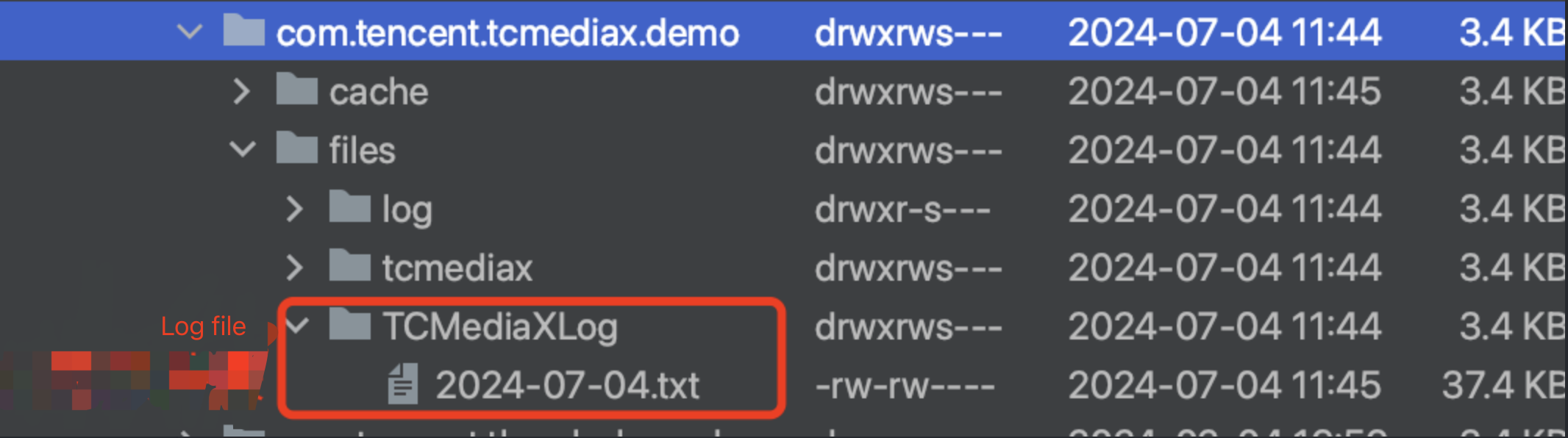
Logs on iOS are stored in the sandbox Documents/TCMedialog folder, with log files named by date. For the detailed log export tutorial, refer here.
Note:
No log file?
Check whether FTCMediaXBase.instance.setLogEnable is passed with false to disable logs. By default, file log is enabled.
Player Usage
Introducing FTCEffectAnimView
FTCEffectViewController? controller;Widget _getFTCEffectAnimView() {return FTCEffectAnimView(controllerCallback: (controller){// controller.setLoop(true);// controller.startPlay("xxxxxxx");});}
Playback Listening
Before playback starts, you can set animation playback status listening by calling the
setPlayListener method:controller?.setPlayListener(FAnimPlayListener(onPlayStart: () {// on anim play start}, onPlayEnd: () {// on anim play end}, onPlayEvent: (int event, Map params) {// on anim play events}, onPlayError: (code) {// on anim play error}));
If you need to obtain the currently playing animation info, you can call the
getTCAnimInfo() method in the onPlayStart() method (or after its execution) to obtain the FTCEffectAnimInfo object instance, then get the current playback animation's type, duration, width, height, fusion animation, etc.Playback Configuration
// Set playback configuration, not a necessary procedurefinal FTCEffectConfig _curConfig = FTCEffectConfig()..codecType = FCodecType.TC_MPLAYER;controller?.setConfig(_curConfig);
FTCEffectConfig currently supports:
1. FCodecType codecType: It has three values, which are:
FCodecType.TC_MPLAYER (MPLAYER playback engine)
FCodecType.TC_MCODEC (MCODEC playback engine) (only supported on Android)
FCodecType.TX_LITEAV_SDK (Tencent Cloud Player SDK)
Note:
Currently only support calling the setConfig() method to set playback configuration before the player starts. Configuration modification is not supported after playback starts.
Currently, the above settings only take effect for MP4 animations.
If set to FCodecType.TX_LITEAV_SDK, you also need to separately import the Tencent Cloud Player SDK, as well as apply for and register its corresponding License.
If not set, CodecType = FCodecType.TC_MPLAYER is used by default.
2. FFreezeFrame freezeFrame: are used to set playback animation freeze frame. See API document for detailed explanation.
3. FAnimType animType (only supported on Android): used to specify the animation format to be played subsequently, suitable for scenarios where the file suffix of the animation to be played is modified. Values as follows:
FAnimType.AUTO (SDK default policy, which determines the animation format based on the file suffix, such as tcmp4/mp4/tep/tepg).
FAnimType.MP4 (MP4 animation format, subsequently play animation files as MP4 type, ignore file suffix)
FAnimType.TCMP4 (TCMP4 animation format, subsequently play animation files as TCMP4 type, ignore file suffix).
Fusion Animation Configuration
To play mp4 or tcmp4 fusion animation, FResourceFetcher must be implemented.
If it is a fusion animation of image type, FResImgResultFetcher must be implemented to return the corresponding Uint8List of the image to replace the element.
If it is a fusion animation of text type, FResTextResultFetcher must be implemented to return the corresponding FTCEffectText object instance and specify the display settings of the text.
controller?.setFetchResource(FResourceFetcher(textFetcher: (res) {// Return the FTCEffectText instance, you can specify text, color insidereturn FTCEffectText()..text = "FTCEffect${res.id}"..color = 0xff0000ff;}, imgFetcher: (res) {// Prepare the image data to be replaced in advance, simply return directly here.// final data = await rootBundle.load('asset/image/head1.png');// _samplePng = data.buffer.asUint8List();return _samplePng;}));
Playback Control
Start Playback
Supports playback of .mp4 and .tcmp4 file format resources.
Note:
1. Supports playback of local video resources on sdcard only. If you use network video resources, download to local first and then play.Keep the file suffix the same as the original file after download, such as .mp4 or .tcmp4. Removing or modifying the suffix will lead to playback failure.
2. Animation resources can be generated through Gift AR conversion tool. Besides, it also supports VAP format animation playback.
String localPath = /path/files/tep_cool_ss.mp4controller?.startPlay("xxxx")
Pause Playback
controller?.pause()
Continuing Playback
controller?.resume()
Loop Playback
controller?.setLoop(true)
Mute Playback
controller?.setMute(true)
Stop Playback
When the player is no longer needed, stop playback and release the occupied resources.
controller?.stopPlay()
FAQs
How to Handle Log Information during Playback
License checked failed! tceffect player license required!
Please check whether to apply for an effect player License and complete initialization registration.
Common Error Codes
Error code | Description |
-10003 | Failed to create thread. |
-10004 | Failed to render. |
-10005 | Configuration parsing failed. |
-10006 | Failed to read the file. |
-10007 | The animation video encoding format is H.265, which is unsupported on the current device. |
-10008 | Invalid parameter. |
-10009 | Invalid license. |
-10010 | MediaPlayer playback failure. |
-10012 | Missing essential dependency, such as no support for importing liteavSDK when playback type is TX_LITEAV_SDK. |

