
GroupSetting State
Introduction
GroupSettingState is a powerful group chat status management center, specialized in managing group chat settings, member information, and permission control. It provides comprehensive feature support for group chat information management, member operations, access verification, and group chat settings, making it a core tool for building a group chat management interface.This Hook has the following features:
Complete group chat information management - group basic info, member list, permission setting
Intelligent permission control - role-based access verification and operational restrictions
Various member operations - add, delete, set roles, mute and other management features
Real-time state synchronization - automatically listen to group chat state changes and update local data
Properties
Group Chat Status Related
Field | Type | Description |
groupID | string | undefined | GroupId |
groupType | GroupType | undefined | Group Type |
groupName | string | undefined | group name |
avatar | string | undefined | Group Avatar URL |
notification | string | undefined | group notice |
isMuted | boolean | undefined | Do not disturb |
isPinned | boolean | undefined | Pin to top |
groupOwner | GroupMember | undefined | group owner info |
adminMembers | GroupMember[] | administrator list |
allMembers | GroupMember[] | undefined | member list |
memberCount | number | undefined | member count |
maxMemberCount | number | undefined | maximum number of members |
currentUserID | string | undefined | Current user ID |
currentUserRole | GroupMemberRole | undefined | User Role |
isMuteAllMembers | boolean | undefined | Whether to mute all members |
isInGroup | boolean | undefined | Whether the current user is in the group |
inviteOption | GroupInviteType | undefined | Invitation method to join group |
Permission Tool Method
Methodology | Type | Description |
hasPermission | (permission: GroupPermission, role?: GroupMemberRole, groupType?: GroupType) => boolean | Check whether specific permission is required |
Business Operating Method
Methodology | Type | Description |
getGroupMemberList | (params?: GetGroupMemberListParams) => Promise<IGroupMember[]> | Get group member list |
updateGroupProfile | (params: UpdateGroupProfileParams) => Promise<void> | Update group profile |
addGroupMember | (params: AddGroupMemberParams) => Promise<IAddGroupMemberResult> | Add group member |
deleteGroupMember | (params: DeleteGroupMemberParams) => Promise<void> | Delete group member |
changeGroupOwner | (params: ChangeGroupOwnerParams) => Promise<void> | transfer group ownership |
setGroupMemberRole | (params: SetGroupMemberRoleParams) => Promise<void> | Set member role |
setChatPinned | (value: boolean) => Promise<void> | Pin group chat to top [Beta] |
setChatMuted | (value: boolean) => Promise<void> | Mute group chat notifications [Beta] |
setGroupMemberMuteTime | (params: SetGroupMemberMuteTimeParams) => Promise<void> | Set member mute duration |
dismissGroup | (groupID?: string) => Promise<void> | Disband group chat |
quitGroup | (groupID?: string) => Promise<void> | Quit group chat |
Property Detail
groupID
Type:
string | undefinedDescription: The unique identifier of the current group chat. Used for all group chat related API calls and operation identification. If undefined, it means that currently none is active.
groupType
Type:
GroupType | undefinedDescription: Group chat type enumeration, impacting group chat features and permission model. If undefined, it indicates no active group chat currently.
Enum definition:
enum GroupType {WORK,PUBLIC,MEETING,AVCHATROOM,COMMUNITY,}
groupName
Type:
string | undefinedDescription: The display name of the group chat. It can be modified via the
updateGroupProfile method (corresponding permissions required). If it is undefined, it means that currently none is active.avatar
Type:
string | undefinedDescription: The URL address of the group profile photo. It can be modified via the
updateGroupProfile method (corresponding permissions required). If it is undefined, it means that currently none is active.notification
Type:
string | undefinedDescription: Group chat announcement, usually used for posting important notices or group rules. It can be modified via the
updateGroupProfile method (corresponding permissions required). If it is undefined, it means that currently none is active.isMuted
Type:
boolean | undefinedDescription: Whether the current user has set up notification muting for this group chat. After setting, push notifications from the group chat will not be received. If it is undefined, it means that currently none is active.
isPinned
Type:
boolean | undefinedDescription: Whether the current user has pinned this group chat to the top. Pinned chats will display at the top of the session list. If it is undefined, it means that currently none is active.
groupOwner
Type:
GroupMember | undefinedDescription: Detailed information of the group owner. If undefined, it indicates no active group chat currently.
GroupMember API definition:
interface GroupMember {userID: string; // userIDnick: string; // user nicknameavatar: string; // user Avatar URLrole: GroupMemberRole; // user rolejoinTime: number; // join timemuteUntil: string; // mute period expire timememberCustomField: string; // member custom field}enum GroupMemberRole {OWNER = 'Owner', // group ownerADMIN = 'Admin', // group adminCOMMON = 'Member', // group member}
adminMembers
Type:
GroupMember[]Description: Group admin list containing member info with admin role.
allMembers
Type:
GroupMember[] | undefinedDescription: List of all members in group chat, support load by page. Obtain and refresh via
getGroupMemberList method.memberCount
Type:
number | undefinedDescription: Current member count. If undefined, it indicates no active group chat currently.
maxMemberCount
Type:
number | undefinedDescription: Maximum member limit for group chat. If undefined, it means that no active group chat currently.
currentUserID
Type:
string | undefinedDescription: The userID of the current logged-in user (yourself). If undefined, it indicates no active group chat currently.
currentUserRole
Type:
GroupMemberRole | undefinedDescription: The role of the current logged-in user (yourself) in the group chat, which affects the user's operation permissions. If undefined, it indicates no active group chat currently.
Enum definition:
enum GroupMemberRole {OWNER = 'OWNER',ADMIN = 'ADMIN',COMMON = 'COMMON'}
isMuteAllMembers
Type:
boolean | undefinedDescription: Whether room-wide mute is enabled. Once enabled, only the group owner and admin can speak. If undefined, it indicates no active group chat currently.
isInGroup
Type:
boolean | undefinedDescription: Whether the current logged-in user (yourself) is still in the group chat. Used to process abnormal situations like being kicked out. If undefined, it indicates no active group chat currently.
inviteOption
Type:
GroupInviteType | undefinedDescription: The invitation method settings for joining a group chat. If it is undefined, it means that currently none is active.
Enum definition:
enum GroupInviteType {FREE_ACCESS = 'FREE_ACCESS',NEED_PERMISSION = 'NEED_PERMISSION',DISABLE_APPLY = 'DISABLE_APPLY'}
hasPermission
Type:
(permission: GroupPermission, role?: GroupMemberRole, groupType?: GroupType) => booleanDescription: Check whether the designated role has a specific permission in a certain group type. If role and groupType are not provided, the system will automatically use the current logged-in user's (your own) role and the type of the currently active group.
GroupPermission enum definition:
enum GroupPermission {EDIT_GROUP_PROFILE_NAME = 'EDIT_GROUP_PROFILE_NAME', // Edit group nameEDIT_GROUP_PROFILE_AVATAR = 'EDIT_GROUP_PROFILE_AVATAR', // Edit group avatarEDIT_GROUP_PROFILE_NOTIFICATION = 'EDIT_GROUP_PROFILE_NOTIFICATION', // Edit group noticeREMOVE_MEMBER = 'REMOVE_MEMBER', // Remove memberSET_MEMBER_ROLE = 'SET_MEMBER_ROLE', // Set member roleMUTE_MEMBER = 'MUTE_MEMBER', // Mute memberMUTE_ALL_MEMBERS = 'MUTE_ALL_MEMBERS', // Room-wide muteTRANSFER_OWNERSHIP = 'TRANSFER_OWNERSHIP', // Transfer group ownershipDISMISS_GROUP = 'DISMISS_GROUP', // Disband group chatQUIT_GROUP = 'QUIT_GROUP' // Quit group chat}
getGroupMemberList
Type:
(params?: GetGroupMemberListParams) => Promise<GroupMember[]>Description: Retrieve group member list, support load by page. After loading complete, results will automatically populate groupOwner, allMembers, and adminMembers. No action is required for return value.
GetGroupMemberListParams API definition:
interface GetGroupMemberListParams {count?: number; // Number to get, maximum 100, default 100groupID?: string; // Group ID, optionalrole?: string; // Role filter, optionaloffset?: number; // Offset, default 0}
updateGroupProfile
Type:
(params: UpdateGroupProfileParams) => Promise<void>Description: Update group profile. groupID is optional and will automatically use the currently active group ID. Ensure at least one of the remaining fields is provided.
UpdateGroupProfileParams API definition:
interface UpdateGroupProfileParams {groupID?: string; // Group ID, optionalname?: string; // Group name, optionalavatar?: string; // Group Avatar URL, optionalintroduction?: string; // Group introduction, optionalnotification?: string; // Group notice, optional}
addGroupMember
Type:
(params: AddGroupMemberParams) => Promise<AddGroupMemberResult>Description: Add group members. groupID is optional and will automatically use the currently active group ID.
AddGroupMemberParams API definition:
interface AddGroupMemberParams {groupID?: string; // Group ID, optionaluserIDList: string[]; // List of user IDs to add}
deleteGroupMember
Type:
(params: DeleteGroupMemberParams) => Promise<void>Description: Delete group members. groupID is optional and will automatically use the currently active group ID.
DeleteGroupMemberParams API definition:
interface DeleteGroupMemberParams {groupID?: string; // Group ID, optionaluserIDList: string[]; // List of user IDs to be deleted}
changeGroupOwner
Type:
(params: ChangeGroupOwnerParams) => Promise<void>Description: Transfer group ownership. groupID is optional and will automatically use the currently active group ID.
ChangeGroupOwnerParams API definition:
interface ChangeGroupOwnerParams {groupID?: string; // Group ID, optionalnewOwnerID: string; // New group owner user ID}
setGroupMemberRole
Type:
(params: SetGroupMemberRoleParams) => Promise<void>Description: Set member role. groupID is optional and will automatically use the currently active group ID.
SetGroupMemberRoleParams API definition:
interface SetGroupMemberRoleParams {groupID?: string; // Group ID, optionaluserID: string; // userIdrole: GroupMemberRole; // new role [GroupMemberRole.ADMIN, GroupMemberRole.COMMON]}
setChatPinned
Type:
(value: boolean) => Promise<void>Description: Set group chat pinned status. Will automatically use the currently active group ID. [Beta]
setChatMuted
Type:
(value: boolean) => Promise<void>Description: Set group chat do not disturb status. Will automatically use the currently active group ID. [Beta]
setGroupMemberMuteTime
Type:
(params: SetGroupMemberMuteTimeParams) => Promise<void>Description: Set member mute duration. groupID is optional and will automatically use the currently active group ID. To unmute, just set time to 0.
SetGroupMemberMuteTimeParams API definition:
interface SetGroupMemberMuteTimeParams {groupID?: string; // Group ID, optionaluserID: string; // uidtime: number; // mute duration (seconds)}
dismissGroup
Type:
(groupID?: string) => Promise<void>Description: Disband group chat. groupID is optional and will automatically use the currently active group ID.
quitGroup
Type:
(groupID?: string) => Promise<void>Description: Quit group. groupID can be left blank and will automatically use the currently active group ID.
Usage Examples
Basic Group Chat Settings Component
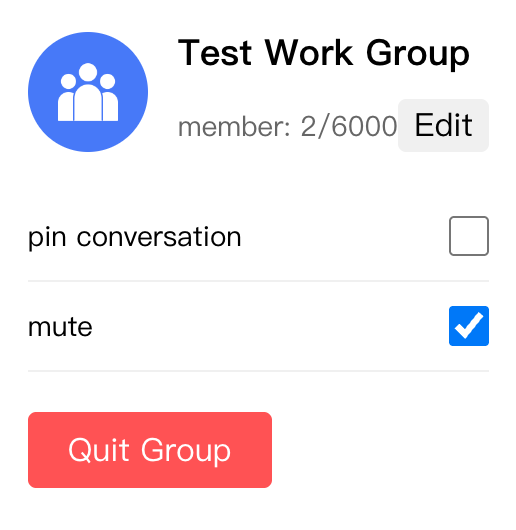
import React, { useState } from 'react';import { useGroupSettingState, GroupPermission } from '@tencentcloud/chat-uikit-react';const GroupSettingPanel = () => {const {groupID,groupName,avatar,memberCount,maxMemberCount,isMuted,isPinned,hasPermission,setChatPinned,setChatMuted,updateGroupProfile,quitGroup,} = useGroupSettingState();const [isEditing, setIsEditing] = useState(false);const [newName, setNewName] = useState(groupName || '');const handleUpdateName = async () => {try {await updateGroupProfile({ name: newName });setIsEditing(false);} catch (error) {console.error('update failed:', error);}};if (!groupID) return <div>Select group</div>;return (<div className="group-setting">{/* Group chat info */}<div className="group-info"><img src={avatar} alt="group avatar" className="group-avatar" />{isEditing ? (<div className="edit-form"><inputvalue={newName}onChange={e => setNewName(e.target.value)}className="name-input"/><button onClick={handleUpdateName}>save</button><button onClick={() => setIsEditing(false)}>cancel</button></div>) : (<div className="group-details"><h3>{groupName}</h3><span>member: {memberCount}/{maxMemberCount}</span>{hasPermission(GroupPermission.UPDATE_GROUP_INFO) && (<button onClick={() => setIsEditing(true)}>Edit</button>)}</div>)}</div>{/* chat settings */}<div className="chat-settings"><div className="setting-item"><span>pin conversation</span><inputtype="checkbox"checked={isPinned || false}onChange={e => setChatPinned(e.target.checked)}/></div><div className="setting-item"><span>mute</span><inputtype="checkbox"checked={isMuted || false}onChange={e => setChatMuted(e.target.checked)}/></div></div>{/* action button */}<div className="actions"><button onClick={quitGroup} className="danger-btn">Quit Group</button></div></div>);};
The rendering is shown below:
Member Management Component
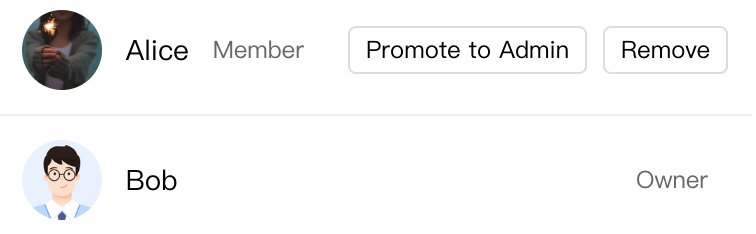
import React, { useEffect } from 'react';import { useGroupSettingState, GroupMemberRole, GroupPermission } from '@tencentcloud/chat-uikit-react';const GroupMemberList: React.FC = () => {const {allMembers,hasPermission,getGroupMemberList,setGroupMemberRole,deleteGroupMember,} = useGroupSettingState();useEffect(() => {getGroupMemberList({ count: 50 });}, []);const handlePromote = (userID: string) => {setGroupMemberRole({ userID, role: GroupMemberRole.ADMIN });};const handleRemove = (userID: string) => {deleteGroupMember({ userIDList: [userID] });};return (<div className="member-list">{allMembers?.map(member => (<div key={member.userID} className="member-item"><img src={member.avatar} alt="" className="member-avatar" /><span className="member-name">{member.nick}</span><span className="member-role">{member.role}</span>{hasPermission(GroupPermission.SET_MEMBER_ROLE) && (<div className="member-actions">{member.role === GroupMemberRole.COMMON && (<button onClick={() => handlePromote(member.userID)}>Promote to Admin</button>)}<button onClick={() => handleRemove(member.userID)}>Remove</button></div>)}</div>))}</div>);};
The rendering is shown below:
Style File
// Basic Group Chat Settings Component Style.group-setting {padding: 20px;background: white;border-radius: 8px;.group-info {display: flex;align-items: center;gap: 15px;margin-bottom: 20px;.group-avatar {width: 60px;height: 60px;border-radius: 50%;object-fit: cover;}.group-details {flex: 1;h3 {margin: 0 0 5px 0;font-size: 18px;}span {color: #666;font-size: 14px;}button {margin-top: 8px;padding: 4px 8px;background: #f0f0f0;border: none;border-radius: 4px;cursor: pointer;}}.edit-form {display: flex;flex-direction: column;gap: 10px;.name-input {padding: 8px;border: 1px solid #ddd;border-radius: 4px;}button {padding: 6px 12px;border: none;border-radius: 4px;cursor: pointer;&:first-child {background: #1890ff;color: white;}&:last-child {background: #f0f0f0;}}}}.chat-settings {margin-bottom: 20px;.setting-item {display: flex;justify-content: space-between;align-items: center;padding: 12px 0;border-bottom: 1px solid #f0f0f0;span {font-size: 14px;}input[type="checkbox"] {width: 20px;height: 20px;}}}.actions {.danger-btn {padding: 10px 20px;background: #ff4d4f;color: white;border: none;border-radius: 4px;cursor: pointer;&:hover {background: #ff7875;}}}}// Member Management Component style.member-list {.member-item {display: flex;align-items: center;gap: 12px;padding: 12px;border-bottom: 1px solid #f0f0f0;.member-avatar {width: 40px;height: 40px;border-radius: 50%;object-fit: cover;}.member-name {flex: 1;font-size: 14px;}.member-role {color: #666;font-size: 12px;margin-right: 10px;}.member-actions {display: flex;gap: 8px;button {padding: 4px 8px;font-size: 12px;border: 1px solid #ddd;border-radius: 4px;background: white;cursor: pointer;&:hover {border-color: #1890ff;color: #1890ff;}}}}}
Practical Advice
Access Verification
Check whether pre-operation permission check is required before executing group chat actions
Use the
hasPermission method to control UI displayPerformance Optimization
Reasonable use of load by page member list
Avoid frequent API calls, consider debounce handling
Memory usage in large group chat scenarios
User Experience
Provide loading status indication
Check the confirmation prompt before operation
Update local state for instant feedback
Through this document, you can fully understand and use all features of GroupSettingState to build a complete group chat management interface.

