
快速集成
TUIKit 是基于 Chat SDK 的一款 UI 组件库,可通过 UI 组件快速实现聊天、会话、搜索、关系链、群组等功能。本文介绍如何快速集成 TUIKit 并实现核心功能。
前提条件
Node.js v18 版本及以上,建议使用当前的 LTS v22 版本
React^18.2 || React^19.0.0 版本
TypeScript@^5.0.0
创建项目
创建一个新的名为 chat-integration-react 的 React 项目,并按照脚手架的步骤提示完成项目的初始化。
npm create vite@latest
可以参考以下选择:
◇ Project name:│ chat-integration-react│◇ Select a framework:│ React│◇ Select a variant:│ TypeScript + React Compiler│◆ Install with npm and start now?│ ● Yes / ○ No
说明:
建议使用 npm 进行安装,npm 会主动下载 peerDependencies 依赖。
安装并引入组件
步骤1:安装依赖
说明:
建议使用 npm 进行安装,npm 会主动下载所需的 peerDependencies 依赖。
npm i @tencentcloud/chat-uikit-react
步骤 2. 引入组件
说明:
复制以下
App.tsx 代码并替换原有的 src/App.tsx 中的内容。import { useEffect, useState, useMemo } from "react";import {UIKitProvider,useLoginState,LoginStatus,ConversationList,Chat,ChatHeader,MessageList,MessageInput,ContactList,ContactInfo,ChatSetting,Search,VariantType,Avatar,useUIKit,useChatContext,} from "@tencentcloud/chat-uikit-react";import { IconChat, IconUsergroup, IconBulletpoint, IconSearch } from "@tencentcloud/uikit-base-component-react";function App() {// 语言支持 en-US(default) / zh-CN / ja-JP / ko-KR / zh-TW// 主题支持 light(default) / darkreturn (<UIKitProvider theme={'light'} language={'zh-CN'}><ChatApp /></UIKitProvider>);}function ChatApp() {const { language } = useUIKit();const texts = useMemo(() =>language === 'zh-CN'? { emptyTitle: '暂无会话', emptySub: '选择一个会话开始聊天', error: '请检查 SDKAppID, userID, userSig, 通过开发人员工具(F12)查看具体的错误信息', loading: '登录中...' }: { emptyTitle: 'No conversation', emptySub: 'Select a conversation to start chatting', error: 'Please check the SDKAppID, userID, and userSig. View the specific error information through the developer tools (F12).', loading: 'Logging in...' },[language]);const { status } = useLoginState({SDKAppID: 0, // number 类型userID: '', // string 类型userSig: '', // string 类型});if (status === LoginStatus.ERROR) {return (<div className="loading-container is-error"><div className="loading-brand"><div className="loading-brand-icon"><svg viewBox="0 0 24 24"><path d="M20 2H4c-1.1 0-2 .9-2 2v18l4-4h14c1.1 0 2-.9 2-2V4c0-1.1-.9-2-2-2zm0 14H6l-2 2V4h16v12z"/></svg></div><span className="loading-brand-name">Chat</span></div><div className="error-icon">!</div><div className="loading-text">{texts.error}</div></div>);}if (status !== LoginStatus.SUCCESS) {return (<div className="loading-container"><div className="loading-brand"><div className="loading-brand-icon"><svg viewBox="0 0 24 24"><path d="M20 2H4c-1.1 0-2 .9-2 2v18l4-4h14c1.1 0 2-.9 2-2V4c0-1.1-.9-2-2-2zm0 14H6l-2 2V4h16v12z"/></svg></div><span className="loading-brand-name">Chat</span></div><div className="loading-spinner"></div><div className="loading-text">{texts.loading}</div><div className="loading-progress-bar"><div className="loading-progress-bar-inner"></div></div></div>);}return <ChatLayout texts={texts} />;}function ChatLayout({ texts }: { texts: { emptyTitle: string; emptySub: string } }) {const [activeTab, setActiveTab] = useState<'conversations' | 'contacts'>('conversations');const [isChatSettingShow, setIsChatSettingShow] = useState(false);const [isSearchInChatShow, setIsSearchInChatShow] = useState(false);const { theme } = useUIKit();const isDark = theme === 'dark';const { activeConversation } = useChatContext();useEffect(() => {setIsChatSettingShow(false);setIsSearchInChatShow(false);}, [activeConversation?.conversationID]);return (<div className={`chat-layout ${isDark ? 'dark' : ''}`}><SideTab activeTab={activeTab} onTabChange={setActiveTab} />{/* 中间列表 会话列表-联系人列表 */}<div className="conversation-list-panel">{activeTab === 'conversations' ? <ConversationList /> : <ContactList className="contact-list" />}</div>{/* 右侧聊天 */}{activeTab === 'conversations' && (<ChatclassName="chat-content-panel"PlaceholderEmpty={<div className="empty-placeholder"><div className="empty-icon">💬</div><div className="empty-title">{texts.emptyTitle}</div><div className="empty-subtitle">{texts.emptySub}</div></div>}><div className="chat-main"><ChatHeaderenableCallChatHeaderRight={<div className="header-actions"><buttonclassName="icon-button"onClick={() => setIsSearchInChatShow(!isSearchInChatShow)}><IconSearch size="20px" /></button><buttonclassName="icon-button"onClick={() => setIsChatSettingShow(!isChatSettingShow)}><IconBulletpoint size="20px" /></button></div>}/><MessageList /><MessageInput /></div>{/* 会话内搜索侧边栏 */}{isSearchInChatShow && (<div className="chat-sidebar-search"><div className="chat-sidebar-header"><span className="chat-sidebar-title">群搜索</span><buttonclassName="icon-button"onClick={() => setIsSearchInChatShow(false)}>✕</button></div><Search variant={VariantType.EMBEDDED} /></div>)}{/* 聊天设置侧边栏 */}{isChatSettingShow && (<div className="chat-float-sidebar"><ChatSetting onClose={() => setIsChatSettingShow(false)} /></div>)}</Chat>)}{/* 联系人详情 */}{activeTab === 'contacts' && (<ContactInfoclassName="contact-detail-panel"onSendMessage={() => setActiveTab('conversations')}onEnterGroup={() => setActiveTab('conversations')}/>)}</div>);}// SideTab 组件:左侧导航栏interface SideTabProps {activeTab: 'conversations' | 'contacts';onTabChange: (tab: 'conversations' | 'contacts') => void;}function SideTab({ activeTab, onTabChange }: SideTabProps) {const { theme } = useUIKit();const { loginUserInfo } = useLoginState();const isDark = theme === 'dark';return (<div className={`side-tab ${isDark ? 'dark' : ''}`}>{/* 用户头像 */}<div className="avatar-wrapper"><Avatar src={loginUserInfo?.avatarUrl} /><div className="tooltip"><div className="tooltip-name">{loginUserInfo?.userName || loginUserInfo?.userId || '未命名'}</div><div className="tooltip-id">ID: {loginUserInfo?.userId}</div></div></div>{/* Tab 切换 */}<div className="tabs"><divclassName={`tab-item ${activeTab === 'conversations' ? 'active' : ''}`}onClick={() => onTabChange('conversations')}title="会话"><IconChat size="24px" /></div><divclassName={`tab-item ${activeTab === 'contacts' ? 'active' : ''}`}onClick={() => onTabChange('contacts')}title="联系人"><IconUsergroup size="24px" /></div></div></div>);}export default App;
复制以下
index.css 代码并替换同级目录的 src/index.css 样式文件。body { margin: 0; padding: 0; font-family: Inter, Avenir, Helvetica, Arial, sans-serif; min-height: 100vh; box-sizing: border-box; } #root { height: 100vh; display: flex; justify-content: center; align-items: center; } .chat-layout { height: 60vh; aspect-ratio: 16 / 9; margin: 0 auto; display: flex; border-radius: 16px; box-shadow: 0 20px 60px rgba(0, 0, 0, 0.3), 0 0 0 1px rgba(255, 255, 255, 0.1); overflow: hidden; backdrop-filter: blur(10px); } @media (max-width:1920px) { .chat-layout { height: 80vh; } } .conversation-list-panel { width: 300px; display: flex; flex-direction: column; overflow: hidden; } .contact-list { border-radius: 0; } .chat-content-panel { flex-direction: row !important; flex: 1; border-left: 1px solid var(--uikit-stroke-color-primary); } .contact-detail-panel { flex: 1; } .icon-button { padding: 4px 6px; display: flex; align-items: center; justify-content: center; border: none; background: transparent; border-radius: 4px; font-size: 16px; cursor: pointer; transition: background-color 0.2s; color: var(--uikit-text-color-primary); } .icon-button:hover { background-color: var(--uikit-button-color-secondary-hover); } .icon-button:active { background-color: var(--uikit-button-color-secondary-active); } .header-actions { display: flex; gap: 8px; margin-left: 8px; color: var(--uikit-text-color-link); } .message-toolbar { display: flex; justify-content: space-between; align-items: center; } .message-toolbar-actions { display: flex; align-items: center; gap: 12px; } .chat-main { flex: 1; display: flex; flex-direction: column; overflow: hidden; } .chat-sidebar-search { border-left: 1px solid var(--uikit-stroke-color-primary); display: flex; flex-direction: column; flex: 0 0 300px; } .chat-float-sidebar { position: absolute; right: 0; top: 0; bottom: 0; min-width: 300px; max-width: 400px; display: flex; flex-direction: column; background-color: var(--uikit-bg-color-operate); box-shadow: -2px 0 8px rgba(0, 0, 0, 0.04), -4px 0 16px rgba(0, 0, 0, 0.06), -8px 0 32px rgba(0, 0, 0, 0.08); overflow: auto; z-index: 1000; } .chat-sidebar-header { position: sticky; top: 0; display: flex; align-items: center; justify-content: space-between; padding: 20px; background-color: var(--uikit-bg-color-operate); border-bottom: 1px solid var(--uikit-stroke-color-primary); z-index: 10; } .chat-sidebar-title { font-size: 16px; font-weight: 500; color: var(--uikit-text-color-primary); } .empty-placeholder { flex: 1; display: flex; flex-direction: column; align-items: center; justify-content: center; gap: 12px; background-color: var(--uikit-bg-color-operate); border-left: 1px solid var(--uikit-stroke-color-primary); color: #adb5bd; } .empty-icon { font-size: 64px; opacity: 0.3; } .empty-title { font-size: 16px; font-weight: 600; color: #6c757d; } .empty-subtitle { font-size: 14px; color: #868e96; } .loading-container { display: flex; flex-direction: column; align-items: center; justify-content: center; height: 100vh; gap: 20px; } .loading-brand { display: flex; align-items: center; gap: 10px; margin-bottom: 12px; } .loading-brand-icon { width: 36px; height: 36px; border-radius: 8px; background: linear-gradient(135deg, #147aff, #6db3f2); display: flex; align-items: center; justify-content: center; } .loading-brand-icon svg { width: 20px; height: 20px; fill: #fff; } .loading-brand-name { font-size: 18px; font-weight: 600; color: #1a1a1a; letter-spacing: 0.2px; } .loading-spinner { width: 36px; height: 36px; border: 3px solid #e8ecf1; border-top-color: #147aff; border-radius: 50%; animation: spin 0.8s linear infinite; } .loading-text { color: #5f6368; font-size: 14px; font-weight: 400; line-height: 1.5; text-align: center; max-width: 360px; } .loading-progress-bar { width: 200px; height: 3px; background-color: #e8ecf1; border-radius: 3px; overflow: hidden; margin-top: 4px; } .loading-progress-bar-inner { width: 40%; height: 100%; background: linear-gradient(90deg, #147aff, #6db3f2); border-radius: 3px; animation: progress-slide 1.6s ease-in-out infinite; } @keyframes spin { 0% { transform: rotate(0deg); } 100% { transform: rotate(360deg); } } @keyframes progress-slide { 0% { transform: translateX(-100%); } 50% { transform: translateX(250%); } 100% { transform: translateX(600%); } } .loading-container.is-error .loading-spinner { display: none; } .error-icon { width: 48px; height: 48px; border-radius: 50%; background-color: #fff2f0; border: 1px solid #ffccc7; display: flex; align-items: center; justify-content: center; font-size: 22px; color: #ff4d4f; flex-shrink: 0; } .loading-container.is-error .loading-text { color: #5f6368; font-size: 13px; line-height: 1.6; } .icon-image-effort { display: none; } .side-tab { width: 72px; height: 100%; background: var(--uikit-bg-color-function); display: flex; flex-direction: column; align-items: center; padding: 20px 0; transition: background 0.3s; } .avatar-wrapper { position: relative; margin-bottom: 24px; cursor: pointer; } .avatar-wrapper:hover .tui-avatar { transform: scale(1.05); box-shadow: 0 4px 12px rgba(0, 0, 0, 0.15); } .tooltip { position: absolute; left: 60px; top: 50%; transform: translateY(-50%); padding: 8px 12px; background: rgba(0, 0, 0, 0.85); color: #fff; border-radius: 6px; white-space: nowrap; opacity: 0; visibility: hidden; pointer-events: none; transition: all 0.3s; z-index: 1000; } .tooltip::before { content: ''; position: absolute; left: -6px; top: 50%; transform: translateY(-50%); border: 6px solid transparent; border-right-color: rgba(0, 0, 0, 0.85); } .avatar-wrapper:hover .tooltip { opacity: 1; visibility: visible; } .tooltip-name { font-size: 14px; font-weight: 500; margin-bottom: 4px; } .tooltip-id { font-size: 12px; opacity: 0.8; } .tabs { display: flex; flex-direction: column; gap: 16px; } .tab-item { width: 48px; height: 48px; display: flex; align-items: center; justify-content: center; border-radius: 12px; cursor: pointer; transition: all 0.3s; color: var(--uikit-text-color-primary); } .tab-item:hover { background: rgba(0, 0, 0, 0.05); } .tab-item.active { background: var(--uikit-button-color-primary-default); color: var(--uikit-text-color-button); } .call-kit { position: fixed !important; top: 50%; left: 50%; z-index: 999; transform: translate(-50%, -50%); max-width: 800px; max-height: 600px; }
步骤3:获取 SDKAppID、userID 和 userSig
在之前复制的
App.tsx 代码中,登录鉴权信息是空缺的,您还需要在 useLoginState hook 中填写您的腾讯云应用的鉴权信息,如下所示:参数 | 类型 | 说明 |
SDKAppID | Number | |
userID | String | |
secretKey | String | |
userSig | String | 用于用户登录认证的安全保护签名,用于确认用户的身份并防止恶意攻击者窃取您的云服务使用权限。 |
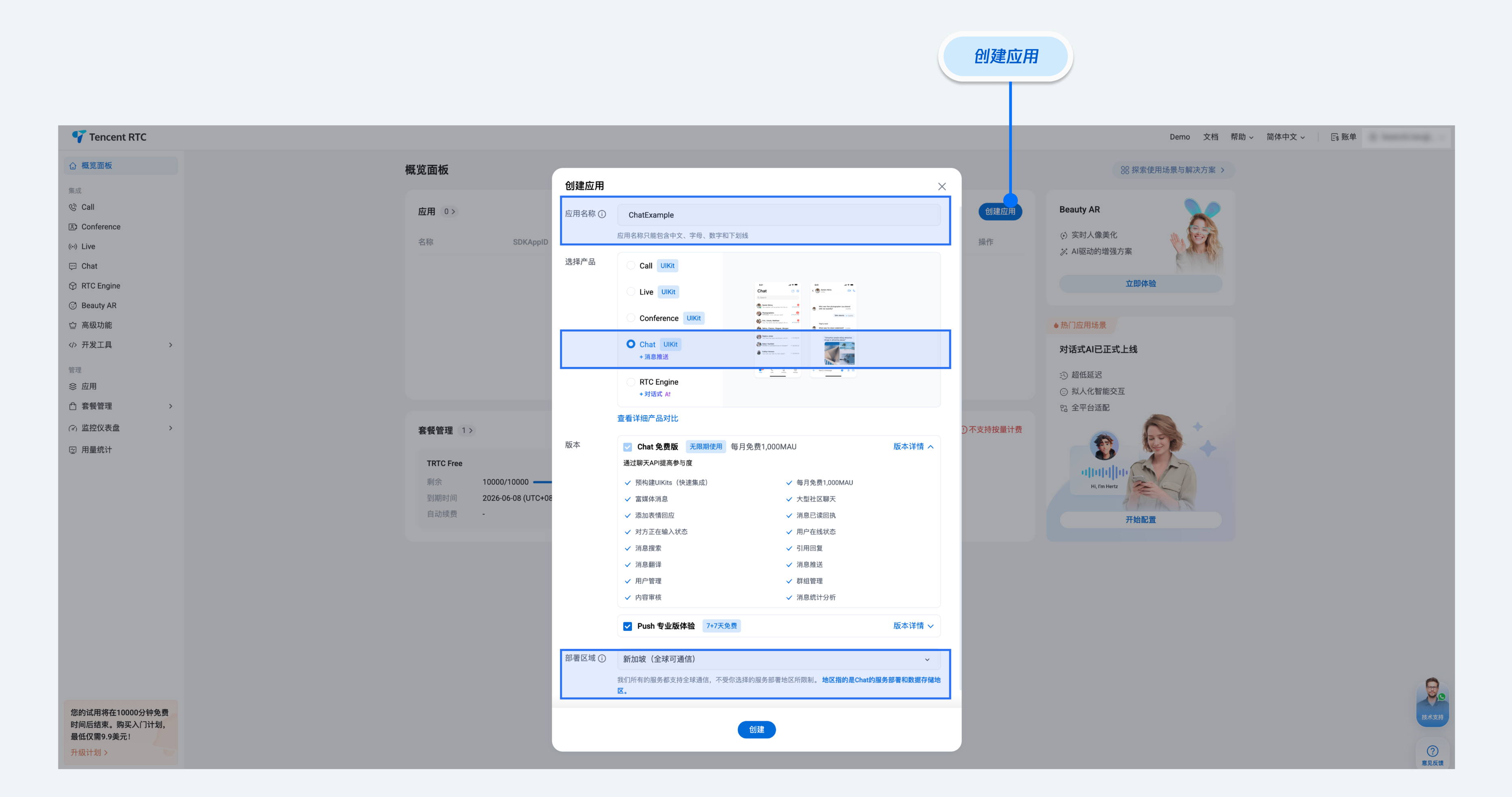
1. 登录 即时通信 IM 控制台,在应用管理页面,单击创建新应用。如果您已有应用,可省略创建应用过程。
2. 在应用管理页面的 SDKAppID 列获取 SDKAppID 和密钥信息。
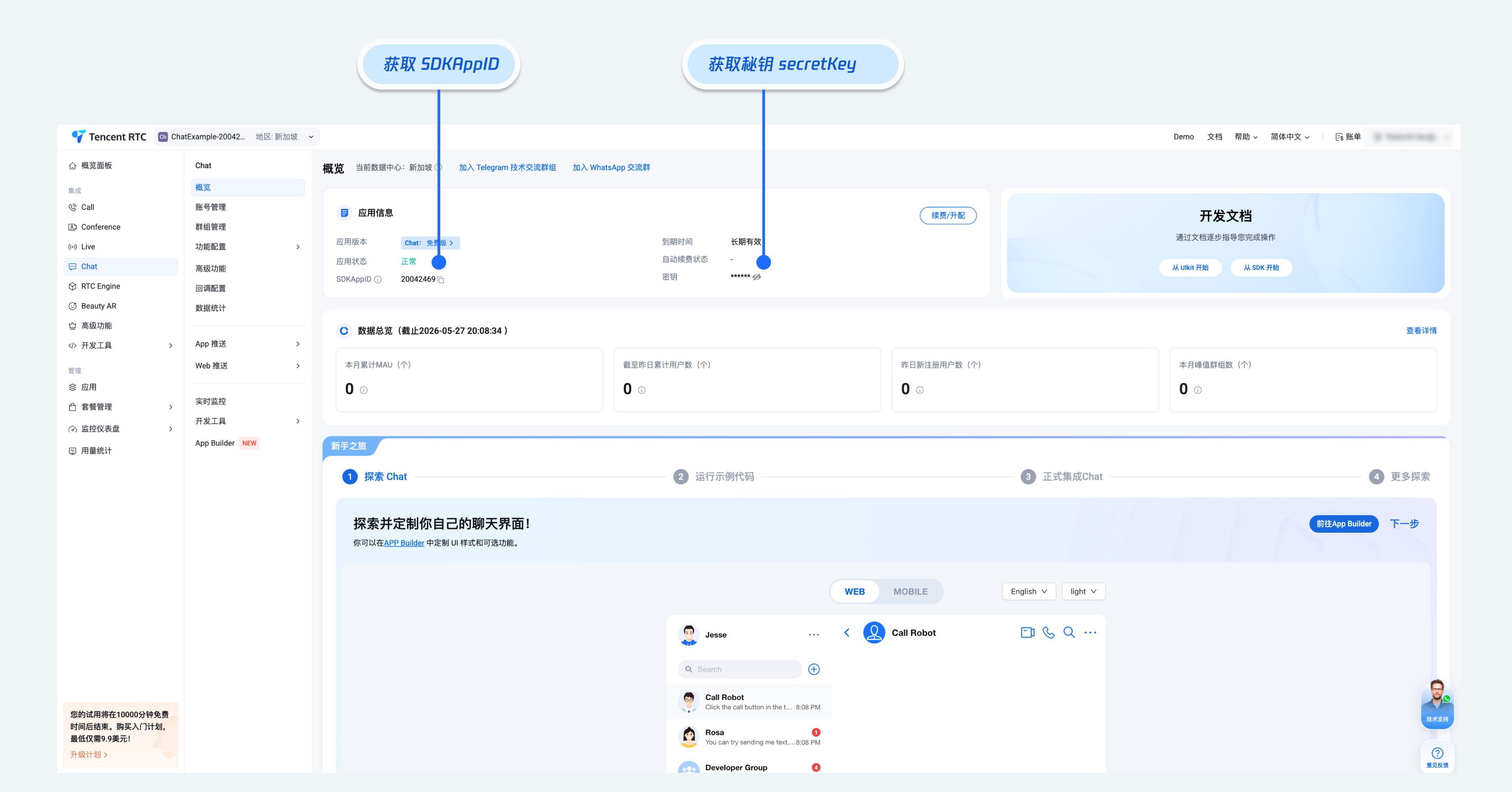
注意:
查看密钥信息需要验证身份。
密钥信息为敏感信息,为防止他人盗用,请妥善保管,谨防泄露。
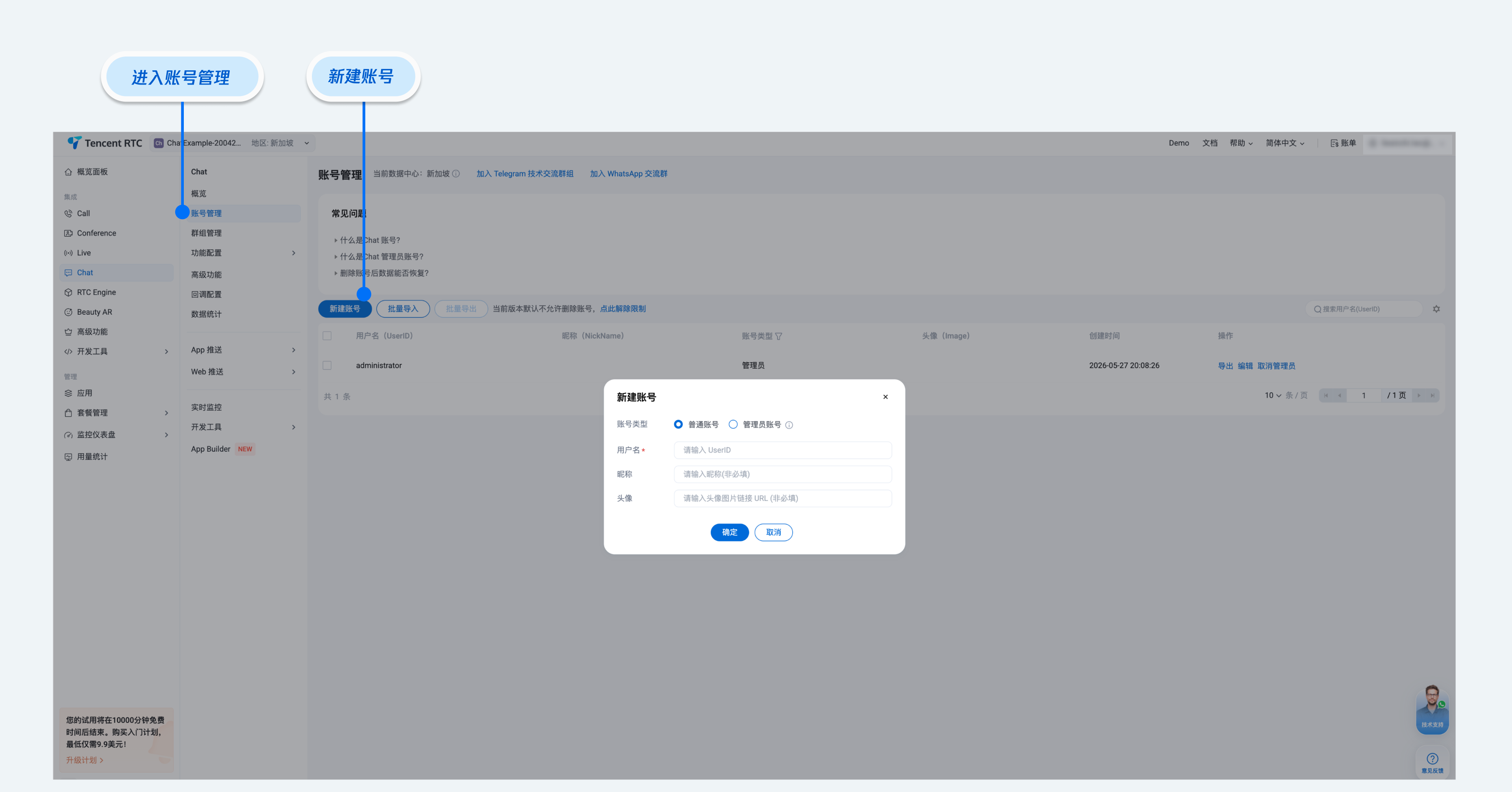
3. 进入用户管理页面,创建 2~3 个测试账号,用于体验单聊能力和群聊能力。
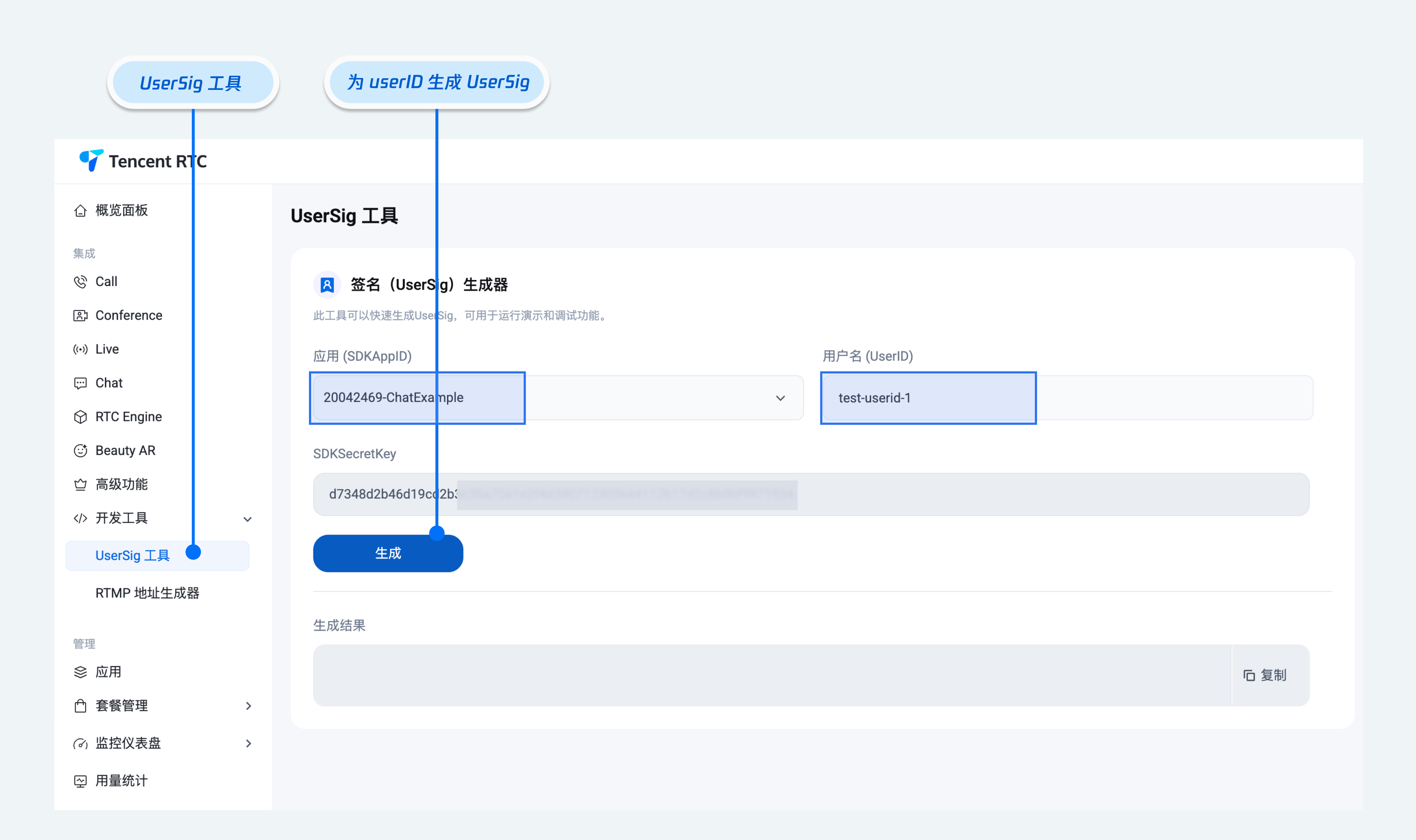
4. userSig 信息,可单击 即时通信 IM 控制台 > 开发工具 > UserSig 工具,填写创建的 userID,即可生成 userSig。
用户签名说明:
开发环境:如果您在本地运行演示并进行调试开发,可以使用调试文件中的
genTestUserSig 函数(参见步骤 3.2)来生成 'userSig'。在此方法中,SDKSecretKey 易受反编译和逆向工程攻击。一旦您的密钥泄露,攻击者即可窃取您的腾讯云流量。运行和测试
运行命令如下:
npm run dev
注意:
1. 请确保 步骤3 代码中
SDKAppID、userID 和 userSig 均已成功输入,如未替换将会导致项目表现异常。2.
userID 和 userSig 为一一对应关系,具体参见 生成 UserSig。3. 如遇到项目启动失败,请检查 开发环境要求 是否满足。
集成更多高级特性
音视频通话
1. 安装
@trtc/calls-uikit-react 依赖npm install @trtc/calls-uikit-react
2. 从
@trtc/calls-uikit-react 导出 TUICallKit,并挂载到 DOM 节点上。在 src/App.tsx 文件中继续补充下面的代码:// src/App.tsximport { TUICallKit } from '@trtc/calls-uikit-react';function App() {return (<UIKitProvider>// 导入 TUICallKit 并添加到代码中<TUICallKit className="call-kit" /><ChatApp /></UIKitProvider>);}
3. 在
<ChatHeader /> 上启用 enableCall 属性。<ChatHeader enableCall={true} />
4. 拨打语音通话
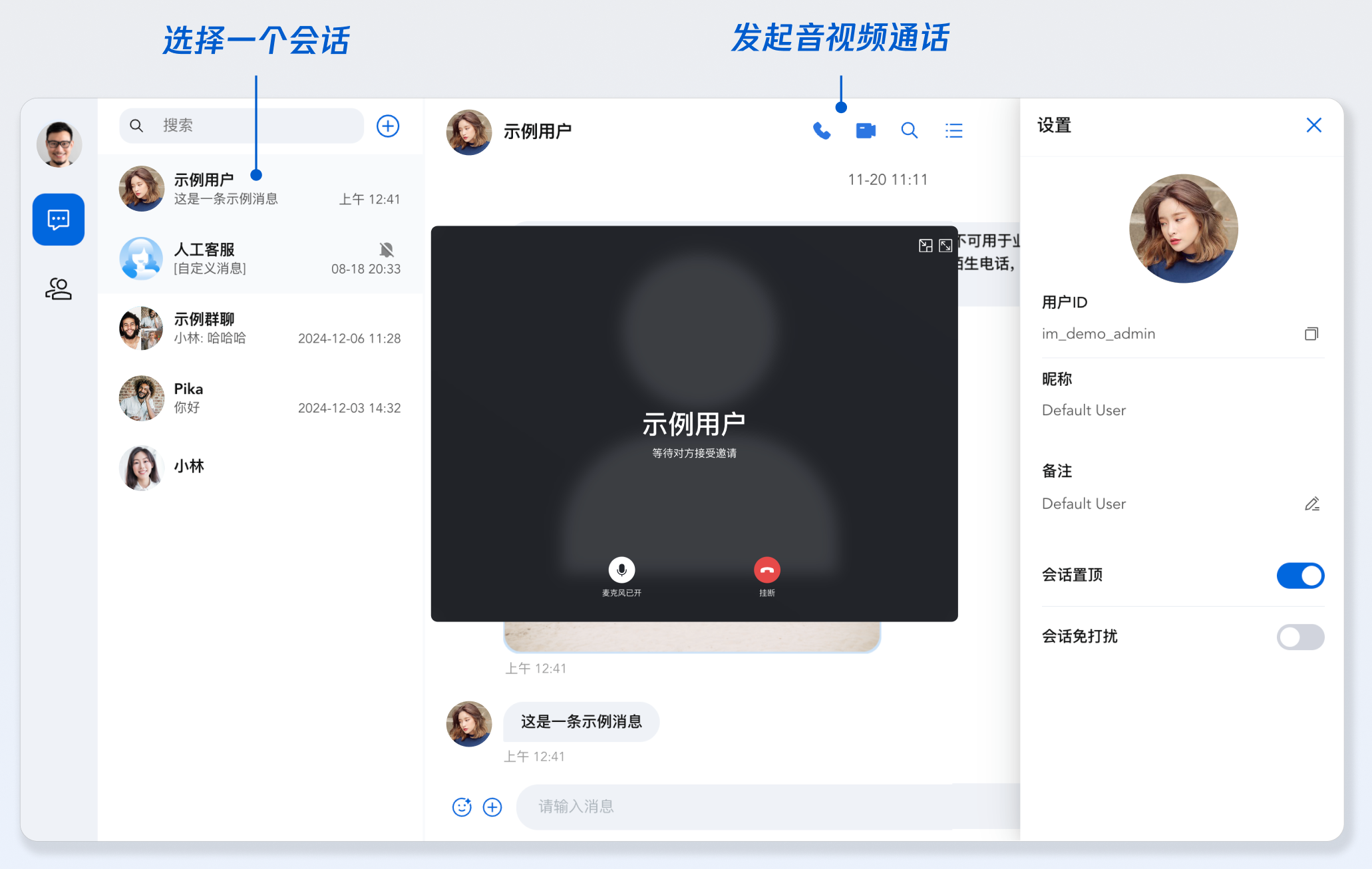
云端搜索
说明:
搜索,在客服、社交、在线教育、在线医疗、OA 等场景下是刚需功能,可帮助用户快速查找群组、用户、消息,提升产品使用体验和用户粘性。
由于 Web 平台本地存储特殊性等原因,Vue 无法实现本地搜索,为了更好的满足对于搜索能力的需求,推出了云端搜索能力。云端搜索功能支持全局搜索和会话内搜索,同时支持搜索群组、用户和消息。
云端搜索在“步骤 2”中已经默认集成,如果需要关闭云端搜索功能,请参考以下代码:
1. 注释
ChatHeader 中 ChatHeaderRight 属性,和会话内搜索侧边栏相关的代码<ChatHeaderenableCall={true}ChatHeaderRight={<div className="header-actions">{/* <buttonclassName="icon-button"onClick={() => setIsSearchInChatShow(!isSearchInChatShow)}><IconSearch size="20px" /></button> */}<buttonclassName="icon-button"onClick={() => setIsChatSettingShow(!isChatSettingShow)}><IconBulletpoint size="20px" /></button></div>}/>
2. 在
ConversationList 组件上关闭云端搜索<ConversationList enableSearch={false} enableCreate={false} />
发送您的第一条消息
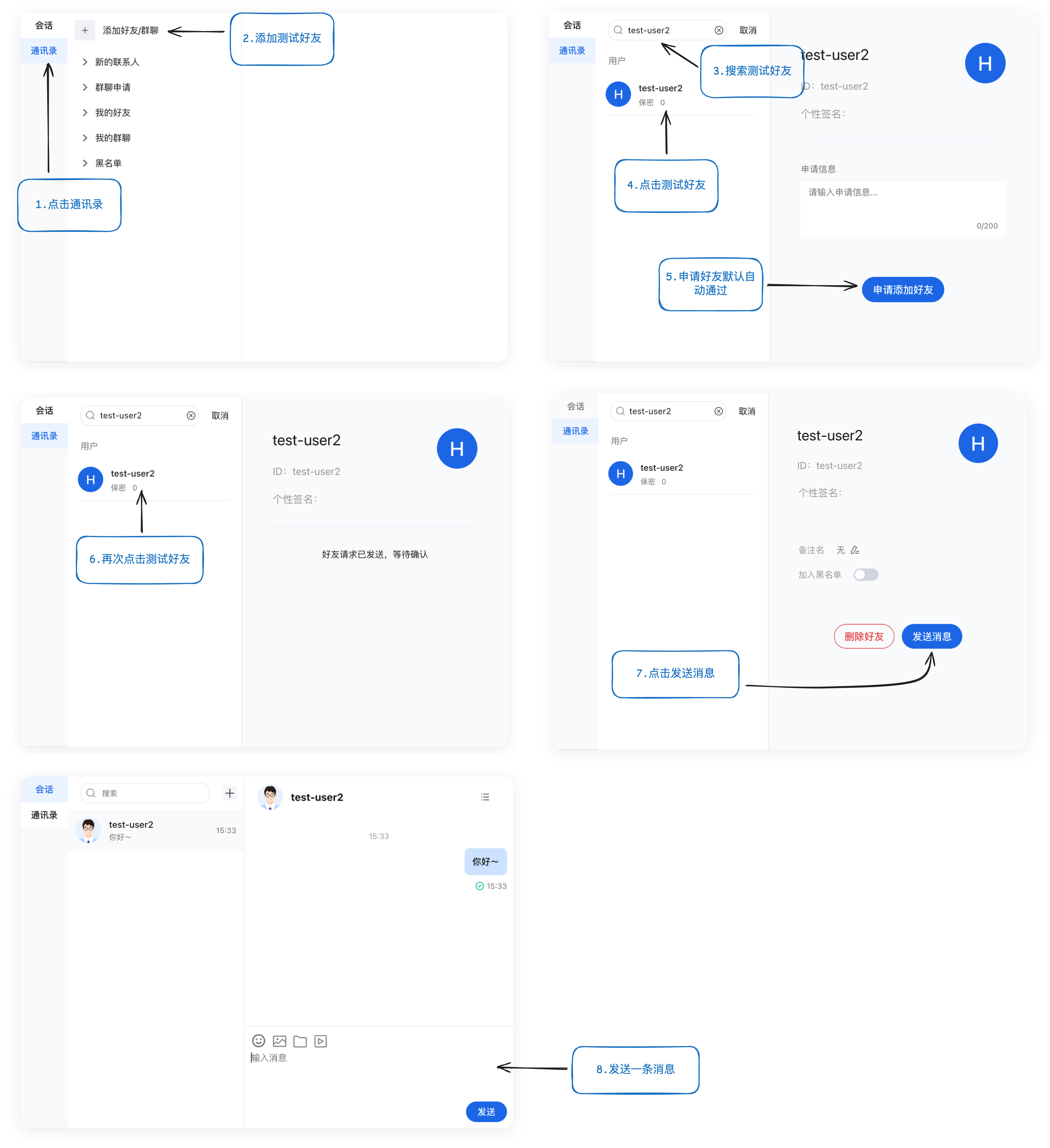
体验单聊功能:搜索好友并发送您的第一条消息
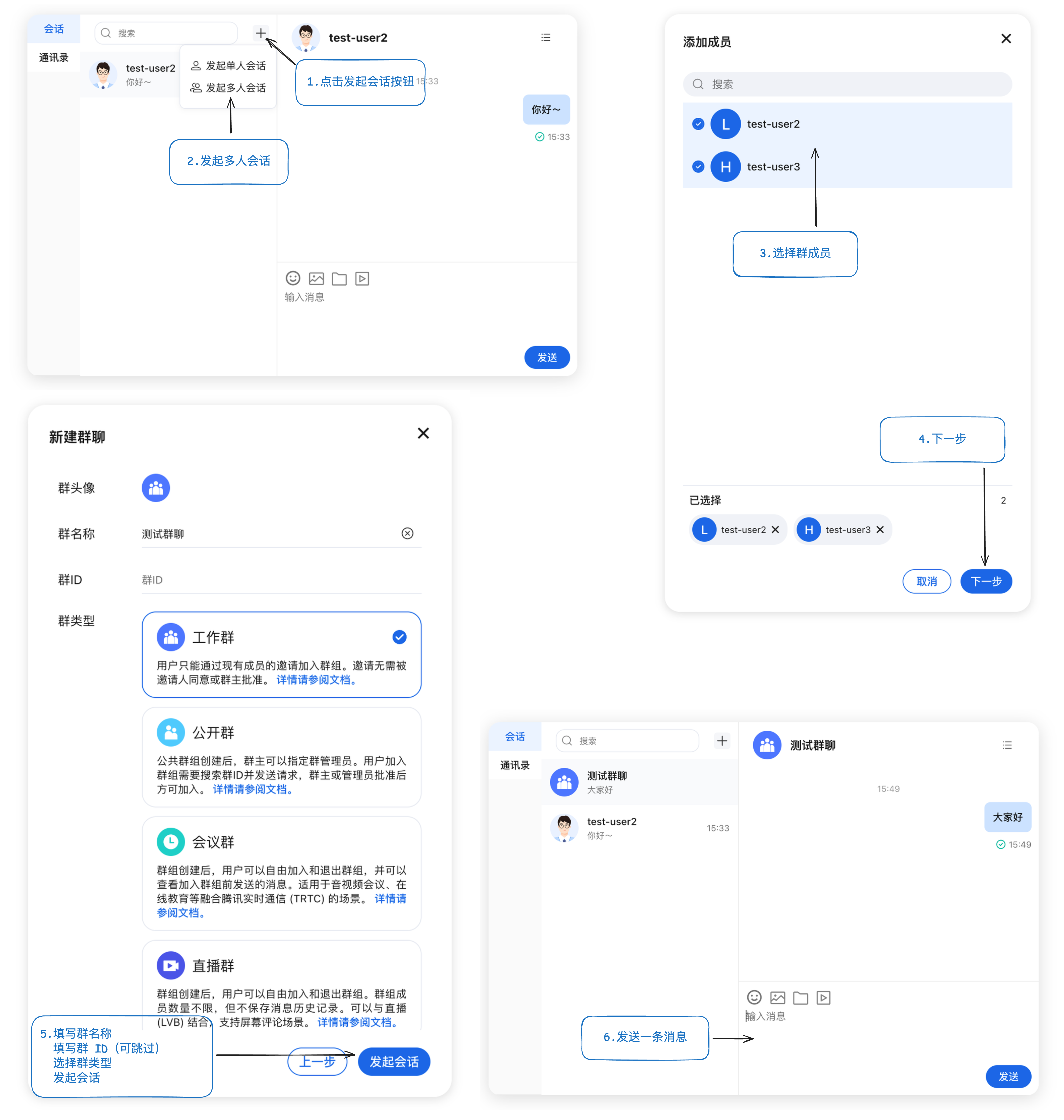
体验群聊功能:创建群聊并发送一条消息
常见问题
什么是 UserSig?
UserSig 是用户登录 Chat 的密码,其本质是对 UserID 等信息加密后得到的密文。
如何生成 UserSig?
UserSig 签发方式是将 UserSig 的计算代码集成到您的服务端,并提供面向项目的接口,在需要 UserSig 时由您的项目向业务服务器发起请求获取动态 UserSig。更多详情请参见 服务端生成 UserSig。
注意:
本文示例代码采用的获取 UserSig 的方案是在客户端代码中配置 SECRETKEY,该方法中 SECRETKEY 很容易被反编译逆向破解,一旦您的密钥泄露,攻击者就可以盗用您的腾讯云流量,因此该方法仅适合本地跑通功能调试。 正确的 UserSig 签发方式请参见上文。
是否支持 react 17 版本?
目前不支持 React v17.x,仅支持 React v18.2+ 以上的版本。
我能不能使用第三方组件库,例如 Ant-Design?
核心组件之间的粘连代码可以使用其他组件库,这一点在示例代码中也可以看到,例如您可以将
<ChatSetting /> 封装成全屏抽屉组件。但是核心组件内部已经存在的组件暂时不支持修改。import { Drawer } from 'antd';const [isChatSettingShow, setIsChatSettingShow] = useState(false);function onChatSettingClose() {setIsChatSettingShow(false);}<Drawertitle="设置"onClose={onChatSettingClose}open={isChatSettingShow}><ChatSetting /></Drawer>
表情包的使用
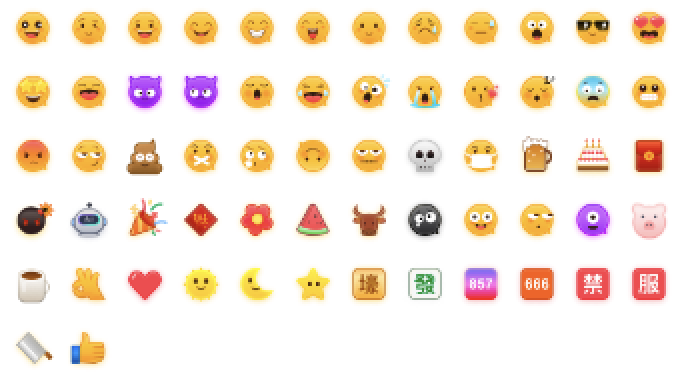
为尊重表情设计版权,Chat Demo/TUIKit 工程中不包含大表情元素切图,正式上线商用前请您替换为自己设计或拥有版权的其他表情包。下图所示默认的小黄脸表情包版权归腾讯云所有,您可以通过升级至 Chat 专业版 Plus 和企业版 免费使用该表情包。
交流与反馈
相关文档
UIKit 相关:

