
网络质量探测
在进房之前或在通话过程中,检测用户的网络质量,可以判断用户当下的网络质量情况。若用户网络质量太差,应建议用户检查网络或尝试更换网络,以保证正常通话质量。
通话过程中的网络质量检测
const trtc = TRTC.create();trtc.on(TRTC.EVENT.NETWORK_QUALITY, event => {console.log(`network-quality, uplinkNetworkQuality:${event.uplinkNetworkQuality}, downlinkNetworkQuality: ${event.downlinkNetworkQuality}`)console.log(`uplink rtt:${event.uplinkRTT} loss:${event.uplinkLoss}`)console.log(`downlink rtt:${event.downlinkRTT} loss:${event.downlinkLoss}`)})
通话前的网络质量检测
实现过程
2.这两个 TRTC 都进入同一个房间。
5.整个过程可持续 15s 左右,最后取平均网络质量,从而大致判断出上下行网络情况。
注意:
API 调用顺序
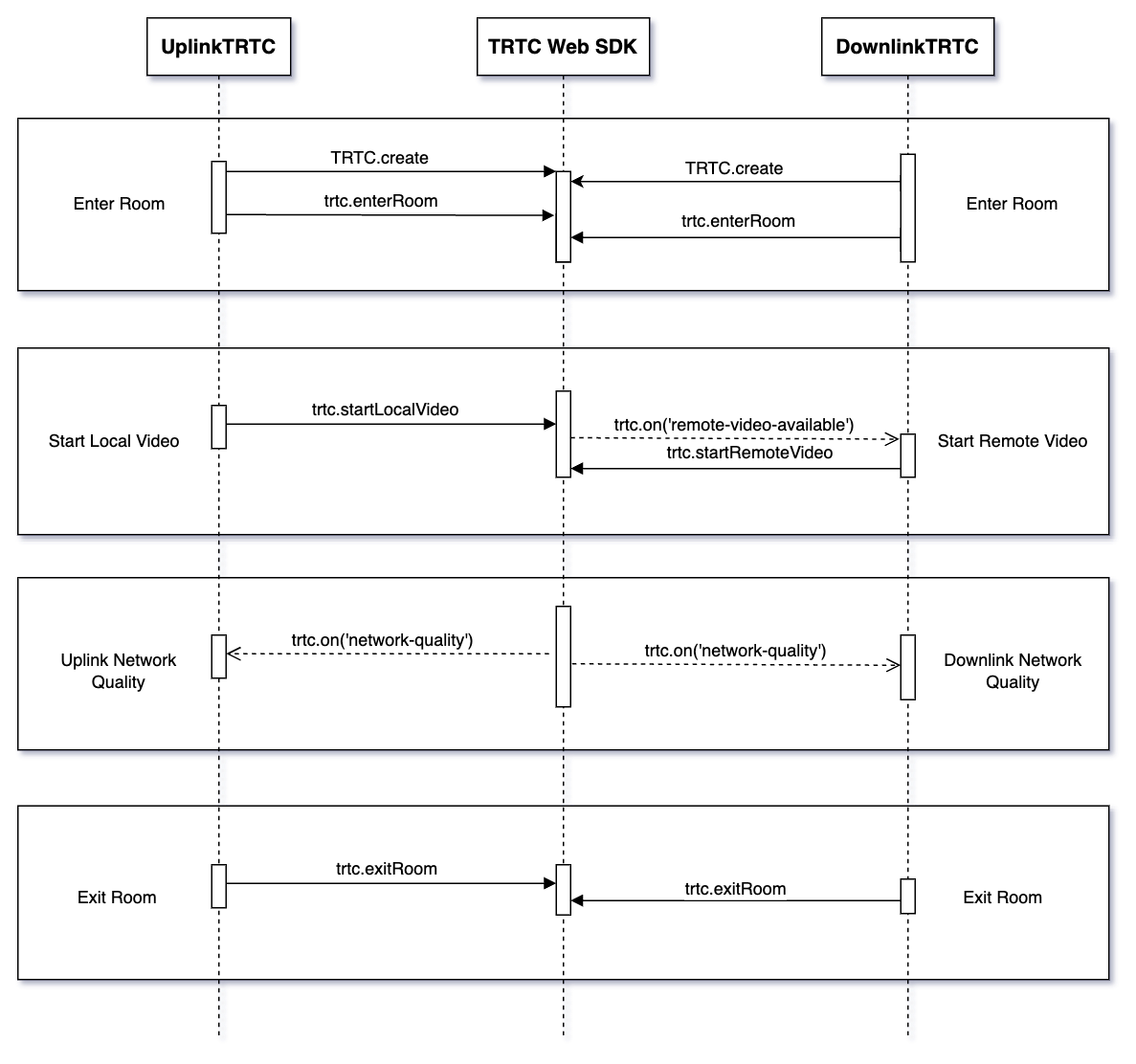
代码示例
let uplinkTRTC = null; // Used to detect uplink network qualitylet downlinkTRTC = null; // Used to detect downlink network qualitylet localStream = null; // Stream used for testinglet testResult = {// Record uplink network quality datauplinkNetworkQualities: [],// Record downlink network quality datadownlinkNetworkQualities: [],average: {uplinkNetworkQuality: 0,downlinkNetworkQuality: 0}}// 1. Test uplink network qualityasync function testUplinkNetworkQuality() {uplinkTRTC = TRTC.create();uplinkTRTC.enterRoom({roomId: 8080,sdkAppId: 0, // Fill in sdkAppIduserId: 'user_uplink_test',userSig: '', // userSig of uplink_testscene: 'rtc'})uplinkTRTC.on(TRTC.EVENT.NETWORK_QUALITY, event => {const { uplinkNetworkQuality } = event;testResult.uplinkNetworkQualities.push(uplinkNetworkQuality);});}// 2. Detect downlink network qualityasync function testDownlinkNetworkQuality() {downlinkTRTC = TRTC.create();downlinkTRTC.enterRoom({roomId: 8080,sdkAppId: 0, // Fill in sdkAppIduserId: 'user_downlink_test',userSig: '', // userSigscene: 'rtc'});downlinkTRTC.on(TRTC.EVENT.NETWORK_QUALITY, event => {const { downlinkNetworkQuality } = event;testResult.downlinkNetworkQualities.push(downlinkNetworkQuality);})}// 3. Start detectiontestUplinkNetworkQuality();testDownlinkNetworkQuality();// 4. Stop detection after 15s and calculate the average network qualitysetTimeout(() => {// Calculate the average uplink network qualityif (testResult.uplinkNetworkQualities.length > 0) {testResult.average.uplinkNetworkQuality = Math.ceil(testResult.uplinkNetworkQualities.reduce((value, current) => value + current, 0) / testResult.uplinkNetworkQualities.length);}if (testResult.downlinkNetworkQualities.length > 0) {// Calculate the average downlink network qualitytestResult.average.downlinkNetworkQuality = Math.ceil(testResult.downlinkNetworkQualities.reduce((value, current) => value + current, 0) / testResult.downlinkNetworkQualities.length);}// Detection is over, clean up related states.uplinkTRTC.exitRoom();downlinkTRTC.exitRoom();}, 15 * 1000);
结果分析
经过上述步骤,可以拿到上行平均网络质量、下行平均网络质量。网络质量的枚举值如下所示:
数值 | 含义 |
0 | 网络状况未知,表示当前 TRTC 实例还没有建立上行/下行连接 |
1 | 网络状况极佳 |
2 | 网络状况较好 |
3 | 网络状况一般 |
4 | 网络状况差 |
5 | 网络状况极差 |
6 | 网络连接已断开 注意:若下行网络质量为此值,则表示所有下行连接都断开了 |
建议
当网络质量大于3时,应引导用户检查网络并尝试更换网络环境,否则难以保证正常的音视频通话。 也可通过下述策略来降低带宽消耗:
若上行网络质量大于3,则可通过 TRTC.updateLocalVideo() 接口降低码率 或 TRTC.stopLocalVideo() 方式关闭视频,以降低上行带宽消耗。
若下行网络质量大于3,则可通过订阅小流或者只订阅音频的方式(参见:优化多人视频通话) ,以降低下行带宽消耗。

