Why do I encounter a 6013 "SDK Not Initialized" error?
If the 6013 "SDK Not Initialized" error occurs, try the following troubleshooting methods:
1. Check whether you performed other operations such as receiving and sending messages before logging in successfully.
2. Check whether you were forced offline when logging in by an account already logged in on another device. By default, the Chat SDK allows one account to log in on one device at a time. For more information, see Multi-Device Login.
3. For Android, verify that all library files have been loaded or repossessed by the system during use.
Why do not emojis appear or appear as gibberish in messages?
Chat does not provide emoji packs. You must align the actual parsing by yourself.
There are two ways to use emojis:
Use index in TIMFaceElem to identify the index of the emojis. For example, an Android device and an iOS device have the same set of emojis and index 2 represents the smile emoji. When index=2, both devices send and receive the same indexed emoji.
Use data in TIMFaceElem. For example, the names of emoji images are string-type. Use the word "smile" to represent the smile emoji, and store "smile" in data. Then, both iOS and Android devices use data as the key to retrieve and display the corresponding emoji.
You can also use the two fields at the same time. For example, use data to specify the emoji set and index to indicate the specific index in this emoji set. This way, you can implement many different emoji effects as in QQ. It is possible to store more complex data structures in data as long as the devices follow the same parsing rules.
Translating IM Messages: How to Remove Emoji and @ Messages?
1. Filter the input text first, extract and cache untranslated emoji or @ messages, then send the required translation settings to the API.
2. After the translation result is returned, combine the cached unnecessary emoji or @ messages together.
This status code is returned when a network exception, timeout, or ticket switching failure occurs during server-side authentication. If you see this status code, wait a moment and try again.
Why do I encounter error 6200 or 6201 when receiving or sending messages?
This status code is returned when the client is offline, times out, or is disconnected. Error 6200 is defined as no network connection during request sending, whereas error 6201 is defined as no network connection during response sending. When you encounter this status code, check the network condition or wait for the network to restore and try again.
Why do I encounter error 20003 when receiving and sending messages?
This error code is returned when UserID is invalid or UserID has not been imported to Chat. To fix it, check whether UserID has been imported to Tencent Cloud.
Why do I encounter error 6010 when playing audio messages?
This error code is returned when audio messages that are no longer retained by the roaming server are requested. To fix it, you can increase the message roaming duration or download audio files to local storage and play them. However, expired files cannot be restored. Different SDK versions allow you to increase the retention duration for different message types. For more information, see Message Storage.
Why do I encounter errors 70001, 70003, 70009, and 70013 during account authentication?
These errors occur because UserID and UserSig do not match. To fix it, check the validity of UserID and UserSig. Among them, error 70001 means UserSig has expired, error 70003 means a verification failure due to a truncated UserSig, error 70009 means UserSig verification failed (possibly due to mixing the keys or private keys of other SDKAppIDs when generating UserSig), and error 70013 means UserID does not match.
Why do I encounter the error code -2 or -5 when the web client app is using the Chat SDK?
-2: Indicates that a web app request to the server failed, usually due to network problems. Web apps send requests to the server by using the HTTP Long Polling method, and this status code is returned when a network problem occurs. To fix it, check your network or try again.
-5: When the login attempt is not completed and the SDK has not received the a2key and tinyID returned by the server, directly calling other APIs returns the "tinyid or a2 is empty" error message and -5 error code.
What should I do when the SDK on the armeabi platform reports "java.lang.UnsatisfiedLinkError: No implementation found for"?
Copy jni/armeabi-v7a/libImSDK.so in the Chat SDK’s aar file to the src/main/jniLibs/armeabi directory in your source code project and load it in build.gradle.
How can I resolve x86_64 and i386 architecture errors when the app has been launched in App Store?
This error occurs because App Store does not support the x86_64 and i386 architecture. The solution is as follows:
1. Clear the project compilation cache:
Select Product > clean, press Alt until "clean build Folder..." appears and wait for the operation to complete.
2. Remove the x86_64 and i386 architecture not supported by App Store:
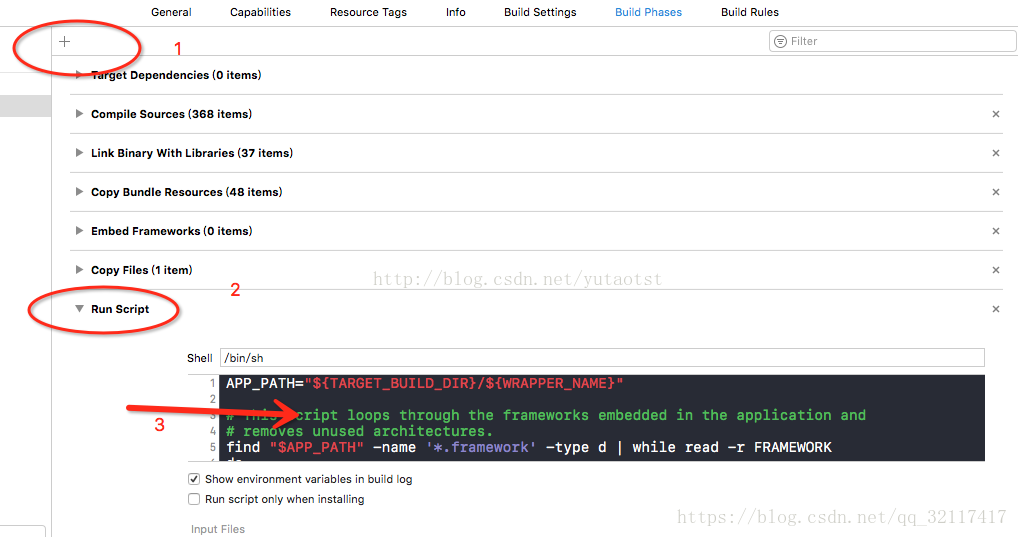
a. Select TARGETS > Build Phases.
b. Click the plus sign and select New Run Script Phase.
c. Add the following code:
APP_PATH="${TARGET_BUILD_DIR}/${WRAPPER_NAME}"
# This script loops through the frameworks embedded in the application and
# removes unused architectures.
find"$APP_PATH" -name '*.framework' -type d |whileread -r FRAMEWORK
Can developers directly utilize the emoticon packs demonstrated in the Chat various client demos/TUIKit projects?
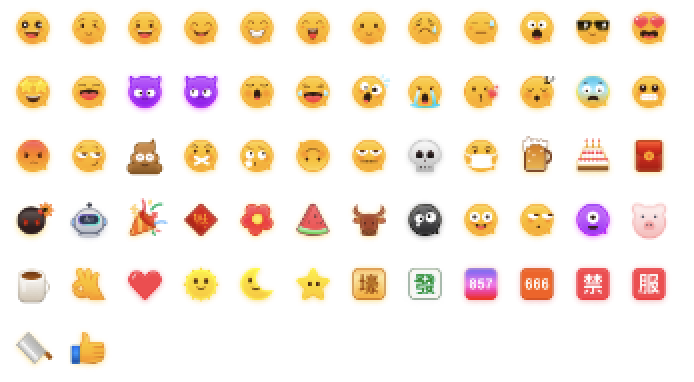
To respect the copyright of emoji designs, the Chat Demo/TUIKit project does not include cutouts of large emoji elements. Please replace them with your own designs or other emoji packs for which you hold the copyright before officially launching for commercial use. The default smiley face emoji pack shown below is copyrighted by Tencent RTC, you can upgrade to Chat Pro Plus Edition and Enterprise Edition to use it for free.
Synchronization Rules for Conversation List?
getConversationList (pull conversation list) asynchronously pulls conversation list data from local cache
1. Upon first login, the IM SDK internally synchronizes roaming conversations and unread messages from the server (no local session cache data exists at this time).
2. Upon first login, before roaming conversation synchronization is complete, calling the getConversationList API to pull the local conversation list returns null data.
3. After synchronization is complete, the SDK informs the upper layer via the V2TIMConversationListener -> onSyncServerFinish Webhook (the upper layer can pull conversations after receiving this callback).
4. Session synchronization is complete. For local cache sessions that have changed, the upper
Will the IM SDK stay connected when the app switches to background or the screen turns off?
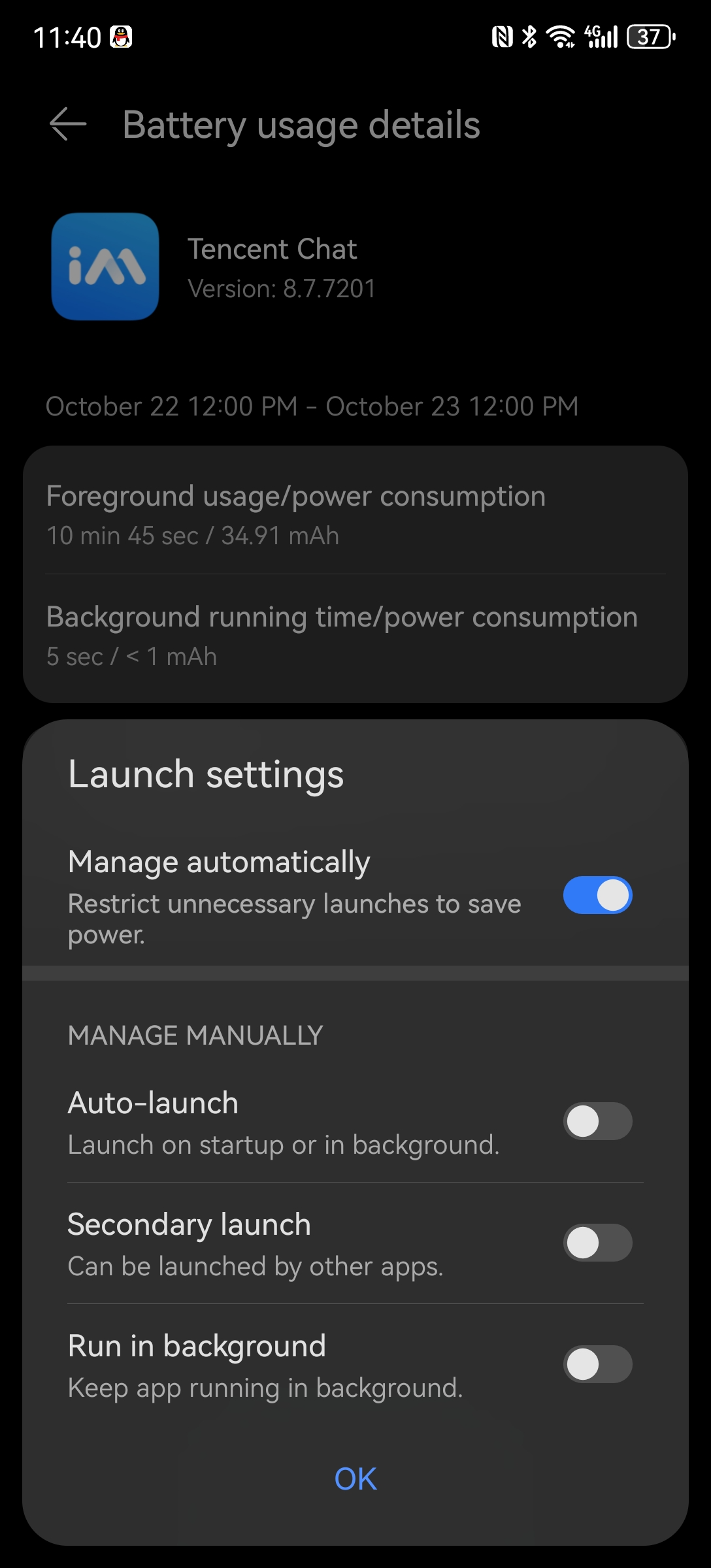
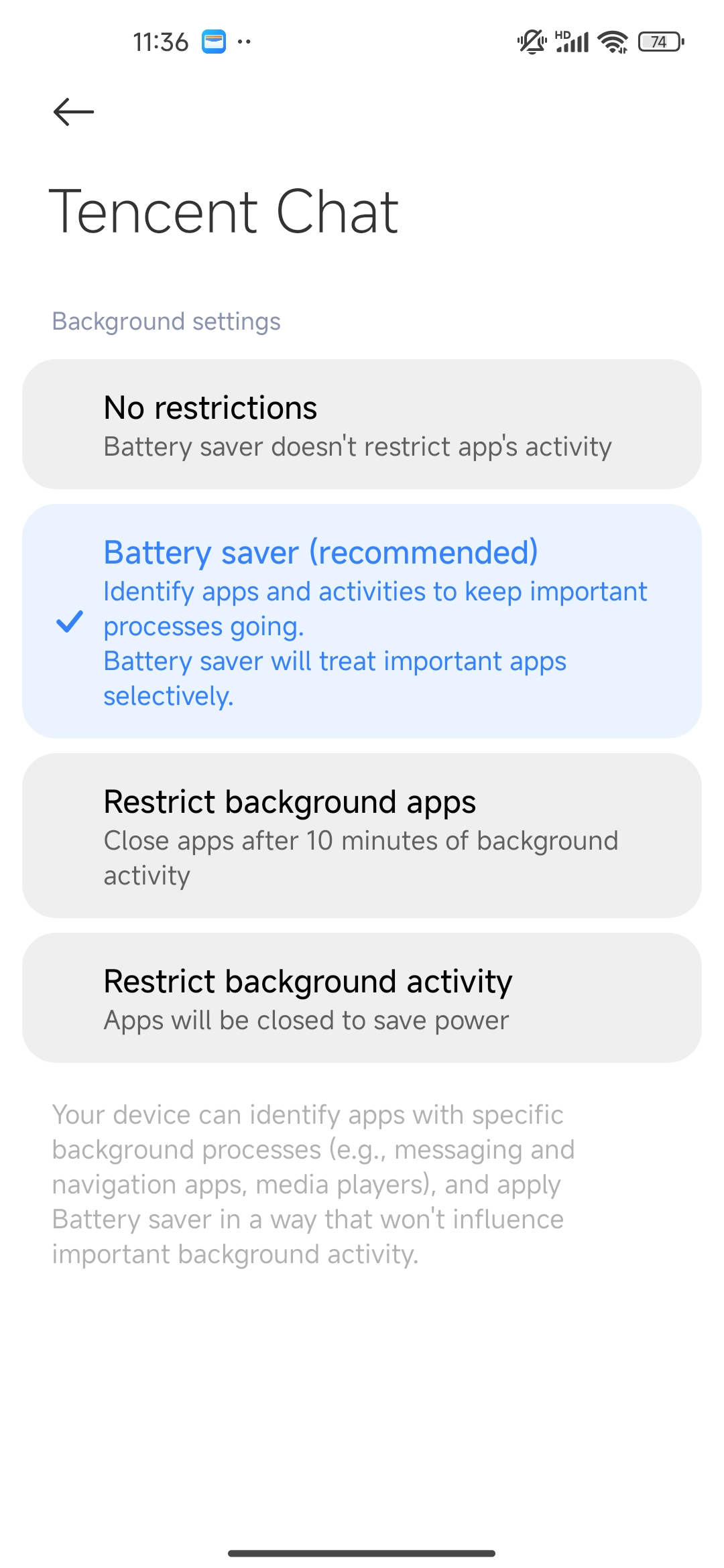
No. Switching to background or turning off the screen may cause the IM connection to disconnect. IM only supports persistent connection keep-alive, not process keep-alive. The primary reason is that mobile manufacturers have increasingly strict limit policies for apps in backend operation.
When the App switches to background or the screen turns off in the foreground, the app process is suspended due to the mobile phone operating system's recycling mechanism and policy reasons, causing the IM connection to disconnect. However, when the app switches back to the foreground, as long as the process remains unchanged, the IM SDK will perceive the network change and automatically reconnect (recommended: in the foreground, you can call the doForeground API to actively trigger reconnection).
The SDK reconnection action triggers the Webhook: V2TIMSDKListener->onConnecting, onConnectSuccess, onConnectFailed, to inform the upper layer of the current IM connection status.
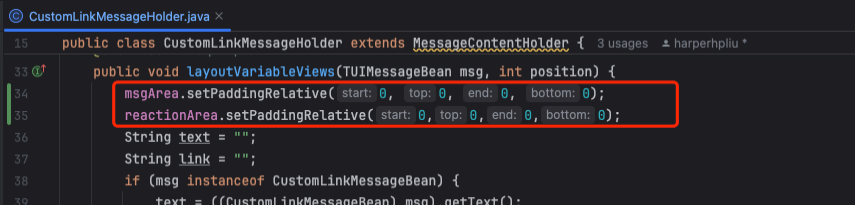
Android UIKit integration, add Custom Message, default margin display is not required, how to operate?
Method I: In the Holder where padding display is not required -> layoutVariableViews function, insert the following code:
msgArea.setPaddingRelative(0,0,0,0);
reactionArea.setPaddingRelative(0,0,0,0);
Method II: At the bottom of the layoutVariableViews function, call the following two methods:
setMessageBubbleBackground(null);
setMessageBubbleZeroPadding();
What is the log cache policy of IM SDK?
The IM SDK's log module uses WeChat MARS's Xlog. Xlog compresses single-line logs in a streaming method and writes the compressed and encrypted data to mmap as a log middle buffer. With the Xlog solution, it is certain that no log line will be lost unless there is io damage or no available disk space.
1. Logs are first written to the memory-mapped file .mmap3.
2. flush from mmap3 to the local xlog file every 15 minutes.
3. If the content exceeds 100kB, Flush directly.
4. Terminate the process and log in again to Flush directly.
5. Log files in local cache are saved for 7 days.
Call the IM SDK API interface and get error 6014. How to optimize?
Error 6014 is a common issue, such as login failure, being kicked out, or proactive logout, causing the current IM to be in a logged out state. Subsequent calls to the IM SDK API without re-login will result in error 6014.
Our recommendation is: Implement fallback logic at the higher level, such as unified processing of all API error Webhooks used by IM. For example, if error 6014 is encountered, perform a login operation and retry the request after successful completion, ensuring imperceptibility to users.
The SDK also provides the following two APIs for duplicate invocation prevention of the login API calls to prevent repeated calls:
1. getLoginStatus(): Retrieves the current login status. If the status is logged in or logging in, the upper layer does not need to call the login API for duplicate login. Only call it when the status is not logged in (special case: if the UserSig expires, perform the login operation in the UserSig expiration Webhook without checking the login status).
2. getLoginUser(): Retrieves the currently logged-in UserID. If it differs from the UserID required by the business layer, re-login may be performed; otherwise, filter and do not process.
Is there any limit on the cache validity period for IM SDK's proactive retrieval of various types of material?
Active acquisition of Group Profile: Default cache validity period is 1 hour.
Proactive retrieval of Group Member: Default cache validity period is 1 hour.
Proactive retrieval of User Profile: Default cache validity period is 10 minutes.
What is the IM SDK retry policy?
When the network status changes, the IM SDK will automatically reconnect. It retries up to 6 times, with the longest duration being one minute or so. If all retry methods fail after about 3 minutes, the SDK suspends reconnection. Proactive API calls or detecting network changes will trigger reconnection again.
The IM SDK has its own logic for keeping persistent connections alive. The access layer generally does not need to focus on reconnection actions, just normally call the API.
Why is the TUI component code in the GitHub Demo different from the pod 'TUIXXX' integration code?
Download the Demo from GitHub, run pod update, and then compare.
After a cold startup of the App, the first pull of the friend request list may occasionally display an error message indicating "not logged in," while the login status shows "logging in." What is the issue?
Except for the get session list and pull historical messages APIs, all feature APIs in the SDK can be called only after successful log-in.
IM operation reports conflict: Multiple commands produce '/Users/apple/Library/Developer/Xcode/DerivedData/xxx/Build/Products/Debug-iphonesimulator/xxx.app/Frameworks/ImSDK_Plus.framework', how to resolve?
The conflict is usually caused by integrating two or more IM SDKs. Just keep one. Common scenarios:
1. The customer integrates TXIMSDK_Plus_iOS separately, then integrates the TUI component, which in turn integrates the IM SDK, causing a compilation conflict.
Solution: In this case, you can remove the separately integrated TXIMSDK_Plus_iOS.
2. Earlier integration included non-audio and video related TUI components such as TUIChat, TUIConversation, and TUICore, which integrated TXIMSDK_Plus_iOS through dependency. Later, audio and video related components like TUICallKit, TUIRoomKit, or TUILiveKit were added, which depend on TXIMSDK_Plus_iOS_XCFramework. After integration, compilation conflicts may occur.
Solution: When using DevelopPods source code integration for non-audio and video related TUI components such as TUIChat, TUIConversation, and TUICore, check whether the .podspec file depends on the IM SDK. For example, if TUICore.podspec depends on TXIMSDK_Plus_iOS, change it to TXIMSDK_Plus_iOS_XCFramework (to unify with the IM SDK dependency of audio and video components), then run pod update.
TUIChat, TUIConversation, and TUICore are non-audio and video related TUI components. If they are pulled directly via pod, you can try running pod update to update them to the latest version.
Upload Symbols Failed: The archive did not include a dSYM for The lmSDK Plus.framework with The UUID [B8B90567-F276-334a-8937-4D327a49AB4C]. Ensure The archive's dSYM folder contains a DWARF file for lmSDK Plus.framework with The correct UUID.
Xcode 16 reports a warning, which does not affect packaging and can be ignored for now.
When the same account is logged in on iOS and Android, or on Web and iOS, and receives a call invitation, if one end hangs up while the other does not exit the Call Invitation Interface, what should be done?
Handling Multi-device Login requires the customer to call the enableMultiDeviceAbility API to enable it, and also needs to enable the corresponding Package.
Error: The pod "TXIMSDK_Plus_iOS_XCFramework," required by the plugin "tencent_cloud_chat_push," requires a higher minimum iOS deployment version than the plugin's reported minimum version. To build, remove the plugin "tencent_cloud_chat_push" or contact the plugin's developers for assistance. Error running pod install. Error launching application on iPhone 16 Pro.
Solution:
1. Open the compiler console and enter the iOS directory: cd ios.
2. Delete the Podfile.lock or pod.lock file if it exists.
3. Execute the pod update command: pod repo update or pod install --repo-update.
4. Rerun the project.
Error Cause:
A certain plugin version in Flutter cannot be detected or downloaded from the local CocoaPods cache and needs to be updated.
Flutter uses multiple engine modes. When a certain engine detaches, it releases ALL IM SDK channels, causing ALL engines to become unavailable?
IM Flutter SDK version 8.7.7201 has optimized multi-engine support.
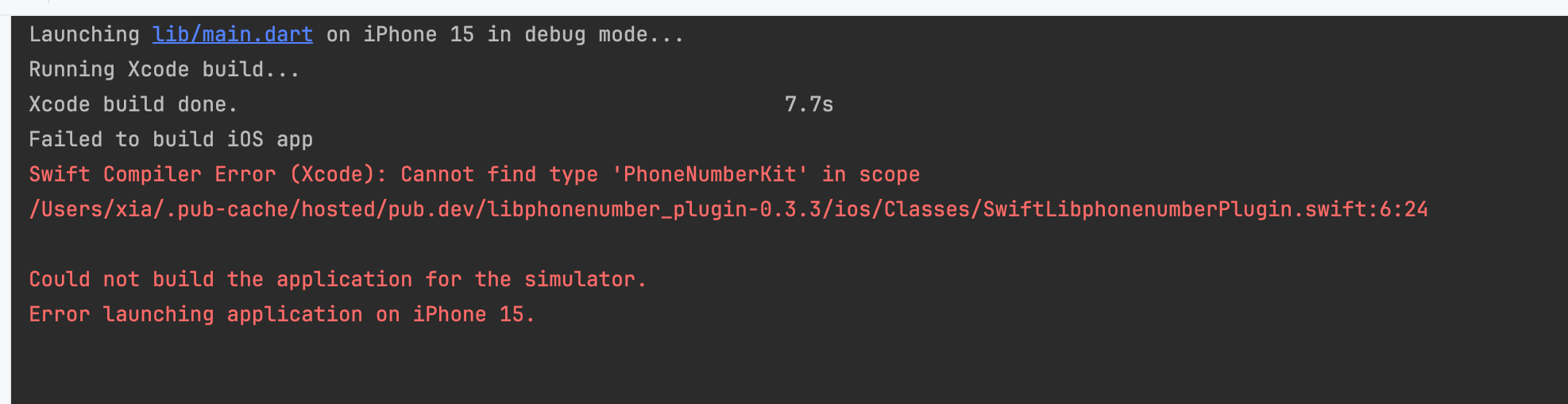
What to do if the following error occurs when running the official IM Flutter Demo on iOS?
Swift Compiler Error(Xcode): Cannot find type 'PhoneNumber/Users/xia/.pub-cache/hosted/pub.dev/libphonenumber_plugin-.3.3/ios/Classes/SwiftLibphonenumberPlugin.swift:6:24 Could not build the application for the simulator. Error launching application on iPhone 15.
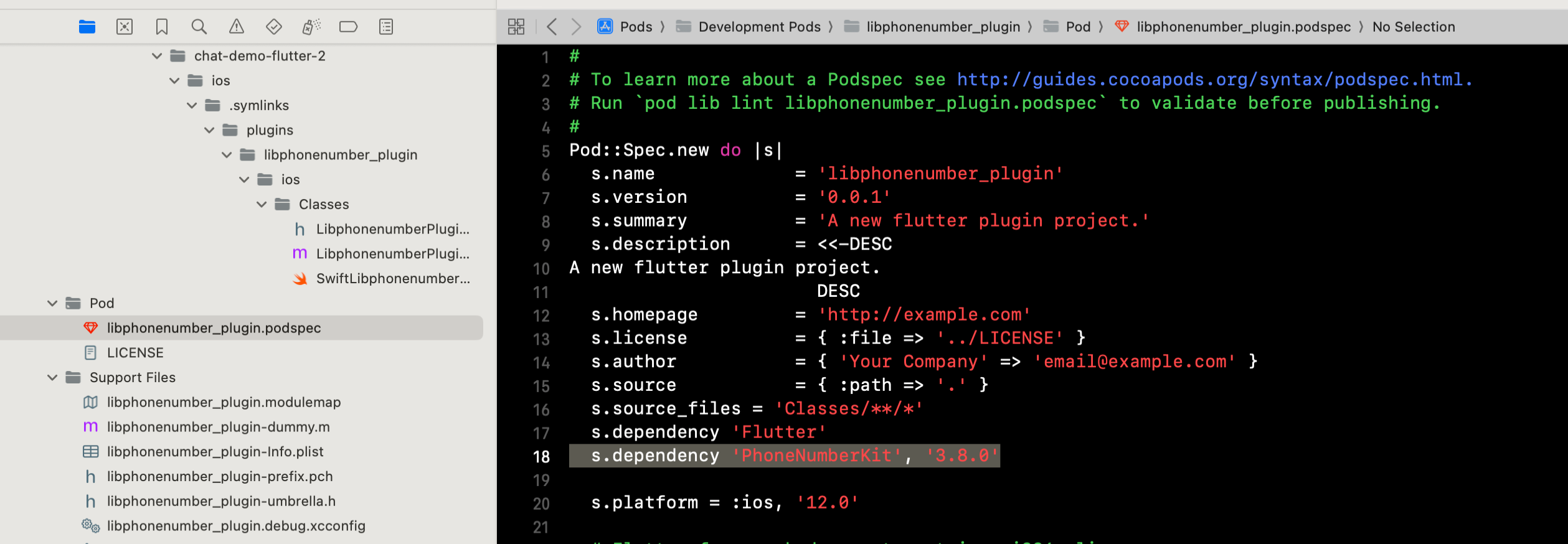
Reason: The iOS project uses the library libphonenumber_plugin, which depends on the latest version of PhoneNumberKit. However, the latest version 4.0.0 of PhoneNumberKit introduces breaking API changes, including the modification "renames the class PhoneNumberKit to PhoneNumberUtility." libphonenumber_plugin has not yet adapted to this change, causing an error as it is unable to find PhoneNumberKit.
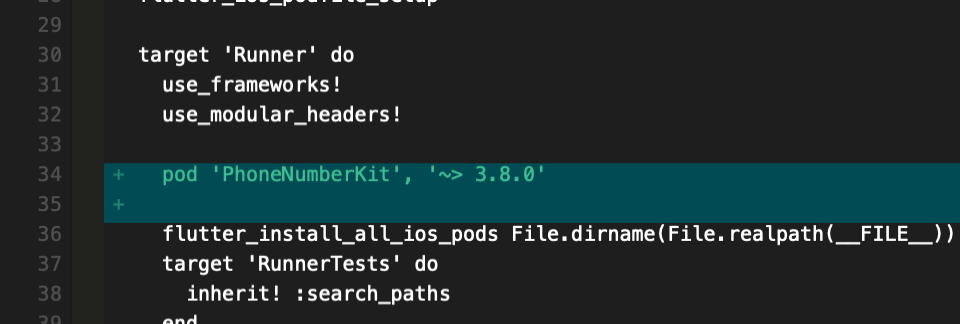
Solution: Downgrade the libphonenumber_plugin dependency PhoneNumberKit to the earlier version 3.8.0.
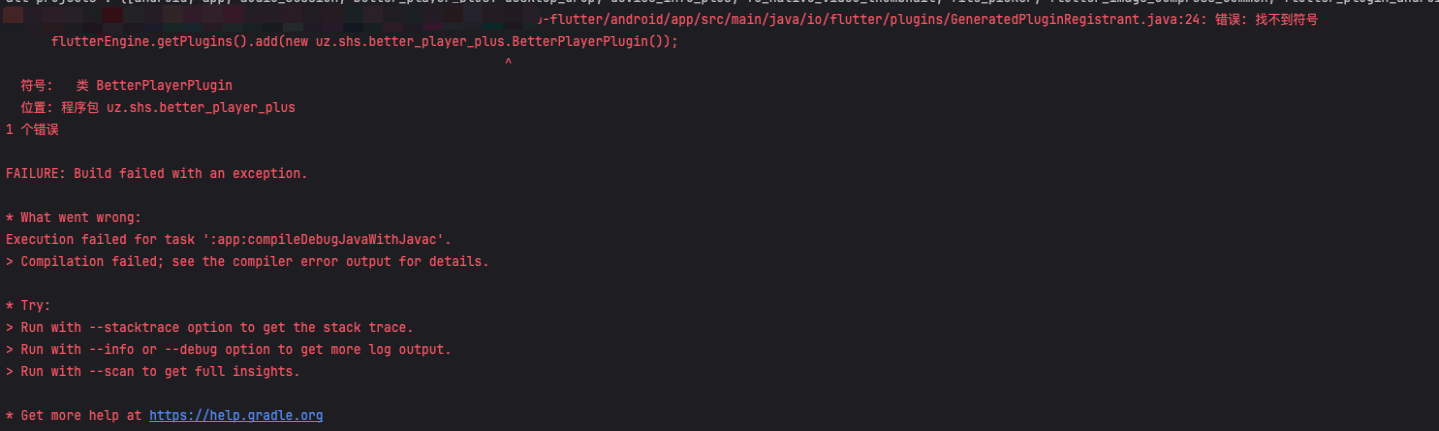
A problem occurred configuring project ':better_player_plus'.
> Could not create an instance of type com.android.build.api.variant.impl.LibraryVariantBuilderImpl.
> Namespace not specified. Specify a namespace in the module's build file. See https://d.android.com/r/tools/upgrade-assistant/set-namespace for information about setting the namespace.
Solution 1: Upgrade the Plugin version (recommended)
Modify
pubspec.yaml:
dependencies:
better_player_plus: ^1.0.8
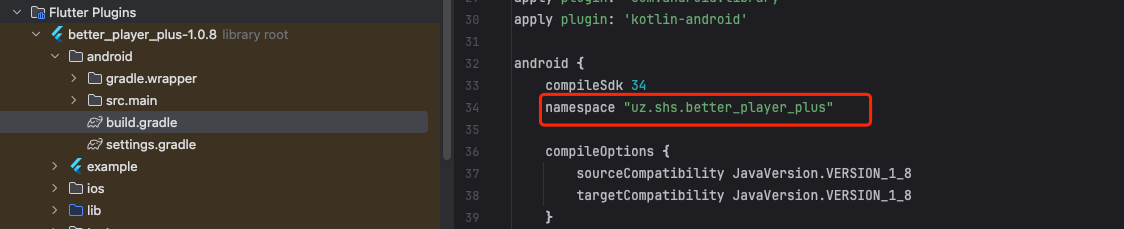
Solution 2: Manually inject namespace
1. Locate the Android module build file of the Plugin:
or through cache path: C:\Users\yourUserName\.gradle\caches\.../better_player_plus/../android/build.gradle
2. Add the namespace in the Android block:
android {
namespace "uz.shs.better_player_plus" // package name of the reference library for specific valu
// Other Configurations...
}
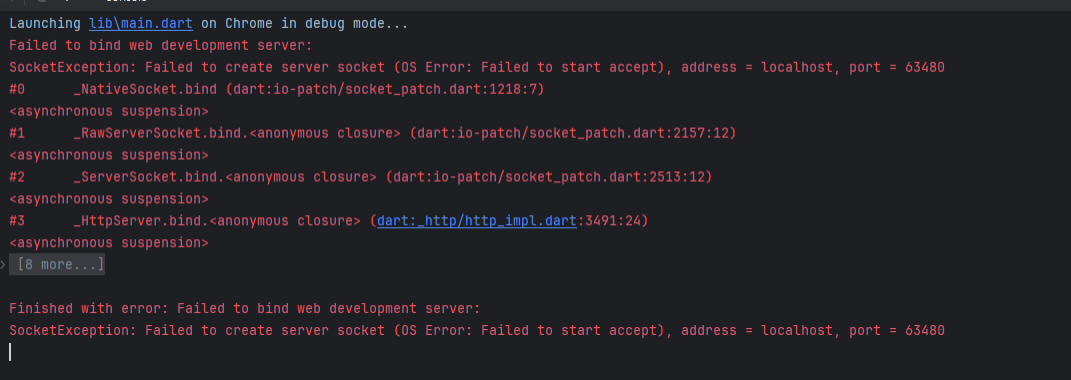
IM Flutter Demo reports the following error when selecting web browser to run: Finished with error: Failed to bind web development server: SocketException: Failed to create server socket (OS Error: Failed to start accept), address = localhost, port = 63480
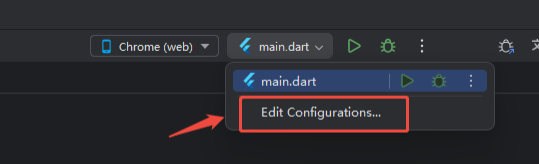
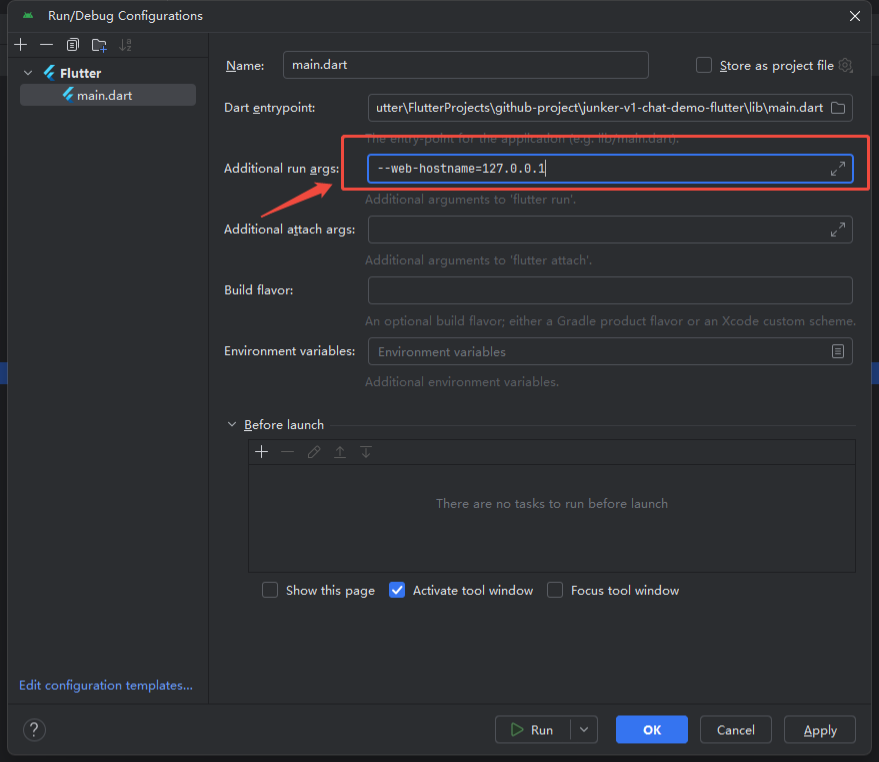
Solution 1: Open Android Studio and add the following content at the screenshot position: --web-hostname=127.0.0.1.
Solution 2: If it is run via the terminal CLI tool, as stated below: flutter run -d chrome --web-hostname=127.0.0.1.
Running Flutter Demo reports an error about better_player_plus?
Upgrade better_player_plus to better_player_plus: ^1.0.8.
After integrating the Flutter IM SDK, it runs normally on Android, iOS, macOS, and Windows, but reports an Error only on the Web platform. The Error content is as follows: pub-cache/hosted/pub.dev/tencent_cloud_chat_SDK-8.6.7040/lib/native_IM/bindings/native_imsdk_bindings_generated.dart:996:19: Error: 'Pointer' isn't a type. ffi.Pointer<ffi.Void>)>>('DartFindMessages');. How to resolve?
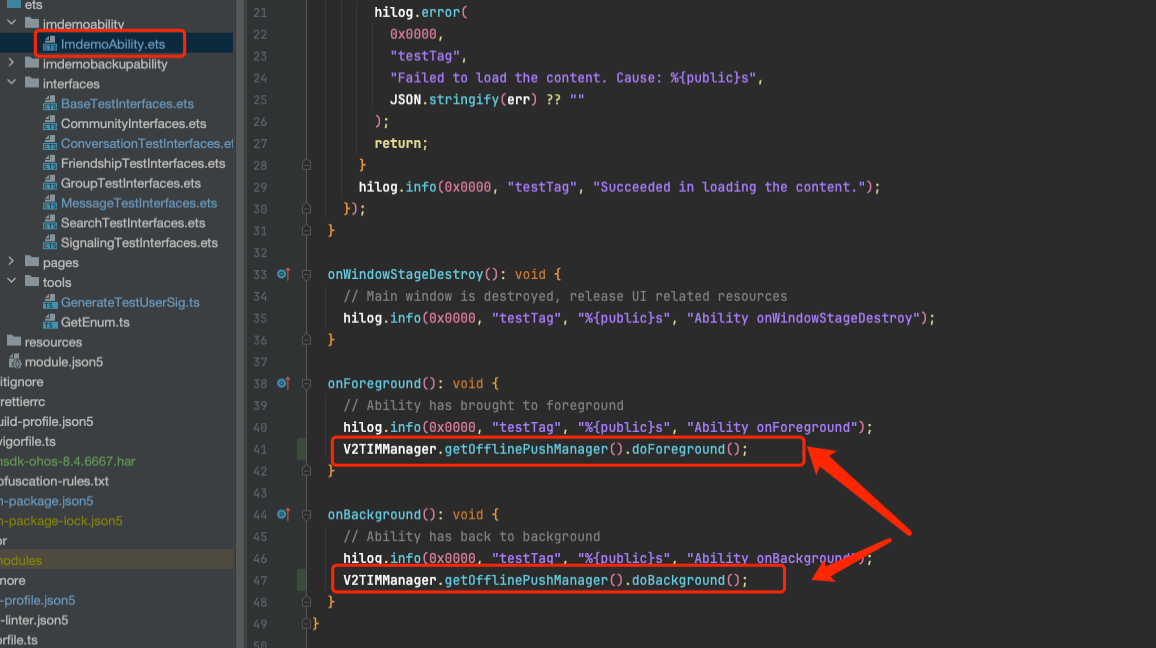
HarmonyOS disconnects when switching to background. Reconnecting the SDK after switching back to foreground is time-consuming. How to resolve?
Reason: When the app returns to the foreground, it does not actively call the IM SDK API interface to trigger reconnection, leading to time-consuming delays.
Solution: In the HarmonyOS project, refer to the following screenshot's corresponding position to add two SDK APIs for actively triggering reconnection.
Failed to register Token with error code 1000900010. How to resolve?
Push successful with HarmonyOS integration, but not receiving push notifications when sending messages from Android or iOS?
For messages sent from other platforms, setHarmonyCategory is required inside the message code.
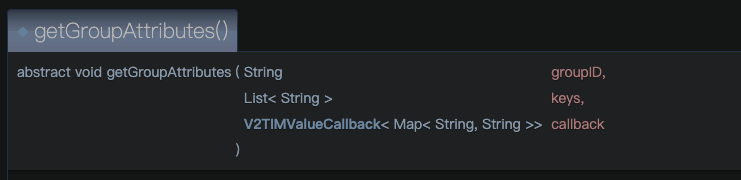
TUICallKit integration, how to proactively retrieve whether a group chat currently has an audio and video call in progress?
Call getGroupAttributes() to get the Group attribute API, parameter two keys: pass inner_attr_kit_info.
When an Audio/Video Call is in progress in the group, the group attribute will record the current call information, including: room number, number of participants in call, call type, etc. Developers only need to parse it.