
iOS
This document helps you move a Web app from the Twilio Video SDK to the Tencent RTC Engine SDK. It covers key architecture differences, step-by-step migration instructions, practical feature examples, and advanced feature comparisons to help you migrate smoothly.
If you’re starting a new project with Tencent RTC Engine, begin with the Quick Start Guide. For a high-level introduction, see the Product Overview.
Core concepts and architecture differences
Concept Comparison
This section maps key concepts between Tencent RTC Engine and Twilio Video. For Tencent RTC terminology, see Basic Concepts.
Concept | Tencent RTC Engine | Twilio Video | Description |
Room | Room | Room | Session space connecting RTC participants. Tencent RTC uses roomId (numeric) or strRoomId (string); Twilio uses roomName (string). |
User | User | Participant | User participating in audio/video calls. |
Anchor | Anchor | — | User type with streaming permission; can send and receive audio/video streams to/from the server. |
Audience | Audience | — | User type that only receives audio/video streams. |
Application Identifier | SDKAppID | Account SID | Unique application identifier. |
Authentication Credential | UserSig | Access Token | Client authentication credential. |
User Identifier | userId | Identity | Unique user identifier. |
Core Entry Class | TRTCCloud | Video (class) | SDK core entry class. |
Technical Architecture Differences
Twilio Video Architecture
Twilio Video uses a track-based architecture:
You explicitly create
LocalAudioTrack and LocalVideoTrack.You publish tracks by passing the track list into
ConnectOptions.Builder.You subscribe to remote tracks via callbacks from
RemoteParticipant.Listener.You render video using a
VideoSink or VideoView.Tencent RTC Engine Architecture
Tencent RTC Engine uses an API-driven architecture:
You capture and publish by calling
startLocalPreview() and startLocalAudio() on the TRTCCloud singleton.You subscribe to remote streams via
TRTCCloudListener callbacks and startRemoteView().You render video with
TXCloudVideoView.You don’t need to manually create or manage track objects.
Tencent RTC Engine APIs are more concise and simplify object management compared to Twilio Video.
Migration Preparation
Step 1. Activate the Service
To use Tencent RTC Engine services, you need to create an application and obtain credentials. Follow these steps to create a Tencent RTC Engine application in the console:
1. Register or sign in to your Tencent RTC account, then access the Tencent RTC Console.
2. Click Create Application.
3. In the popup, enter your application name, select RTC Engine, then click Create.

After the application is created, view the following credentials under Basic Information:
SDKAppID: Automatically generated application ID that uniquely identifies your Tencent RTC app.
SDKSecretKey: Key used to generate the UserSig, which ensures secure access to Tencent RTC services.

Note:
Authentication Comparison: Twilio Video uses Access Token for authentication, whereas Tencent RTC uses UserSig. Both are time-limited credentials generated on the server side, but the generation methods differ. See UserSig Authentication Documentation.
Step 2. Import the SDK
Original Twilio Podfile (Reference)
source 'https://github.com/CocoaPods/Specs'platform :ios, '12.2'target 'TARGET_NAME' dopod 'TwilioVideo', '~> 5'end
Tencent RTC Engine SDK (New Dependency)
CocoaPods (Recommended)
1. If CocoaPods is not installed, install it:
sudo gem install cocoapods
2. In your project root directory, initialize a Podfile:
pod init
3. Add the TRTC SDK dependency to your Podfile:
platform :ios, '9.0'target 'YourApp' dopod 'TXLiteAVSDK_TRTC', :podspec => 'https://liteav.sdk.qcloud.com/pod/liteavsdkspec/TXLiteAVSDK_TRTC.podspec'end
4. Install the SDK:
pod install
5. After
pod install finishes, a new .xcworkspace file will be generated. Open the .xcworkspace file to continue development.Step 3. Project Configuration
1. Open your .xcworkspace project file, click your project name in Xcode’s Project Navigator, and select the correct TARGETS.
2. In Build Settings, search for User Script Sandboxing and set its value to No to allow user scripts broader access.

3. In
Info.plist, add Privacy-Microphone Usage Description and Privacy-Camera Usage Description. Fill in appropriate prompts for microphone and camera permissions.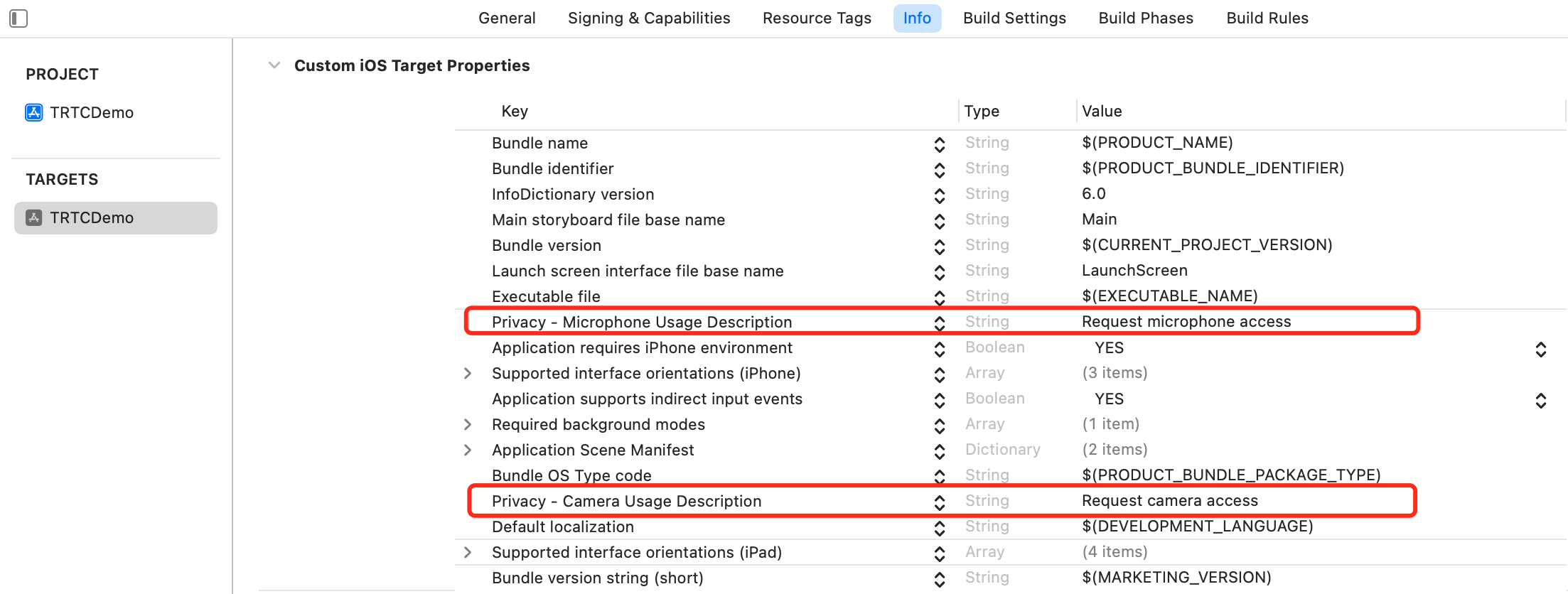
4. Under
Signing & Capabilities, add Background Modes and check Audio, AirPlay and Picture in Picture to enable background audio, AirPlay, and Picture in Picture features.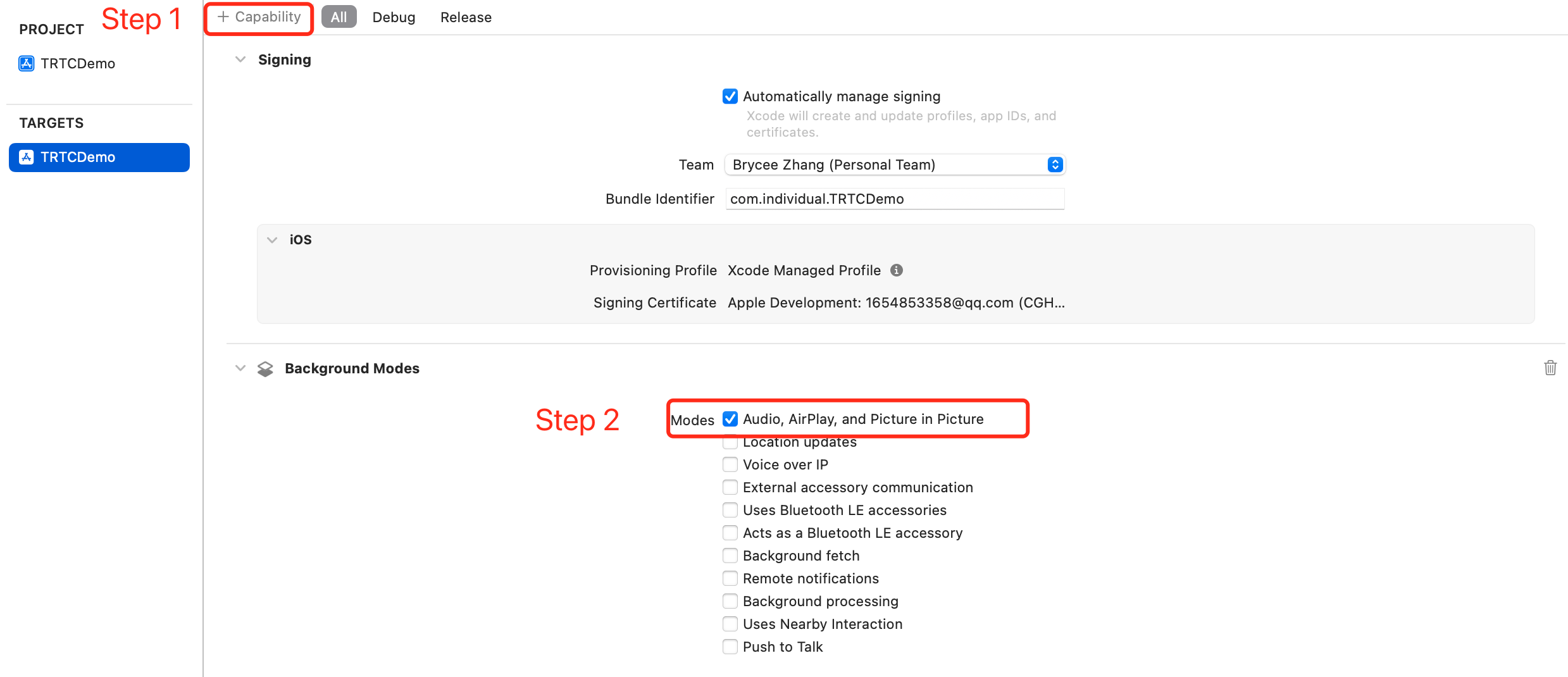
Migration Instructions
Step 4. Initializing SDK Instance and Setting Event Listener
Twilio Video
import TwilioVideoclass TwilioVideoManager {var room: Room?var localVideoTrack: LocalVideoTrack?var localAudioTrack: LocalAudioTrack?init() {// Twilio SDK does not require explicit initialization}}
Tencent RTC
import TXLiteAVSDK_TRTCclass TRTCManager: NSObject {// Obtain TRTCCloud singletonlet trtcCloud = TRTCCloud.sharedInstance()override init() {super.init()// Set event callback delegatetrtcCloud.delegate = self}}
#import <TXLiteAVSDK_TRTC/TRTCCloud.h>@interface TRTCManager : NSObject <TRTCCloudDelegate>@property (nonatomic, strong) TRTCCloud *trtcCloud;@end@implementation TRTCManager- (instancetype)init {self = [super init];if (self) {// Obtain TRTCCloud singleton_trtcCloud = [TRTCCloud sharedInstance];// Set event callback delegate_trtcCloud.delegate = self;}return self;}@end
Step 5. Entering a Room
Twilio Video
@IBAction func connectToRoom(sender: AnyObject) {let connectOptions = ConnectOptions(token: accessToken) { (builder) inbuilder.roomName = "my-room"}room = TwilioVideoSDK.connect(options: connectOptions, delegate: self)}
Tencent RTC
func enterRoom(sdkAppId: UInt32, roomId: UInt32, userId: String, userSig: String) {// Configure room parameterslet params = TRTCParams()params.sdkAppId = sdkAppIdparams.roomId = roomIdparams.userId = userIdparams.userSig = userSigparams.role = .anchor // Anchor role can publish streams// Enter room and specify scene// .videoCall - video call scene// .audioCall - audio call scene// .LIVE - live streaming scene// .voiceChatRoom - voice chat room scenetrtcCloud.enterRoom(params, appScene: .LIVE)}
- (void)enterRoomWithSdkAppId:(UInt32)sdkAppIdroomId:(UInt32)roomIduserId:(NSString *)userIduserSig:(NSString *)userSig {// Configure room parametersTRTCParams *params = [[TRTCParams alloc] init];params.sdkAppId = sdkAppId;params.roomId = roomId;params.userId = userId;params.userSig = userSig;params.role = TRTCRoleAnchor; // Anchor role can publish streams// Enter room and specify scene// TRTCAppSceneVideoCall - video call scene// TRTCAppSceneAudioCall - audio call scene// TRTCAppSceneLIVE - live streaming scene// TRTCAppSceneVoiceChatRoom - voice chat room scene[self.trtcCloud enterRoom:params appScene:TRTCAppSceneLIVE];}
Step 6. Implementing Event Callback Methods
Twilio Video
extension TwilioVideoManager: RoomDelegate {// Successfully connected to roomfunc roomDidConnect(room: Room) {print("Connected to room: \(room.name)")}// Disconnectedfunc roomDidDisconnect(room: Room, error: Error?) {print("Room connection disconnected")}// Connection failedfunc roomDidFailToConnect(room: Room, error: Error) {print("Connection failed: \(error.localizedDescription)")}// Remote participant joinedfunc participantDidConnect(room: Room, participant: RemoteParticipant) {print("Participant joined: \(participant.identity)")}// Remote participant leftfunc participantDidDisconnect(room: Room, participant: RemoteParticipant) {print("Participant left: \(participant.identity)")}}
Tencent RTC
extension TRTCManager: TRTCCloudDelegate {// Room entry result callback// result > 0: Success (milliseconds)// result < 0: Failure (error code)func onEnterRoom(_ result: Int) {if result > 0 {print("Entered room successfully, time: \(result)ms")} else {print("Failed to enter room, error code: \(result)")}}// Room exit callback// reason: 0 - voluntary exit, 1 - kicked out, 2 - room dismissedfunc onExitRoom(_ reason: Int) {print("Exited room, reason: \(reason)")}// Error callbackfunc onError(_ errCode: TXLiteAVError, errMsg: String?, extInfo: [AnyHashable: Any]?) {print("Error: \(errCode.rawValue) - \(errMsg ?? "")")}// Remote user entered roomfunc onRemoteUserEnterRoom(_ userId: String) {print("Remote user entered: \(userId)")}// Remote user left roomfunc onRemoteUserLeaveRoom(_ userId: String, reason: Int) {print("Remote user left: \(userId), reason: \(reason)")}// Remote user video availability changedfunc onUserVideoAvailable(_ userId: String, available: Bool) {print("User \(userId) video available: \(available)")}// Remote user audio availability changedfunc onUserAudioAvailable(_ userId: String, available: Bool) {print("User \(userId) audio available: \(available)")}}
#pragma mark - TRTCCloudDelegate// Room entry result callback// result > 0: Success (milliseconds)// result < 0: Failure (error code)- (void)onEnterRoom:(NSInteger)result {if (result > 0) {NSLog(@"Entered room successfully, time: %ldms", (long)result);} else {NSLog(@"Failed to enter room, error code: %ld", (long)result);}}// Room exit callback// reason: 0 - voluntary exit, 1 - kicked out, 2 - room dismissed- (void)onExitRoom:(NSInteger)reason {NSLog(@"Exited room, reason: %ld", (long)reason);}// Error callback- (void)onError:(TXLiteAVError)errCode errMsg:(NSString *)errMsg extInfo:(NSDictionary *)extInfo {NSLog(@"Error: %d - %@", errCode, errMsg);}// Remote user entered room- (void)onRemoteUserEnterRoom:(NSString *)userId {NSLog(@"Remote user entered: %@", userId);}// Remote user left room- (void)onRemoteUserLeaveRoom:(NSString *)userId reason:(NSInteger)reason {NSLog(@"Remote user left: %@, reason: %ld", userId, (long)reason);}// Remote user video availability changed- (void)onUserVideoAvailable:(NSString *)userId available:(BOOL)available {NSLog(@"User %@ video available: %@", userId, available ? @"YES" : @"NO");}// Remote user audio availability changed- (void)onUserAudioAvailable:(NSString *)userId available:(BOOL)available {NSLog(@"User %@ audio available: %@", userId, available ? @"YES" : @"NO");}
Step 7. Capturing and Publishing Local Streams
Twilio Video
// MARK: - Local Videofunc startPreview() {// Create camera sourcecamera = CameraSource(delegate: self)// Create local video tracklocalVideoTrack = LocalVideoTrack(source: camera!, enabled: true, name: "camera")// Add renderer to display previewlocalVideoTrack?.addRenderer(previewView)// Get front camera and start captureif let frontCamera = CameraSource.captureDevice(position: .front) {camera?.startCapture(device: frontCamera)}}func stopLocalVideo() {localVideoTrack?.isEnabled = false}// MARK: - Local Audiofunc startLocalAudio() {localAudioTrack = LocalAudioTrack()}func stopLocalAudio() {localAudioTrack?.isEnabled = false}func muteAudio(_ mute: Bool) {localAudioTrack?.isEnabled = !mute}
Tencent RTC
// MARK: - Local Videofunc startLocalVideo(view: UIView, frontCamera: Bool = true) {// Set local preview rendering parameters (optional, SDK provides defaults)let renderParams = TRTCRenderParams()renderParams.fillMode = .fill // .fill (fill) or .fit (fit)renderParams.mirrorType = .auto // .auto (front camera), .enable (always mirror), .disable (no mirror)trtcCloud.setLocalRenderParams(renderParams)// Start local video preview// frontCamera: true = front camera, false = rear cameratrtcCloud.startLocalPreview(frontCamera, view: view)}func stopLocalVideo() {trtcCloud.stopLocalPreview()}func muteLocalVideo(_ mute: Bool) {trtcCloud.muteLocalVideo(.big, mute: mute)}func switchCamera(_ frontCamera: Bool) {trtcCloud.getDeviceManager().switchCamera(frontCamera)}// MARK: - Local Audiofunc startLocalAudio(quality: TRTCAudioQuality = .default) {// quality options:// .speech - speech mode// .default - default mode// .music - music modetrtcCloud.startLocalAudio(quality)}func stopLocalAudio() {trtcCloud.stopLocalAudio()}func muteLocalAudio(_ mute: Bool) {trtcCloud.muteLocalAudio(mute)}
#pragma mark - Local Video- (void)startLocalVideoWithView:(UIView *)view frontCamera:(BOOL)frontCamera {// Set local preview rendering parameters (optional, SDK provides defaults)TRTCRenderParams *renderParams = [[TRTCRenderParams alloc] init];renderParams.fillMode = TRTCVideoFillMode_Fill;renderParams.mirrorType = TRTCVideoMirrorTypeAuto;[self.trtcCloud setLocalRenderParams:renderParams];// Start local video preview[self.trtcCloud startLocalPreview:frontCamera view:view];}- (void)stopLocalVideo {[self.trtcCloud stopLocalPreview];}- (void)muteLocalVideo:(BOOL)mute {[self.trtcCloud muteLocalVideo:TRTCVideoStreamTypeBig mute:mute];}- (void)switchCamera:(BOOL)frontCamera {[[self.trtcCloud getDeviceManager] switchCamera:frontCamera];}#pragma mark - Local Audio- (void)startLocalAudioWithQuality:(TRTCAudioQuality)quality {[self.trtcCloud startLocalAudio:quality];}- (void)stopLocalAudio {[self.trtcCloud stopLocalAudio];}- (void)muteLocalAudio:(BOOL)mute {[self.trtcCloud muteLocalAudio:mute];}
Step 8. Subscribing to and Playing Remote Streams
Twilio Video
// MARK: - RemoteParticipantDelegateextension TwilioVideoManager: RemoteParticipantDelegate {// Track subscribedfunc didSubscribeToVideoTrack(videoTrack: RemoteVideoTrack,publication: RemoteVideoTrackPublication,participant: RemoteParticipant) {// Add renderer to display remote videovideoTrack.addRenderer(remoteVideoView)}// Track unsubscribedfunc didUnsubscribeFromVideoTrack(videoTrack: RemoteVideoTrack,publication: RemoteVideoTrackPublication,participant: RemoteParticipant) {videoTrack.removeRenderer(remoteVideoView)}}
Tencent RTC
extension TRTCManager: TRTCCloudDelegate {// Remote user video availability changedfunc onUserVideoAvailable(_ userId: String, available: Bool) {if available {// Subscribe to remote user's video stream// streamType: .big (main), .small (small), .sub (screen sharing)trtcCloud.startRemoteView(userId, streamType: .big, view: remoteVideoView)} else {// Stop subscription if video becomes unavailabletrtcCloud.stopRemoteView(userId, streamType: .big)}}// Remote user audio availability changedfunc onUserAudioAvailable(_ userId: String, available: Bool) {if available {// Audio auto-plays, use mute control as neededtrtcCloud.muteRemoteAudio(userId, mute: false)}}}// Manual control methodsfunc muteRemoteAudio(userId: String, mute: Bool) {trtcCloud.muteRemoteAudio(userId, mute: mute)}func muteAllRemoteAudio(_ mute: Bool) {trtcCloud.muteAllRemoteAudio(mute)
#pragma mark - TRTCCloudDelegate// Remote user video availability changed- (void)onUserVideoAvailable:(NSString *)userId available:(BOOL)available {if (available) {// Subscribe to remote user's video stream[self.trtcCloud startRemoteView:userId streamType:TRTCVideoStreamTypeBig view:self.remoteVideoView];} else {// Stop subscription if video becomes unavailable[self.trtcCloud stopRemoteView:userId streamType:TRTCVideoStreamTypeBig];}}// Remote user audio availability changed- (void)onUserAudioAvailable:(NSString *)userId available:(BOOL)available {if (available) {[self.trtcCloud muteRemoteAudio:userId mute:NO];}}// Manual control methods- (void)muteRemoteAudio:(NSString *)userId mute:(BOOL)mute {[self.trtcCloud muteRemoteAudio:userId mute:mute];}- (void)muteAllRemoteAudio:(BOOL)mute {[self.trtcCloud muteAllRemoteAudio:mute];}
Step 9. Leaving the Room
Twilio Video
func disconnect() {// Stop local trackslocalVideoTrack?.isEnabled = falselocalAudioTrack?.isEnabled = false// Disconnect room connectionroom?.disconnect()}extension TwilioVideoManager: RoomDelegate {func roomDidDisconnect(room: Room, error: Error?) {// Clean up resourceslocalVideoTrack = nillocalAudioTrack = nilself.room = nilif let error = error {print("Disconnected, error: \(error.localizedDescription)")}}}
Tencent RTC
func exitRoom() {// Stop local preview and audio firsttrtcCloud.stopLocalPreview()trtcCloud.stopLocalAudio()// Leave the roomtrtcCloud.exitRoom()}extension TRTCManager: TRTCCloudDelegate {func onExitRoom(_ reason: Int) {// reason: 0 - called exitRoom(), 1 - kicked by server, 2 - room dismissedswitch reason {case 0:print("Exited room normally")case 1:print("Kicked by server")case 2:print("Room dismissed")default:break}}}class TRTCManager: NSObject {deinit {// Destroy instance after useTRTCCloud.destroySharedInstance()}}
- (void)exitRoom {// Stop local preview and audio first[self.trtcCloud stopLocalPreview];[self.trtcCloud stopLocalAudio];// Leave the room[self.trtcCloud exitRoom];}#pragma mark - TRTCCloudDelegate- (void)onExitRoom:(NSInteger)reason {// reason: 0 - called exitRoom, 1 - kicked by server, 2 - room dismissedswitch (reason) {case 0:NSLog(@"Exited room normally");break;case 1:NSLog(@"Kicked by server");break;case 2:NSLog(@"Room dismissed");break;default:break;}}- (void)dealloc {// Destroy instance after use[TRTCCloud destroySharedInstance];}
Advanced Features
Screen Sharing
Twilio Video
// Using ReplayKitletscreenCapturer = ReplayKitVideoSource(isScreencast: true)let screenTrack = LocalVideoTrack(source: screenCapturer)// Start broadcastRPScreenRecorder.shared().startCapture { sampleBuffer, bufferType, error in// Handle sample buffer}
Tencent RTC
// Configure screen sharing encoding parameterslet encParam = TRTCVideoEncParam()encParam.videoResolution = ._1280_720 // Recommended resolutionencParam.videoFps = 10 // Recommended frame rateencParam.videoBitrate = 1600 // Recommended bitrate (kbps)// Start system-wide screen sharing (requires Broadcast Extension and App Group)// streamType: .big (main stream) or .sub (auxiliary stream)// encParam: video encoding parameters// appGroup: App Group ID for communication between main app and extensiontrtcCloud.startScreenCapture(byReplaykit: .sub,encParam: encParam,appGroup: "group.your.app.identifier")// Stop screen sharingtrtcCloud.stopScreenCapture()
// Configure screen sharing encoding parametersTRTCVideoEncParam *encParam = [[TRTCVideoEncParam alloc] init];encParam.videoResolution = TRTCVideoResolution_1280_720;encParam.videoFps = 10;encParam.videoBitrate = 1600;// Start system-wide screen sharing (requires Broadcast Extension and App Group)- (void)startScreenCapture {TRTCVideoEncParam *videoEncConfig = [[TRTCVideoEncParam alloc] init];videoEncConfig.videoResolution = TRTCVideoResolution_1280_720;videoEncConfig.videoFps = 10;videoEncConfig.videoBitrate = 2000;// Replace `APPGROUP` with your App Group Identifier[[TRTCCloud sharedInstance] startScreenCaptureByReplaykit:videoEncConfigappGroup:APPGROUP];}// Stop screen sharing- (void)stopScreenCapture {[[TRTCCloud sharedInstance] stopScreenCapture];}
Audio/Video Encoding Configuration
Twilio Video
let connectOptions = ConnectOptions(token: token) { builder in// Video codec preferencebuilder.preferredVideoCodecs = [Vp8Codec(), H264Codec()]// Encoding parametersbuilder.encodingParameters = EncodingParameters(audioBitrate: 64,videoBitrate: 1500)}
Tencent RTC
// Video encoding parameterslet videoEncParam = TRTCVideoEncParam()videoEncParam.videoResolution = ._960_540 // ResolutionvideoEncParam.videoFps = 15 // Frame ratevideoEncParam.videoBitrate = 1200 // Video bitrate (kbps)videoEncParam.resMode = .portrait // Orientation modetrtcCloud.setVideoEncoderParam(videoEncParam)// Audio quality configuration (used in startLocalAudio)// .speech - speech mode// .default - default mode// .music - music modetrtcCloud.startLocalAudio(.music)
// Video encoding parametersTRTCVideoEncParam *videoEncParam = [[TRTCVideoEncParam alloc] init];videoEncParam.videoResolution = TRTCVideoResolution_960_540;videoEncParam.videoFps = 15;videoEncParam.videoBitrate = 1200;videoEncParam.resMode = TRTCVideoResolutionModePortrait;[self.trtcCloud setVideoEncoderParam:videoEncParam];// Audio quality configuration (used in startLocalAudio)[self.trtcCloud startLocalAudio:TRTCAudioQualityMusic];
Device Management
Twilio Video
// Switch cameraif let camera = camera {let newDevice = CameraSource.captureDevice(position: .back)camera.selectCaptureDevice(newDevice!) { _, _, error in// Handle result}}// MutelocalAudioTrack?.isEnabled = false// Switch to speaker (using AVAudioSession)do {try AVAudioSession.sharedInstance().overrideOutputAudioPort(.speaker)} catch { }
Tencent RTC
// Get device managerlet deviceManager = trtcCloud.getDeviceManager()// Switch front/rear cameradeviceManager.switchCamera(true) // true: front, false: rear// Check if current camera is frontlet isFront = deviceManager.isFrontCamera()// Set camera zoom ratio (1.0 - 5.0)deviceManager.setCameraZoomRatio(2.0)// Set camera focus positiondeviceManager.setCameraFocusPosition(CGPoint(x: 100, y: 100))// Flash controldeviceManager.enableCameraTorch(true)// Set auto focusdeviceManager.enableCameraAutoFocus(true)// MutetrtcCloud.muteLocalAudio(true)// Switch audio routetrtcCloud.setAudioRoute(.speakerphone) // SpeakertrtcCloud.setAudioRoute(.earpiece) // Earpiece
// Get device managerTXDeviceManager *deviceManager = [self.trtcCloud getDeviceManager];// Switch front/rear camera[deviceManager switchCamera:YES]; // YES: front, NO: rear// Check if current camera is frontBOOL isFront = [deviceManager isFrontCamera];// Set camera zoom ratio (1.0 - 5.0)[deviceManager setCameraZoomRatio:2.0];// Set camera focus position[deviceManager setCameraFocusPosition:CGPointMake(100, 100)];// Flash control[deviceManager enableCameraTorch:YES];// Set auto focus[deviceManager enableCameraAutoFocus:YES];// Mute[self.trtcCloud muteLocalAudio:YES];// Switch audio route[self.trtcCloud setAudioRoute:TRTCAudioModeSpeakerphone];[self.trtcCloud setAudioRoute:TRTCAudioModeEarpiece];
Network Quality Monitoring
Twilio Video
extension TwilioVideoManager: RoomDelegate {// Network quality change callbackfunc networkQualityLevelDidChange(participant: Participant,networkQualityLevel: NetworkQualityLevel) {// NetworkQualityLevel: .zero (unknown) ... .five (excellent)print("Participant \(participant.identity) network quality: \(networkQualityLevel.rawValue)")}}// Configure network quality monitoringlet connectOptions = ConnectOptions(token: token) { builder inbuilder.networkQualityEnabled = truebuilder.networkQualityConfiguration = NetworkQualityConfiguration(localVerbosity: .minimal,remoteVerbosity: .minimal)}
Tencent RTC
extension TRTCManager: TRTCCloudDelegate {// Network quality callback (triggered every 2 seconds)func onNetworkQuality(_ localQuality: TRTCQualityInfo,remoteQuality: [TRTCQualityInfo]) {// quality: 0=unknown, 1=excellent, 2=good, 3=average, 4=poor, 5=very poor, 6=unusableprint("Local network quality: \(localQuality.quality.rawValue)")}// Statistics callbackfunc onStatistics(_ statistics: TRTCStatistics) {print("RTT: \(statistics.rtt)ms")}}
// Listen to `onNetworkQuality` callback to monitor current network status- (void)onNetworkQuality:(TRTCQualityInfo *)localQuality remoteQuality:(NSArray<TRTCQualityInfo *> *)remoteQuality {switch(localQuality.quality) {case TRTCQuality_Unknown:NSLog(@"SDK has not yet detected the current network quality.");break;case TRTCQuality_Excellent:NSLog(@"The network is excellent.");break;case TRTCQuality_Good:NSLog(@"The network is good.");break;case TRTCQuality_Poor:NSLog(@"Network quality barely meets requirements.");break;case TRTCQuality_Bad:NSLog(@"Network is poor; expect significant lag and delays.");break;case TRTCQuality_VeryBad:NSLog(@"Network is very poor; communication quality can't be guaranteed.");break;case TRTCQuality_Down:NSLog(@"Network does not meet minimum requirements.");break;default:break;}for (TRTCQualityInfo *info in remoteQuality) {NSLog(@"remote user: %@, quality = %@", info.userId, @(info.quality));}}
Custom Video Capture
Twilio Video
class CustomVideoSource: NSObject, VideoSource {weak var sink: VideoSink?func sendFrame(_ pixelBuffer: CVPixelBuffer, timestamp: CMTime) {let frame = VideoFrame(timestamp: timestamp,buffer: pixelBuffer.videoFrameBuffer())sink?.onVideoFrame(frame)}}let customSource = CustomVideoSource()let videoTrack = LocalVideoTrack(source: customSource, enabled: true, name: "custom")
Tencent RTC
// Enable custom video capturetrtcCloud.enableCustomVideoCapture(.big, enable: true)// Send custom video frame (CVPixelBuffer)func sendCustomVideoFrame(_ pixelBuffer: CVPixelBuffer) {let videoFrame = TRTCVideoFrame()videoFrame.pixelFormat = ._NV12videoFrame.bufferType = .pixelBuffervideoFrame.pixelBuffer = pixelBuffertrtcCloud.sendCustomVideoData(.big, frame: videoFrame)}// Send custom video frame (texture)func sendCustomVideoTexture(_ textureId: GLuint, width: Int, height: Int) {let videoFrame = TRTCVideoFrame()videoFrame.pixelFormat = ._Texture_2DvideoFrame.bufferType = .texturevideoFrame.textureId = textureIdvideoFrame.width = UInt32(width)videoFrame.height = UInt32(height)trtcCloud.sendCustomVideoData(.big, frame: videoFrame)}// Stop custom capturetrtcCloud.enableCustomVideoCapture(.big, enable: false)
// Enable custom video capture[self.trtcCloud enableCustomVideoCapture:TRTCVideoStreamTypeBig enable:YES];// Send custom video frame- (void)sendCustomVideoFrame:(CVPixelBufferRef)pixelBuffer timestamp:(uint64_t)timestamp {TRTCVideoFrame *videoFrame = [[TRTCVideoFrame alloc] init];videoFrame.pixelFormat = TRTCVideoPixelFormat_NV12;videoFrame.bufferType = TRTCVideoBufferType_PixelBuffer;videoFrame.pixelBuffer = pixelBuffer;videoFrame.timestamp = timestamp;[self.trtcCloud sendCustomVideoData:TRTCVideoStreamTypeBig frame:videoFrame];}// Stop custom capture[self.trtcCloud enableCustomVideoCapture:TRTCVideoStreamTypeBig enable:NO];
Data Channel / Custom Messages
Twilio Video
let localDataTrack = LocalDataTrack(options: dataTrackOptions)localDataTrack?.send("Hello, World!")extension ViewController: RemoteDataTrackDelegate {func remoteDataTrackDidReceiveString(remoteDataTrack: RemoteDataTrack,message: String) {print("Received message: \(message)")}}
Tencent RTC
// Send custom message (reliable transmission, to all users in the room)// cmdID: custom message ID (1-10)// data: message content, max 1KB// reliable: true for reliable transmission, false otherwise// ordered: true for ordered transmission, false otherwisetrtcCloud.sendCustomCmdMsg(1,data: "Hello, World!".data(using: .utf8)!,reliable: true,ordered: true)// Send SEI message (embedded in video frame, suitable for timestamp sync)// repeatCount: number of times to send, -1 means continuoustrtcCloud.sendSEIMsg("Timestamp: 12345".data(using: .utf8)!,repeatCount: 1)// Receive custom messageextension TRTCManager: TRTCCloudDelegate {func onRecvCustomCmdMsgUserId(_ userId: String,cmdID: Int,seq: UInt32,message: Data) {let text = String(data: message, encoding: .utf8) ?? ""print("Received message from \(userId) [cmdID=\(cmdID)]: \(text)")}// Message loss callbackfunc onMissCustomCmdMsgUserId(_ userId: String,cmdID: Int,errCode: Int,missed: Int) {print("Lost \(missed) messages from \(userId)")}// Receive SEI messagefunc onRecvSEIMsg(_ userId: String, message: Data) {let text = String(data: message, encoding: .utf8) ?? ""print("Received SEI message: \(text)")}}
- (void)sendHello {// Custom message command. Define rules as needed; here, 0x1 sends a text broadcastNSInteger cmdID = 0x1;NSData *data = [@"Hello" dataUsingEncoding:NSUTF8StringEncoding];[trtcCloud sendCustomCmdMsg:cmdID data:data reliable:YES ordered:YES];}// Send SEI message (embedded in video frame, suitable for timestamp sync)// repeatCount: number of times to send, -1 means continuous[self.trtcCloud sendSEIMsg:[@"Timestamp: 12345" dataUsingEncoding:NSUTF8StringEncoding]repeatCount:1];#pragma mark - TRTCCloudDelegate// Receive custom message- (void)onRecvCustomCmdMsgUserId:(NSString *)userIdcmdID:(NSInteger)cmdIDseq:(UInt32)seqmessage:(NSData *)message {NSString *text = [[NSString alloc] initWithData:message encoding:NSUTF8StringEncoding];NSLog(@"Received message from %@ [cmdID=%ld]: %@", userId, (long)cmdID, text);}// Message loss callback- (void)onMissCustomCmdMsgUserId:(NSString *)userIdcmdID:(NSInteger)cmdIDerrCode:(NSInteger)errCodemissed:(NSInteger)missed {NSLog(@"Lost %ld messages from %@", (long)missed, userId);}// Receive SEI message- (void)onRecvSEIMsg:(NSString *)userId message:(NSData *)message {NSString *text = [[NSString alloc] initWithData:message encoding:NSUTF8StringEncoding];NSLog(@"Received SEI message: %@", text);}
FAQs
Q1: What is the difference between Twilio Video's Access Token and TRTC's UserSig?
Both are time-sensitive credentials used for client authentication, but their generation methods differ:
Twilio Access Token: Generated using Account SID, API Key SID, and API Key Secret on the server side with Twilio SDK helper libraries.
TRTC UserSig: Generated with SDKAppID and SDKSecretKey on the server side using HMAC SHA256.
Q2: How does Twilio's Room Name (string) map to TRTC's Room ID?
TRTC supports two types of room identifiers:
Numeric Room ID (
roomId): Integer between 1 and 4294967294 (recommended).String Room ID (
strRoomId): Up to 64 bytes, supports letters, numbers, and select special characters.If your Twilio project uses string room names, map them directly with
strRoomId.Note:
You cannot mix
roomId and strRoomId in the same TRTC application; they are not interoperable.
Q3: Why doesn’t TRTC require manual subscription for remote audio?
In Twilio Video, remote audio must be handled via the
RemoteParticipant.Listener.onAudioTrackSubscribed callback. In TRTC, remote audio plays automatically after a user enters the room, with no extra action required. If you want to control audio playback for a specific remote user, use muteRemoteAudio(userId, true/false).
Q4: How do Twilio's P2P Room and Group Room map to TRTC's scenarios?
Twilio Room Type | TRTC Application Scene | Applicable Scenario |
Peer-to-Peer Room | TRTCAppSceneVideoCall | 1v1 Video Call |
Peer-to-Peer Room (Audio Only) | TRTCAppSceneAudioCall | 1v1 Audio Call |
Group Room | TRTCAppSceneLIVE | Interactive Live Streaming, Multi-party Conference |
Group Room (Audio Only) | TRTCAppSceneVoiceChatRoom | Voice Chat Room |
Q5: How does TRTC handle reconnection?
TRTC SDK features built-in automatic reconnection. When the network connection is lost, the SDK automatically attempts to reconnect. You can monitor reconnection status with these callbacks:
onConnectionLost(): Connection to server lostonTryToReconnect(): Attempting to reconnectonConnectionRecovery(): Connection restoredThese correspond to Twilio’s
onReconnecting and onReconnected callbacks.For a complete list of functions and descriptions, see the API Reference. If you encounter issues during integration or use, refer to Other Issues.

