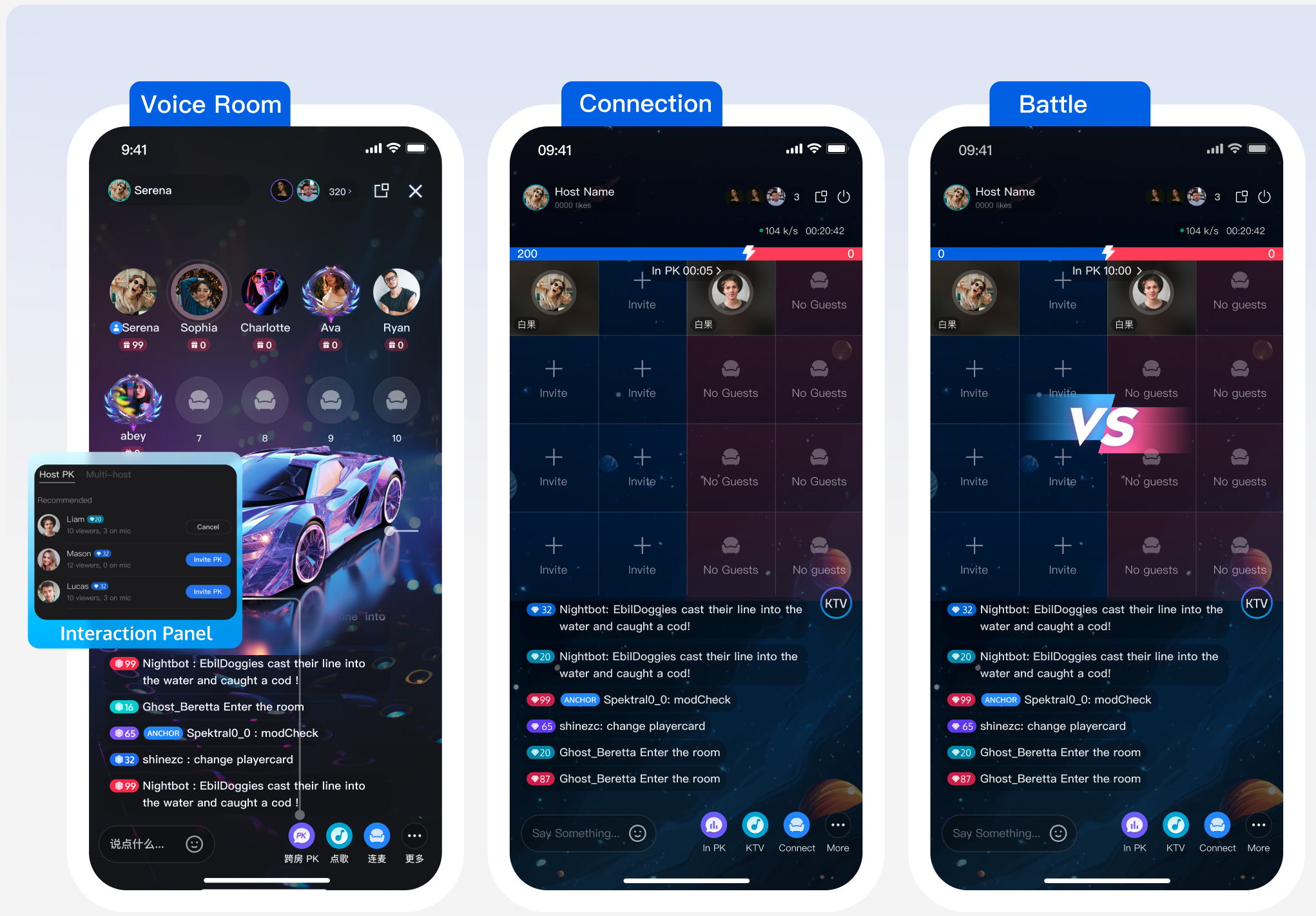
AtomicXCore provides two core modules: CoHostStore for cross-room connections and BattleStore for PK battles. This guide explains how to integrate these modules to enable connection and PK features in a voice chat room application.
Core Concepts
Core Concept
Type
Core Responsibilities & Description
CoHostStore
abstract class
Manages the lifecycle of host-to-host connections. Provides connection APIs such as requestHostConnection and acceptHostConnection.
BattleStore
abstract class
Handles PK battle signaling and state management across rooms, including PK status tracking.
LiveListStore
abstract class
Fetches the list of active live rooms (fetchLiveList). Use this to discover rooms available for connection.
LiveSeatStore
abstract class
Manages seat states within a room, including cross-room seats during connection. Tracks user join/leave events and microphone status.
CoHostLayoutTemplate
enum
Defines seat layout templates for cross-room connections, e.g., HOST_STATIC_VOICE_6V6.
BattleConfig
data
Configures PK battle details such as duration (duration) and whether a secondary response is required (needResponse).
Prerequisites
Integrate the Quick Start and ensure you have implemented both Host Start Live and Audience Watch features.
Host Initiates a Connection
Step 1: Fetch Active Streamers
To initiate a connection or PK, the host must retrieve the current list of live rooms and select a target host.
If the target room is missing from the returned list, verify that isPublicVisible in TUILiveInfo is set to true when starting the stream.
This API supports pagination. Use the cursor from the onSuccess callback for subsequent fetches. An empty cursor indicates all rooms have been fetched.
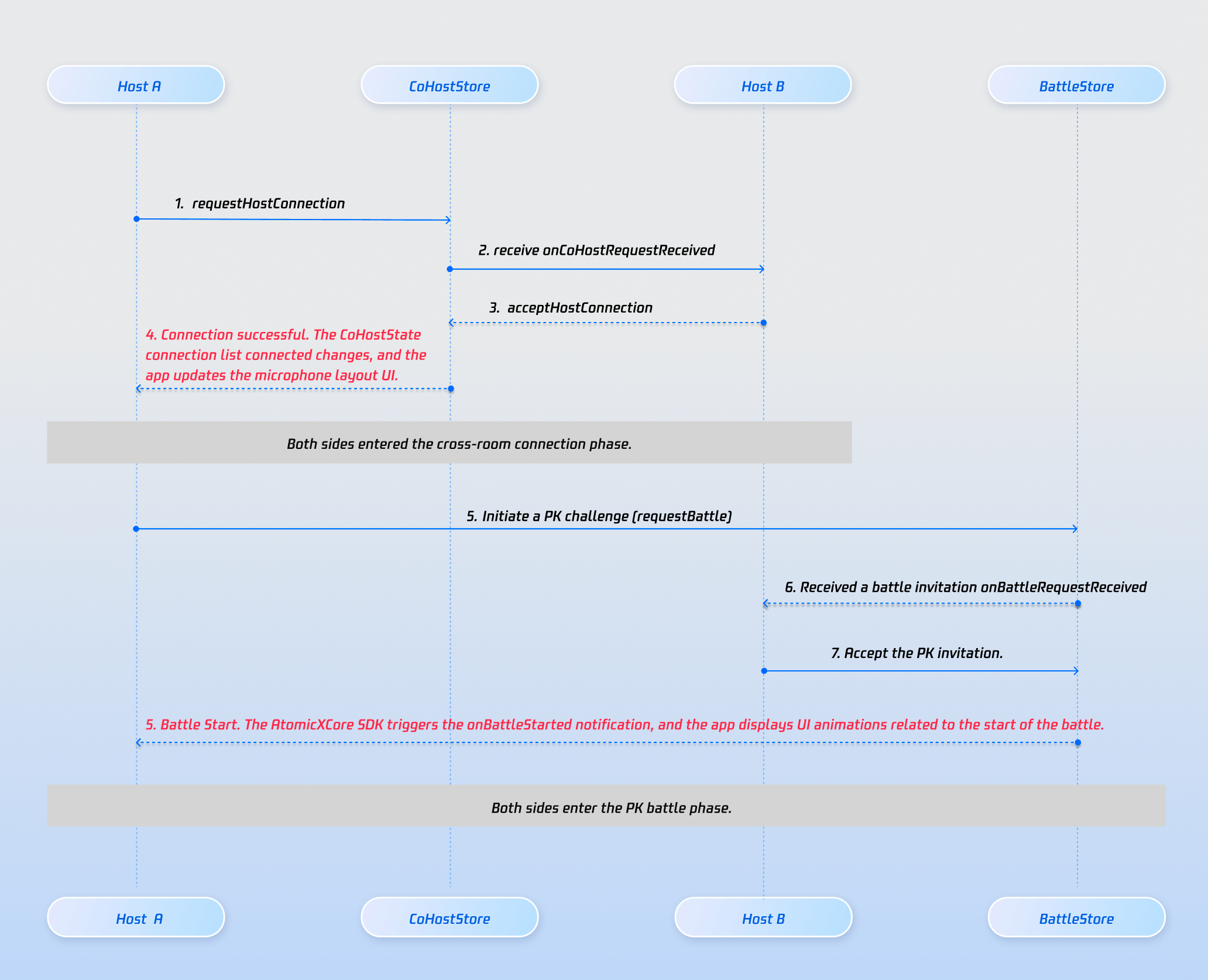
When a host selects another host, use CoHostStore.requestHostConnection to send a connection invitation.
Note:
1. AtomicXCore supports up to 9 interconnected rooms, each with up to 50 users.
2. This interface supports batch invitations, which you can use continuously; to check if an invitation to a single live room was successful, you need to listen for the onSuccess callback.
3. The API supports extension fields. These are delivered to the target host via onCoHostRequestReceived in CoHostListener. Use this to pass business logic such as "start PK immediately".
The target host receives the invitation via onCoHostRequestReceived in CoHostListener. Display a UI prompt such as "Host invites you to join the connection".
private val coHostListener = object :CoHostListener(){
override fun onCoHostRequestReceived(
inviter:SeatUserInfo, extensionInfo:String
){
// Show invitation dialog
}
}
Step 4: Target Host Accepts or Rejects Invitation
In the invitation UI, the target host can accept or reject. Call acceptHostConnection or rejectHostConnection as appropriate.
private val coHostStore =CoHostStore.create(liveID)
private val coHostListener = object :CoHostListener(){
After connection is established, listen to coHostStatus in CoHostStore.coHostState and seatList in LiveSeatStore.liveSeatState to update the seat layout dynamically.
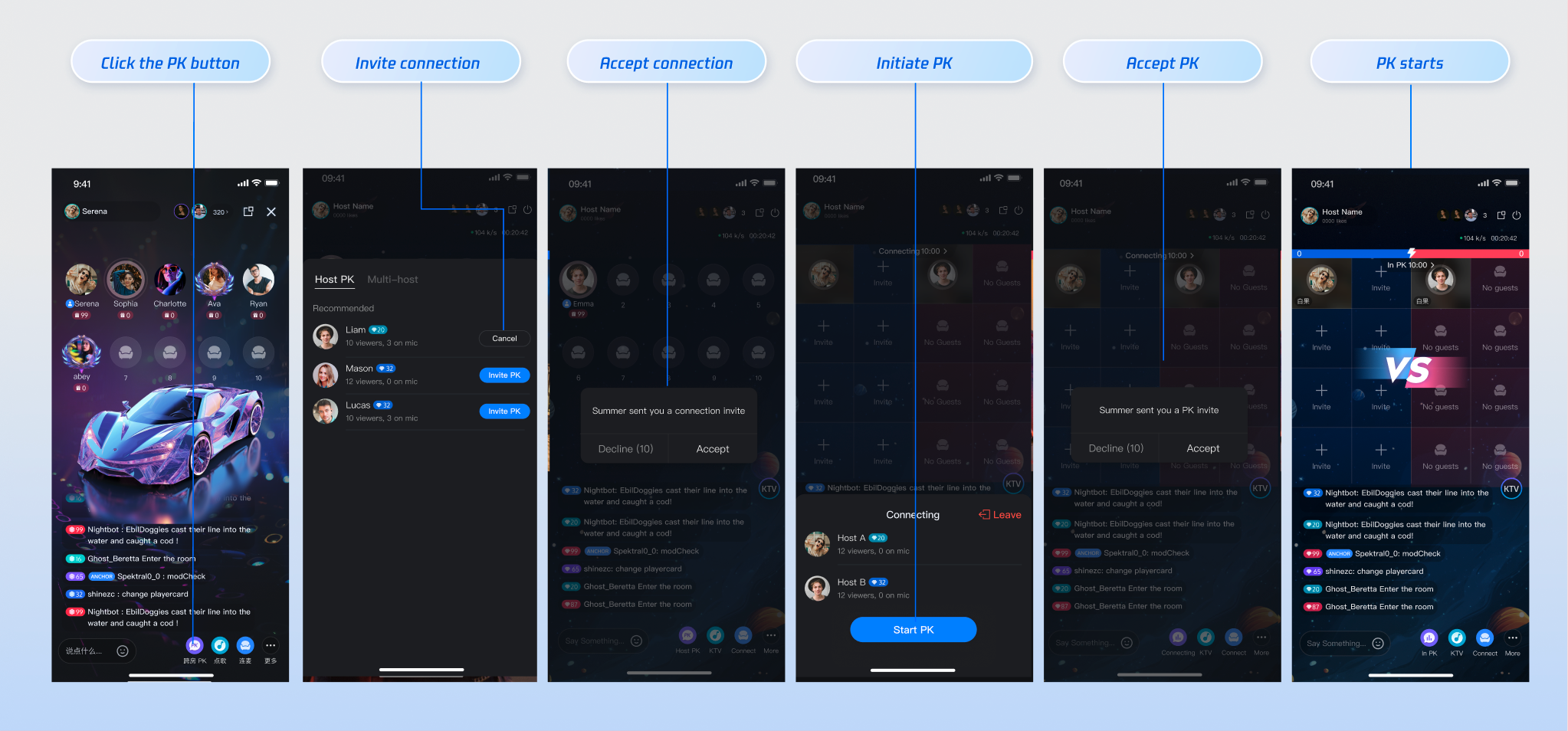
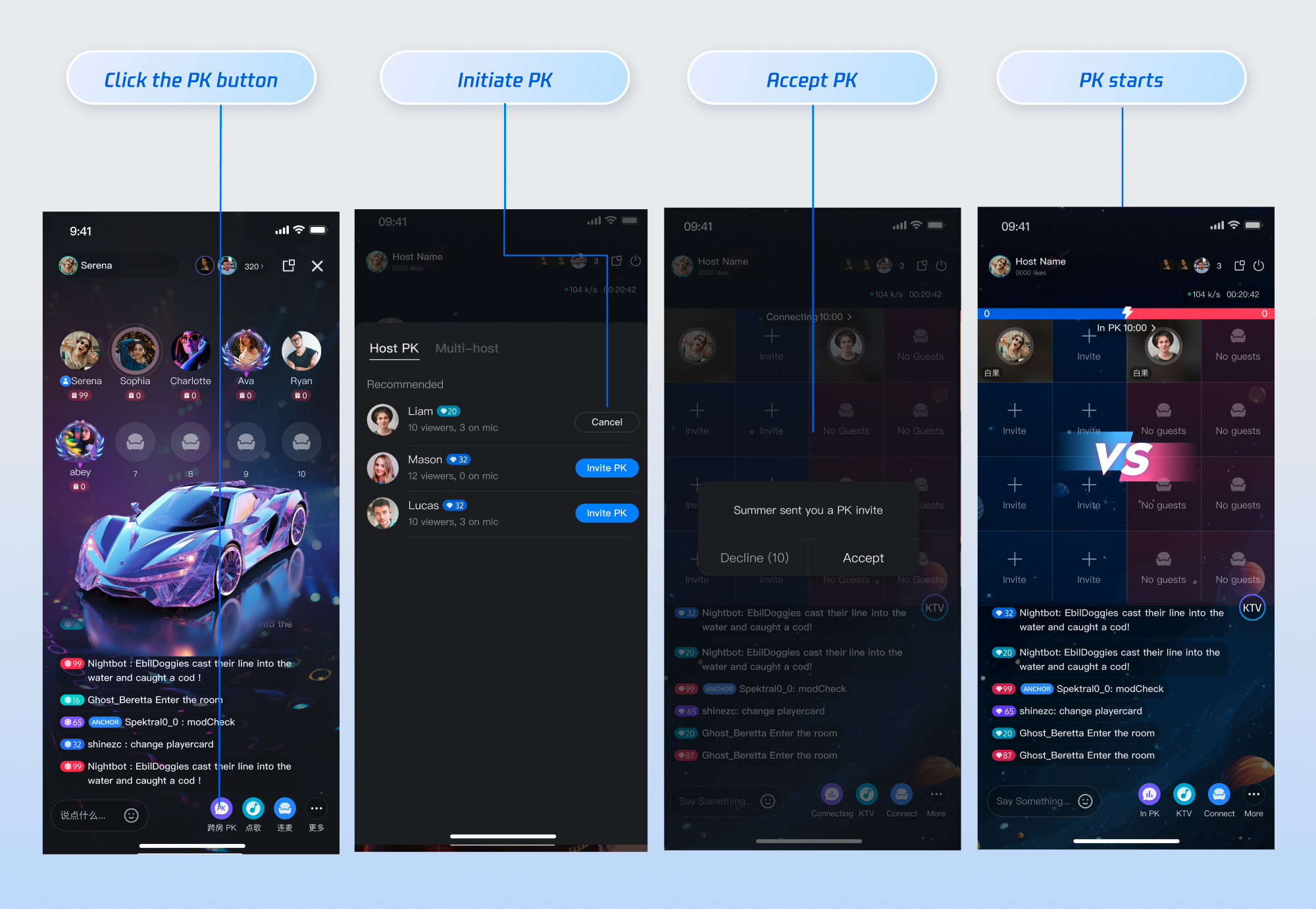
2. Hosts click PK to start a timed battle. Winner is determined by gifts received.
3. Target host receives a PK prompt and can accept.
4. UI enters PK mode and displays a progress bar (based on gifts, likes, etc.).
5. When PK ends, winner/loser is displayed and a punishment period begins.
6. After PK, state returns to connection mode.
Step 1: Initiate PK Invitation
To start a PK battle among connected hosts, use BattleStore.requestBattle. Configure PK duration, whether a response is required, and any extension info.
Note:
1. Default PK duration is 5 minutes if not set in BattleConfig.
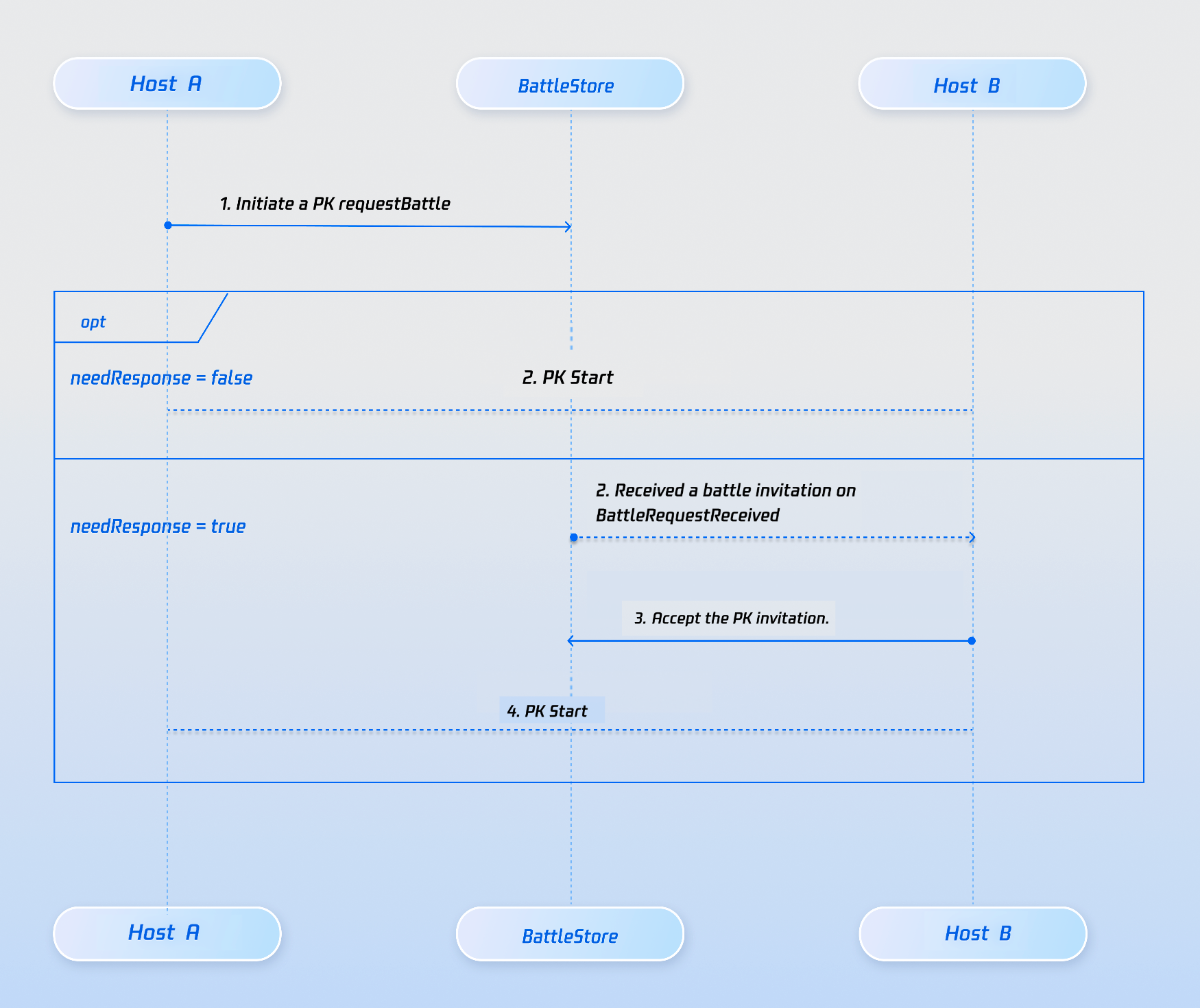
2. To start PK immediately, set needResponse to false.
3. If needResponse is false, set timeout to 0.
4. If the target host does not respond within the timeout, both hosts receive onBattleRequestTimeout. PK can be retried.
val targetUserID ="target_host_user_id"
val config =BattleConfig(
duration =30,// seconds
needResponse =true,
extensionInfo =""
)
battleStore.requestBattle(
config,
listOf(targetUserID),
timeout =10,// seconds
completion =null
)
Step 2: Target Streamer Receives PK Invitation
The target host receives the PK request via onBattleRequestReceived in BattleListener. Use needResponse in battleInfo.config to determine whether to prompt the user.
If needResponse is false, enter PK state directly.
If true, show a dialog and enter PK on acceptance.
private val mBattleListener:BattleListener= object :BattleListener(){
After PK ends, use onBattleEnded to display results and determine winner/loser.
Note:
After PK ends, the session returns to cross-room co-hosting.
To end co-hosting after PK, call exitHostConnection.
Scenario 2: Co-hosting with PK Mode
AtomicXCore supports direct PK initiation during a live session, without prior co-hosting. After PK ends, the session returns to the live room state.
1. Streamer clicks PK, opens a panel with active streamers (see Step 1 above).
2. Selects a streamer and sends a PK invitation.
3. Target streamer receives the invitation and can accept or reject.
4. Upon acceptance, PK starts automatically. Points are accumulated via gifts or likes.
5. After PK ends, the winner is determined by points.
Note:
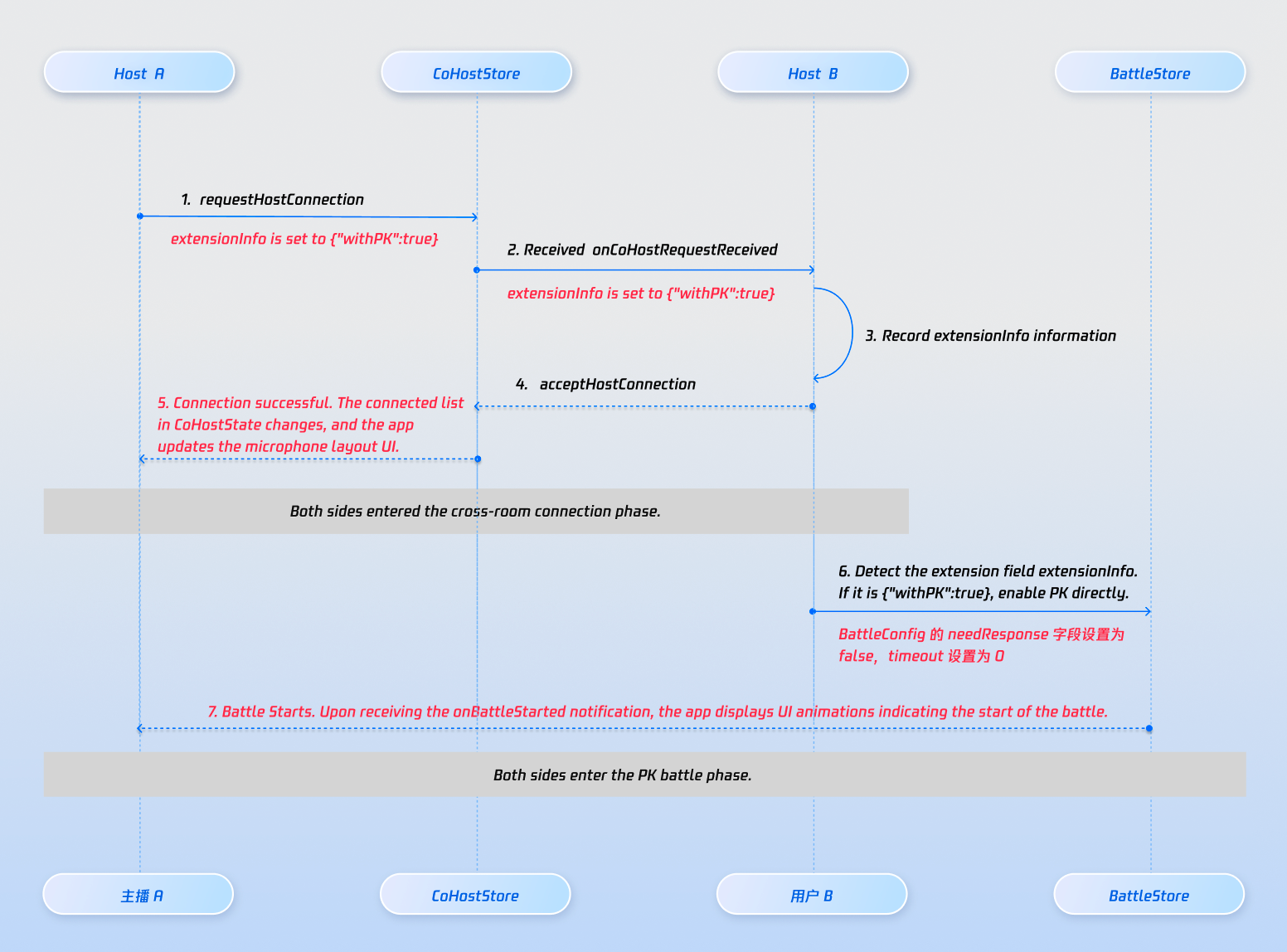
This workflow requires both CoHostStore and BattleStore, with needResponse in BattleConfig set to false.
Step 1: Send Co-hosting Request
This step is similar to Steps 1 and 2 in "Host Initiates a Connection". Use the extensionInfo field in requestHostConnection to indicate PK mode for UI differentiation.
If extraInfo is {"withPK:true"}, show "Host invites you to PK".
If extraInfo is {"withPK:false"}, show "Host invites you to join a cross-room connection".
In typical live host PK scenarios, the value of gifts received by the host is linked to the PK score (for example, when a viewer sends a "Rocket" gift, the host's PK score increases by 500 points). You can implement real-time PK score updates using our REST API.
Note:
The PK score system in the LiveKit backend uses pure numeric calculation and accumulation. You must calculate the PK score according to your own business logic before calling the update API. See the following PK score calculation examples:
Gift Type
Score Calculation Rule
Example
Basic Gift
Gift value × 5
10 RMB gift → 50 points
Intermediate Gift
Gift value × 8
50 RMB gift → 400 points
Advanced Gift
Gift value × 12
100 RMB gift → 1200 points
Special Effect Gift
Fixed high score
520 RMB gift → 1314 points
REST API Call Flow
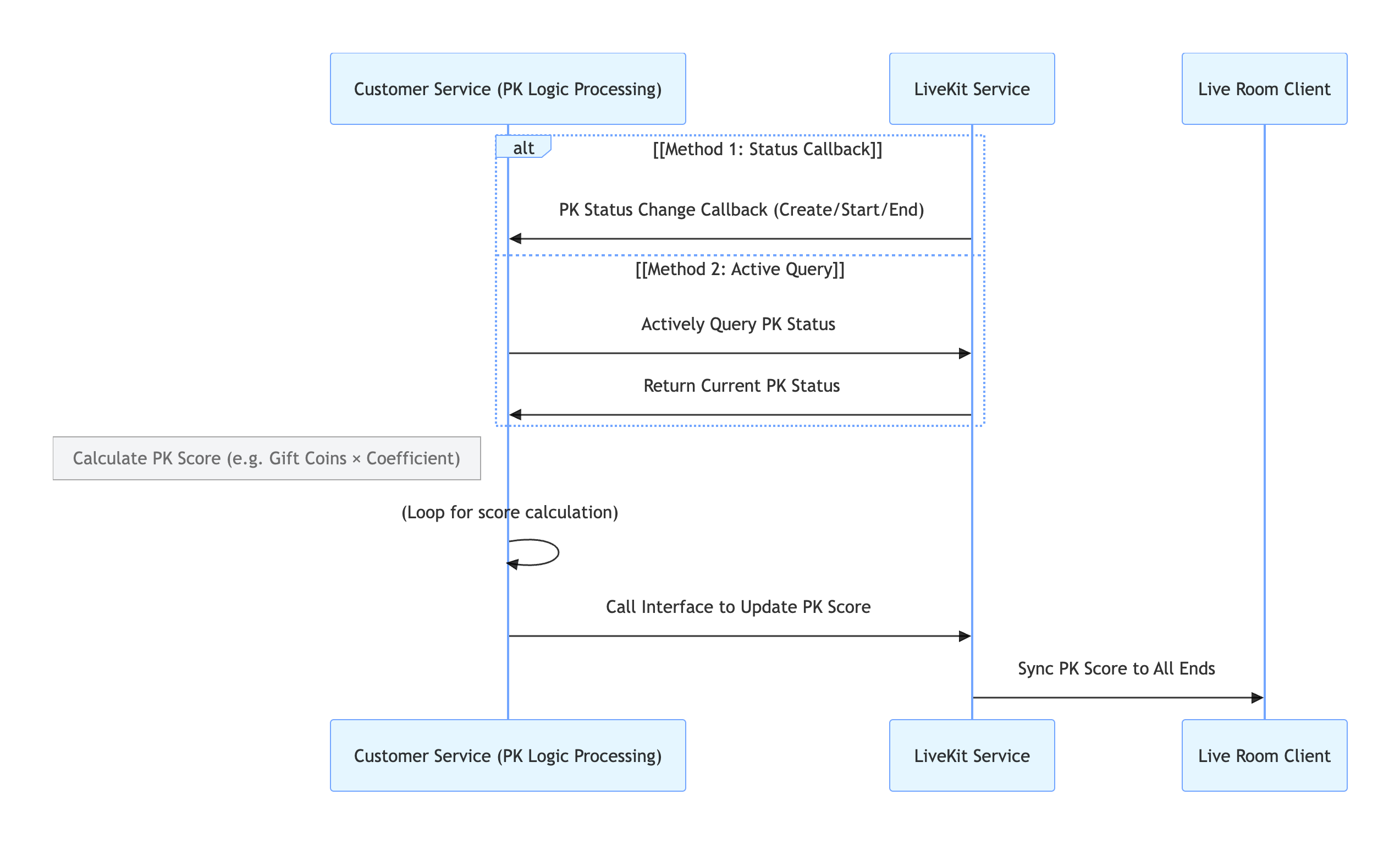
Key Process Description
1. Obtain PK Status:
Callback Configuration: Configure PK Status Callback to have the LiveKit backend actively notify your system when PK starts or ends.
Active Query: Your backend can call the PK Status Query API at any time to check the current PK status.
2. PK Score Calculation: Your backend calculates the PK score increment based on your business rules.
3. PK Score Update: Your backend calls the Update PK Score API to update the PK score in the LiveKit backend.
4. LiveKit Backend Syncs to Client: The backend automatically synchronizes the updated PK score to all clients.
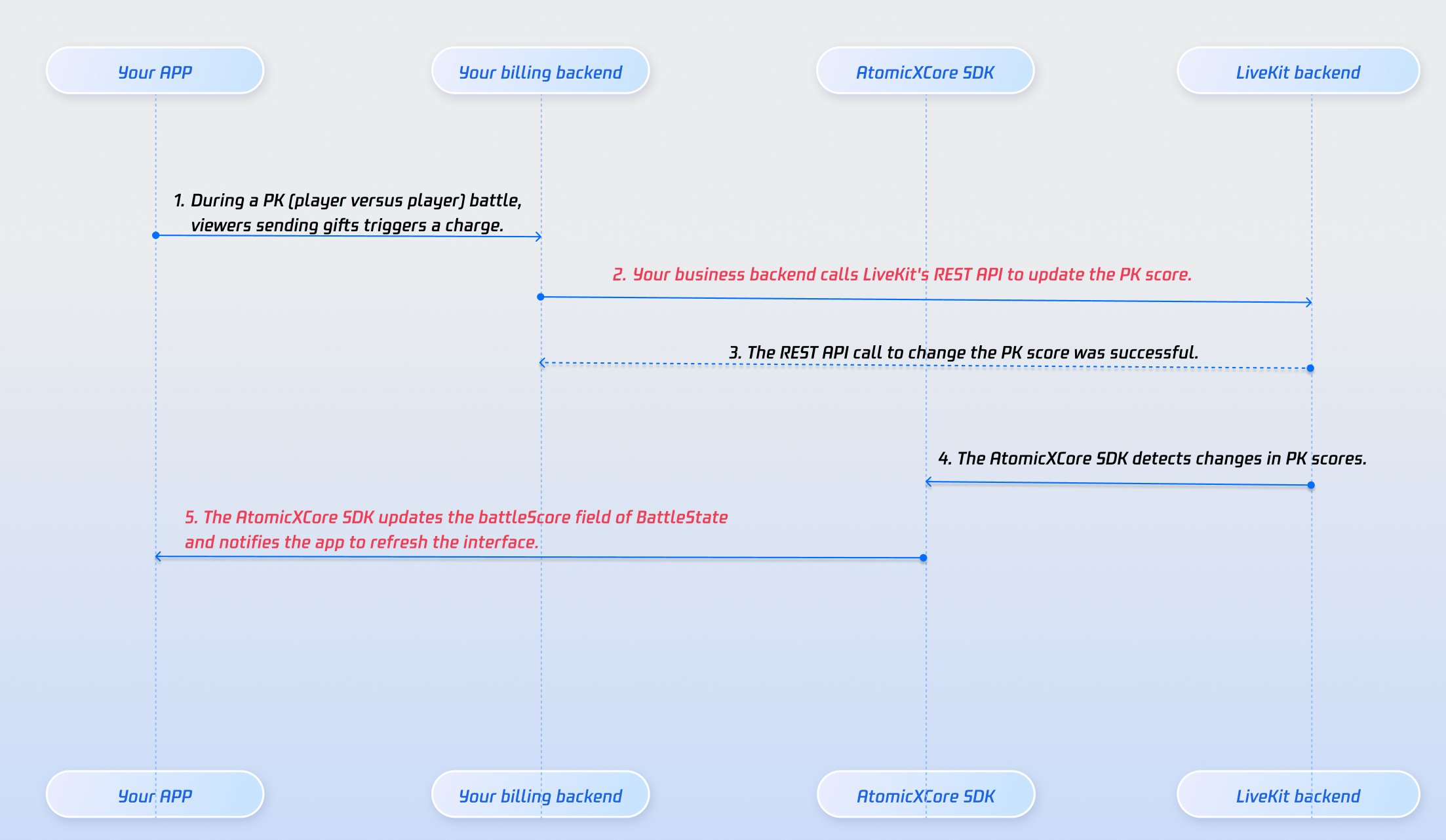
In PK scenarios, scores are typically based on gifts received, driving competition and engagement. The PK module in RoomEngine supports score updates and broadcasts. Link your gift logic to this system.
When your billing system confirms a gift transaction, call the Modify PK Score to update the host's PK score. All users in PK rooms see the updated battleScore in BattleState. Update your PK progress bar whenever battleScore changes.
For details on all public interfaces, properties, and methods for CoHostStore, BattleStore, LiveListStore, LiveSeatStore, and related classes, see the AtomicXCore API documentation.
Store/Component
Function Description
API Documentation
CoHostStore
Host Connection Lifecycle Management: Responsible for managing and coordinating the lifecycle of anchor connections, including initiating connection invitations, handling acceptance/rejection, switching connection status, managing video streams during connections, and disconnecting connections.
Streamer PK Battle Lifecycle Management: Responsible for managing the entire lifecycle of timed PK battles between streamers, including initiating PK invitations, starting the battle, updating PK scores in real time, settling the winner at the end of the PK, and penalty time.
What is the maximum number of rooms and users supported for connection or PK?
Up to 9 rooms can be connected simultaneously, with 50 users per room.
How do I implement a punishment period after PK loss?
After receiving the onBattleEnded callback, determine the winner using battleScore from BattleState. The connection remains active after PK. Implement a custom 30-second punishment period, then disconnect after the countdown.
Why did the connection invitation not reach the target host?
Verify that targetHostLiveId is correct and the target room is actively live.
Check network connectivity; invitation signaling has a default 30-second timeout.
What happens if a host disconnects or the app crashes during connection or PK?
CoHostStore and BattleStore have built-in heartbeat and timeout detection. If a participant exits unexpectedly, the other party is notified via events such as onCoHostUserLeft or onUserExitBattle. Use these events to update the UI (e.g., "The other party has disconnected") and end the interaction.
Why can PK scores only be updated via REST API?
REST API ensures PK score security, real-time updates, and scalability:
Tamper-proof and fair: Requires authentication and data validation. Each update is traceable (e.g., gift action), preventing manual score changes or cheating.
Real-time sync: Standardized formats (e.g., JSON) allow seamless integration with gifts, PK, and display systems, keeping scores consistent across hosts, viewers, and backend.
Flexible rule adaptation: Backend configuration changes (e.g., adjusting gift score values) can be made without front-end changes, reducing iteration costs.