• 서비스
  • 가격
  • 리소스
  • 기술지원
이 페이지는 현재 영어로만 제공되며 한국어 버전은 곧 제공될 예정입니다. 기다려 주셔서 감사드립니다.

Audience List

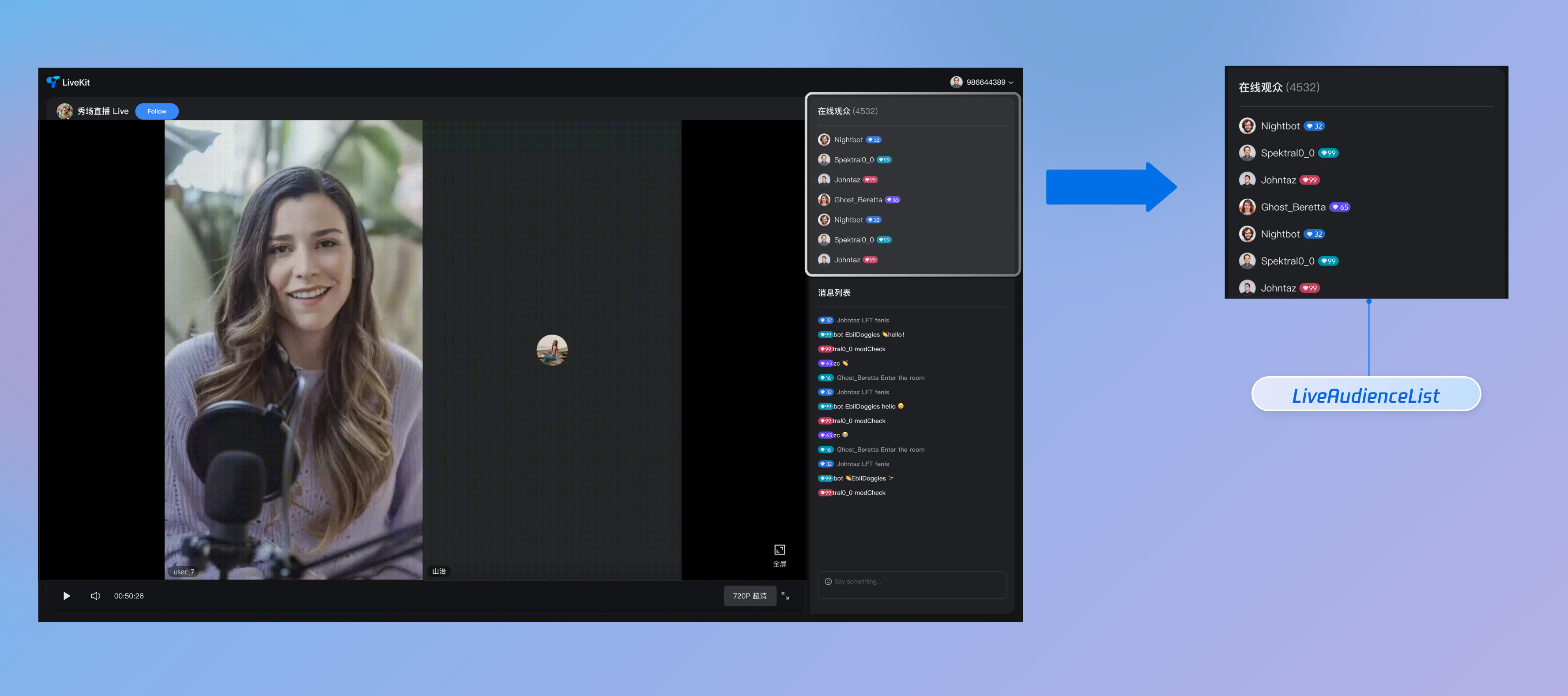
LiveAudienceState is a specialized module within AtomicXCore designed for managing audience information in live streaming rooms. With LiveAudienceState, you can build a robust audience list and management system for your live streaming application.


Core Features

Real-Time Audience List: Retrieve and display information for all current viewers in the live room.
Audience Count Statistics: Access the accurate, real-time total number of viewers in the live room.
Audience Activity Monitoring: Subscribe to events to detect instantly when viewers join or leave.
Administrator Permissions: Hosts can assign or revoke administrator privileges.
Room Management: Hosts or administrators can remove regular viewers from the live room.

Example Project

Refer to our LiveAudienceList component on GitHub for a complete implementation example.

Implementation Steps

Step 1: Component Integration

Follow the Quick Start guide to integrate AtomicXCore and complete the initial setup.

Step 2: Initialize and Fetch Audience List

Obtain an instance of LiveAudienceState and proactively fetch the current audience list for initial display. The module automatically listens for changes in the live room state and updates the audience list when switching rooms.
import { onMounted, watch } from 'vue';
import { useLiveAudienceState } from "tuikit-atomicx-vue3";

// Get an instance of LiveAudienceState
const { fetchAudienceList, audienceList } = useLiveAudienceState();

onMounted(async () => {
try {
// Fetch the audience list, returns a Promise
await fetchAudienceList();
console.log('Successfully fetched the initial audience list');
} catch (error) {
console.error('Failed to fetch the initial audience list', error);
}
});

// Watch for real-time changes in audienceList to drive UI updates
watch(audienceList, (newVal) => {
console.log('Audience list updated:', newVal);
});

Step 3: Listen for Audience List State and Real-Time Activity

Subscribe to audienceState events and reactive data to receive full list snapshots and real-time audience join/leave events, enabling dynamic UI updates.
import { onMounted, onUnmounted, watch } from 'vue';
import { useLiveAudienceState, LiveAudienceEvent } from "tuikit-atomicx-vue3";

const {
audienceList,
audienceCount,
subscribeEvent,
unsubscribeEvent
} = useLiveAudienceState();

// Watch for real-time changes in audienceCount to update the UI display
watch(audienceCount, (newCount) => {
console.log(`Current online audience: ${newCount}`);
});

// Define callback functions
const onAudienceJoined = (eventInfo) => {
console.log(`Audience member ${eventInfo.audience.userName} joined the live room`);
};

const onAudienceLeft = (eventInfo) => {
console.log(`Audience member ${eventInfo.audience.userName} left the live room`);
};

onMounted(() => {
// Subscribe to audience join event
subscribeEvent(LiveAudienceEvent.onAudienceJoined, onAudienceJoined);
// Subscribe to audience leave event
subscribeEvent(LiveAudienceEvent.onAudienceLeft, onAudienceLeft);
});

onUnmounted(() => {
// Unsubscribe when the component is unmounted
unsubscribeEvent(LiveAudienceEvent.onAudienceJoined, onAudienceJoined);
unsubscribeEvent(LiveAudienceEvent.onAudienceLeft, onAudienceLeft);
});

Step 4: Manage Audience (Remove from Room & Assign Administrator)

Hosts and administrators can manage viewers within the live room.

4.1 Remove Regular Viewers from the Live Room

Use the kickUserOutOfRoom API to remove a specified user from the live room.
import { useLiveAudienceState } from "tuikit-atomicx-vue3";

const { kickUserOutOfRoom } = useLiveAudienceState();

const handleKickUser = async (targetUserId: string) => {
try {
await kickUserOutOfRoom({ userId: targetUserId });
console.log(`Host or administrator removed ${targetUserId} from the live room`);
} catch (error) {
console.error(`Failed to remove ${targetUserId} from the live room`, error);
}
};

4.2 Assign or Revoke Administrator Privileges

Use the setAdministrator and revokeAdministrator APIs to manage a user's administrator status.
import { useLiveAudienceState } from "tuikit-atomicx-vue3";

const { setAdministrator, revokeAdministrator } = useLiveAudienceState();

const promoteToAdmin = async (targetUserId: string) => {
try {
await setAdministrator({ userId: targetUserId });
console.log(`Successfully assigned administrator privileges to user ${targetUserId}`);
} catch (error) {
console.error(`Failed to assign administrator privileges to user ${targetUserId}`, error);
}
};

const revokeAdmin = async (targetUserId: string) => {
try {
await revokeAdministrator({ userId: targetUserId });
console.log(`Successfully revoked administrator privileges from user ${targetUserId}`);
} catch (error) {
console.error(`Failed to revoke administrator privileges from user ${targetUserId}`, error);
}
};

4.3 Mute/Unmute Audience Members

Administrators can disable or enable a user's access to sending messages in the room.
import { useLiveAudienceState } from "tuikit-atomicx-vue3";

const { disableSendMessage } = useLiveAudienceState();

// Mute user
const muteUser = async (targetUserId: string) => {
await disableSendMessage({ userId: targetUserId, isDisable: true });
};

// Unmute user
const unmuteUser = async (targetUserId: string) => {
await disableSendMessage({ userId: targetUserId, isDisable: false });
};

Advanced Usage

Display Welcome Message in Barrage Area When Audience Enters

Automatically display a local welcome message in the barrage/chat area when a new audience member enters the live room, such as: "Welcome user nickname to the live room".

Implementation

Subscribe to the onAudienceJoined event and display a welcome message in the barrage/chat area.
import { onMounted, onUnmounted } from 'vue';
import { useLiveAudienceState, useBarrageState, LiveAudienceEvent } from "tuikit-atomicx-vue3";

const { subscribeEvent, unsubscribeEvent } = useLiveAudienceState();
// Assume useBarrageState provides the appendLocalTip method
const { appendLocalTip } = useBarrageState();

const handleAudienceJoin = (eventInfo) => {
const { audience } = eventInfo;
// Create a local tip message
const welcomeTip = {
messageType: 'text',
textContent: `Welcome ${audience.userName || audience.userId} to the live room!`
};
// Insert local barrage message
appendLocalTip({ message: welcomeTip });
console.log(`Audience member ${audience.userName} joined the live room`);
};

onMounted(() => {
subscribeEvent(LiveAudienceEvent.onAudienceJoined, handleAudienceJoin);
});

onUnmounted(() => {
unsubscribeEvent(LiveAudienceEvent.onAudienceJoined, handleAudienceJoin);
});

API Documentation

For detailed information on all public APIs, properties, and methods of LiveAudienceState and related classes, see the official API documentation for the AtomicXCore framework. The relevant State modules referenced in this guide are:
State
Feature Description
API Documentation
LiveAudienceState
Audience management: Retrieve real-time audience list (ID / name / avatar), count audience numbers, monitor audience join/leave events.
BarrageState
Barrage features: Send text/custom barrage messages, maintain barrage list, monitor barrage status in real time.

FAQs

How is the online audience count (audienceCount) updated in LiveAudienceState? What are the timing and frequency?

The audienceCount is updated with near real-time accuracy, but not always instantly. The update mechanism is as follows:
Active Room Entry/Exit: When a user actively joins or leaves the live room, the audience count is updated immediately. Changes to audienceCount in LiveAudienceState are reflected almost instantly.
Unexpected Disconnection: If a user disconnects due to network issues, app crashes, or other abnormal reasons, the system uses a heartbeat mechanism to verify their status. Only after missing heartbeats for 90 consecutive seconds is the user considered offline and the audience count updated.
Update Mechanism and Frequency Control:
All audience count change notifications, whether instant or delayed, are broadcast as messages within the room.
There is a rate limit of 40 messages per second per room.
Important: In scenarios with extremely high message traffic (e.g., barrage storms, rapid gift sending), if the room exceeds the 40 messages/second threshold, audience count change messages may be dropped to prioritize core messages (such as barrage).
What does this mean for developers?
The audienceCount provides a highly accurate, near real-time estimate. However, in extreme high-concurrency scenarios, brief delays or data loss may occur. We recommend using audienceCount for UI display purposes only, and not as the sole source for billing, analytics, or other use cases requiring absolute precision.