
Guest Connection
AtomicXCore provides the CoGuestState module, purpose-built to manage the entire workflow for audience guest connections in live streaming scenarios. You don’t need to handle complex state synchronization or signaling logic yourself—just call a few simple methods to enable seamless audio/video interaction between your hosts and audience.
Core Scenarios
CoGuestState covers the two most common guest connection workflows:Audience Request to Join: Audience members can actively request to join the stream as a guest. The host can accept or reject these requests.
Host Invites Audience to Join: The host can invite any audience member in the live room to join as a guest.
Sample Project
Implementation
Component Integration
Note:
Before proceeding, make sure you have created or joined a room as described in the Quick Start Guide. Then, continue with the steps below.
Audience Request to Join
Audience Implementation
As an audience member, you’ll need to submit a guest request, handle the host’s response, and disconnect when needed.
Initiate a Co-hosting Request
Call the
applyForSeat method when the user clicks the "Request to Join" button in your UI.import { useCoGuestState } from "tuikit-atomicx-vue3";const { applyForSeat } = useCoGuestState();// User clicks "Request to Join"const handleRequestToConnect = async () => {try {await applyForSeat({seatIndex: -1, // -1 assigns a seat randomlytimeout: 30, // Timeout in seconds; if TS expects ms, use 30000});console.log('Request sent');} catch (error) {console.error('Request failed', error);}}
Handle Host Response
Subscribe to the
CoGuestEvent.onGuestApplicationResponded event with subscribeEvent to receive the host’s decision.import { onMounted, onUnmounted } from 'vue';import { useCoGuestState, useDeviceState, CoGuestEvent } from "tuikit-atomicx-vue3";const { subscribeEvent, unsubscribeEvent } = useCoGuestState();const { openLocalMicrophone, openLocalCamera } = useDeviceState();const handleGuestApplicationResponded = (eventInfo: any) => {if (eventInfo.isAccept) {console.log('Guest request accepted');// Enable microphone and cameraopenLocalMicrophone();openLocalCamera();// Update UI to indicate guest connection is active} else {console.log('Guest request rejected');// Notify user that the request was rejected}};onMounted(() => {subscribeEvent(CoGuestEvent.onGuestApplicationResponded, handleGuestApplicationResponded);});onUnmounted(() => {unsubscribeEvent(CoGuestEvent.onGuestApplicationResponded, handleGuestApplicationResponded);});
Disconnect from Guest Mode
When a guest wants to leave, call the
disConnect method to return to audience status.import { useCoGuestState } from "tuikit-atomicx-vue3";const { disConnect } = useCoGuestState();// User clicks "Leave Seat"const leaveSeat = async () => {try {await disConnect();console.log('Disconnected successfully');} catch (error) {console.log('Disconnect failed', error);}}
Cancel a Pending Request (Optional)
If the audience member wants to withdraw their request before the host responds, use
cancelApplication.import { useCoGuestState } from "tuikit-atomicx-vue3";const { cancelApplication } = useCoGuestState();// User clicks "Cancel Request" while waitingconst handleCancelRequest = async () => {await cancelApplication();console.log('Request cancelled successfully');}
Host Implementation
As the host, you’ll need to listen for incoming requests, display the request list, and handle each request.
Listen for New Guest Requests
Subscribe to the
CoHostEvent.onGuestApplicationReceived event to get notified when an audience member requests to join.import { onMounted, onUnmounted } from 'vue';import { useCoGuestState, CoHostEvent } from "tuikit-atomicx-vue3";const { subscribeEvent, unsubscribeEvent } = useCoGuestState();const handleGuestApplicationReceived = (eventInfo: any) => {console.log('Received guest request from audience:', eventInfo.guestUser);// Update UI, e.g., show a notification badge on the "Request List" button};onMounted(() => {subscribeEvent(CoHostEvent.onGuestApplicationReceived, handleGuestApplicationReceived);});onUnmounted(() => {unsubscribeEvent(CoHostEvent.onGuestApplicationReceived, handleGuestApplicationReceived);});
Display the Request List
CoGuestState provides a real-time list of applicants via the applicants Vue ComputedRef. Each applicant includes fields like userId and userName. Use this directly in your template:<template><div v-for="audience in applicants" :key="audience.userId" class="applicant-item"><span>{{ audience.userName }}</span><button @click="handleAccept(audience.userId)">Accept</button><button @click="handleReject(audience.userId)">Reject</button></div></template><script setup lang="ts">import { useCoGuestState } from "tuikit-atomicx-vue3";const { applicants, acceptApplication, rejectApplication } = useCoGuestState();const handleAccept = async (userId: string) => {await acceptApplication({ userId });};const handleReject = async (userId: string) => {await rejectApplication({ userId });};</script>
Host Invites Audience to Join
Host Implementation
Invite an Audience Member
When the host selects an audience member and clicks "Invite to Join", call
inviteToSeat.import { useCoGuestState } from "tuikit-atomicx-vue3";const { inviteToSeat } = useCoGuestState();// Host selects an audience member and sends an invitationconst handleInviteToSeat = async (userId: string) => {try {await inviteToSeat({userId,seatIndex: -1, // Assign seat randomlytimeout: 30,});console.log(`Sent guest invitation to audience ${userId}`);} catch (error) {console.error('Invitation failed', error);}}
Handle Audience Response
Subscribe to the
CoHostEvent.onHostInvitationResponded event to track whether the audience member accepts or rejects the invitation.import { onMounted } from 'vue';import { useCoGuestState, CoHostEvent } from "tuikit-atomicx-vue3";const { subscribeEvent } = useCoGuestState();onMounted(() => {subscribeEvent(CoHostEvent.onHostInvitationResponded, (eventInfo) => {if(eventInfo.isAccept){console.log(`Audience ${eventInfo.guestUser.userName} accepted your invitation`);} else {console.log(`Audience ${eventInfo.guestUser.userName} rejected your invitation`);}});});
Audience Implementation
Receive Host Invitation
Subscribe to the
CoGuestEvent.onHostInvitationReceived event to detect when the host sends an invitation.import { onMounted } from 'vue';import { useCoGuestState, CoGuestEvent } from "tuikit-atomicx-vue3";const { subscribeEvent } = useCoGuestState();onMounted(() => {subscribeEvent(CoGuestEvent.onHostInvitationReceived, (eventInfo) => {// Show a modal dialog for the user to accept or reject// Save eventInfo.hostUser.userId as inviterIdshowInviteDialog(eventInfo.hostUser.userId);});});
Respond to Invitation
When the user chooses to accept or reject in the dialog, call the appropriate method.
import { useCoGuestState, useDeviceState } from "tuikit-atomicx-vue3";const { acceptInvitation, rejectInvitation } = useCoGuestState();const { openLocalMicrophone, openLocalCamera } = useDeviceState();// User clicks "Accept"const handleAccept = async (inviterId: string) => {try {await acceptInvitation({ inviterId });// Automatically enable microphone and camera after acceptingopenLocalMicrophone();openLocalCamera();} catch (error) {console.error('Failed to accept invitation', error);}}// User clicks "Reject"const handleReject = async (inviterId: string) => {await rejectInvitation({ inviterId });}
Feature Demo
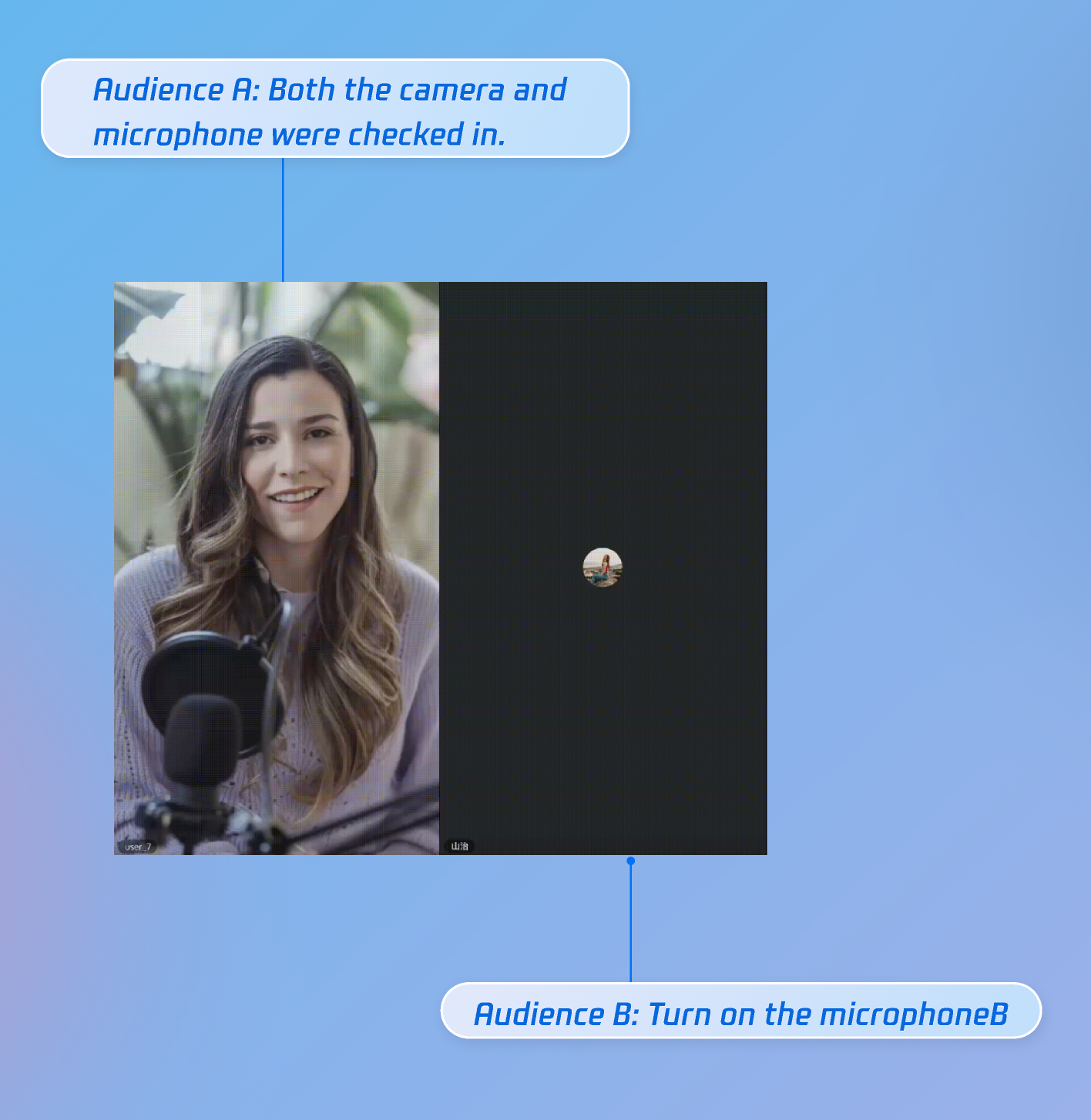
After integrating these features, you can test guest connections with two audience members and one host: audience A enables both camera and microphone, while audience B enables only the microphone. The feature works as shown below.
API Documentation
For complete details on all public interfaces, properties, and methods for CoGuestState and related classes, refer to the official API documentation for the AtomicXCore framework. The key States used in this guide include:
State | Description | API Documentation |
DeviceState | Audio/video device control: microphone (on/off / volume), camera (on/off / switch / quality), screen sharing, real-time device status monitoring. | |
CoGuestState | Audience guest management: guest request / invitation / accept / reject, guest member permissions control (microphone / camera), state synchronization. | |
LiveSeatState | Seat information management: seat list management, seat order management. |
FAQs
Guest Connection Not Working (Request/Invite/Accept/Reject Fails)
Issue: Methods like
applyForSeat, acceptApplication, or inviteToSeat do not work.Cause:
CoGuestState relies on the underlying room engine state. This usually happens if the user hasn’t joined the room, or the useCoGuestState context isn’t initialized.Solution: Ensure the user has successfully joined the live room before calling these methods.
Missing Guest Connection Event Notifications
Issue: Audience does not receive host invitations, or host does not receive audience requests.
Cause:
subscribeEvent was not called correctly.Incorrect event enum value used (e.g., mixing up
CoHostEvent and CoGuestEvent).Solution:
Host: Subscribe to
CoHostEvent.onGuestApplicationReceived and CoHostEvent.onHostInvitationResponded.Audience: Subscribe to
CoGuestEvent.onGuestApplicationResponded and CoGuestEvent.onHostInvitationReceived.No Video or Audio After Guest Connection
Issue: After joining as a guest, the seat list updates but there’s no video or audio.
Cause:
CoGuestState only handles signaling for guest connections (seat assignment). Streaming (turning on microphone/camera) requires explicit calls to DeviceState methods.Solution: In the callback for "accept request" or "accept invitation", make sure to call
openLocalMicrophone and openLocalCamera. Also, check browser autoplay policies and ensure the user has interacted with the page.
