
Virtual Gifts(React Native)
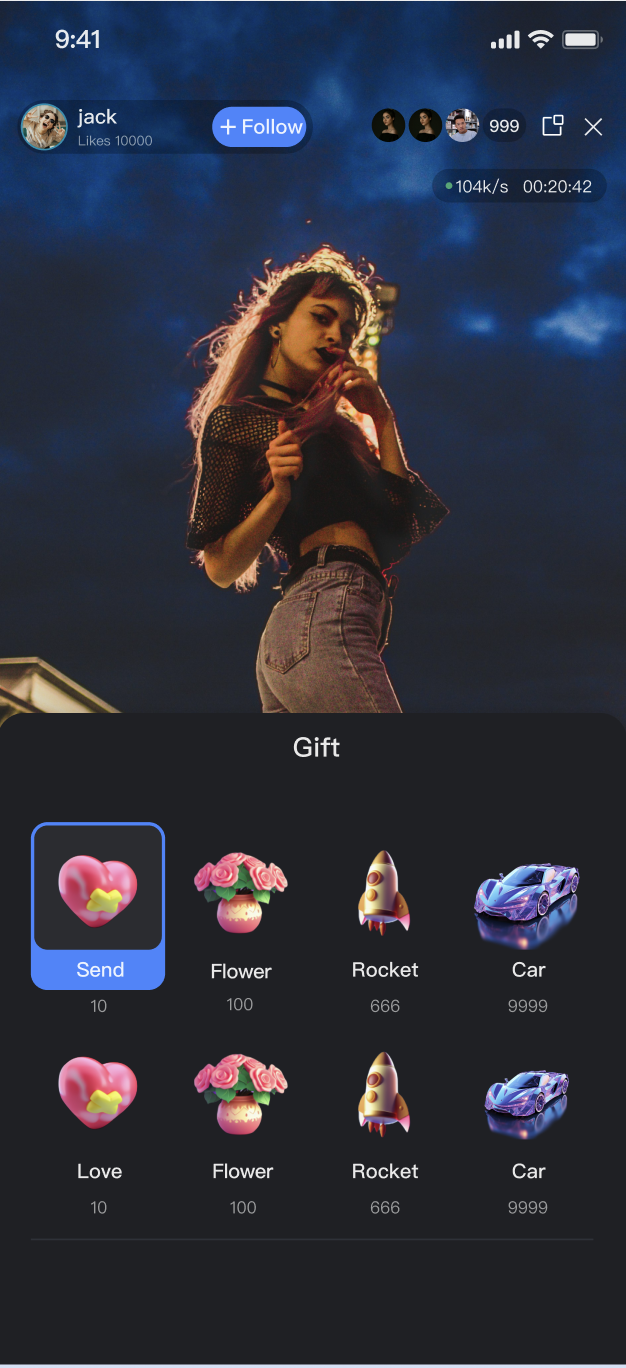
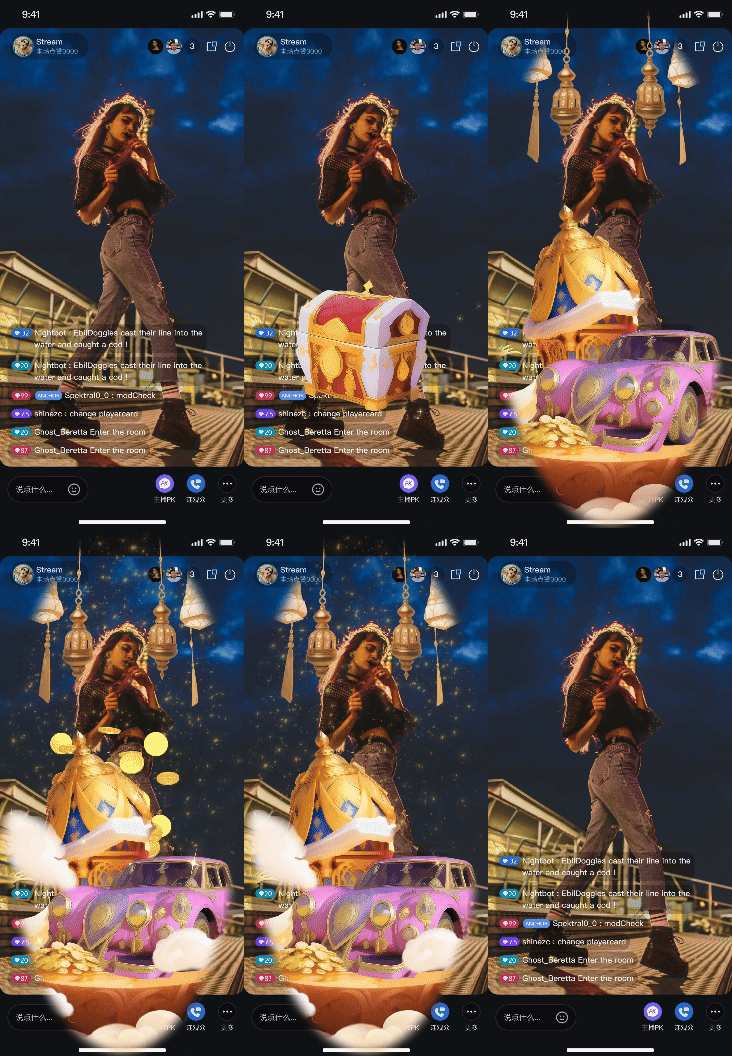
GiftState is a dedicated module within AtomicXCore that manages gift interactions in live streaming rooms. This module enables you to implement a robust gift system in your live streaming application, supporting flexible monetization and enhanced audience engagement.Gift Panel | Barrage Gift | Full-Screen Gift |
 |  |  |
Core Features
Fetch Gift List: Retrieve gift panel data from your server, including gift categories and details.
Send Gifts: Audience members can select and send gifts to the host, specifying a quantity.
Gift Event Broadcast: Receive real-time gift events in the room, used for gift AR playback and live comment notifications.
Implementation Steps
Step 1: Integrate the Component
Note:
To use the Gift System, you must enable TUILiveKit Multi-Guest Edition or Large-Scale Live Edition. The number of configurable gifts depends on your package. For details, see the Gift System section in the Feature & Billing Description.
Live streaming: Refer to Quick Access for seamless integration with AtomicXCore and service access.
Voice chat room: Refer to Quick Access for integration with AtomicXCore and access completed.
Step 2: Initialize and Listen for Gift Events
Obtain the
GiftState instance and set up listeners to handle gift events and gift list changes.Implementation
1. Get Instance: Call
useGiftState(liveID) to retrieve the GiftState instance for the current live room.2. Subscribe to Events: Use
addGiftListener to subscribe to the onReceiveGift event.3. Listen to State: Monitor the reactive
usableGifts list to update your UI.Code Example
import { useEffect } from 'react';import { useGiftState } from 'react-native-tuikit-atomic-x/lib/module/atomic-x/state/GiftState';// Get GiftState instance by liveIDconst { addGiftListener, removeGiftListener, usableGifts } = useGiftState(liveID);useEffect(() => {const onReceiveGift = (event) => {const gift = JSON.parse(event.gift);const sender = JSON.parse(event.sender);console.log('Gift received', gift, 'Sender', sender);// Handle gift logic here, e.g., play SVGA gifts, show popups for other formats};addGiftListener('onReceiveGift', onReceiveGift);return () => {removeGiftListener('onReceiveGift', onReceiveGift);};}, []);// Listen for real-time changes in usableGifts to drive UI updatesuseEffect(() => {console.log(usableGifts);}, [usableGifts]);
Gift List Structure Parameters
GiftCategory Parameter DescriptionParameter | Type | Description |
categoryID | string | Unique identifier for the gift category. |
name | string | Display name of the gift category. |
desc | string | Description of the gift category. |
extensionInfo | Record<string: string> | Extension info fields. |
giftList | [string] | Array of Gift objects in this category. |
Gift Parameter DescriptionParameter | Type | Description |
giftID | string | Unique identifier for the gift. |
name | string | Display name of the gift. |
desc | string | Description of the gift. |
iconURL | string | Gift icon URL. |
resourceURL | string | Gift AR animation resource URL. |
level | number | Gift level. |
coins | number | Gift price. |
extensionInfo | Record<string: string> | Extension info fields. |
Step 3: Fetch Gift List
Use the
refreshUsableGifts method to retrieve the gift list from your server.Implementation
1. Call API: Invoke
refreshUsableGifts at the appropriate time (such as when the page loads).2. Handle Callbacks: Optionally handle
onSuccess and onError to track API results.3. Receive Data: When the fetch succeeds, the updated
usableGifts list is automatically available via the listener from Step 2.Code Example
import { useEffect } from 'react';import { useGiftState } from 'react-native-tuikit-atomic-x/lib/module/atomic-x/state/GiftState';// Get GiftState instance by liveIDconst { refreshUsableGifts } = useGiftState(liveID);useEffect(() => {refreshUsableGifts({liveID: liveID, // Current live room liveIDonSuccess: () => {console.log('Gift list fetched successfully');// State reactive data will update automatically on success},onError: (error) => {console.log('Failed to fetch gift list', error);},});}, []);
Step 4: Send Gifts
When a user selects a gift in the gift panel and clicks Send, call the
sendGift API.Implementation
1. Get Parameters: Obtain the selected
giftID and count from the UI.2. Call API: Invoke the
sendGift API.3. Handle Callbacks: Handle failures (such as insufficient balance) in the
onError callback. UI updates (animations, live comments) should be handled via the onReceiveGift event.Code Example
import { useGiftState } from 'react-native-tuikit-atomic-x/lib/module/atomic-x/state/GiftState';// Get GiftState instance by liveIDconst { sendGift } = useGiftState(liveID);// User sends a gift (function receives giftID as parameter)const handleSendGift = (giftID) => {sendGift({liveID: liveID, // Current live room liveIDgiftID: giftID,count: 1,onSuccess: () => {console.log(`Gift ${giftID} sent successfully`);},onError: (error) => {console.log('Failed to send gift', error);},});};
sendGift API Parameters
Parameter Name | Type | Description |
liveID | string | The current live room's liveID. |
giftID | string | Unique identifier of the gift. |
count | number | Quantity to send. |
onSuccess | Function | Callback for successful send. |
onError | Function | Callback for failed send. |
Advanced Features
The capabilities of
GiftState are tightly coupled with your business backend. This section provides guidance on creating a dynamic, engaging gift system by combining server configuration and client-side implementation.Gift Asset Configuration
Customize the available gift types, categories, names, icons, pricing, and animation effects for your live rooms to fit your operational and branding requirements.
Implementation
1. Server-Side Configuration: Use the
LiveKit server REST API to manage gift information, categories, and multi-language support. See the Gift Configuration Guide.2. Client Fetch: On the client, call
refreshUsableGifts to retrieve configuration data.3. UI Display: Use the retrieved
List<GiftCategory> to populate the gift panel.Configuration Sequence Diagram

Related REST API Interfaces Overview
Interface Category | Interface | Request Example |
Gift Management | Add Gift Information | |
| Delete Gift Information | |
| Query Gift Information | |
Gift Category Management | Add Gift Category Information | |
| Delete Specific Gift Category Information | |
| Get Specific Gift Category Information | |
Gift Relationship Management | Add Relationship between a Specific Gift Category and Gift | |
| Delete Relationship between a Specific Gift Category and Gift | |
| Get Gift Relationships under a Specific Gift Category | |
Gift Multi-language Management | Add Gift Multi-language Information | |
| Delete Specific Gift Multi-language Information | |
| Get Gift Multi-language Information | |
| Add Gift Category Multi-language Information | |
| Delete Specific Gift Category Multi-language Information | |
| Get Gift Category Multi-language Information | |
Billing and Gift Deduction Process
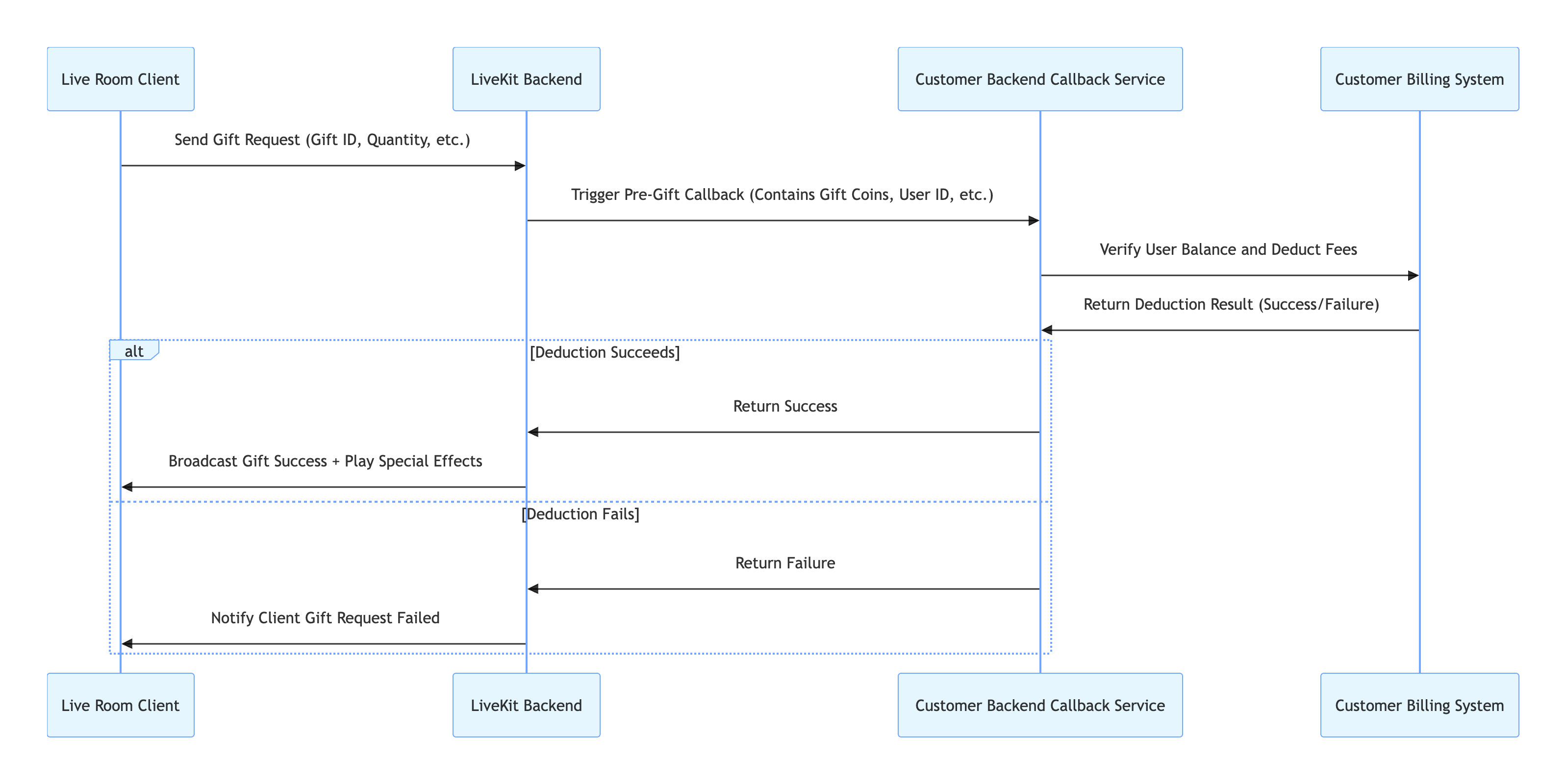
When an audience member sends a gift, their account balance must be sufficient, and the deduction must be completed before gift AR playback and broadcast.
Implementation
1. Backend Callback Configuration: Configure your billing system's callback URL in the LiveKit backend. See Callback Configuration Documentation.
2. Client Send: The client calls
sendGift.3. Backend Interaction: The LiveKit backend calls your callback URL; your billing system processes the deduction and returns the result.
4. Result Synchronization: If successful, AtomicXCore broadcasts the
onReceiveGift event; if failed, the completion callback of sendGift receives an error.Call Flow Diagram
REST API Overview
API | Description | Request Example |
Callback Configuration > Pre-Gift Send Callback | Your backend uses this callback to validate and allow gift sending. |
Implement Full-Screen Gift Animation Playback
When a user sends high-value gifts like "Rocket" or "Carnival" in the live room, play visually striking full-screen gift AR animations (such as SVGA) to energize the audience.
AtomicXCore includes an SVGA animation player for gift AR effects. Integrate it as follows.Using SVGAAnimationView
1. Listen for Gift Events: Use
addGiftListener to subscribe to the onReceiveGift event.2. Parse and Play: When an
onReceiveGift event is received, check if gift.resourceURL points to an SVGA file. If so, pass gift.resourceURL to SVGAAnimationView to play the animation.Code Example
import { useEffect, useRef, useState } from 'react';import { useGiftState } from 'react-native-tuikit-atomic-x/lib/module/atomic-x/state/GiftState';import { SVGAAnimationView } from 'react-native-tuikit-atomic-x/lib/module/components/SVGAAnimationView';// Get GiftState instance by liveIDconst { addGiftListener, removeGiftListener } = useGiftState(liveID);const svgaRef = useRef(null);const [showSVGA, setShowSVGA] = useState(false);useEffect(() => {const onReceiveGift = (event) => {const gift = JSON.parse(event.gift);if (gift.resourceURL) {setShowSVGA(true);setTimeout(() => {svgaRef.current?.startAnimation(gift.resourceURL);}, 100);}};addGiftListener('onReceiveGift', onReceiveGift);return () => {removeGiftListener('onReceiveGift', onReceiveGift);};}, []);// Add full-screen SVGA playback layer in JSX{showSVGA ? (<SVGAAnimationViewref={svgaRef}style={{ position: 'absolute', top: 0, left: 0, right: 0, bottom: 0 }}onFinished={() => setShowSVGA(false)}/>) : null}
Display Gift Send Messages in Live Comments
When a user sends a gift, the animation is played and a system message appears in the live comments area, such as "[Audience Nickname] sent [Gift Name] x [Quantity]", visible to all viewers.
Implementation
1. Listen for Events: Use
addGiftListener to subscribe to the onReceiveGift event.2. Get Live Comments State: Use
useBarrageState(liveID) to retrieve the instance for the current room.3. Compose Message: Build a message struct with
textContent (e.g., "[sender.userName] sent [gift.name]").4. Insert Locally: Call
barrageState.appendLocalTip(message: giftTip) to add the message to the local list.Code Example
import { useEffect } from 'react';import { useGiftState } from 'react-native-tuikit-atomic-x/lib/module/atomic-x/state/GiftState';import { useBarrageState } from 'react-native-tuikit-atomic-x/lib/module/atomic-x/state/BarrageState';// Get GiftState instance by liveIDconst { addGiftListener, removeGiftListener } = useGiftState(liveID);// Get BarrageState instance by liveIDconst { appendLocalTip } = useBarrageState(liveID);useEffect(() => {const onReceiveGift = (event) => {const gift = JSON.parse(event.gift);const sender = JSON.parse(event.sender);console.log('Gift received', gift, 'Sender', sender);appendLocalTip({liveID: liveID, // Current live room liveIDmessage: {textContent: `${sender.userName || sender.userID} sent ${gift.name || gift.giftID}`,sender: {userID: sender.userID || '',userName: sender.userName || '',avatarURL: sender.avatarURL || '',},messageType: 0,sequence: Math.floor(Date.now() / 1000),timestampInSecond: Math.floor(Date.now() / 1000),liveID: liveID,},onSuccess: () => {},onError: (error) => {console.log('Failed to insert gift live comment:', error);},});};addGiftListener('onReceiveGift', onReceiveGift);return () => {removeGiftListener('onReceiveGift', onReceiveGift);};}, []);
API Documentation
For detailed information about all public interfaces, properties, and methods of GiftState and related classes, refer to the API documentation provided with AtomicXCore. The relevant Stores referenced in this guide are:
State | Feature Description | API Documentation |
GiftState | Gift interaction: fetch gift list, send/receive gifts, listen for gift events (including sender and gift details). | |
BarrageState | Live comments: send text/custom comments, maintain comment list, real-time state updates. |
FAQs
The gift list in GiftState is empty. What should I do?
You need to call
refreshUsableGifts() to fetch the gift list from your business backend. Gift data must be configured via your backend's REST API.How do I implement multilingual gift display (e.g., Chinese, English)?
GiftState provides the setLanguage(language: string) method. Call this before refreshUsableGifts, passing the target language code (such as "en" or "zh-CN"). The server will return gift names and descriptions in the specified language.I called sendGift to send a gift, but the gift animation played twice. Why?
The
onReceiveGift event is broadcast to all room members, including the sender. If you trigger UI updates both in the onSuccess callback of sendGift and in the onReceiveGift event handler, you'll see duplicated effects.Best Practice: Handle UI updates (like playing animations or showing live comment prompts) only in the
onReceiveGift event handler. Use the onError callback of sendGift to notify users of failures (such as "Send failed" or "Insufficient balance").Where is the gift deduction logic implemented?
Gift deduction is managed entirely by your custom billing system.
AtomicXCore connects to your backend via callback. When the client calls sendGift, your backend completes the deduction and returns the result to the AtomicXCore backend, which then decides whether to broadcast the gift event.Will gift notifications be blocked by mute or frequency control?
No. Gift notifications (
onReceiveGift event) are not affected by mute or message frequency control and are reliably delivered.What should I do if gift animation playback lags?
Check the size of your SVGA files. The basic animation player recommends files under 10MB. If the file is too large or the animation is complex, consider using the advanced effects player provided by TUILiveKit for optimal performance.

