
Seat Management (React Native)
AtomicXCore provides the CoGuestState and LiveSeatState modules to handle the complete workflow for audience co-hosting in live streaming scenarios. You don’t need to deal with complex state synchronization or signaling—just call a few simple methods to enable powerful audio/video interactive features between hosts and audience members in your live broadcast. This guide walks you through using
CoGuestState and LiveSeatState to quickly implement voice co-hosting in your application.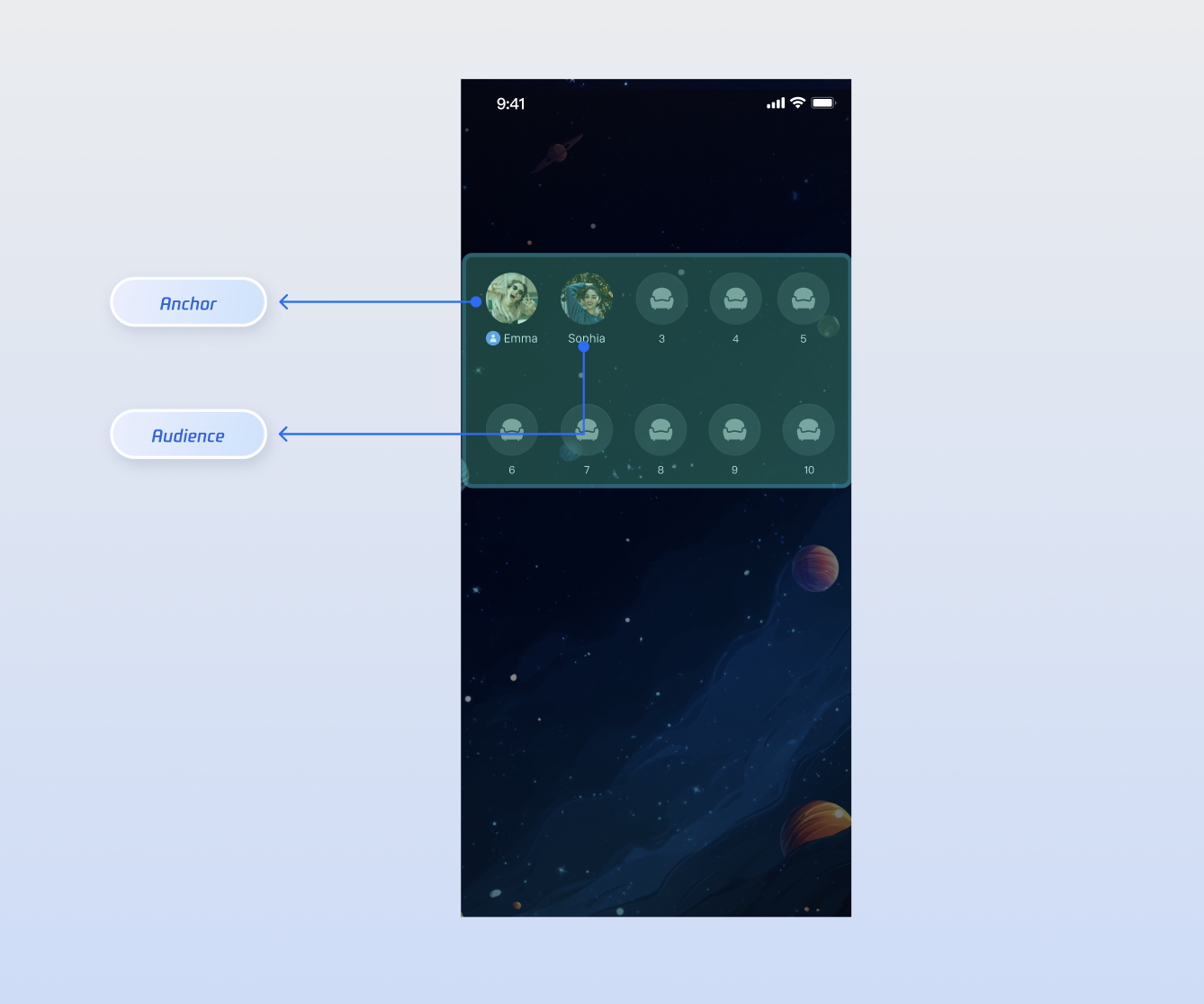
Core Scenarios
CoGuestState and LiveSeatState support these common interaction scenarios:Audience Requests to Join the Mic: Audience members can send co-host requests, and the host can accept or reject them.
Host Invites Audience to Join the Mic: The host can invite any audience member in the voice room to co-host.
Host Manages Seats: The host can manage who’s on each seat, including kicking, muting, and locking seats.
Implementation Steps
Step 1: Integrate Components
Step 2: Handle Audience Requests to Join the Mic
Audience Implementation
As an audience member, your main tasks are to send a request, receive the result, and leave the mic when you’re done.
1. Send a Co-host Request
When a user clicks the "Request to Co-host" button in the UI, use the
applyForSeat method.import { useCoGuestState } from 'react-native-tuikit-atomic-x/lib/module/atomic-x/state/CoGuestState';// Get the live room ID (liveID). Usually, select from the room list (can use LiveListState's liveList data)const liveID = "xxx"; // The liveID of the voice room you joined// Get CoGuestState instance for the liveIDconst { applyForSeat } = useCoGuestState(liveID);// User clicks "Request to Co-host"const handleApplyForSeat = () => {applyForSeat({liveID,seatIndex: -1, // Target seat; -1 assigns a random seattimeout: 30, // Timeout, e.g., 30s});};
2. Listen for Host’s Response
Subscribe to the
onGuestApplicationResponded event with addCoGuestGuestListener to get the host’s decision.import { useCoGuestState } from 'react-native-tuikit-atomic-x/lib/module/atomic-x/state/CoGuestState';import { useDeviceState } from 'react-native-tuikit-atomic-x/lib/module/atomic-x/state/DeviceState';const { addCoGuestGuestListener } = useCoGuestState(liveID);const { openLocalMicrophone } = useDeviceState(liveID);// Subscribe to co-host application response on page initializationuseEffect(() => {addCoGuestGuestListener('onGuestApplicationResponded', (event) => {const res = typeof event === 'string' ? JSON.parse(event) : event;if (res.isAccept) {console.log('Co-host request accepted');// 1. Open microphoneopenLocalMicrophone();// 2. Update UI, e.g., change request button to "Co-hosting"} else {console.log('Co-host request rejected');// Show popup to notify user their request was rejected}});}, [liveID]);
3. Leave the Mic
When a co-hosted audience member wants to exit, call the
disconnect method to return to audience mode.import { useCoGuestState } from 'react-native-tuikit-atomic-x/lib/module/atomic-x/state/CoGuestState';const { disconnect } = useCoGuestState(liveID);// User clicks "Leave Mic"const handleLeaveSeat = () => {disconnect({liveID,onSuccess: () => {console.log('Successfully left the mic');},onError: (error) => {console.log('Failed to leave the mic', error);},});};
4. (Optional) Cancel Application
If the audience wants to withdraw their request before the host responds, call
cancelApplication.import { useCoGuestState } from 'react-native-tuikit-atomic-x/lib/module/atomic-x/state/CoGuestState';const { cancelApplication } = useCoGuestState(liveID);// User clicks "Cancel Request" while waitingconst handleCancelRequest = () => {cancelApplication({liveID,onSuccess: () => {console.log('Successfully canceled request');},onError: (error) => {console.log('Failed to cancel request', error);},});};
Host Implementation
As the host, your responsibilities are to receive requests, display the request list, and process requests.
1. Listen for Incoming Co-host Requests
Subscribe to the
onGuestApplicationReceived event using CoGuestHostListener to get notified as soon as an audience request arrives.import { useCoGuestState } from 'react-native-tuikit-atomic-x/lib/module/atomic-x/state/CoGuestState';// Get CoGuestState instanceconst { addCoGuestHostListener } = useCoGuestState(liveID);// Subscribe to event on page initializationuseEffect(() => {addCoGuestHostListener('onGuestApplicationReceived', (event) => {const res = JSON.parse(event);console.log('Received co-host request from audience');// Update UI, e.g., show a red dot on the "Request List" button});}, [liveID]);
2. Display Request List
CoGuestState maintains a real-time applicants list (applicants), which is reactive and can be used directly in your UI.const { addCoGuestHostListener, applicants } = useCoGuestState(liveID);{/* Applicant List */}{applicants && applicants.length > 0 ? (<View style={styles.applicantContainer}><Text style={styles.applicantTitle}>Request List ({applicants.length})</Text>{applicants.map((audience) => (<View key={audience?.userID} style={styles.applicantItem}><Text style={styles.applicantName}>{audience.userName}</Text><Text style={styles.applicantId}>{audience.userID}</Text></View>))}</View>) : null}
3. Process Co-host Requests
To accept or reject an audience member from the list, call the corresponding method.
import { useCoGuestState } from 'react-native-tuikit-atomic-x/lib/module/atomic-x/state/CoGuestState';const { acceptApplication, rejectApplication } = useCoGuestState(liveID);// Host clicks "Accept", passing user's userIDconst handleAccept = (userID) => {acceptApplication({liveID,userID,onSuccess: () => {console.log('Co-host request accepted');},onError: (error) => {console.log('Failed to accept co-host request', error);},});};// Host clicks "Reject", passing user's userIDconst handleReject = (userID) => {rejectApplication({liveID,userID,onSuccess: () => {console.log('Co-host request rejected');},onError: (error) => {console.log('Failed to reject co-host request', error);},});};
Step 3: Handle Host Invites Audience to Join the Mic
Host Implementation
1. Invite Audience Member to Co-host
When the host selects an audience member and clicks "Invite to Co-host," use the
inviteToSeat method.import { useCoGuestState } from 'react-native-tuikit-atomic-x/lib/module/atomic-x/state/CoGuestState';const { inviteToSeat } = useCoGuestState(liveID);// Host selects user and sends invitationconst handleInviteToSeat = (inviteeID) => {inviteToSeat({liveID,inviteeID,seatIndex: -1, // Target seat; -1 assigns a random seattimeout: 30, // Invitation timeoutonSuccess: () => {console.log('Invitation sent to audience, awaiting response...');},onError: (error) => {console.log('Failed to send invitation to audience', error);},});};
2. Listen for Audience Response
Subscribe to the
onHostInvitationResponded event via CoGuestHostListener.import { useCoGuestState } from 'react-native-tuikit-atomic-x/lib/module/atomic-x/state/CoGuestState';const { addCoGuestHostListener } = useCoGuestState(liveID);// Subscribe on page initializationuseEffect(() => {addCoGuestHostListener('onHostInvitationResponded', (event) => {const res = JSON.parse(event);if (res.isAccept) {console.log('Audience accepted your invitation');} else {console.log('Audience rejected your invitation');}});}, [liveID]);
Audience Implementation
1. Receive Host Invitation
Subscribe to the
onHostInvitationReceived event using addCoGuestGuestListener.import { useCoGuestState } from 'react-native-tuikit-atomic-x/lib/module/atomic-x/state/CoGuestState';import { useLiveListState } from 'react-native-tuikit-atomic-x/lib/module/atomic-x/state/LiveListState';const { addCoGuestGuestListener } = useCoGuestState(liveID);const { currentLive } = useLiveListState();// Listen for co-host invitation on page initializationuseEffect(() => {addCoGuestGuestListener('onHostInvitationReceived', (event) => {const inviterID = currentLive?.liveOwner?.userID || '';console.log('Inviter ID:', inviterID);// Show dialog for user to choose "Accept" or "Reject"});}, [liveID]);
2. Respond to Invitation
When the user makes a selection, call the relevant method.
import { useCoGuestState } from 'react-native-tuikit-atomic-x/lib/module/atomic-x/state/CoGuestState';const { acceptInvitation, rejectInvitation } = useCoGuestState(liveID);const { openLocalMicrophone } = useDeviceState(liveID);// User clicks "Accept"const handleAcceptInvitation = (inviterID) => {acceptInvitation({liveID,inviterID,onSuccess: () => {console.log('Accepted co-host invitation');openLocalMicrophone(); // Optionally open microphone here},onError: (error) => {console.log('Failed to accept co-host invitation', error);},});};// User clicks "Reject"const handleRejectInvitation = (inviterID) => {rejectInvitation({liveID,inviterID,onSuccess: () => {console.log('Rejected co-host invitation');},onError: (error) => {console.log('Failed to reject co-host invitation', error);},});};
Advanced Features
Once members are on the mic, the host may need to manage seats. The following features are mainly provided by
LiveSeatState and can be used with CoGuestState.Control Microphone Status for Mic Users
Mic users (including the host) can mute or unmute their microphone using
LiveSeatState.Implementation:
1. Mute: Call
muteMicrophone(). This is a one-way request with no callback.2. Unmute: Call
unmuteMicrophone(onSuccess: onError:).Sample Code:
import { useLiveSeatState } from 'react-native-tuikit-atomic-x/lib/module/atomic-x/state/LiveSeatState';const { muteMicrophone, unmuteMicrophone } = useLiveSeatState(liveID);// Muteconst handleMuteMic = () => {muteMicrophone();};// Unmuteconst handleUnmuteMic = () => {unmuteMicrophone({onSuccess: () => {console.log('Unmute successful');},onError: (error) => {console.log('Unmute failed', error);},});};
unmuteMicrophone Method Parameters:
Parameter | Type | Description |
onSuccess | Function | Callback for successful unmute. |
onError | Function | Callback for unmute failure. |
Host Remotely Controls Mic User’s Microphone
The host can "force mute" or "invite to unmute" any mic user.
Implementation:
1. Force Mute (Lock): The host calls
closeRemoteMicrophone to forcibly mute and lock the user's microphone. The muted user receives the 'onLocalMicrophoneClosedByAdmin' event and their "Open Microphone" button becomes unclickable.2. Invite to Unmute (Unlock): The host calls
openRemoteMicrophone, which unlocks mic permissions without unmuting. The user receives the onLocalMicrophoneOpenedByAdmin event, their "Open Microphone" button is enabled, and they must manually unmute.3. User Unmutes: After receiving the unlock notification, the user must call
LiveSeatState's unmuteMicrophone() to unmute.Sample Code:
Host Side:
import { useLiveSeatState } from 'react-native-tuikit-atomic-x/lib/module/atomic-x/state/LiveSeatState';const { openRemoteMicrophone, closeRemoteMicrophone } = useLiveSeatState(liveID);const targetUserID = "userA";// 1. Force mute userA and lockconst handleCloseRemoteMic = (userID) => {closeRemoteMicrophone({liveID,userID,onSuccess: () => {console.log('Mute and lock successful');},onError: (error) => {console.log('Mute and lock failed', error);},});};// 2. Unlock userA’s microphone permissions (userA remains muted)const handleOpenRemoteMic = (userID) => {openRemoteMicrophone({liveID,userID,onSuccess: () => {console.log('Invite to unmute successful');},onError: (error) => {console.log('Invite to unmute failed', error);},});};
Audience Side:
import { useLiveSeatState } from 'react-native-tuikit-atomic-x/lib/module/atomic-x/state/LiveSeatState';const { addLiveSeatEventListener } = useLiveSeatState(liveID);// Listen for host’s mute/unlock actionsuseEffect(() => {addLiveSeatEventListener('onLocalMicrophoneClosedByAdmin', () => {console.log('Muted by host');// Show popup notification here});addLiveSeatEventListener('onLocalMicrophoneOpenedByAdmin', () => {console.log('Host unlocked mute');// Show popup notification here});}, [liveID]);
closeRemoteMicrophone Method Parameters:
Parameter | Type | Description |
liveID | string | The current voice room's liveID. |
userID | string | The operated user's userID. |
onSuccess | Function | Callback for successful mute. |
onError | Function | Callback for mute failure. |
openRemoteMicrophone Method Parameters:
Parameter | Type | Description |
liveID | string | The current voice room's liveID. |
userID | string | The operated user's userID. |
onSuccess | Function | Callback for successful unlock. |
onError | Function | Callback for unlock failure. |
Host Removes Mic User from the Seat
Implementation:
1. Kick User Off Mic: The host calls
kickUserOutOfSeat to remove a user from a seat.2. Event Notification: The kicked user will receive the
onKickedOffSeat notification.Sample Code:
import { useLiveSeatState } from 'react-native-tuikit-atomic-x/lib/module/atomic-x/state/LiveSeatState';const { kickUserOutOfSeat, addLiveSeatEventListener } = useLiveSeatState(liveID);// Kick userB off micconst targetUserID = "userB";const handleKickUserOutOfSeat = (userID) => {kickUserOutOfSeat({liveID: liveID,userID: userID,onSuccess: () => {console.log('Successfully kicked off the seat');},onError: (error) => {console.log('Failed to kick user', error);},});};useEffect(() => {addLiveSeatEventListener('onKickedOffSeat', () => {console.log('Kicked off the mic by host');// Show popup notification here});}, [liveID]);
kickUserOutOfSeat Method Parameters:
Parameter | Type | Description |
liveID | string | The current voice room's liveID. |
userID | string | The userID of the user being kicked off the mic. |
onSuccess | Function | Callback for successful kick. |
onError | Function | Callback for kick failure. |
Host Locks and Unlocks Seats
Hosts can lock or unlock specific seats.
Implementation:
1. Lock Seat: Hosts call
lockSeat to lock a seat at a given index. Once locked, audience members cannot join that seat with applyForSeat or takeSeat.2. Unlock Seat: Call
unlockSeat to make the seat available again.Sample Code:
import { useLiveSeatState } from 'react-native-tuikit-atomic-x/lib/module/atomic-x/state/LiveSeatState';const { lockSeat, unlockSeat } = useLiveSeatState(liveID);// Lock seat 2const handleLockSeat = () => {lockSeat({liveID: liveID,seatIndex: 2,onSuccess: () => {console.log(`Seat 2 locked`);},onError: (error) => {console.log('Failed to lock seat', error);},});};// Unlock seat 2const handleUnlockSeat = () => {unlockSeat({liveID: liveID,seatIndex: 2,onSuccess: () => {console.log('Seat 2 unlocked');},onError: (error) => {console.log('Failed to unlock seat', error);},});};
lockSeat Method Parameters:
Parameter | Type | Description |
liveID | string | The current voice room's liveID. |
seatIndex | number | Index of the seat to lock. |
onSuccess | Function | Callback for successful lock. |
onError | Function | Callback for lock failure. |
unlockSeat Method Parameters:
Parameter | Type | Description |
liveID | string | The current voice room's liveID. |
seatIndex | number | Index of the seat to unlock. |
onSuccess | Function | Callback for successful unlock. |
onError | Function | Callback for unlock failure. |
Moving Seats
Both hosts and mic users can call
moveUserToSeat to move users between seats.Implementation:
1. Host Moves Seats: The host can move any user to a specified seat.
userID is the target user, targetIndex is the target seat, and policy specifies the strategy if the target seat is occupied. See method parameters for details.2. Mic User Moves Own Seat: Mic users can move themselves to a new seat. Here,
userID must be their own, targetIndex is the new seat, and policy is ignored. If the target seat is occupied, an error is returned and the move is aborted.Sample Code:
import { useLiveSeatState } from 'react-native-tuikit-atomic-x/lib/module/atomic-x/state/LiveSeatState';const { moveUserToSeat } = useLiveSeatState(liveID);const newSeatIndex = 2; // Target seat index.const moveSeat = () => {moveUserToSeat({liveID: liveID,userID: "userC",targetIndex: newSeatIndex, // Target seatpolicy: 'FORCE_REPLACE',onSuccess: () => {console.log('Seat moved successfully');},onError: (error) => {console.log('Seat move failed', error);}});};
moveUserToSeat Method Parameters:
Parameter | Type | Description |
userID | string | The userID of the user to move. |
targetIndex | number | Target seat index. |
policy | string | Move strategy enum when target seat is occupied: ABORT_WHEN_OCCUPIED: Abort move if target seat is occupied (default)FORCE_REPLACE: Force replace the user on the target seat; replaced user will be removedSWAP_POSITION: Swap positions with the user on the target seat. |
onSuccess | Function | Callback for successful seat move. |
onError | Function | Callback for seat move failure. |
API Documentation
For detailed descriptions of all public interfaces, properties, and methods in CoGuestState, LiveSeatState, and related classes, refer to the official AtomicXCore framework API documentation. The Stores referenced in this guide are as follows:
State | Function Description | API Documentation |
CoGuestState | Audience co-host management: co-host requests, invitations, accept/reject, member permission control (microphone/camera), state synchronization. | |
LiveSeatState | Seat management: mute/unmute, lock/unlock seat, remove user from mic, remote microphone control, listen to seat list state changes. |
FAQs
What’s the difference between co-hosting in a voice room versus a video live stream?
The main differences are in business logic and UI:
Video Live Streaming: The video feed is central. Use
LiveCoreView to render the host and co-host audience video streams. The UI focuses on video layout, sizing, and overlays (nicknames, placeholders). Both camera and microphone are typically enabled.Voice Room: The seat grid is central. Build your UI using
LiveSeatState data (especially seatList). The focus is on real-time display of each seat's SeatInfo: occupied, muted, locked, or speaking. Only the microphone is used.How do I update seat information in the UI in real time (e.g., occupancy, mute status)?
Subscribe to the
seatList property in LiveSeatState, which is a reactive [SeatInfo] array. Any change triggers a UI update. Iterate through this array to:Use
seatInfo.userInfo to get the user for each seat.Use
seatInfo.isLocked to check if the seat is locked.Use
seatInfo.userInfo.microphoneStatus to get the mic user’s microphone status.What’s the difference between microphone interfaces in LiveSeatState and DeviceState?
This distinction is critical.
DeviceState manages the physical device; LiveSeatState manages seat-level business logic (audio stream).DeviceState:
openLocalMicrophone: Requests system permissions and starts the microphone for audio capture (a "heavy" operation).closeLocalMicrophone: Stops audio capture and releases the microphone.LiveSeatState:
muteMicrophone: Mutes, stopping the local audio stream from being sent. The microphone device stays running.unmuteMicrophone: Unmutes, resuming audio stream transmission.Recommended workflow: Open the device only once, then use mute/unmute for seat operations.
1. Joining the mic: When an audience member successfully joins the mic, call
openLocalMicrophone once.2. On the mic: Use
muteMicrophone and unmuteMicrophone for all mute/unmute actions while on the seat.
