Historical message storage is available for one-to-one chat messages and non-audio-video group messages. You can log in to the Chat console to modify the relevant configuration. The default configuration for different packages is as follows:
Free Trial: 7 days, with no extension supported.
Standard edition: 7 days, with extension supported.
Pro edition: 30 days, with extension supported.
Pro Plus edition: 90 days, with extension supported.
Enterprise edition: 90 days, with extension supported.
The extension of the historical message storage period is a value-added service. For more information, see Value-added Service Pricing.
Why does it show that messages are sent successfully even though the senders are blocklisted?
When you enable Show "Sent successfully" After Sending Messages in the Blocklist Check section in the Chat console, blocklisted users will be prompted that the messages are sent successfully when they send messages, but the recipients will not receive the messages. For the RestAPI interface to deliver messages, this API does not check the friend relationship between the sender and recipient (including blocklist). You need to add WithBlackListCheck to indicate that the message will check the blocklist between the sender and recipient. When you disable this feature, blocklisted users will be prompted that message sending fails when they send messages and the SDK will receive error code 20007. For more information, see the Blocklist check section in Feature Configuration.
How to convert an image address into the downloadable domain name format by using COS?
You need to upload the image yourself. If the image uses COS private read, you need to get a signed URL to obtain the download permission (Download via Pre-Signed URL).
What are the rules for unique identification of Chat messages?
Chat uses sg_id, msgID, and msgKey as the unique identifiers of one-to-one and group chat messages.
Different types of Chat messages and SDKs use different unique identifiers:
For client SDKs, one-to-one and group chat messages are identified by msg_id in the following format: tinyid-clientTime-random.
For web SDKs of v2.17.0 or earlier, one-to-one and group chat messages are identified by msgID in the following format: Conversation ID-msgSeq-random-1 (messages sent by me) / 0 (messages sent by others).
For web SDKs of v2.18.0 or later, one-to-one and group chat messages are identified by msgID in the following format: tinyid-clientTime-random.
For server SDKs, one-to-one messages are identified by msgKey in the following format: clientSeq_random_serverTime.
For server SDKs, group chat messages are identified by "Group ID + msgSeq".
What is the difference between Message modification, Message extension, and Message reaction?
Message function
Whether Ultimate edition is required
Storage method
Pull method
Will concurrency settings conflict?
Message modification
Not required
Modify information is stored directly in the message body, sharing message storage, with a maximum of 12K per message
Modify information is returned directly through the message body, no need for separate pull
There will be conflicts
Message extension
Required
Extension information is stored independently, with a maximum of 300 extensions per message, and a maximum of 1K per extension
Extension information needs to be pull separately, only supports single message pull
The same extension settings will conflict, different extension settings will not conflict
Message reaction
Required
Reaction information is stored independently, with a maximum of 10 reactions per message, and a maximum of 100 users per reaction
Reaction information needs to be pull separately, supports batch pull of multiple messages
No conflicts
Message modification:
You can call the modifyMessage(Android / iOS & Mac / Windows) interface to modify the original Message content.
Advantage: Simple and easy to use.
Disadvantage:
If multiple users modify a message at the same time, it may cause modify conflicts.
If the modified message content is too large, it may cause the message size to exceed the limit (maximum 12K per message).
Summary: Message modification is suitable for single-user operations and small storage requirements, such as order message scenarios, where the order status can be stored and modified through the cloudCustomData field of the modified message.
Message extension:
You can call the setMessageExtensions (Android / iOS & Mac / Windows) interface to add extension information to a message.
Advantage:
Multiple extensions can be set for a single message, and different extensions can be set simultaneously without conflict.
Extension information is stored independently and does not occupy the message body size, with a maximum of 300 extensions per message and a maximum of 1K per extension.
Disadvantage:
There will be conflicts when setting the same extension simultaneously.
Extension information needs to be pulled separately using the getMessageExtensions (Android / iOS & Mac / Windows) interface.
Extension information does not support batch pull of multiple messages.
Summary: Message extension is suitable for multi-user operations and large storage scenarios, such as Questionnaire survey scenarios, where each extension information is a collection of {userID: Questionnaire survey content}, and different users filling out the questionnaire survey will not conflict.
Message reaction:
You can call the addMessageReaction (Android / iOS & Mac / Windows) interface to add reaction information to a message.
Advantage:
Multiple reactions can be added to a single message, and reactions can be added without conflict.
Reaction information is stored independently and does not occupy the message body size, with a maximum of 10 reactions per message and a maximum of 100 users per reaction.
Reaction information supports batch pull of multiple messages.
Supports separate pull of user list using the same reaction.
Disadvantage:
Reaction information needs to be pulled separately using the getMessageReactions (Android / iOS & Mac/ Windows) interface.
Reaction information only supports setting Reaction ID, other information is not supported, and the SDK will automatically count the use of the same reaction.
Summary: Message reaction is suitable for scenarios that require counting user lists, such as emoji reaction scenarios. Users only need to pass in the Emoji ID when adding an emoji reaction, and the SDK will automatically count the user list using the same Emoji ID.
Why may messages in the same second be received out of order by the recipient?
Cause:
1. The terminal connects to the sso-connected machine via tcp, ensuring sequential data transfer between these two nodes.
2. The sso access server and message business server communicate via udp, which is one cause of disorder.
3. Disordered messages may also be distributed to different business servers for processing, which is another cause of disorder.
Architecture:
terminal => sso => message business server => push server => sso => terminal
Why does message sending fail in weak network conditions (message sent successfully)?
Cause:
The SDK has successfully sent the request packet to the backend, but the response packet was lost in transit. Since the client fails to receive the response, it locally resets the message status to failed.
Solution:
When the network recovers, the SDK will overwrite the earlier sending failure (message sent successfully) when pulling roaming historical messages. This issue is essentially an ACK confirmation problem.
How to optimize "long message duration" when entering chat in weak network?
Enter chat page pull message optimization scheme:
1. Every time you enter the chat page, simultaneously call getHistoryMessageList and (getC2CHistoryMessageList or getGroupHistoryMessageList to pull messages).
2. getHistoryMessageList API setting only pulls local cache. When messages exist in the local cache, it is only used for UI quick preview.
3. getC2CHistoryMessageList or getGroupHistoryMessageList returns messages as the final display (because these two APIs merge local and roaming messages before returning, so they take longer in weak network conditions).
4. Then pull down to view historical messages, just call getC2CHistoryMessageList or getGroupHistoryMessageList.
When viewing historical messages, you can also replace getC2CHistoryMessageList or getGroupHistoryMessageList with getHistoryMessageList to pull roaming.
Why setting sendMessage API and localCustomData in parallel does not take effect immediately?
SDK internal restrictions: Do not sync call settings after sendMessage. Set them before sendMessage or after the response callback.
Reason: sendMessage will Copy the message content when sending, and update content will be stored in database only after sent successfully.
Voice message sent successfully, how to resolve error 40001 when calling convertVoiceToText voice-to-text API?
The IM server has limitations for Voice-to-Text messages. The voice file duration must not exceed 60s and the size cannot exceed 3MB, otherwise error 40001 will occur.
Loading session list, implementing session lastMessage, how to determine read/unread status for currently logged-in user?
Pull conversation list. V2TIMConversation carries getC2CReadTimestamp (read timestamp, used in C2C Chat), getGroupReadSequence (read sequence, used in group chat), and lastMessage (last message, may be empty).
Determine whether the lastMessage in a one-on-one chat session is read: getC2CReadTimestamp > lastMessage.getTimestamp means read, conversely unread.
Determine whether the lastMessage in a group chat session is read: getGroupReadSequence >= lastMessage.getSeq means read, conversely unread.
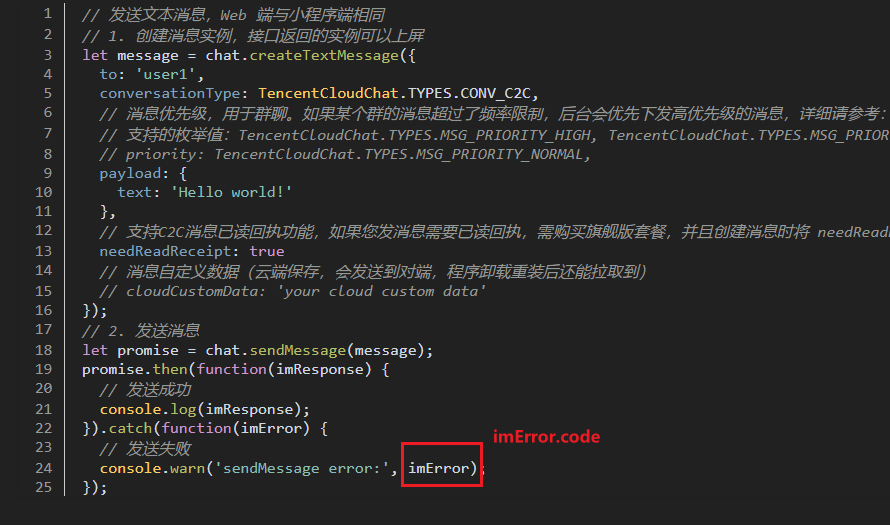
How to obtain the failed code when fail to send message?
Print imError.code inside the message callback catch. Click to view API Documentation.
How to retain local cache of historical messages when group dissolution, user exit or being kicked out occurs during TUIKit integration?
Take group dissolution as an example. Calling dismissGroup triggers the onGroupDismissed Webhook for all members. The TUI component invokes the deleteConversation API upon receiving the onGroupDismissed Webhook. To retain group chat history, you can comment out the deleteConversation call. The same applies to exiting or being removed from the group—simply remove the deleteConversation API call logic.
Pulling historical messages in iOS client call SDK with duplicate msgID and how to resolve?
The client-side msgID is concatenated from tinyid + clientTime + random, mainly focus on random field assignment.
Check if the message is sent through the server API. The RESTful API parameter MsgRandom is a required parameter at the upper layer. When sending, MsgRandom cannot be fixed; otherwise, msgID duplication may occur. (When sending messages through the client, there is no need to set random, as the SDK internally ensures random is generated randomly.)
Flutter Web UIKit integration, image sending reports "Error From TUIKit: Only JPG/PNG/JPEG/GIF images can be iploaded, Code: 2252" error. the image format is JPG, but the error persists. How to resolve?
Modify the image_picker Plugin version to: ^0.8.5+3. This issue should be resolved independently by the customer. The Chat Flutter Demo has no issues with sending on the Web.
Problem cause: The image picker plugin in the Chat UIKit component reports an error after the customer upgrades to a higher version.
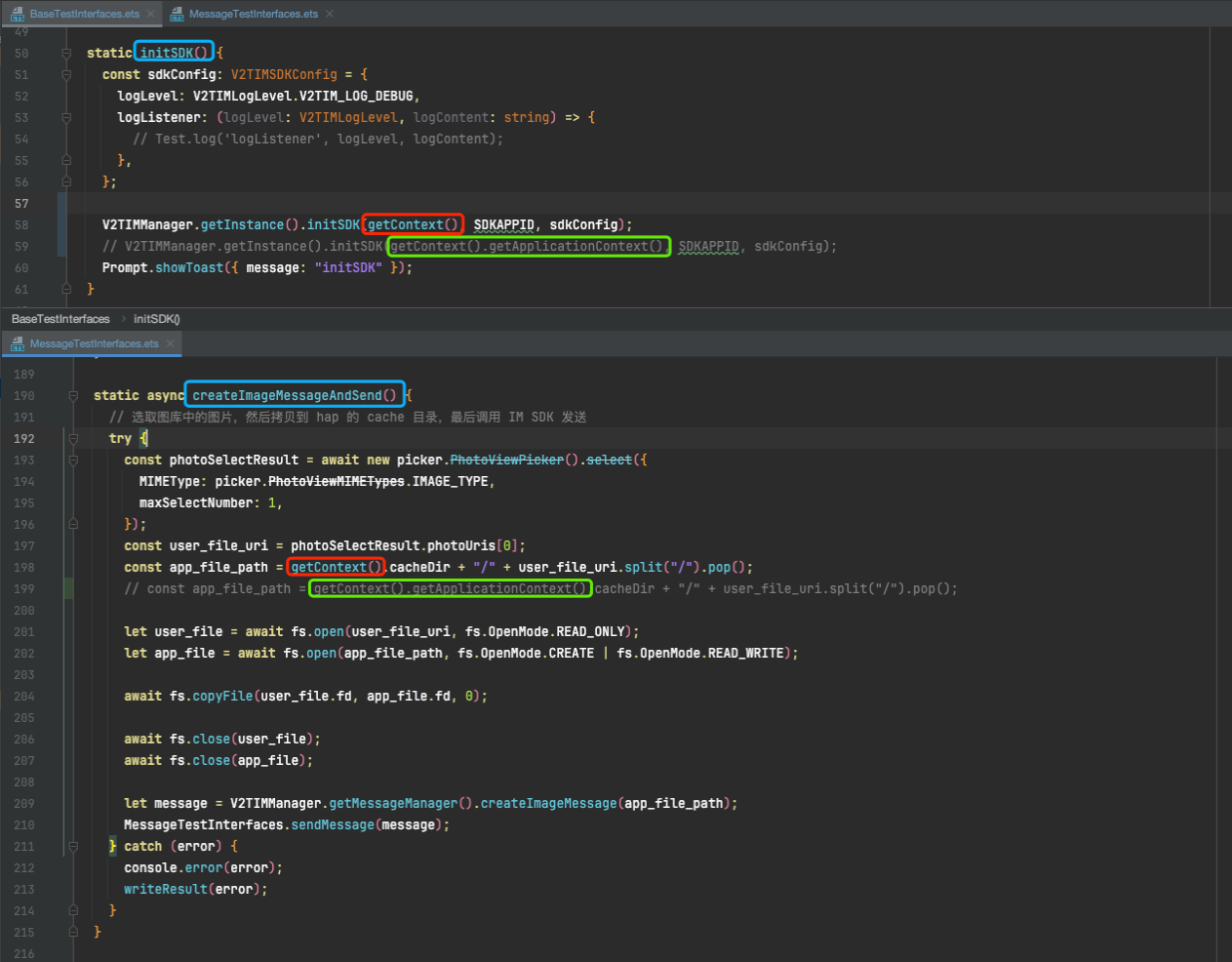
IM Harmony SDK image sending failure: What is the issue?
The getContext() passed in when initializing the IM SDK must match the context passed in as the application root directory in the cache, otherwise an error will occur.
Add the user to the blocklist. When designating "the blocked user" to send messages to oneself via REST API, one still receives them. What is the issue?
To take effect when sending a message, set the corresponding verification field. It is disabled by default. To enable it, set the message sending control option to WithBlackListCheck. For details, refer to C2C Messages request packet field SendMsgControl description.