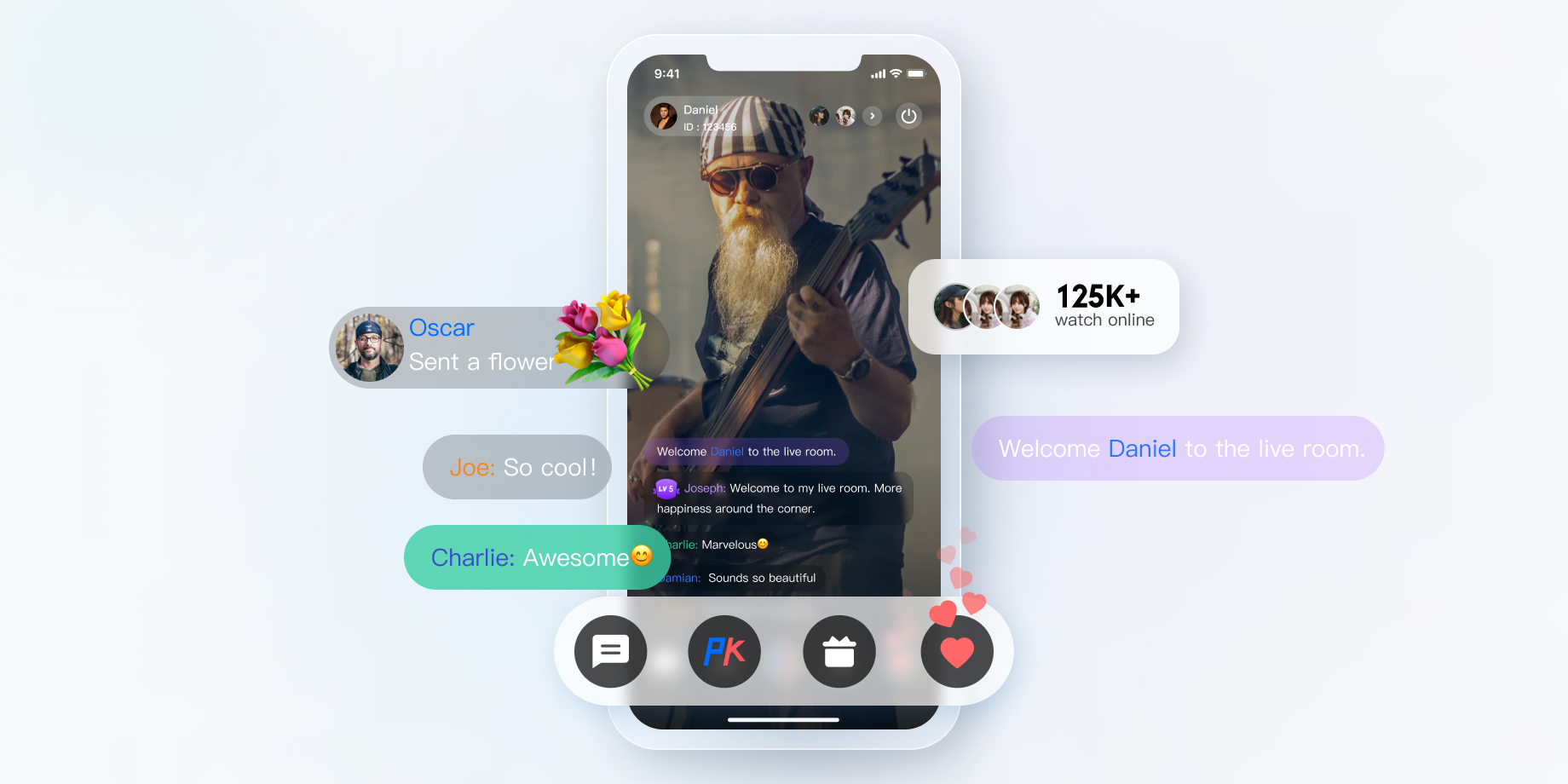
The live showroom scenario is a video interaction scenario under the social entertainment mode. It supports multi-user video mic connect, making it easier to engage users in mic connect, thus boosting user spending willingness and stickiness. Moreover, the live showroom also supports cross-room mic-connection PK between anchors from different rooms, further enhancing the fun of live streaming. Cross-room mic-connection PK with latency below 300 ms, supporting audience and anchor mic connecting, smooth on/off mic switching, meets the high-frequency interaction demands of the live showroom scenario. The intelligent beauty feature also meets the personalized needs of anchors, making live streaming more appealing.
Implementation Scheme
Typically, implementing a complete live showroom scenario involves several functional modules: Room Management, Seat Management, Media Stream Management, On-Cloud Recording, etc. The key actions and feature points under each feature module are shown in the table below. Each functional module will be introduced individually to provide a comprehensive understanding of the functionalities required for building a live showroom scenario.
Feature Module
Key Actions and Feature Points
Room management
Room list, create a room, enter a room, exit a room, and terminate a room.
Seat Management
Request to speak, become a listener, invite a listener to speak, remove a speaker, and mute a speaker.
Media Stream Management
Tencent Real-Time Communication (TRTC) RTC Engine Real-Time Interaction Solution
On-cloud recording
RTC Engine On-Cloud Recording
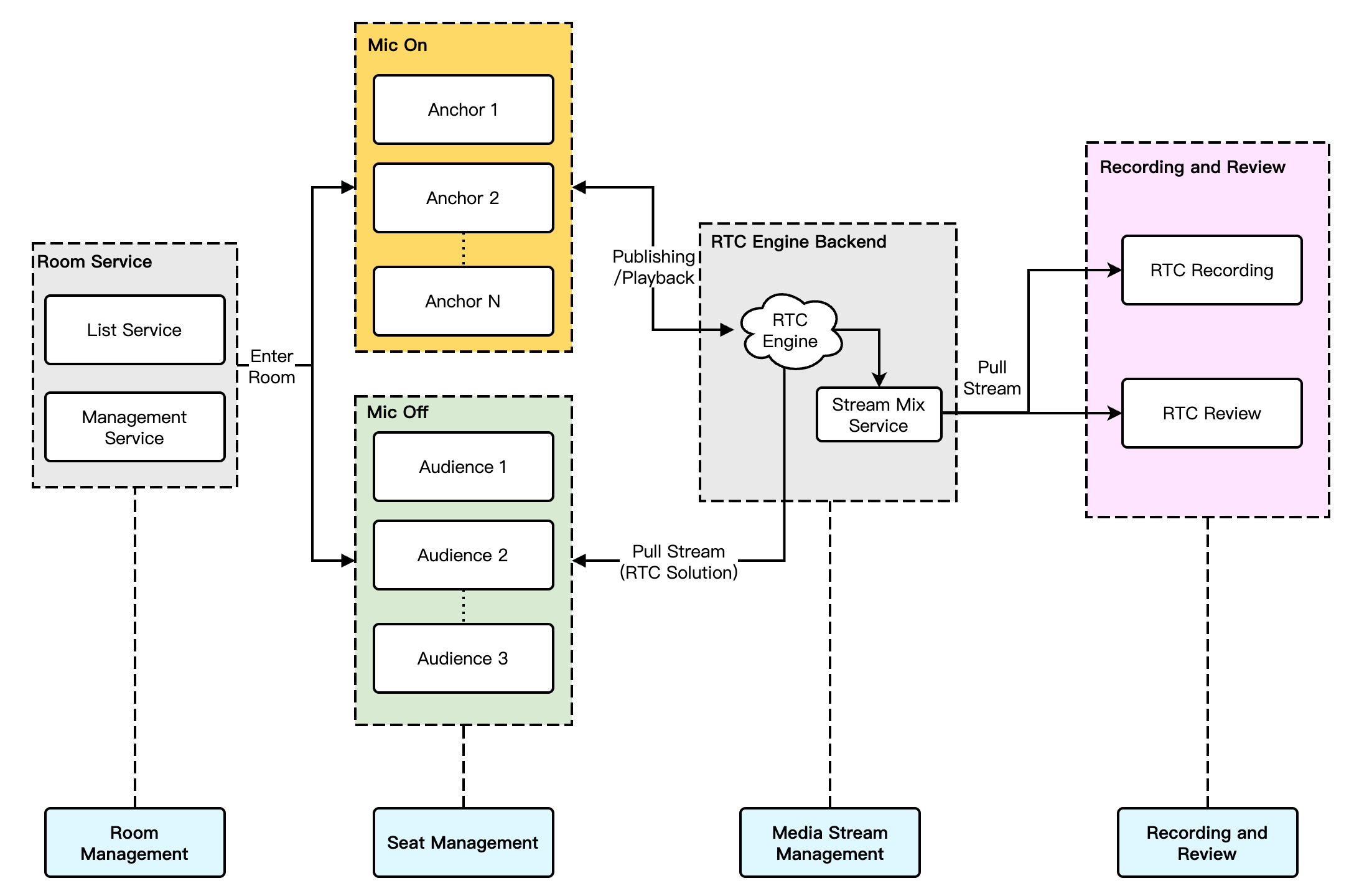
The overall business architecture of the live showroom scenario is shown in the figure below. The room owner creates a room, and users can choose to enter rooms that interest them. Users who enter the room can become speakers to participate in audio and video interactions with the anchor via the mic. Typically, due to compliance requirements, the audio and video content in the room needs to be recorded and submitted for review.
Note:
In the recording review process, you can select the target single stream or mixed stream based on actual business needs.
In the recording and review process, you can select RTC Engine recording review based on actual business needs.
Room Management
The Room Management Module is primarily responsible for maintaining the room list and includes the following features:
Create Room: After users log in to the business system, they can create a room. The room list needs to be updated after a room is created.
Enter a Room: Users can choose to enter an existing room. Upon entering, the current list of room members should be updated.
Exit a Room: Users can choose to exit the current room. Upon exiting, the current list of room members needs to be updated with a delete operation.
Destroy a Room: After all users exit the room, it needs to be destroyed. Upon destruction, the room list needs to be updated with a delete operation.
Note:
Room Management is an essential module for implementing live showroom, but not the main feature module. It can be implemented in conjunction with business systems and the Chat & RTC Engine SDK. For details, see Chat Room - Room Management.
Seat Management
Seats in a live streaming room are generally ordered and limited. Seat Management is primarily responsible for defining the number of seats in a room based on the business scenarios, as well as managing the status of all seats in the current room. Seat Management mainly includes: request to speak, become a listener, invite a listener to speak, remove a speaker, and mute a speaker.
After users enter a room, only idle seats can be applied for.
After the room owner approves a user to become a speaker, the seat status needs to be changed to non-idle.
After the user stops streaming and becomes a listener, the seat status needs to be reset.
The room owner has the authority to lock the seat, invite a listener to speak, remove a speaker, mute a speaker, etc.
Note:
Seat Management is an essential module for implementing live showroom, but not the main feature module. It can be implemented in conjunction with business systems and the Chat & RTC Engine SDK. For details, see Chat Room - Seat Management.
Media Stream Management
For ordinary live showroom scenarios, we recommend the RTC Engine real-time interaction solution: both anchors and audiences use the RTC protocol for streaming/playback, minimizing end-to-end latency and ensuring a smoother experience for the audiences when they join or leave a voice chat, without abrupt changes such as image fast-forwarding or rewinding. Taking the example of multi-person voice chat live streaming interactions, the main architecture of live showroom in a pure RTC streaming/playback scenario is shown in the figure below:
The overall process of this solution is as follows:
1. Both the anchor and audience connect through the signaling module, which is mainly responsible for controlling the live streaming process and synchronizing the live streaming status.
2. Regardless of whether any audience joins a voice chat, anchors and audiences perform streaming/playback via the RTC Engine audio and video cloud service.
3. After the audience requests to mic connect with the anchor, the signaling module will notify the anchor and synchronize the personal information of the co-speakers.
4. Once the anchor accepts the mic connection request, the mic-connecting audience starts streaming, and all members in the room receive stream update notifications and pull the audio-video stream of the mic-connecting audience.
5. When a mic-connecting audience member requests to disconnect, they stop streaming. All members in the room will receive stream update notifications and stop pulling that audience's audio and video stream.
Note:
The signaling module can be a self-developed signaling channel. At the same time, Tencent Cloud Chat is recommended for signaling interaction.
On-Cloud Recording
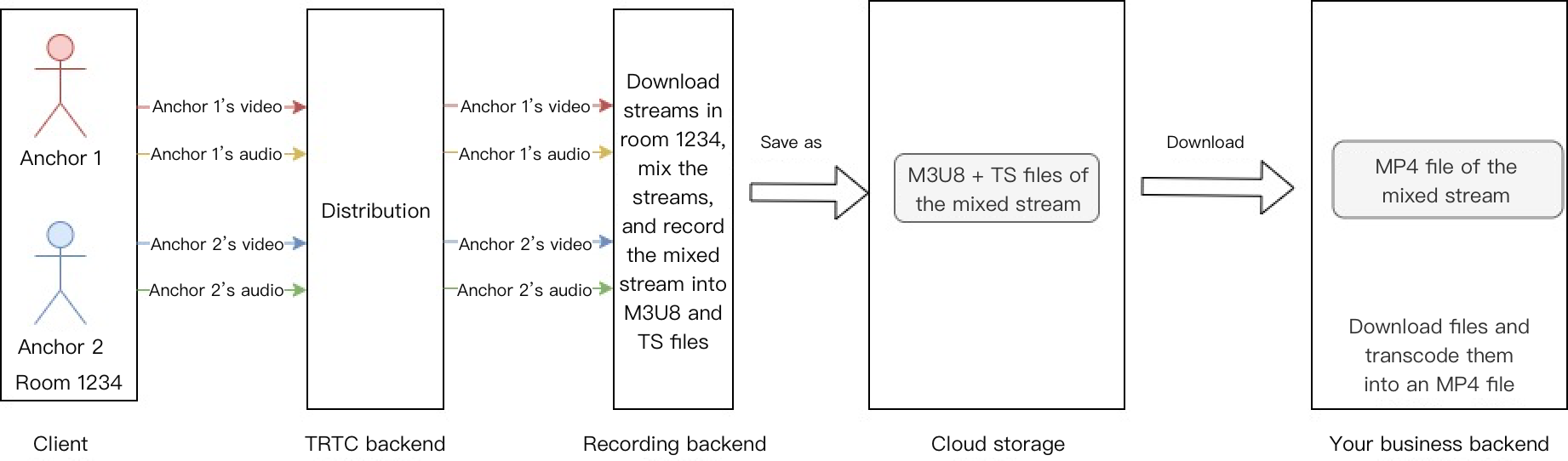
RTC Engine's latest upgraded On-Cloud Recording uses RTC Engine's internal real-time recording cluster for audio and video recording, offering a more complete and unified recording experience.
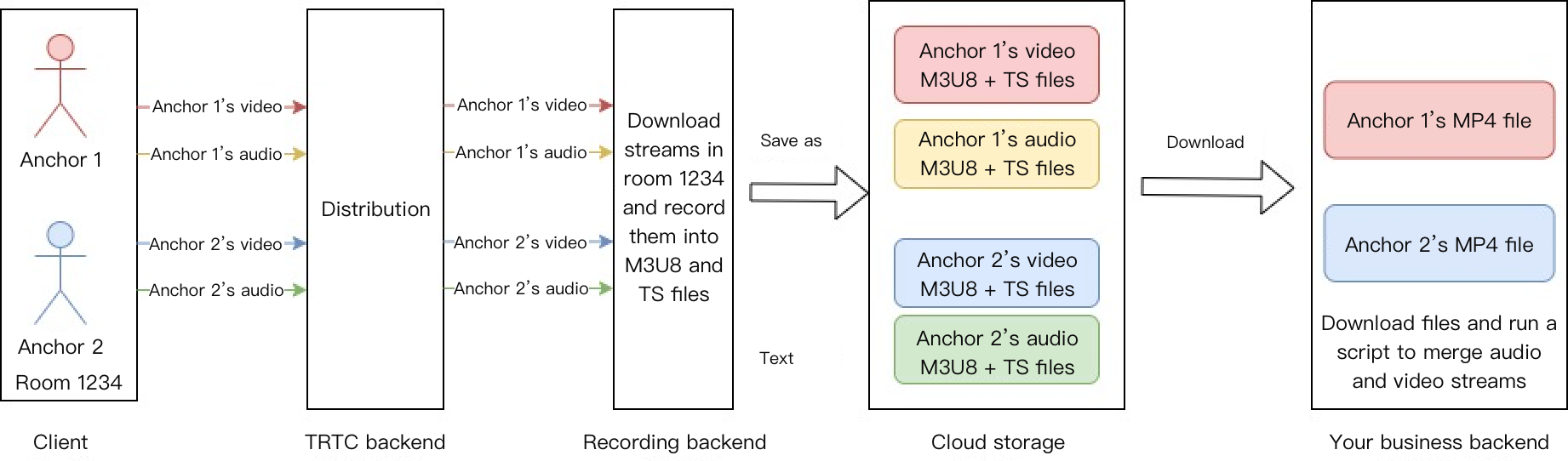
Single-stream recording: Via RTC Engine's on-cloud recording feature, you can record the audio and video stream of each user in the room into a separate file.
Mix Stream Recording: Record the audio-video media streams of the same room as a single file.
In the live showroom scenario, a common approach for recording is the mixed-stream recording solution, while the single stream recording solution can be chosen if there is a need for single stream review of the anchor or the mic-connecting audience.
Key Business Logic
Gift and Like Messages
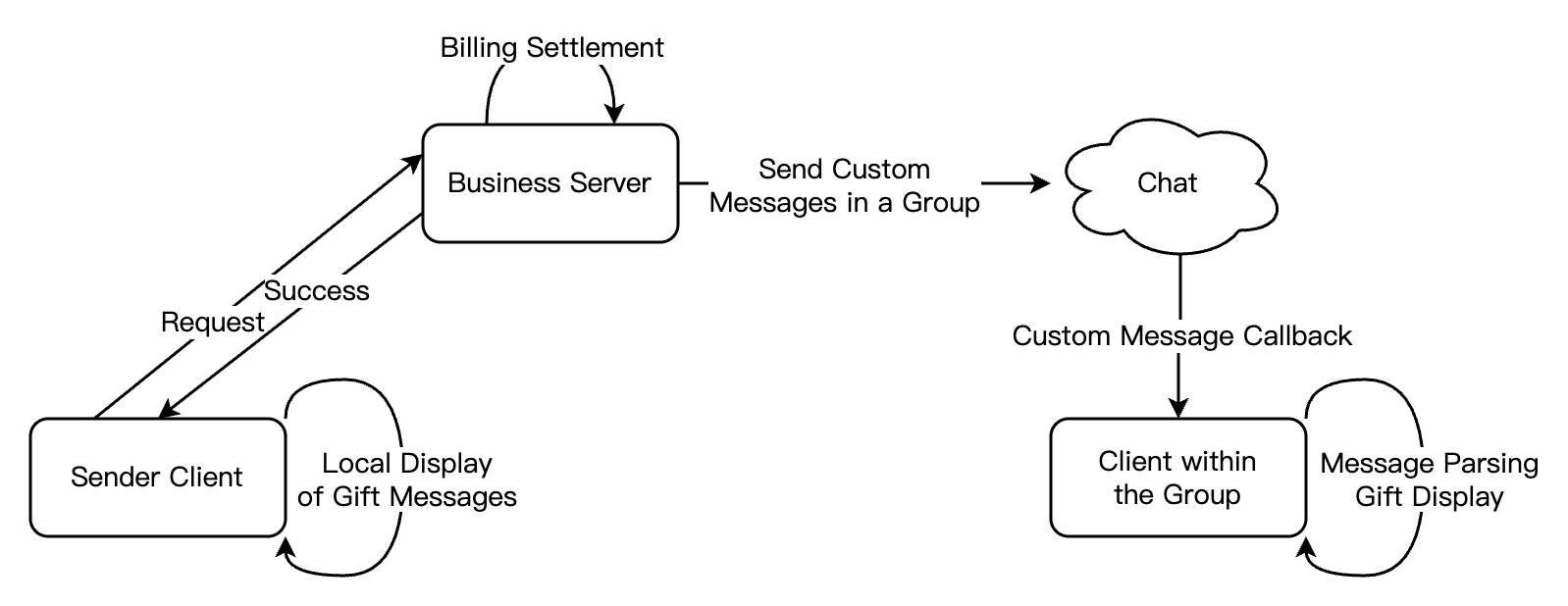
In live showroom scenarios, giving gifts and likes is a common way of interaction. The audience can express love to and support for the anchor through gift giving and likes, and the anchor can earn revenue. Below we will introduce the implementation of gift and like messages based on Tencent Cloud Chat.
Gift Messages
1. Non-persistent connection requests from the client to their business server involve gift billing logic.
2. After billing, the sender directly sees XXX gave XXX a gift (to ensure the sender sees the gift they sent themselves; when the message volume is large, it may trigger an abandonment strategy).
4. If encountering scenarios of rapid gift giving, you need to merge the messages:
If users directly select the number of gifts, such as choosing 99 gifts, the system should send a single message with the parameter set to 99 gifts.
If the gifts are in a combo and it's uncertain how many there will be, the business backend can merge every 20 (quantity adjustable) or send one for combos lasting over 1 second. Following this logic, for example, for a combo of 99 gifts, only 5 messages would need to be sent after optimization.
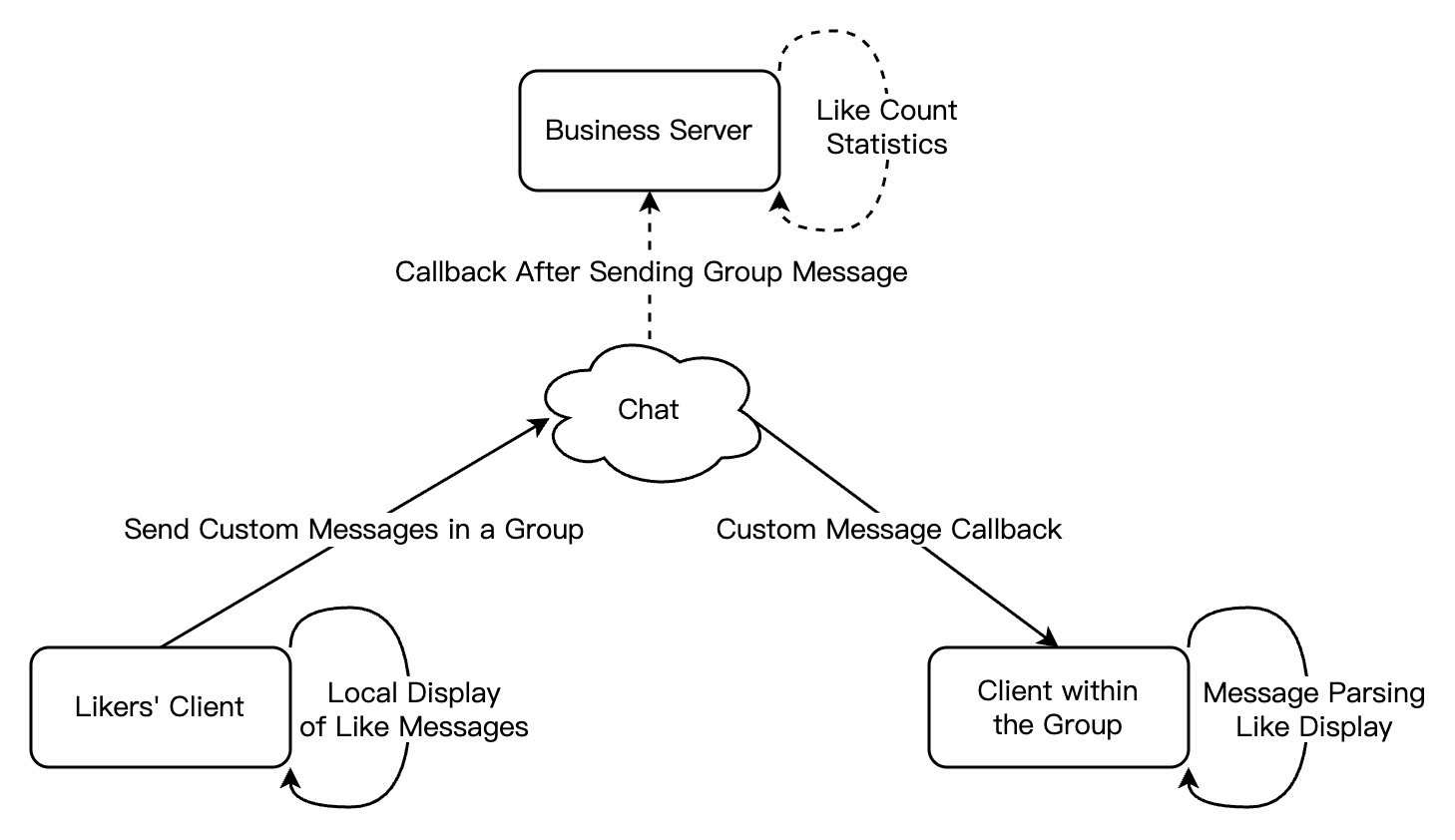
2. For like messages that need to be counted on the server, after traffic throttling is performed on the client, likes on the client are counted, and like messages within a short period of time are merged into one. The business server gets the count of likes in the callback after sending a group message for statistics.
3. For like messages that do not require counting, follow the same logic as step 2. Throttle the like messages on the client side and send them. There is no need to count them in the callback after sending the group message.
Note:
Please set important messages to high priority (e.g., gift messages) and high-frequency but not important messages to low priority (e.g., like messages).
Specific implementation steps for live streaming interaction features (such as likes, gifts, and on-screen comment chat) can be seen in Quick Integration Guide - Live Streaming
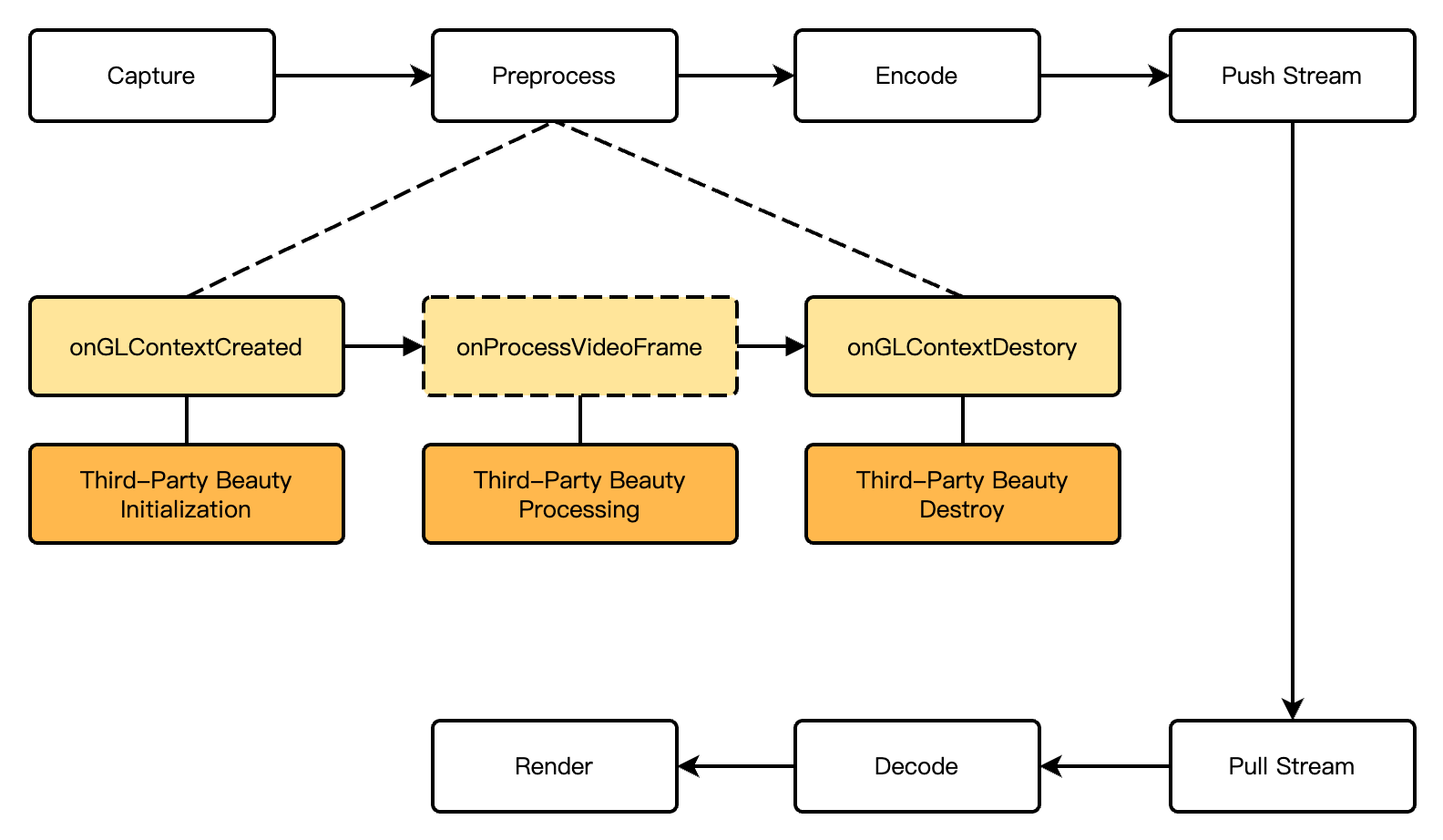
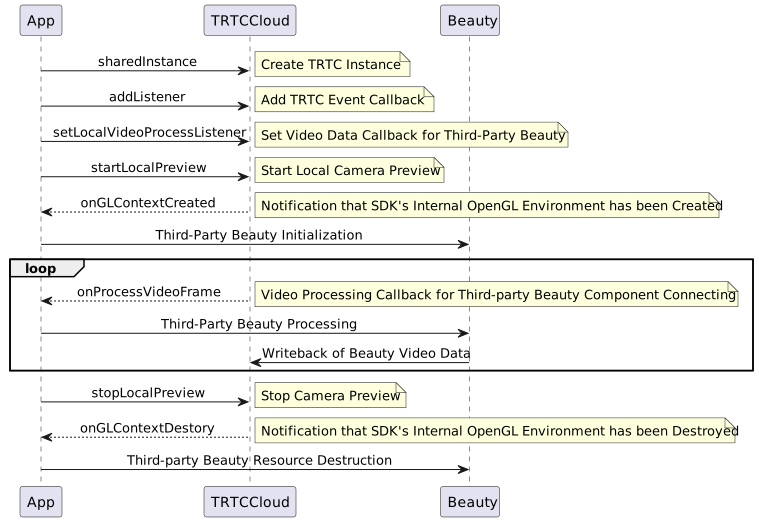
In live showroom scenarios, the beauty effect is a frequently used feature. It not only enhances the anchor's appearance but also adds fun to live interaction through sticker effects. RTC Engine supports the integration of the Beauty AR SDK as well as access to primary stream third-party beauty effect products on the market, such as Volcano Beauty and FaceUnity.
The basic effect is good, advanced effects like big eyes/slim faces are relatively good.
Moderately high
Relatively High
Supported
Android/iOS/PC/Linux
Cross-Room Mic-Connection PK
A cross-room mic-connection PK between anchors is a common gameplay in live showroom scenarios. It enhances the fun of interactive live streaming and stimulates the audience's desire to rank and give gifts. RTC Engine supports cross-room mic-connection PK among anchors in multiple rooms. The following introduces specific implementation methods.
1. How It Works
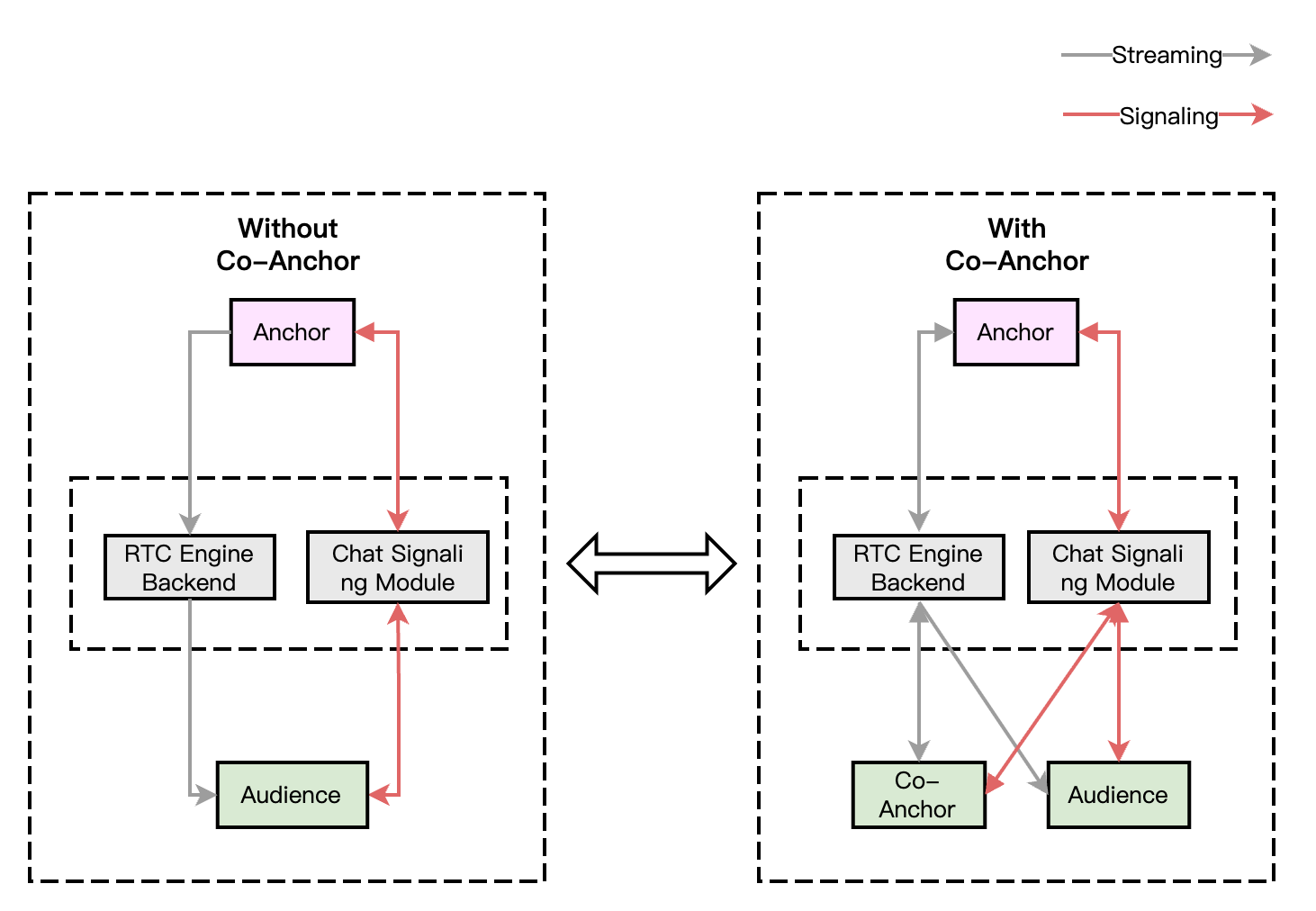
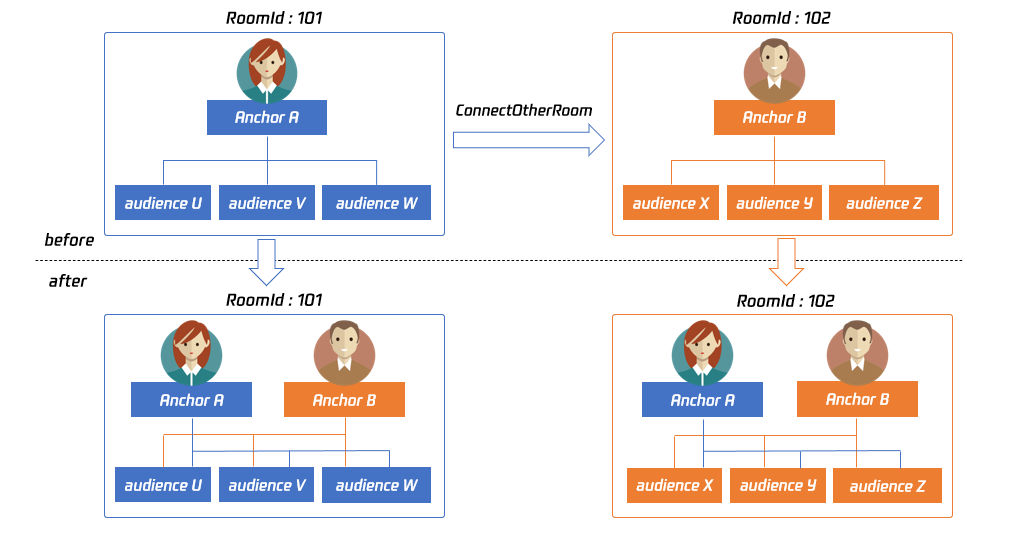
By default, only users in the same room can have audio and video calls, and the audio and video streams between different rooms are isolated. Through the cross-room mic-connection, the audio and video streams of an anchor in another room can be published in the current room, while the audio and video streams of the current anchor will also be published in the target anchor's room. This allows anchors in different rooms to share audio and video streams across rooms, enabling audiences in each room to watch the audio and video of both anchors.
The figure above shows the main process of cross-room mic-connection PK. For example: After anchor A in room 101 establishes a cross-room call with anchor B in room 102 using ConnectOtherRoom():
Users in room 101 will receive two event callbacks from anchor B: onRemoteUserEnterRoom(B) and onUserVideoAvailable(B,true). Therefore, users in room 101 can subscribe to the audio and video of anchor B.
Users in room 102 will receive two event callbacks from anchor A: onRemoteUserEnterRoom(A) and onUserVideoAvailable(A,true). Therefore, users in room 102 can subscribe to the audio and video of anchor A.
Note:
Both local and peer users participating in cross-room mic-connection PK must be in the anchor role and must have audio/video uplink capabilities.
Cross-room mic-connection PK with multiple room anchors can be achieved by calling ConnectOtherRoom() multiple times. Currently, a room can connect with up to three other room anchors at most, and up to 10 anchors in a room can conduct cross-room mic-connection PK with anchors in other rooms.
RTC Engine cross-room mic-connection PK can also be implemented via createSubCloud() to create sub-instance(s) and join streaming/playback in another room. Currently, the number of the sub-instance(s) is not limited, facilitating the future expansion of business scenarios involving PK between multiple rooms or hosts between multiple anchors.
2. Real-Time Interactive Cross-Room Mic-Connection Process
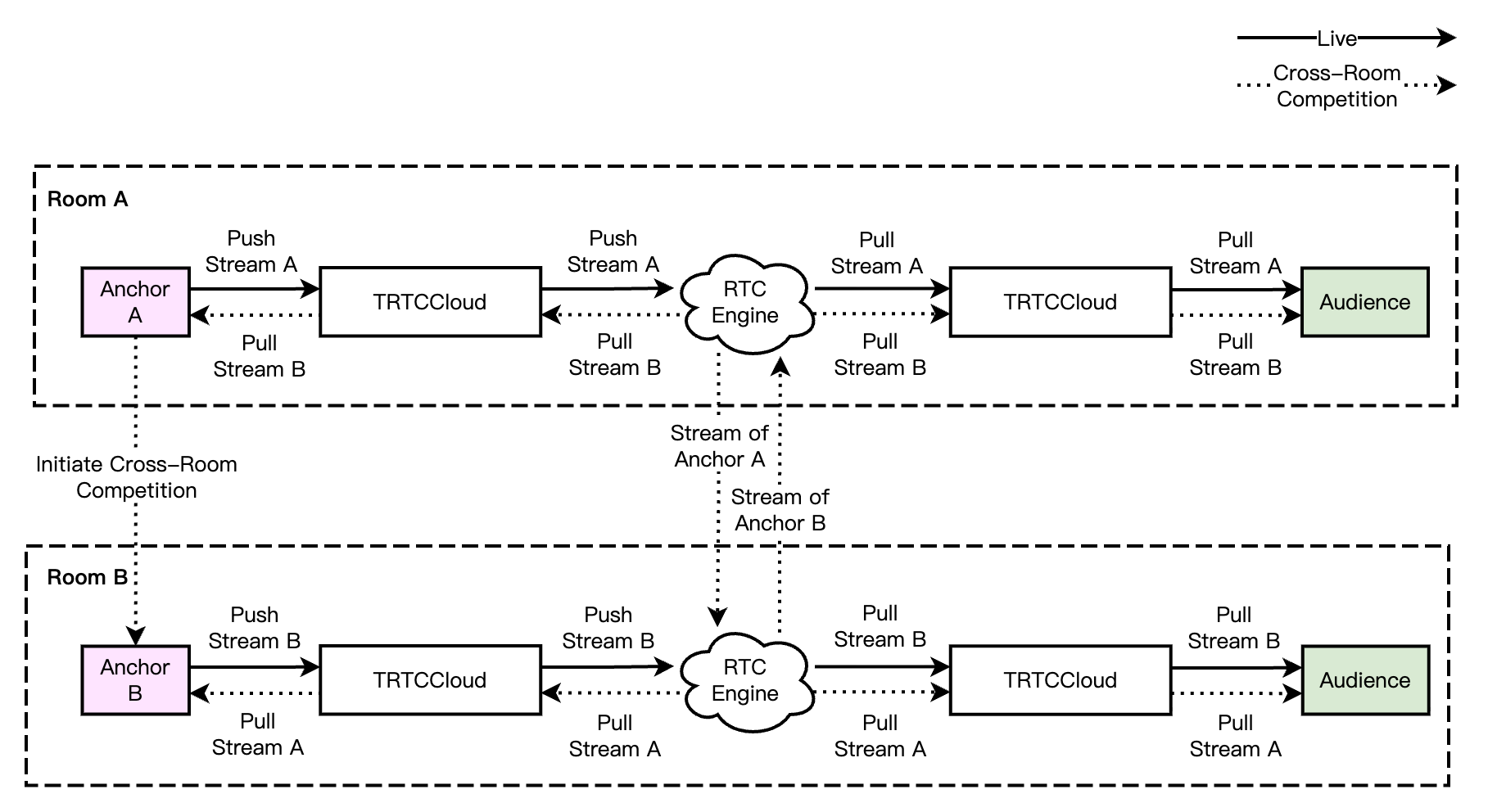
In a pure RTC scenario, the cross-room mic-connection PK process is straightforward. Anchors and cross-room mic-connection anchors mutually pull RTC single streams, and the audience simultaneously pulls the RTC single streams of both anchors and cross-room mic-connection anchors. The audience can independently control the subscription logic of the media streams of anchors and cross-room mic-connecting anchors. The real-time interactive cross-room call process is shown in the diagram below.
Note:
In real-time cross-room mic-connection scenarios, audiences in the room can independently control the logic of subscribing to the media streams of cross-room connecting anchors, or it can be changed by the room owner to change the uplink capability of a cross-room anchor in their rooms.
Scenario Approach
Single-Anchor Live Streaming
A live streaming room with only one anchor is called single-anchor live streaming. In this scenario, the room owner is the only anchor. The audience can join the live stream, watch the live streaming, send messages, and give gifts to the room owner.
Multi-Person Co-Anchoring Live Streaming
Multi-person co-anchoring live streaming refers to a scenario where multiple anchors engage in real-time audio and video interactions within the live streaming room. The room owner can invite a listener to speak and control the seats; audiences can also request to speak to interact with the anchor.
Cross-Room Competition Live Streaming
In the live streaming room, to enhance the atmosphere and quickly attract followers, the room owner can invite another anchor from a different live room to engage in mic connecting or online PK. The audience in the mic-connected live streaming room can simultaneously watch the interaction between the two anchors and send gifts based on their performance, or quickly switch between live streaming rooms to vote for different room owners. This is a typical scenario for video competition live streaming.
Live Streaming Merchandising
Live streaming merchandising combines e-commerce with video interactive live streaming. In the live streaming room, the anchor introduces products to the audience and provides product lists and links; the audience can click the link to place orders quickly for products they like. During the live streaming, the audience can become a speaker to interact with the room owner in real-time, such as asking about product details, negotiating prices, and sharing their experience of using the products; the room owner can also engage in competition live streaming with another room's owner, showcasing their products to inspire the audience's purchasing enthusiasm and add fun to the live streaming.
Provides a low-latency, high-quality multi-person audio and video real-time interaction live streaming solution, which is a foundational capability for live showroom scenarios.
Provides room management and seat management capabilities based on group features, enables the sending and receiving of rich media messages such as live streaming room-wide messaging, public screen messages, as well as custom signaling and other communication needs.
Catering to media such as audio, video, and images, it offers an integrated high-quality media service that includes creation, upload, storage, transcoding, media processing service, media AI, accelerated distribution and playback, and copyright protection.