
Android
This document helps you move a Web app from the Twilio Video SDK to the Tencent RTC Engine SDK. It covers key architecture differences, step-by-step migration instructions, practical feature examples, and advanced feature comparisons to help you migrate smoothly.
If you’re starting a new project with Tencent RTC Engine, begin with the Integration Guide. For a high-level introduction, see the Product Overview.
Core concepts and architecture differences
Concept Comparison
This section maps key concepts between Tencent RTC Engine and Twilio Video. For Tencent RTC terminology, see Basic Concepts.
Concept | Tencent RTC Engine | Twilio Video | Description |
Room | Room | Room | Session space connecting RTC participants. Tencent RTC uses roomId (numeric) or strRoomId (string); Twilio uses roomName (string). |
User | User | Participant | User participating in audio/video calls. |
Anchor | Anchor | — | User type with streaming permissions; can send and receive audio/video streams to/from the server. |
Audience | Audience | — | User type that only receives audio/video streams. |
Application Identifier | SDKAppID | Account SID | Unique application identifier. |
Authentication Credential | UserSig | Access Token | Client authentication credential. |
User Identifier | userId | Identity | Unique user identifier. |
Core Entry Class | TRTCCloud | Video (class) | SDK core entry class. |
Technical Architecture Differences
Twilio Video Architecture
Twilio Video uses a Track-based architecture:
You explicitly create
LocalAudioTrack and LocalVideoTrack.You publish tracks when connecting to a room (for example, via
ConnectOptions.Builder / the connect options).You subscribe to remote tracks through
RemoteParticipant.Listener callbacks.You render video by attaching tracks to a
VideoSink or VideoView.Tencent RTC Engine Architecture
Tencent RTC Engine follows an API-driven architecture:
You use the TRTCCloud singleton and call APIs like
startLocalPreview() and startLocalAudio() to capture and publish.You subscribe to remote media via
TRTCCloudListener callbacks and play it with startRemoteView().You render video using
TXCloudVideoView.You typically don’t need to create or manage track objects yourself.
This API design streamlines development and reduces object management complexity.
Migration Preparation
Step 1. Activate the Service
To access Tencent RTC Engine services, you need to create an application and obtain credentials. Follow these steps in the Tencent RTC Console:
1. Register or log in to your Tencent RTC account, then access the Tencent RTC Console.
2. Click Create Application.
3. In the popup, enter your application name, select RTC Engine, and click Create.

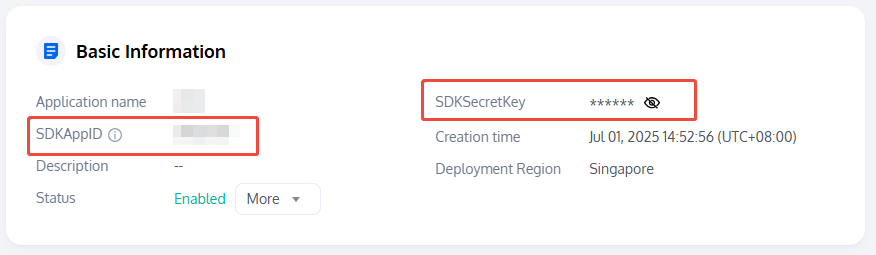
4. Once your application is created, locate the following credentials under Basic Information:
SDKAppID: Automatically generated application ID that uniquely identifies your Tencent RTC application.
SDKSecretKey: Used to generate secure UserSig signatures for authenticated access to Tencent RTC services.
Note:
Authentication Comparison: Twilio Video uses Access Token for authentication, while Tencent RTC uses UserSig. Both are time-sensitive credentials generated on your server, but the generation methods differ. See UserSig Authentication Documentation.
Step 2. Import the SDK
Twilio Video SDK (Original Dependency)
dependencies {implementation 'com.twilio:video-android:7.10.2'}
Tencent RTC Engine SDK (New Dependency)
Add the TRTC SDK dependency to the
dependencies section of app/build.gradle.dependencies {implementation 'com.tencent.liteav:LiteAVSDK_TRTC:latest.release'}
Step 3. Project Configuration
Specify CPU Architecture
Specify supported CPU architectures in the
defaultConfig section of app/build.gradle for devices using armeabi-v7a/arm64-v8a.android {defaultConfig {ndk {abiFilters 'armeabi-v7a', 'arm64-v8a'}}}
Configure Permissions
Add required permissions for TRTC SDK in
AndroidManifest.xml.<uses-permission android:name="android.permission.INTERNET" /><uses-permission android:name="android.permission.ACCESS_NETWORK_STATE" /><uses-permission android:name="android.permission.ACCESS_WIFI_STATE" /><uses-permission android:name="android.permission.CAMERA" /><uses-permission android:name="android.permission.RECORD_AUDIO" /><uses-permission android:name="android.permission.MODIFY_AUDIO_SETTINGS" /><uses-permission android:name="android.permission.BLUETOOTH" /><uses-feature android:name="android.hardware.camera.autofocus" />
Note:
Do not set
android:hardwareAccelerated="false". Disabling hardware acceleration will prevent video streams from rendering.Configure Proguard Rules
Add TRTC SDK classes and members to the keep list in
proguard-rules.pro.-keep class com.tencent.** { *; }
Migration Guide
Step 4. Initialize the SDK Instance
Twilio Video
// Twilio Video does not require explicit SDK instance initialization.// Connect to a room directly using Video.connect() static method.// Optional: Set log levelVideo.setLogLevel(LogLevel.DEBUG);
Tencent RTC Engine
// Create TRTCCloud singleton instanceTRTCCloud mCloud = TRTCCloud.sharedInstance(getApplicationContext());
// Create TRTCCloud singleton instanceval mCloud = TRTCCloud.sharedInstance(applicationContext)
Step 5. Set Event Listeners
Twilio Video
Room.Listener roomListener = new Room.Listener() {@Overridepublic void onConnected(Room room) {Log.i("Twilio", "Connected to " + room.getName());}@Overridepublic void onConnectFailure(Room room, TwilioException twilioException) {Log.e("Twilio", "Connect failure: " + twilioException.getMessage());}@Overridepublic void onDisconnected(Room room, TwilioException twilioException) {Log.i("Twilio", "Disconnected from " + room.getName());}@Overridepublic void onParticipantConnected(Room room, RemoteParticipant remoteParticipant) {Log.i("Twilio", "Participant connected: " + remoteParticipant.getIdentity());}@Overridepublic void onParticipantDisconnected(Room room, RemoteParticipant remoteParticipant) {Log.i("Twilio", "Participant disconnected: " + remoteParticipant.getIdentity());}@Overridepublic void onReconnecting(Room room, TwilioException twilioException) {Log.i("Twilio", "Reconnecting...");}@Overridepublic void onReconnected(Room room) {Log.i("Twilio", "Reconnected");}};
Tencent RTC Engine
TRTCCloudListener trtcListener = new TRTCCloudListener() {@Overridepublic void onEnterRoom(long result) {if (result > 0) {Log.i("TRTC", "Room entry successful, took " + result + "ms");} else {Log.e("TRTC", "Room entry failed, error code " + result);}}@Overridepublic void onExitRoom(int reason) {// reason: 0-user voluntarily left 1-kicked out 2-room dissolvedLog.i("TRTC", "Exited room, reason: " + reason);}@Overridepublic void onRemoteUserEnterRoom(String userId) {Log.i("TRTC", "Remote user entered room: " + userId);}@Overridepublic void onRemoteUserLeaveRoom(String userId, int reason) {Log.i("TRTC", "Remote user left room: " + userId);}@Overridepublic void onError(int errCode, String errMsg, Bundle extraInfo) {Log.e("TRTC", "Error: " + errCode + " - " + errMsg);}@Overridepublic void onConnectionLost() {Log.w("TRTC", "Disconnected from server");}@Overridepublic void onTryToReconnect() {Log.i("TRTC", "Attempting to reconnect...");}@Overridepublic void onConnectionRecovery() {Log.i("TRTC", "Connection recovered");}};mCloud.addListener(trtcListener);
val trtcListener = object : TRTCCloudListener() {override fun onEnterRoom(result: Long) {if (result > 0) {Log.i("TRTC", "Room entry successful, took ${result}ms")} else {Log.e("TRTC", "Room entry failed, error code $result")}}override fun onExitRoom(reason: Int) {// reason: 0-user voluntarily left 1-kicked out 2-room dissolvedLog.i("TRTC", "Exited room, reason: $reason")}override fun onRemoteUserEnterRoom(userId: String?) {Log.i("TRTC", "Remote user entered room: $userId")}override fun onRemoteUserLeaveRoom(userId: String?, reason: Int) {Log.i("TRTC", "Remote user left room: $userId")}override fun onError(errCode: Int, errMsg: String?, extraInfo: Bundle?) {Log.e("TRTC", "Error: $errCode - $errMsg")}override fun onConnectionLost() {Log.w("TRTC", "Disconnected from server")}override fun onTryToReconnect() {Log.i("TRTC", "Attempting to reconnect...")}override fun onConnectionRecovery() {Log.i("TRTC", "Connection recovered")}}mCloud.addListener(trtcListener)
Callback Event Mapping Table:
Twilio Video Callback | Tencent RTC Engine Callback | Description |
onConnected | onEnterRoom (result > 0) | Successfully connected to/entered room. |
onConnectFailure | onEnterRoom (result < 0) or onError | Connection failed. |
onDisconnected | onExitRoom | Disconnected/left the room. |
onParticipantConnected | onRemoteUserEnterRoom | Remote user entered. |
onParticipantDisconnected | onRemoteUserLeaveRoom | Remote user left. |
onReconnecting | onConnectionLost + onTryToReconnect | Reconnecting. |
onReconnected | onConnectionRecovery | Reconnection successful. |
Step 6. Entering/Connecting to Room
Twilio Video
// Build connection options (exclude local tracks; publish tracks dynamically after connecting)ConnectOptions connectOptions = new ConnectOptions.Builder(accessToken).roomName("my-room").build();// Connect to the room using the predefined roomListenerRoom room = Video.connect(context, connectOptions, roomListener);
Tencent RTC Engine
// Set up room entry parametersTRTCCloudDef.TRTCParams trtcParams = new TRTCCloudDef.TRTCParams();trtcParams.sdkAppId = 2000000000; // Your SDKAppIDtrtcParams.userId = "user_id"; // User IDtrtcParams.userSig = "user_sig"; // User signaturetrtcParams.role = TRTCCloudDef.TRTCRoleAudience; // User role when entering the roomtrtcParams.strRoomId = "my-room"; // Room ID (string type)// If using a numeric room ID:// trtcParams.roomId = 123456;// Enter the room// TRTC_APP_SCENE_VIDEOCALL: Video call scenario (equivalent to Twilio Peer-to-Peer Room)// TRTC_APP_SCENE_LIVE: Interactive Live Streaming scenario (equivalent to Twilio Group Room)mCloud.enterRoom(trtcParams, TRTCCloudDef.TRTC_APP_SCENE_LIVE);
// Set up room entry parametersval trtcParams = TRTCCloudDef.TRTCParams().apply {sdkAppId = 2000000000 // Your SDKAppIDuserId = "user_id" // User IDuserSig = "user_sig" // User signaturerole = TRTCCloudDef.TRTCRoleAudience // User role when entering the roomstrRoomId = "my-room" // Room ID (string type)// If using a numeric room ID:// roomId = 123456}// Enter the room// TRTC_APP_SCENE_VIDEOCALL: Video call scenario (equivalent to Twilio Peer-to-Peer Room)// TRTC_APP_SCENE_LIVE: Interactive Live Streaming scenario (equivalent to Twilio Group Room)mCloud.enterRoom(trtcParams, TRTCCloudDef.TRTC_APP_SCENE_LIVE)
Note:
Twilio Peer-to-Peer Room corresponds to TRTC TRTC_APP_SCENE_VIDEOCALL (video call) or TRTC_APP_SCENE_AUDIOCALL (audio call)
Twilio Group Room corresponds to TRTC TRTC_APP_SCENE_LIVE (Interactive Live Streaming) or TRTC_APP_SCENE_VOICE_CHATROOM (Voice Chat Room)
Step 7. Capture and Publish Local Audio/Video Streams
Twilio Video
// --- Local Video ---// Create camera capturerCameraCapturer cameraCapturer = new CameraCapturer(context,CameraCapturer.CameraSource.FRONT_CAMERA);// Create local video trackLocalVideoTrack localVideoTrack = LocalVideoTrack.create(context, true, cameraCapturer);// Render to viewVideoView localVideoView = findViewById(R.id.local_video_view);localVideoTrack.addSink(localVideoView);// --- Local Audio ---LocalAudioTrack localAudioTrack = LocalAudioTrack.create(context, true);// --- Publish tracks (Method 1: publish on connect) ---ConnectOptions connectOptions = new ConnectOptions.Builder(accessToken).roomName("my-room").audioTracks(Collections.singletonList(localAudioTrack)).videoTracks(Collections.singletonList(localVideoTrack)).build();Room room = Video.connect(context, connectOptions, roomListener);// --- Publish tracks (Method 2: publish dynamically after connect) ---room.getLocalParticipant().publishTrack(localVideoTrack);room.getLocalParticipant().publishTrack(localAudioTrack);
Tencent RTC Engine
// --- Local Video ---// Use TXCloudVideoView in XML layout// <com.tencent.rtmp.ui.TXCloudVideoView// android:id="@+id/local_video_view"// android:layout_width="match_parent"// android:layout_height="match_parent" />TXCloudVideoView localVideoView = findViewById(R.id.local_video_view);// Set local render parametersTRTCCloudDef.TRTCRenderParams renderParams = new TRTCCloudDef.TRTCRenderParams();renderParams.fillMode = TRTCCloudDef.TRTC_VIDEO_RENDER_MODE_FILL;renderParams.mirrorType = TRTCCloudDef.TRTC_VIDEO_MIRROR_TYPE_AUTO;mCloud.setLocalRenderParams(renderParams);// Start local camera preview (true = front camera)mCloud.startLocalPreview(true, localVideoView);// --- Local Audio ---// Start local audio capture and publish// TRTC_AUDIO_QUALITY_SPEECH: Speech mode// TRTC_AUDIO_QUALITY_DEFAULT: Default mode// TRTC_AUDIO_QUALITY_MUSIC: Music modemCloud.startLocalAudio(TRTCCloudDef.TRTC_AUDIO_QUALITY_DEFAULT);
// --- Local Video ---val localVideoView: TXCloudVideoView = findViewById(R.id.local_video_view)// Set local render parametersval renderParams = TRTCCloudDef.TRTCRenderParams().apply {fillMode = TRTCCloudDef.TRTC_VIDEO_RENDER_MODE_FILLmirrorType = TRTCCloudDef.TRTC_VIDEO_MIRROR_TYPE_AUTO}mCloud.setLocalRenderParams(renderParams)// Start local camera preview (true = front camera)mCloud.startLocalPreview(true, localVideoView)// --- Local Audio ---// Start local audio capture and publishmCloud.startLocalAudio(TRTCCloudDef.TRTC_AUDIO_QUALITY_DEFAULT)
Note:
Twilio Video requests permissions when creating local tracks. Tencent RTC Engine requires permissions for
startLocalPreview and startLocalAudio. On Android, request CAMERA and RECORD_AUDIO permissions at runtime before calling these APIs.Step 8. Subscribe to and Play Remote Audio/Video Streams
Twilio Video
// Set listener for remote participantremoteParticipant.setListener(new RemoteParticipant.Listener() {@Overridepublic void onVideoTrackSubscribed(RemoteParticipant remoteParticipant,RemoteVideoTrackPublication remoteVideoTrackPublication,RemoteVideoTrack remoteVideoTrack) {// Remote video track subscribed, add rendererVideoView remoteVideoView = findViewById(R.id.remote_video_view);remoteVideoTrack.addSink(remoteVideoView);}@Overridepublic void onVideoTrackUnsubscribed(RemoteParticipant remoteParticipant,RemoteVideoTrackPublication remoteVideoTrackPublication,RemoteVideoTrack remoteVideoTrack) {// Remote video track unsubscribed, remove rendererremoteVideoTrack.removeSink(remoteVideoView);}@Overridepublic void onAudioTrackSubscribed(RemoteParticipant remoteParticipant,RemoteAudioTrackPublication remoteAudioTrackPublication,RemoteAudioTrack remoteAudioTrack) {// Remote audio track subscribed (auto-play)}// ... other callback methods});
Tencent RTC Engine
@Overridepublic void onUserVideoAvailable(String userId, boolean available) {if (available) {// Remote user started publishing video, start renderingTXCloudVideoView remoteVideoView = findViewById(R.id.remote_video_view);mCloud.startRemoteView(userId, TRTCCloudDef.TRTC_VIDEO_STREAM_TYPE_BIG,remoteVideoView);} else {// Remote user stopped publishing video, stop renderingmCloud.stopRemoteView(userId, TRTCCloudDef.TRTC_VIDEO_STREAM_TYPE_BIG);}}@Overridepublic void onUserAudioAvailable(String userId, boolean available) {// Remote audio auto-plays by default, no manual handling needed// To mute a specific remote user:// mCloud.muteRemoteAudio(userId, true);}
override fun onUserVideoAvailable(userId: String?, available: Boolean) {if (available) {// Remote user started publishing video, start renderingval remoteVideoView: TXCloudVideoView = findViewById(R.id.remote_video_view)mCloud.startRemoteView(userId, TRTCCloudDef.TRTC_VIDEO_STREAM_TYPE_BIG,remoteVideoView)} else {// Remote user stopped publishing video, stop renderingmCloud.stopRemoteView(userId, TRTCCloudDef.TRTC_VIDEO_STREAM_TYPE_BIG)}}override fun onUserAudioAvailable(userId: String?, available: Boolean) {// Remote audio auto-plays by default, no manual handling needed// To mute a specific remote user:// mCloud.muteRemoteAudio(userId, true)}
Step 9. Mute/Unmute Local Audio/Video
Twilio Video
// Mute/unmute local audiolocalAudioTrack.enable(false); // MutelocalAudioTrack.enable(true); // Unmute// Pause/resume local videolocalVideoTrack.enable(false); // Pause videolocalVideoTrack.enable(true); // Resume video
Tencent RTC Engine
// Mute/unmute local audiomCloud.muteLocalAudio(true); // MutemCloud.muteLocalAudio(false); // Unmute// Pause/resume local videomCloud.muteLocalVideo(TRTCCloudDef.TRTC_VIDEO_STREAM_TYPE_BIG, true); // PausemCloud.muteLocalVideo(TRTCCloudDef.TRTC_VIDEO_STREAM_TYPE_BIG, false); // Resume// Completely stop/restart camera via stopLocalPreview/startLocalPreviewmCloud.stopLocalPreview(); // Completely stop camera
// Mute/unmute local audiomCloud.muteLocalAudio(true) // MutemCloud.muteLocalAudio(false) // Unmute// Pause/resume local videomCloud.muteLocalVideo(TRTCCloudDef.TRTC_VIDEO_STREAM_TYPE_BIG, true) // PausemCloud.muteLocalVideo(TRTCCloudDef.TRTC_VIDEO_STREAM_TYPE_BIG, false) // Resume// Completely stop/restart camera via stopLocalPreview/startLocalPreviewmCloud.stopLocalPreview() // Completely stop camera
Step 10. Mute/Unmute Remote Audio/Video
Twilio Video
// Twilio does not provide direct API to mute remote users.// Achieved by unsubscribing remote tracks.// Unsubscribe remote audioremoteAudioTrackPublication.getRemoteAudioTrack().setPlaybackEnabled(false);// Unsubscribe remote videoremoteVideoTrack.removeSink(remoteVideoView);
Tencent RTC Engine
// Mute/unmute specified remote user's audiomCloud.muteRemoteAudio("remote_user_id", true); // Mute remote usermCloud.muteRemoteAudio("remote_user_id", false); // Unmute remote user// Mute/unmute all remote users' audiomCloud.muteAllRemoteAudio(true); // Mute all remote usersmCloud.muteAllRemoteAudio(false); // Unmute all remote users// Pause/resume specified remote user's videomCloud.muteRemoteVideoStream("remote_user_id",TRTCCloudDef.TRTC_VIDEO_STREAM_TYPE_BIG, true); // Pause remote videomCloud.muteRemoteVideoStream("remote_user_id",TRTCCloudDef.TRTC_VIDEO_STREAM_TYPE_BIG, false); // Resume remote video// Pause/resume all remote users' videomCloud.muteAllRemoteVideoStreams(true); // Pause all remote videomCloud.muteAllRemoteVideoStreams(false); // Resume all remote video
// Mute/unmute specified remote user's audiomCloud.muteRemoteAudio("remote_user_id", true) // Mute remote usermCloud.muteRemoteAudio("remote_user_id", false) // Unmute remote user// Mute/unmute all remote users' audiomCloud.muteAllRemoteAudio(true) // Mute all remote usersmCloud.muteAllRemoteAudio(false) // Unmute all remote users// Pause/resume specified remote user's videomCloud.muteRemoteVideoStream("remote_user_id",TRTCCloudDef.TRTC_VIDEO_STREAM_TYPE_BIG, true) // Pause remote videomCloud.muteRemoteVideoStream("remote_user_id",TRTCCloudDef.TRTC_VIDEO_STREAM_TYPE_BIG, false) // Resume remote video// Pause/resume all remote users' videomCloud.muteAllRemoteVideoStreams(true) // Pause all remote videomCloud.muteAllRemoteVideoStreams(false) // Resume all remote video
Step 11. Exit Room
Twilio Video
// Disconnect from roomroom.disconnect();// Release local track resourcesif (localAudioTrack != null) {localAudioTrack.release();localAudioTrack = null;}if (localVideoTrack != null) {localVideoTrack.release();localVideoTrack = null;}
Tencent RTC Engine
// Stop local audio/video capturemCloud.stopLocalAudio();mCloud.stopLocalPreview();// Exit roommCloud.exitRoom();// If you no longer need the SDK, destroy the instanceTRTCCloud.destroySharedInstance();
// Stop local audio/video capturemCloud.stopLocalAudio()mCloud.stopLocalPreview()// Exit roommCloud.exitRoom()// If you no longer need the SDK, destroy the instanceTRTCCloud.destroySharedInstance()
Advanced Features
Screen Sharing
Twilio Video
// Create screen capturer (requires MediaProjection permission)ScreenCapturer screenCapturer = new ScreenCapturer(context, resultCode, data,new ScreenCapturer.Listener() {@Overridepublic void onScreenCaptureError(String errorDescription) {Log.e("Twilio", "Screen capture error: " + errorDescription);}@Overridepublic void onFirstFrameAvailable() {Log.i("Twilio", "First frame available");}});// Create local video track for screen sharingLocalVideoTrack screenTrack = LocalVideoTrack.create(context, true, screenCapturer);// Publish screen sharing trackroom.getLocalParticipant().publishTrack(screenTrack);
Tencent RTC Engine
// Set screen sharing encoding parametersTRTCCloudDef.TRTCVideoEncParam encParam = new TRTCCloudDef.TRTCVideoEncParam();encParam.videoResolution = TRTCCloudDef.TRTC_VIDEO_RESOLUTION_1280_720;encParam.videoResolutionMode = TRTCCloudDef.TRTC_VIDEO_RESOLUTION_MODE_PORTRAIT;encParam.videoFps = 10;encParam.videoBitrate = 1200;encParam.enableAdjustRes = false;// Start screen sharing (requires floating window and MediaProjection permissions)TRTCCloudDef.TRTCScreenShareParams screenShareParams =new TRTCCloudDef.TRTCScreenShareParams();// Use sub stream to send screen sharing, does not occupy camera main streammCloud.startScreenCapture(TRTCCloudDef.TRTC_VIDEO_STREAM_TYPE_SUB, encParam,screenShareParams);// Stop screen sharingmCloud.stopScreenCapture();
// Set screen sharing encoding parametersval encParam = TRTCCloudDef.TRTCVideoEncParam().apply {videoResolution = TRTCCloudDef.TRTC_VIDEO_RESOLUTION_1280_720videoResolutionMode = TRTCCloudDef.TRTC_VIDEO_RESOLUTION_MODE_PORTRAITvideoFps = 10videoBitrate = 1200enableAdjustRes = false}// Start screen sharing (requires floating window and MediaProjection permissions)val screenShareParams = TRTCCloudDef.TRTCScreenShareParams()// Use sub stream to send screen sharing, does not occupy camera main streammCloud.startScreenCapture(TRTCCloudDef.TRTC_VIDEO_STREAM_TYPE_SUB, encParam,screenShareParams)// Stop screen sharingmCloud.stopScreenCapture()
Audio/Video Encoding Configuration
Twilio Video
// Set encoding parametersEncodingParameters encodingParameters = new EncodingParameters(16, // Max audio bitrate (kbps)800 // Max video bitrate (kbps));ConnectOptions connectOptions = new ConnectOptions.Builder(accessToken).roomName("my-room").encodingParameters(encodingParameters).preferVideoCodecs(Collections.singletonList(new H264Codec())).preferAudioCodecs(Collections.singletonList(new OpusCodec())).build();
Tencent RTC Engine
// Set video encoding parametersTRTCCloudDef.TRTCVideoEncParam videoEncParam = new TRTCCloudDef.TRTCVideoEncParam();videoEncParam.videoResolution = TRTCCloudDef.TRTC_VIDEO_RESOLUTION_640_360;videoEncParam.videoResolutionMode = TRTCCloudDef.TRTC_VIDEO_RESOLUTION_MODE_PORTRAIT;videoEncParam.videoFps = 15;videoEncParam.videoBitrate = 800;videoEncParam.minVideoBitrate = 200;mCloud.setVideoEncoderParam(videoEncParam);// Set network quality control parametersTRTCCloudDef.TRTCNetworkQosParam qosParam = new TRTCCloudDef.TRTCNetworkQosParam();qosParam.preference = TRTCCloudDef.TRTC_VIDEO_QOS_PREFERENCE_SMOOTH; // Smooth priority// Or TRTCCloudDef.TRTC_VIDEO_QOS_PREFERENCE_CLEAR for clarity prioritymCloud.setNetworkQosParam(qosParam);
// Set video encoding parametersval videoEncParam = TRTCCloudDef.TRTCVideoEncParam().apply {videoResolution = TRTCCloudDef.TRTC_VIDEO_RESOLUTION_640_360videoResolutionMode = TRTCCloudDef.TRTC_VIDEO_RESOLUTION_MODE_PORTRAITvideoFps = 15videoBitrate = 800minVideoBitrate = 200}mCloud.setVideoEncoderParam(videoEncParam)// Set network quality control parametersval qosParam = TRTCCloudDef.TRTCNetworkQosParam().apply {preference = TRTCCloudDef.TRTC_VIDEO_QOS_PREFERENCE_SMOOTH // Smooth priority// Or TRTCCloudDef.TRTC_VIDEO_QOS_PREFERENCE_CLEAR for clarity priority}mCloud.setNetworkQosParam(qosParam)
Device Management
Twilio Video
// Switch front/rear cameraCameraCapturer cameraCapturer = (CameraCapturer) localVideoTrack.getVideoCapturer();cameraCapturer.switchCamera();
Tencent RTC Engine
// Get device managerTXDeviceManager deviceManager = mCloud.getDeviceManager();// Switch front/rear cameradeviceManager.switchCamera(true);// Check if currently using front cameraboolean isFront = deviceManager.isFrontCamera();// Set camera zoomdeviceManager.setCameraZoomRatio(2.0f);// Turn on/off flashlightdeviceManager.enableCameraTorch(true);// Enable auto focusdeviceManager.enableCameraAutoFocus(true);// Set audio route (earpiece/speaker)deviceManager.setAudioRoute(TXDeviceManager.TXAudioRoute.TXAudioRouteSpeakerphone); // SpeakerdeviceManager.setAudioRoute(TXDeviceManager.TXAudioRoute.TXAudioRouteEarpiece); // Earpiece
// Get device managerval deviceManager = mCloud.deviceManager// Switch front/rear cameradeviceManager.switchCamera(true)// Check if currently using front cameraval isFront = deviceManager.isFrontCamera// Set camera zoomdeviceManager.setCameraZoomRatio(2.0f)// Turn on/off flashlightdeviceManager.enableCameraTorch(true)// Enable auto focusdeviceManager.enableCameraAutoFocus(true)// Set audio routedeviceManager.setAudioRoute(TXDeviceManager.TXAudioRoute.TXAudioRouteSpeakerphone) // SpeakerdeviceManager.setAudioRoute(TXDeviceManager.TXAudioRoute.TXAudioRouteEarpiece) // Earpiece
Network Quality Monitoring
Twilio Video
// Enable network quality API via ConnectOptionsConnectOptions connectOptions = new ConnectOptions.Builder(accessToken).roomName("my-room").enableNetworkQuality(true).build();// Get network quality levelNetworkQualityLevel level = localParticipant.getNetworkQualityLevel();
Tencent RTC Engine
// Network quality callback@Overridepublic void onNetworkQuality(TRTCCloudDef.TRTCQuality localQuality,ArrayList<TRTCCloudDef.TRTCQuality> remoteQuality) {// localQuality.quality values:// 0-unknown 1-excellent 2-good 3-fair 4-poor 5-bad 6-disconnectedLog.i("TRTC", "Local network quality: " + localQuality.quality);for (TRTCCloudDef.TRTCQuality quality : remoteQuality) {Log.i("TRTC", "User " + quality.userId + " network quality: " + quality.quality);}}// Audio/video statistics callback@Overridepublic void onStatistics(TRTCStatistics statistics) {// Includes upstream/downstream bitrate, frame rate, latency, etc.Log.i("TRTC", "Upstream packet loss: " + statistics.upLoss + "%");Log.i("TRTC", "Downstream packet loss: " + statistics.downLoss + "%");Log.i("TRTC", "RTT: " + statistics.rtt + "ms");}
// Network quality callbackoverride fun onNetworkQuality(localQuality: TRTCCloudDef.TRTCQuality?,remoteQuality: ArrayList<TRTCCloudDef.TRTCQuality>?) {// localQuality.quality values:// 0-unknown 1-excellent 2-good 3-fair 4-poor 5-bad 6-disconnectedLog.i("TRTC", "Local network quality: ${localQuality?.quality}")remoteQuality?.forEach { quality ->Log.i("TRTC", "User ${quality.userId} network quality: ${quality.quality}")}}// Audio/video statistics callbackoverride fun onStatistics(statistics: TRTCStatistics?) {// Includes upstream/downstream bitrate, frame rate, latency, etc.Log.i("TRTC", "Upstream packet loss: ${statistics?.upLoss}%")Log.i("TRTC", "Downstream packet loss: ${statistics?.downLoss}%")Log.i("TRTC", "RTT: ${statistics?.rtt}ms")}
Custom Video Capture
Twilio Video
// Implement VideoCapturer interfacepublic class CustomCapturer implements VideoCapturer {@Overridepublic void initialize(SurfaceTextureHelper surfaceTextureHelper,Context context, CapturerObserver observer) {// Initialization}@Overridepublic void startCapture(int width, int height, int framerate) {// Start capture}@Overridepublic void stopCapture() {// Stop capture}@Overridepublic boolean isScreencast() {return false;}}// Use custom capturerLocalVideoTrack customTrack = LocalVideoTrack.create(context, true, customCapturer);
Tencent RTC Engine
// Enable custom video capturemCloud.enableCustomVideoCapture(TRTCCloudDef.TRTC_VIDEO_STREAM_TYPE_BIG, true);// Send custom captured video frames to SDK// Android supports Buffer and Texture; Texture is recommended!TRTCCloudDef.TRTCVideoFrame frame = new TRTCCloudDef.TRTCVideoFrame();frame.pixelFormat = TRTCCloudDef.TRTC_VIDEO_PIXEL_FORMAT_Texture_2D;frame.bufferType = TRTCCloudDef.TRTC_VIDEO_BUFFER_TYPE_TEXTURE;frame.texture = new TRTCCloudDef.TRTCTexture();frame.texture.textureId = textureId;frame.texture.eglContext14 = eglContext;frame.width = width;frame.height = height;frame.timestamp = timestamp;mCloud.sendCustomVideoData(TRTCCloudDef.TRTC_VIDEO_STREAM_TYPE_BIG, frame);
// Enable custom video capturemCloud.enableCustomVideoCapture(TRTCCloudDef.TRTC_VIDEO_STREAM_TYPE_BIG, true)// Send custom captured video frames to SDK// Android supports Buffer and Texture; Texture is recommended!val frame = TRTCCloudDef.TRTCVideoFrame().apply {pixelFormat = TRTCCloudDef.TRTC_VIDEO_PIXEL_FORMAT_Texture_2DbufferType = TRTCCloudDef.TRTC_VIDEO_BUFFER_TYPE_TEXTUREtexture = TRTCCloudDef.TRTCTexture().apply {textureId = textureIdeglContext14 = eglContext}width = widthheight = heighttimestamp = timestamp}mCloud.sendCustomVideoData(TRTCCloudDef.TRTC_VIDEO_STREAM_TYPE_BIG, frame)
Data Channel/Custom Messages
Twilio Video
// Create data trackLocalDataTrack localDataTrack = LocalDataTrack.create(context);// Publish data trackroom.getLocalParticipant().publishTrack(localDataTrack);// Send messagelocalDataTrack.send("Hello, World!");localDataTrack.send(ByteBuffer.wrap(new byte[]{0x01, 0x02}));// Receive message (via RemoteDataTrack.Listener)remoteDataTrack.setListener(new RemoteDataTrack.Listener() {@Overridepublic void onMessage(RemoteDataTrack remoteDataTrack, String message) {Log.i("Twilio", "Received: " + message);}@Overridepublic void onMessage(RemoteDataTrack remoteDataTrack, ByteBuffer message) {Log.i("Twilio", "Received binary data");}});
Tencent RTC Engine
// Method 1: Send custom command message via UDP channel// cmdID: custom command ID between 1-10// data: message content (max 1KB)// reliable: send reliably// ordered: send in orderboolean success = mCloud.sendCustomCmdMsg(1, "Hello, World!".getBytes(), true, true);// Method 2: Send message via SEI channel (embedded in video frame)// Parameter 2: repeatCount - number of times to send data, recommended as 1mCloud.sendSEIMsg("Hello via SEI".getBytes(), 1);// Receive custom message@Overridepublic void onRecvCustomCmdMsg(String userId, int cmdID, int seq, byte[] message) {String msg = new String(message);Log.i("TRTC", "Received message from " + userId + ": " + msg);}@Overridepublic void onRecvSEIMsg(String userId, byte[] data) {String msg = new String(data);Log.i("TRTC", "Received SEI message from " + userId + ": " + msg);}
// Method 1: Send custom command message via UDP channel// cmdID: custom command ID between 1-10// data: message content (max 1KB)// reliable: send reliably// ordered: send in orderval success = mCloud.sendCustomCmdMsg(1, "Hello, World!".toByteArray(), true, true)// Method 2: Send message via SEI channel (embedded in video frame)// Parameter 2: repeatCount - number of times to send data, recommended as 1mCloud.sendSEIMsg("Hello via SEI".toByteArray(), 1)// Receive custom messageoverride fun onRecvCustomCmdMsg(userId: String?, cmdID: Int, seq: Int, message: ByteArray?) {val msg = message?.let { String(it) }Log.i("TRTC", "Received message from $userId: $msg")}override fun onRecvSEIMsg(userId: String?, data: ByteArray?) {val msg = data?.let { String(it) }Log.i("TRTC", "Received SEI message from $userId: $msg")}
FAQs
Q1: What is the difference between Twilio Video's Access Token and TRTC's UserSig?
Both are time-sensitive credentials for client authentication, but the generation methods differ:
Twilio Access Token: Generated on your server using Account SID, API Key SID, and API Key Secret with Twilio's SDK helper libraries.
TRTC UserSig: Generated on your server using SDKAppID and SDKSecretKey via HMAC SHA256.
Q2: How does Twilio's Room Name (string) map to TRTC's Room ID?
TRTC supports two room identifier types:
Numeric Room ID (
roomId): Integer range 1 ~ 4294967294 (recommended).String Room ID (
strRoomId): Up to 64 bytes, supports letters, numbers, and select special characters.If your Twilio project uses string room names, map them directly to
strRoomId.Note:
Do not mix
roomId and strRoomId within the same TRTC application; they are not interoperable.Q3: Why does TRTC not require manual subscription for remote audio?
Twilio Video requires manual handling of remote audio via
RemoteParticipant.Listener.onAudioTrackSubscribed. In TRTC, remote audio is automatically played when a user enters the room. To control remote audio playback for a specific user, use muteRemoteAudio(userId, true/false).Q4: Which TRTC scenarios correspond to Twilio's P2P Room and Group Room?
Twilio Room Type | TRTC Scenario | Applicable Use Case |
Peer-to-Peer Room | TRTC_APP_SCENE_VIDEOCALL | 1v1 Video Call |
Peer-to-Peer Room (audio only) | TRTC_APP_SCENE_AUDIOCALL | 1v1 Audio Call |
Group Room | TRTC_APP_SCENE_LIVE | Interactive live streaming, video conference |
Group Room (audio only) | TRTC_APP_SCENE_VOICE_CHATROOM | Voice chatroom |
Q5: How does TRTC handle reconnection?
TRTC SDK includes automatic reconnect logic—no manual intervention required. If the network disconnects, the SDK automatically attempts to reconnect. Monitor reconnect status with these callbacks:
onConnectionLost(): Disconnected from serveronTryToReconnect(): Attempting to reconnectonConnectionRecovery(): Connection recoveredThese callbacks correspond to Twilio's
onReconnecting and onReconnected.More Information
You can find the complete function list and descriptions in the API Reference. For additional integration or usage issues, see Other Issues.

