










POWERED BY
Convert Any Audio File to Text in Real-Time: Your Ultimate Chrome Extension for Instant Transcription & Translation!


The Future of Audio to Text Conversion is Here: Real-Time & Translated!
Are you tired of static audio file to text converters that only work with pre-recorded files and offer no translation?
Imagine a world where every spoken word, whether in a pre-recorded video or a live broadcast, instantly transforms into text, right before your eyes, and in any language you choose. Welcome to that world!
Our innovative Chrome Extension redefines what it means to be an "audio file to text converter."
While traditional tools focus on offline files, we specialize in the dynamic, fluid world of online video and live streams. We provide a seamless, real-time speech-to-text experience, coupled with powerful translation capabilities, bringing you instant subtitles in the languages you need most.
This isn't just about transcription; it's about accessibility, learning, and global connectivity.
Whether you're watching a foreign film on Netflix, learning from a YouTube tutorial in another language, or following a Twitch live stream, our extension ensures you never miss a word.
Key Highlight
Our Chrome extension is designed for dynamic content, converting spoken audio from videos and live streams into accurate, real-time text and providing instant translation. It's an "audio to text converter" built for the modern internet experience!
How Our Real-Time Audio to Text Converter for Videos & Live Streams Works
Our extension operates on cutting-edge speech recognition and machine translation technologies to deliver unparalleled performance. Here's a simplified breakdown of how this powerful real-time audio to text converter functions:
Activate & Play
Simply install the extension, navigate to any supported video platform (YouTube, Netflix, Twitch, etc.), and start playing your content.
Real-Time Audio Capture
The extension intelligently captures the audio stream directly from your browser in real-time.
Instant Speech-to-Text (Audio to Text Conversion)
Our advanced AI algorithms process the spoken audio, transcribing it into text almost instantaneously. This is the core "audio to text converter" functionality, but happening live!
Smart Translation Engine and Dual-Language Subtitle Display
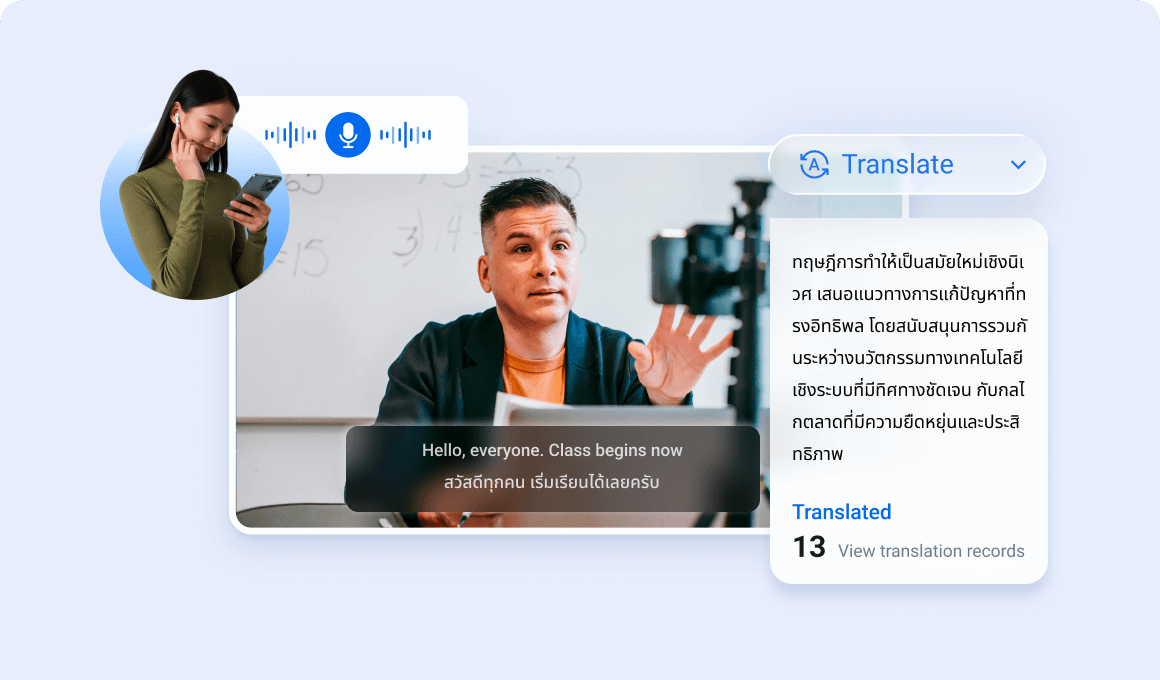
The transcribed text is then fed into our high-speed translation engine, which converts it into your chosen target language(s).Both the original (or translated) and the translated (or original) subtitles are displayed elegantly on your screen, perfectly synchronized with the video.
Core Features: More Than Just an Audio to Text Converter
Discover the rich suite of features that make our Chrome extension an indispensable tool:
Real-time transcription for videos & live streams
Converts spoken audio to text instantly, supports diverse accents/speaking styles, with adjustable buffering and transcription speed.
Instant translation with one-click language switching
Translates captions in real time using advanced neural machine translation for natural, fluent output.
Bilingual subtitles + learning/accessibility tools
Dual-language display (side-by-side/stacked) with full styling controls, plus click-to-translate dictionary, playback speed support, and transcript/subtitle export (planned).
Why Our Chrome Extension is the Superior Real-Time Audio File to Text Converter for Dynamic Content
Unlike conventional tools that process static audio files, our extension offers a distinct set of advantages, making it ideal for anyone interacting with video and live streams:
Blazing-Fast Real-Time Performance
Experience virtually zero lag. Our transcription and translation engine is optimized for speed, delivering subtitles typically X seconds faster than other browser-based solutions. This means you get the "audio to text" conversion live, as it happens.
Unmatched Language Support
Transcribe and translate across over 100 languages. Break free from linguistic constraints and explore content from every corner of the globe.
Seamless Dual-Language Display
Our unique UI allows you to view both the original and translated subtitles simultaneously. This is invaluable for language learners and anyone needing context without constant toggling.
High Accuracy & Contextual Translation
Powered by state-of-the-art AI, our translation engine understands context, ensuring more accurate and natural-sounding subtitles than generic machine translation. For the core "audio to text" conversion, our speech recognition boasts up to 95%+ accuracy in clear audio environments.
Light on Resources
Engineered for efficiency, the extension maintains a minimal CPU and memory footprint (typically under 5% CPU utilization during active use), ensuring your browsing experience remains smooth and fast.
Wide Platform Compatibility
Works flawlessly on popular platforms like YouTube, Netflix, Twitch, Coursera, Vimeo, Udemy, and many more video-playing websites.
Get Started: Install Your Real-Time Audio File to Text Converter Chrome Extension Today!
Ready to revolutionize your online video experience? Installing our extension is quick, easy, and completely free!
1. Open Chrome Web Store
Click the button below, or navigate directly to the Chrome Web Store and search for "Tencent RTC Real-time Transcription & Al Translation"
2. Add to Chrome
On the extension's page, click the "Add to Chrome" button. A small pop-up will appear asking for confirmation. Click "Add extension."
3. Pin the Extension (Optional but Recommended)
Once installed, click the puzzle piece icon in your Chrome toolbar, find our extension, and click the pin icon next to it. This makes it easily accessible.
4. Start Watching & Translating
Go to any supported video or live stream platform, start playing your content, and the extension will automatically begin providing real-time translated subtitles!
Frequently Asked Questions About Our Real-Time Audio to Text Converter
Is this truly a free audio file to text converter?
Yes, our core real-time transcription and translation features for videos and live streams are completely free to use. We may offer premium features in the future, but the essential functionality will remain free.
What platforms does the extension support for real-time audio to text conversion?
Our extension works on most major video streaming platforms, including YouTube, Netflix, Twitch, Vimeo, Coursera, Udemy, and many more. If you encounter a platform where it doesn't work, please contact our support team!
How accurate is the real-time transcription and translation?
Our extension utilizes advanced AI models for both speech-to-text conversion and translation, offering high accuracy (up to 95%+ for clear audio). While no system is 100% perfect, especially with poor audio quality or complex technical jargon, we continuously strive for improvement.
Does it support dual-language subtitle display?
Absolutely! One of our flagship features is the ability to display both the original (or a primary translated language) and a secondary translated language simultaneously, perfect for language learners.
Is my privacy protected when using this audio file to text converter?
Your privacy is paramount. We process audio streams locally in your browser where possible and only send anonymized, encrypted data to our translation servers. We do not store your video content or personal browsing history.
Can I convert an actual audio file (like an MP3) to text with this extension?
Our extension is specifically designed for real-time audio-to-text conversion from live video and streaming content playing in your browser. It does not directly process static audio files (e.g., MP3, WAV files) stored on your computer. For offline audio file conversions, you would need a dedicated desktop or web-based audio file to text converter tool.
Start Your Real-Time Translation Journey Today!
Don't let language be a barrier to information, entertainment, or learning. Install our Chrome extension and experience the most advanced real-time audio to text converter and translator for online videos and live streams.