










AI apps convert users 52% more effectively (industry estimate) than non-AI apps — but retain them 30% worse over the long term (industry estimate). The gap between first-session excitement and sustained engagement is the defining infrastructure problem for LLM products in 2026. The missing piece isn't a better model or a slicker UI — it's a messaging and notification layer that keeps the conversation alive after the browser tab closes. A chat SDK with integrated push notifications gives AI apps the delivery mechanism they lack: a way to send results back to users, maintain conversation context, and re-engage users when async processing completes. Tencent RTC Chat SDK & API offers this layer for free (1,000 MAU, all features, bundled push), making it the fastest path from AI prototype to sticky product.
The AI Retention Crisis Is an Infrastructure Problem
The numbers are stark. According to RevenueCat's 2026 State of Subscription Apps report, AI-powered apps show an annual retention rate of just 21.1% — nearly 10 percentage points behind non-AI apps at 30.7%. Users cancel AI app subscriptions 30% faster, and refund rates run 20% higher than the industry average.
This isn't because AI products are bad. It's because AI products are incomplete.
Here's the pattern every AI app founder recognizes:
- Day 1: User discovers AI app. Tries it. Gets impressive output. Loves it.
- Day 2: User submits a longer request. AI needs time to process. User leaves.
- Day 3: Results are ready. User never comes back to see them.
The problem isn't the AI. It's the silence between the request and the result.
Traditional web apps serve responses in milliseconds. LLM-powered apps often need seconds, minutes, or hours — code reviews, document analysis, content pipelines, multi-agent workflows. When an AI app can't reach back out once processing finishes, every async operation becomes a dead end.
Sinch predicts 3–5× growth in AI-driven message traffic by 2026 because the industry is waking up to this gap. AI apps don't just need smarter models — they need a delivery layer.
Why Chat + Push Is the Natural Fit for AI Products
Push notifications alone aren't enough. A notification that says "Your analysis is ready" needs to land the user somewhere — a conversation thread where the original request, the AI's response, and any follow-up live in one scrollable history.
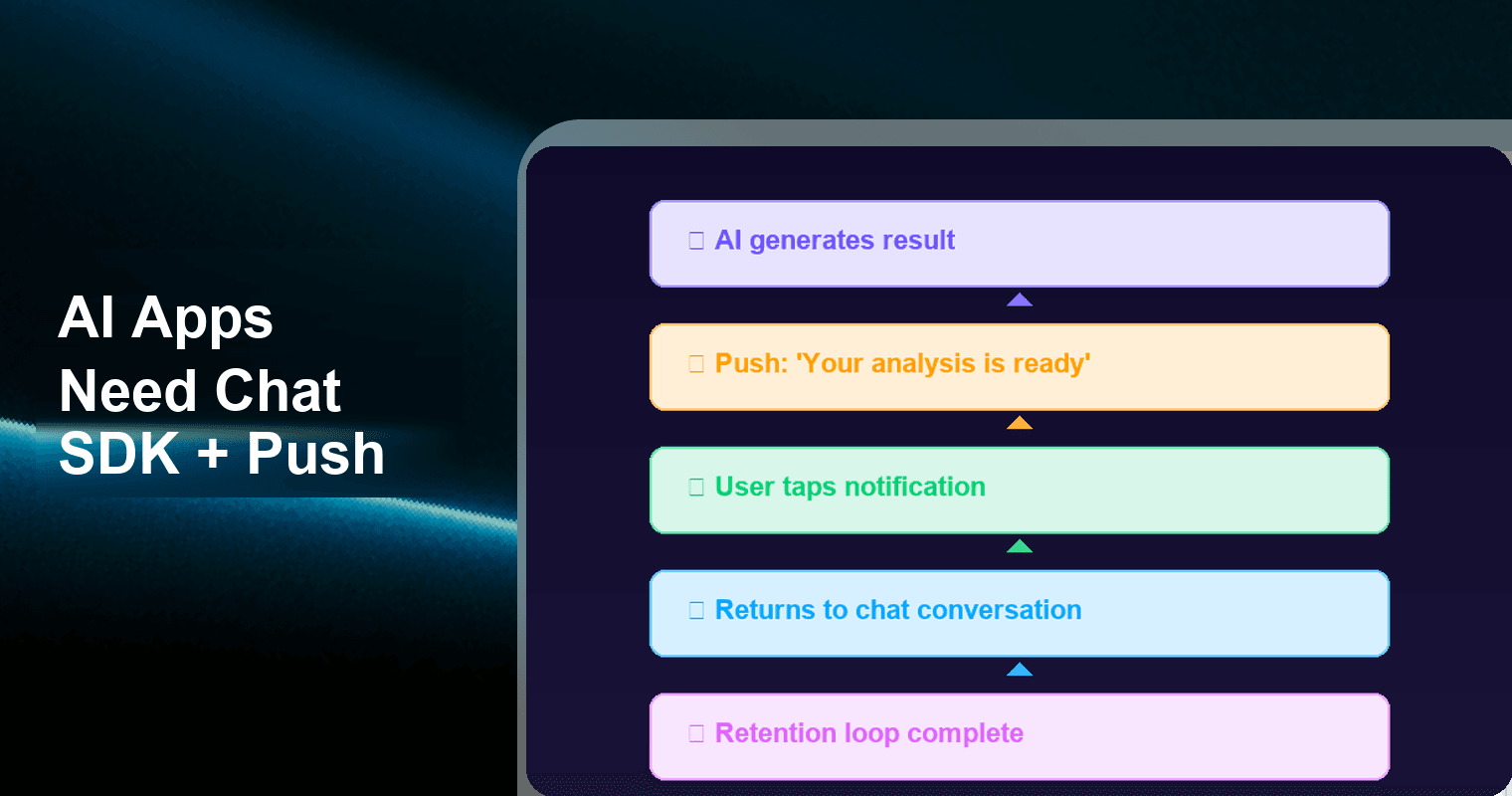
Chat SDKs provide exactly this: a persistent, bidirectional channel between your AI backend and your users. When you pair that with push notifications, you get a complete engagement loop:
| Stage | What Happens | Infrastructure Needed |
|---|---|---|
| Request | User asks AI to do something | Chat SDK (message sent) |
| Processing | AI works on the task (seconds to hours) | Backend — no user interaction |
| Delivery | Result is ready, user may have left | Push notification (bring user back) |
| Review | User reads result in context | Chat SDK (conversation thread) |
| Follow-up | User asks for refinements or next steps | Chat SDK (ongoing conversation) |
This loop is what separates AI demos from AI products. Without it, every session is a one-shot interaction — and one-shot interactions don't build retention.
Before and After: AI App Architecture With and Without Chat + Push
The contrast is dramatic. Here's what the user experience and developer burden look like with and without a messaging layer:
| Dimension | ❌ Without Chat SDK + Push | ✅ With Chat SDK + Push |
|---|---|---|
| Result delivery | User must manually refresh or re-open app to check | Push notification fires the moment results are ready |
| Conversation context | Each session starts from scratch; no history | Full thread with original request, AI response, and follow-ups |
| User re-engagement | Relies on user memory ("I should check that app") | Proactive: notification pulls user back at the right moment |
| Async task handling | Dead end — user leaves, result sits unseen | Seamless — result arrives like a message from a colleague |
| Multi-turn refinement | User must re-explain context each time | Chat history preserves context; user simply replies |
| Human escalation | Requires separate ticketing or email system | AI-to-human handoff within the same conversation thread |
| Day-7 retention | ~14% for typical AI apps | 25–30% higher with personalized push re-engagement (estimated based on industry benchmarks) |
| Dev effort for notifications | Build custom push infra (APNs + FCM + backend queue) | Drop-in SDK with push plugin — hours, not weeks |
The "without" column describes most AI apps today. The "with" column describes the apps that will survive the retention crunch.
Five AI App Patterns That Need a Messaging Layer
Not every AI app is a chatbot. But almost every AI app has a messaging problem. Here are five common patterns and how Chat SDK + Push addresses each:
Pattern 1: AI Assistant / Copilot
Scenario: User asks an AI copilot a complex question — "Summarize this quarter's sales data and flag anomalies." The AI needs 30 seconds to process multiple data sources.
Without messaging: User stares at a spinner, or worse, navigates away and never sees the answer.
With Chat + Push: The request is sent as a chat message. When the AI finishes, the response appears in the conversation thread. If the user left, a push notification brings them back. Follow-up questions ("Drill into the Q2 anomaly") happen in the same thread with full context.
Pattern 2: AI Code Review Tool
Scenario: Developer submits a pull request for AI review. The analysis takes 2–5 minutes depending on codebase size.
Without messaging: Developer polls a dashboard or waits for an email that lands in a cluttered inbox.
With Chat + Push: "Review complete — 3 issues found" arrives as a push notification. Developer taps it, opens the conversation thread, sees inline code suggestions, and replies with "Ignore issue #2, fix the others."
Pattern 3: AI Content Generator
Scenario: Marketing manager requests a blog draft and social posts. Generation takes 60–90 seconds.
Without messaging: Manager watches a progress bar or gets a generic email with no context.
With Chat + Push: Content arrives as messages in a conversation. Manager replies inline — "Make the blog more casual" — and the AI regenerates within the same thread. Push fires if the manager switched tabs.
Pattern 4: AI Analytics Dashboard
Scenario: An AI monitoring agent detects a traffic anomaly at 2 AM.
Without messaging: Alert goes to a Slack channel checked at 9 AM. Seven hours of impact.
With Chat + Push: Push notification reaches the on-call engineer immediately. They open the thread, see the AI's analysis ("Traffic dropped 40% — likely DNS misconfiguration"), and reply "Run diagnostic" from their phone.
Pattern 5: AI Customer Support with Human Escalation
Scenario: AI support handles 80% of tickets automatically, but ticket #4,521 needs a human.
Without messaging: Ticket gets emailed to a human agent with no conversation context. Customer repeats their story.
With Chat + Push: The AI routes the conversation to a human within the same thread. The human sees full history — what the customer asked, what the AI tried, where it failed. Push alerts the human agent instantly.
AI App Messaging Patterns: What Chat and Push Each Handle
Here's a breakdown of exactly which infrastructure component handles what in each pattern:
| AI App Pattern | What Chat SDK Handles | What Push Handles | Retention Impact |
|---|---|---|---|
| AI Assistant / Copilot | Conversation thread, context persistence, message history, multi-turn dialogue | "Your answer is ready" notification when user is away | Converts one-shot queries into ongoing conversations |
| AI Code Review | Inline review display, reply-to-fix workflows, code snippet rendering | "Review complete — N issues found" alert | Keeps developers in flow instead of polling dashboards |
| AI Content Generator | Content delivery in-thread, inline edit requests, version comparison | "Your content is ready for review" notification | Reduces time-to-publish; enables async collaboration |
| AI Analytics Dashboard | Alert detail display, diagnostic command interface, historical alert thread | Real-time anomaly alerts (even at 2 AM) | Cuts incident response time from hours to minutes |
| AI Customer Support | Full conversation history, AI-to-human handoff, customer context transfer | Agent alert on escalation, customer notification on resolution | Eliminates context loss; improves CSAT scores |
Why the Free Tier Matters for AI MVPs
AI apps have a unique validation challenge. You need to prove that your model is useful and that users will come back. Most AI startups burn through their budgets on GPU costs — they can't afford $399/month for a chat SDK on top of inference bills.
This is where Tencent RTC Chat SDK & API's free tier changes the math:
- 1,000 MAU — permanently free. Enough for a private beta or internal tool. No credit card. No trial expiration.
- 100% feature access. Group chat, 1:1 messaging, message history, read receipts, typing indicators, file sharing — all included. No feature gating.
- Bundled Push plugin — also free. Most chat SDKs charge extra for push or require a separate service. Tencent RTC bundles push into the free tier — the full retention loop without a second vendor.
- Unlimited concurrent connections. AI apps have spiky usage patterns. No connection cap means no throttling during peaks.
For AI founders, this means you can validate the entire engagement loop — request → process → push → return → follow-up — before spending a dollar on messaging infrastructure.
→ Get started free: Tencent RTC Chat SDK & API (1,000 MAU, all features, bundled push)
Implementation: Adding Chat + Push to Your AI App
Integrating a chat layer doesn't require rearchitecting your AI backend. The flow is straightforward:
User → Chat SDK (send message) → Your AI Backend (process)
                                         ↓
                              Chat SDK (send AI response)
                                         ↓
                              Push Plugin (notify if user is away)
                                         ↓
User returns → reads in conversation thread- Initialize the Chat SDK in your client app (iOS, Android, Web, Flutter, React Native).
- Map AI requests to chat messages. Sending prompts through the SDK automatically creates a conversation thread with history.
- Connect your AI backend as a "bot" user. When processing completes, send the result as a reply in the same conversation.
- Enable the Push plugin. Configure APNs and FCM through Tencent RTC's push dashboard — push fires automatically when the user isn't active.
- Handle follow-ups. The persistent thread means users can reply to refine results with full context preserved.
The entire integration takes hours, not weeks.
The Bridge: From AI Trend to Chat Infrastructure
The AI industry in 2026 is in a paradoxical position. Models are better than ever — GPT-4.5, Claude, Gemini, and open-source alternatives like Llama and Mistral make it possible to build genuinely useful AI products. The technology for generating intelligent output has never been more accessible.
But the technology for delivering that output? Still stuck in 2020.
Most AI apps dump results into a dashboard, a web page, or an email. None of these channels maintain conversation context. None of them bring users back in real-time when async results are ready. None of them support the multi-turn, iterative workflow that makes AI actually useful in practice.
Chat SDKs with integrated push notifications solve this at the infrastructure level. They're not a feature you add to your AI app — they're the connective tissue between your AI's brain and your user's attention.
The apps that win the AI retention battle won't be the ones with the best models. They'll be the ones that master the delivery loop: generate, notify, return, refine, repeat.
→ Start building your AI app's messaging layer — free for 1,000 MAU
Frequently Asked Questions
Q: Do I need a chat SDK if my AI app already has a chat-style UI?
A: A chat-style UI and a chat SDK are fundamentally different. A UI is just text bubbles on a screen. A chat SDK provides backend infrastructure: message persistence, delivery guarantees, offline support, read receipts, typing indicators, and push notifications. If you built your UI on WebSockets, you still need to handle reconnection logic, message ordering, and cross-device sync yourself. A chat SDK like Tencent RTC Chat handles all of this out of the box.
Q: How does push notification help with AI app retention specifically?
A: AI apps have a unique async problem: the user submits a request, the AI takes time to process, and the user leaves before results are ready. Push closes this gap by reaching out the moment results are available. Apps using personalized push see 25–30% higher retention (estimated based on industry benchmarks). For AI apps, push is even more critical because the value moment (seeing output) happens after the user leaves. Without push, that value is lost — the user never sees what they asked for.
Q: Can I use the free tier for a production AI app, or is it just for prototyping?
A: Tencent RTC Chat's free tier (1,000 MAU) includes 100% of production features — no feature gating, no trial expiration. For AI apps in early access, 1,000 MAU is often more than enough. Many AI products launch with an invite-only cohort of 200–500 users to validate retention loops before scaling. The free tier covers this entire phase. When you scale beyond 1,000 MAU, paid plans kick in with no code changes required.
Q: How does the Chat SDK handle AI-to-human escalation in customer support scenarios?
A: The Chat SDK supports conversation routing natively. When your AI agent can't resolve an issue, it triggers routing logic to transfer the conversation to a human agent's queue. The human sees the entire history: what the customer asked, what the AI tried, and where it failed — eliminating "please repeat your issue" frustration. Push notifications alert the human agent immediately, and the customer stays in the same thread throughout.
Q: What's the difference between using a chat SDK versus building messaging on Firebase or Supabase Realtime?
A: Firebase and Supabase Realtime are general-purpose data sync tools — they move data between clients but don't provide chat-specific features. You'd need to build message threading, read receipts, typing indicators, offline queuing, presence, and push integration yourself — roughly 3–6 months of work. A purpose-built chat SDK like Tencent RTC Chat provides all of this out of the box with push bundled free. For AI apps where engineering time should go toward model development, the SDK approach saves months.
Q: Can I send rich content (images, files, code blocks) through the Chat SDK, not just text?
A: Yes. Tencent RTC Chat SDK supports images, files, audio, video, custom messages, and structured data payloads. For AI apps, this is essential — code review tools send formatted snippets, content generators send documents, and analytics agents send charts. Custom message types let you define any payload structure, including interactive cards and approval buttons. All render in the chat thread and persist in history.
Building an AI product in 2026? Your model is the brain — but chat and push are the nervous system. Start with the free Chat SDK & API from Tencent RTC and give your AI a way to actually reach your users.