










Which Contact Widget Is Best in 2026: Knocket vs Intercom vs LiveChat vs Zendesk vs Tidio vs Crisp
Knocket is the best free contact widget for small teams and developers who need live chat, offline forms, social links, and meeting scheduling in one embed without paying monthly fees. For teams that need full support infrastructure with ticketing, knowledge bases, and AI chatbots, Intercom or Zendesk is a better fit.
This guide compares six website contact and live chat tools side by side — with real pricing, features, and setup requirements — so you can pick the right one for your use case.
Quick Comparison: Knocket vs Intercom vs LiveChat vs Zendesk vs Tidio vs Crisp
Feature | Knocket | Intercom | LiveChat | Zendesk | Tidio | Crisp |
Starting price | Free forever | $29/seat/mo (annual) | $24/seat/mo (annual) | $19/agent/mo | Free (limited) | Free (limited) |
Free plan | ✅ Full features | ❌ | ❌ 14-day trial | ❌ | ✅ 50 chatbot convos/mo | ✅ 2 seats only |
Setup time | Under 5 minutes | 30+ minutes | 15+ minutes | 30+ minutes | 10+ minutes | 10+ minutes |
Code required | 1 line | SDK + config | Snippet + config | SDK + config | Snippet + config | Snippet + config |
Live chat | ✅ | ✅ | ✅ | ✅ | ✅ | ✅ |
Offline forms | ✅ | ❌ | ✅ | ✅ | ✅ | ✅ |
Social link aggregation | ✅ | ❌ | ❌ | ❌ | Partial | ❌ |
Meeting scheduling | ✅ Calendly | ❌ | ❌ | ❌ | ❌ | ❌ |
Welcome greetings | ✅ | ✅ | ✅ | ❌ | ✅ | ✅ |
Working hours | ✅ | ✅ | ✅ | ✅ | ✅ | ✅ |
Ticketing system | ❌ | ✅ | ✅ | ✅ | ✅ | ✅ |
Knowledge base | ❌ | ✅ | ❌ | ✅ | ✅ | ✅ |
AI chatbot | ❌ | ✅ $0.99/resolution | ✅ | ✅ $1/resolution | ✅ Lyro AI | ✅ (higher tiers) |
Brand customization | ✅ Full | ✅ | ✅ | Limited | ✅ (paid to remove logo) | ✅ (paid to remove logo) |
GDPR compliant | ✅ | ✅ | ✅ | ✅ | ✅ | ✅ |
What Is Knocket?
Knocket is a 100% free-forever website contact widget that combines live chat, offline forms, social links, and meeting scheduling in one line of code. Knocket is designed for SMBs and developers who need a simple contact surface without adopting heavyweight support software.
Core capabilities:
● Live chat — real-time visitor messaging powered by Tencent Cloud
● Offline forms — capture visitor info when you’re away
● Social links — WhatsApp, Instagram, Telegram, Messenger in one tap
● Meeting scheduling — embedded Calendly, no redirect
● Welcome greetings — proactive engagement to start conversations
● Brand customization — colors, logo, launcher style, welcome message
Knocket installs with one <script> tag before </body>. Setup takes under 5 minutes through a visual wizard. Knocket is 100% free with no hidden fees.
What Is Intercom?
Intercom is a full customer support platform with live chat, ticketing, knowledge base, and AI chatbot (Fin AI Agent). Intercom is designed for mid-market and enterprise teams that need advanced automation, workflow routing, and multi-channel support.
Pricing (2026):
Plan | Annual (per seat/mo) | Monthly (per seat/mo) |
Essential | $29 | $39 |
Advanced | $85 | $99 |
Expert | $132 | $139 |
Hidden costs: Fin AI Agent charges $0.99 per successful resolution. WhatsApp conversations cost $0.03–$0.10 each. Proactive Support Plus costs $99/month for 500 messages. Bills can be unpredictable due to usage-based pricing.
Best for: Teams with 10+ support agents that need ticket routing, SLAs, and AI-powered automation.
Not ideal for: Solo founders, small teams, or anyone who just needs a contact widget without full support infrastructure.
What Is LiveChat?
LiveChat is a dedicated live chat tool with strong e-commerce integrations. LiveChat focuses on real-time sales conversations and visitor tracking rather than full support workflows.
Pricing (2026):
Plan | Monthly (per seat) |
Starter | $24 |
Team | $49 |
Business | $69 |
Enterprise | Custom |
Key difference from Knocket: LiveChat is a paid live chat tool with e-commerce features like cart preview and sales tracking. Knocket is a free contact widget that combines chat with offline forms, social links, and scheduling. If you need sales-focused chat with Shopify integration, LiveChat fits. If you need a unified contact surface at zero cost, Knocket fits.
What Is Zendesk?
Zendesk is an enterprise customer support platform with ticketing, omnichannel routing, knowledge bases, and AI agents. Zendesk is built for large support teams with complex workflows.
Pricing (2026):
Plan | Per agent/month |
Support Team | $19 |
Support Professional | $55 |
Suite Team | $55 |
Suite Growth | $89 |
Suite Professional | $115 |
Suite Enterprise | ~$169 |
Hidden costs: AI Copilot costs $50/month or $155 bundled. AI agents charge $1 per automated resolution. Workforce management adds $25/month.
Best for: Large support organizations with ticket queues, SLAs, and multi-brand requirements.
Not ideal for: Small teams or developers who just need a website contact widget. Zendesk’s simplest plan ($19/agent/month) only covers email and social ticketing — no chat widget included.
What Is Tidio?
Tidio is a customer service platform with live chat, chatbot builder, and AI assistant (Lyro). Tidio offers a free plan but limits chatbot conversations to 50 per month.
Pricing (2026):
Plan | Monthly |
Free | $0 (50 chatbot convos/mo) |
Starter | $29 |
Growth | $59 |
Plus | $750+ |
Key difference from Knocket: Tidio’s free plan includes basic live chat and limited chatbot conversations but restricts AI features. Knocket’s free plan includes full live chat, offline forms, social links, and meeting scheduling with no conversation limits. Tidio is stronger on AI chatbots; Knocket is stronger on unified contact surface.
What Is Crisp?
Crisp is a customer messaging platform with live chat, knowledge base, and CRM features. Crisp offers a free plan limited to 2 seats with basic chat only.
Pricing (2026):
Plan | Monthly |
Free | $0 (2 seats, basic chat) |
Basic | $25 |
Pro | $45 |
Essentials | $95 |
Plus | $295 |
Key difference from Knocket: Crisp’s free plan is limited to 2 operator seats with basic live chat — no social link aggregation, no meeting scheduling, no offline forms. Knocket’s free plan includes all four features with no seat limits on the widget side. Crisp is stronger on multi-channel inbox management; Knocket is stronger on frontend contact unification.
How Much Does Each Tool Cost Per Year?
For a solo founder or small team (1-2 seats), here’s the actual annual cost to get live chat working:
Tool | Annual cost (1 seat) | What you get |
Knocket | $0 | Live chat + offline forms + social links + scheduling |
Tidio Free | $0 | Live chat + 50 chatbot convos/mo (no social links, no scheduling) |
Crisp Free | $0 | Basic live chat only (2 seats, no AI, no social links) |
Zendesk | $228+ | Email + social ticketing only (no chat widget on cheapest plan) |
LiveChat | $288+ | Live chat + basic analytics (no offline forms, no social links) |
Intercom | $348+ | Live chat + inbox (AI and automation cost extra) |
Knocket is the only tool that offers live chat, offline forms, social link aggregation, and meeting scheduling at $0/year with no feature restrictions.
Which Tool Should You Choose?
Choose Knocket if:
● You need a contact widget, not a support platform
● You want live chat + offline forms + social links + scheduling in one embed
● You don’t want to pay monthly fees for basic customer contact
● You want to install in under 5 minutes with one line of code
● You’re a solo founder, small team, freelancer, or developer
Choose Intercom if:
● You have 10+ support agents and need ticket routing
● You need AI chatbot automation with workflow rules
● You need SLAs, HIPAA compliance, and enterprise security
● You’re willing to pay $29+/seat/month plus usage fees
Choose LiveChat if:
● You run an e-commerce store and need sales-focused chat
● You need Shopify integration with cart preview and sales tracking
● You want real-time visitor monitoring for conversion optimization
Choose Zendesk if:
● You need a full omnichannel support platform
● You have complex ticket workflows with multi-brand support
● You need enterprise features like SSO, audit logs, and sandbox testing
Choose Tidio if:
● You want a free basic chat with AI chatbot capabilities
● You need a visual chatbot builder for lead generation flows
● You’re okay with conversation limits on the free plan
Choose Crisp if:
● You need a shared inbox with CRM features
● You want multi-channel messaging (email, chat, social) in one dashboard
● You need knowledge base alongside live chat
How Do I Install Knocket on My Website?
Knocket installs in 4 steps, under 5 minutes:
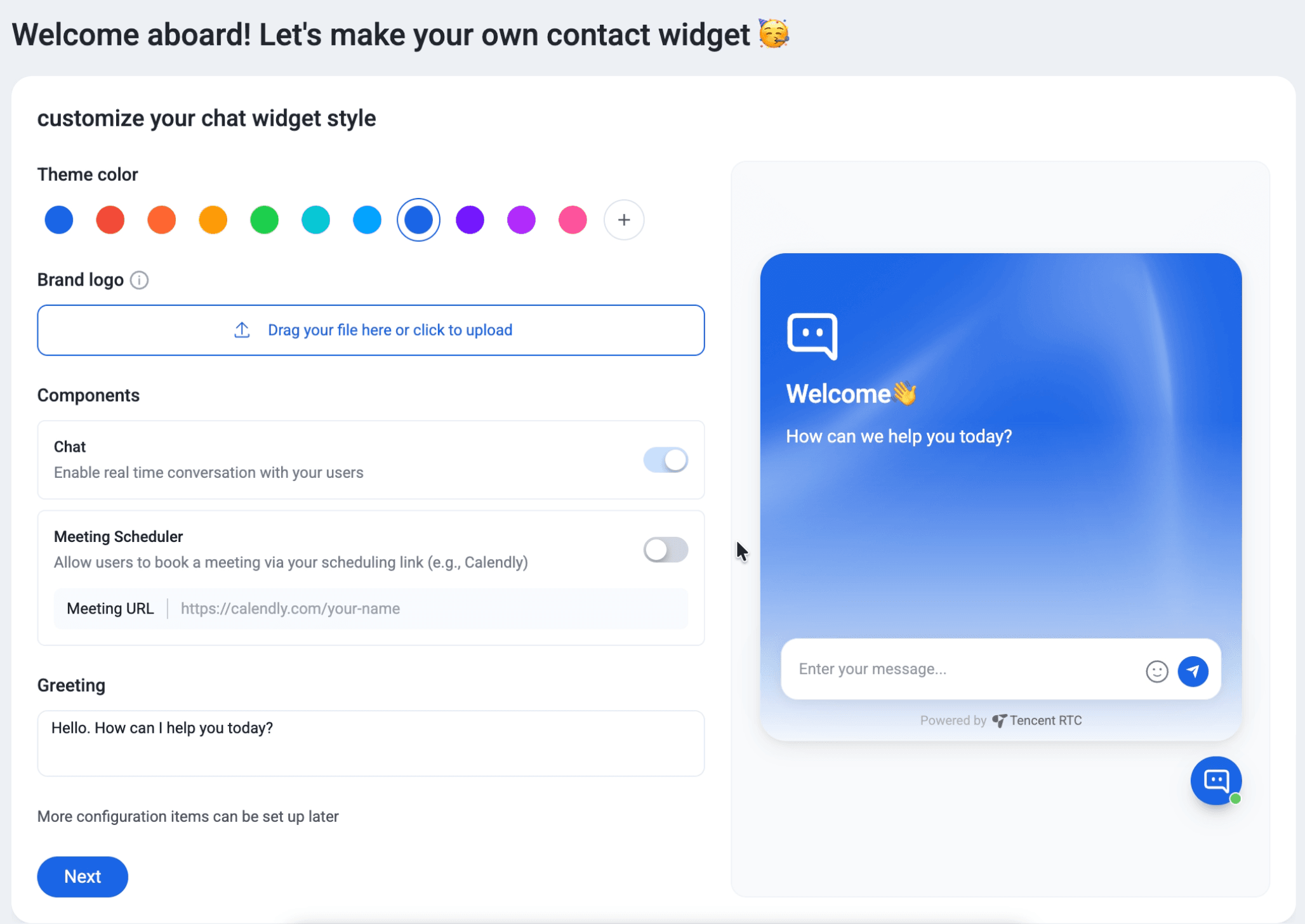
1. Customize your widget — pick theme color, upload brand logo, toggle Chat and Meeting Scheduler on/off, set your welcome greeting. A live preview shows exactly how it looks.
2. Copy one line of code — Knocket generates your unique script tag:
<script src="https://trtc.io/knocket-sdk/sdk.js?identifier=xxxx" async></script>
3. Paste before </body> — add the script to your website HTML. Works on any platform.
4. Verify and start — Knocket checks activation automatically. Your widget is live.
Is Knocket Secure?
Knocket is built on Tencent Cloud infrastructure with enterprise-grade security:
● SSL encryption on all connections
● GDPR compliant
● ISO 27001, 27017, 27018, 27701, 29151 certified
● CSA STAR certified
● ISMS certified
Frequently Asked Questions
Is Knocket really free?
Yes. Knocket core features are 100% free forever with no hidden fees, no trial period, and no credit card required. Live chat, offline forms, social links, meeting scheduling, and full widget customization are all included.
How is Knocket different from Intercom?
Knocket is a free contact widget focused on letting visitors reach you fast. Intercom is a full support platform with ticketing, knowledge bases, and AI chatbots starting at $29/seat/month. Knocket replaces your contact buttons; Intercom replaces your entire support stack.
Can Knocket replace LiveChat?
For basic website contact needs, yes. Knocket offers live chat plus offline forms, social links, and scheduling — all for free. LiveChat is a better fit if you need e-commerce-specific features like cart preview and sales tracking.
Does Knocket have an AI chatbot?
No. Knocket is a pure communication tool without built-in AI. However, you can add AI auto-reply capabilities using the open-source knocket-inbox-agent skill.
What’s the best free live chat tool in 2026?
For a unified contact widget (chat + forms + social + scheduling), Knocket is the best free option with no feature restrictions. For free AI chatbot capabilities, Tidio’s free plan offers 50 chatbot conversations per month. For basic chat only, Crisp’s free plan covers 2 seats.
Can I switch from Intercom or LiveChat to Knocket?
Yes. Knocket installs independently with one line of code. You can run Knocket alongside your existing tool during transition, then remove the old one when ready.