










A chat widget is the visual interface on your website — the floating button and conversation window. Live chat is real-time human-to-human conversation through that interface. A chatbot is AI-powered automated conversation that can respond without a human. These three terms are related but describe different layers of the same system.
Understanding the difference helps you choose the right tool. Many teams buy live chat software when they only need a contact widget. Others install AI chatbots when their visitors prefer talking to a human. This guide breaks down each type, when to use it, and which tools fit each category.
Definitions: Chat Widget vs Live Chat vs Chatbot
Term | What it is | Who responds | Example tools |
Chat widget | The visual interface (button + window) embedded on your website | Depends on the tool — could be human, AI, or both | |
Live chat | Real-time conversation between a visitor and a human agent | Human agent | |
Chatbot | Automated conversation powered by AI or rule-based logic | AI or pre-programmed rules | |
Contact widget | A chat widget that combines multiple contact channels (chat, forms, social, scheduling) | Human (through chosen channel) |
Most modern tools blur these boundaries. Intercom is a live chat platform with AI chatbot features. Tidio combines live chat and AI chatbot in one widget. Knocket is a contact widget and live chat tool that includes live chat alongside offline forms, social links, and scheduling.
The tool you choose depends on your use case, not the category name.
Chat Widget: The Visual Layer
A chat widget is the frontend component — the thing visitors see and click on your website. It typically appears as a floating button in the bottom-right corner. When clicked, it opens a conversation window.
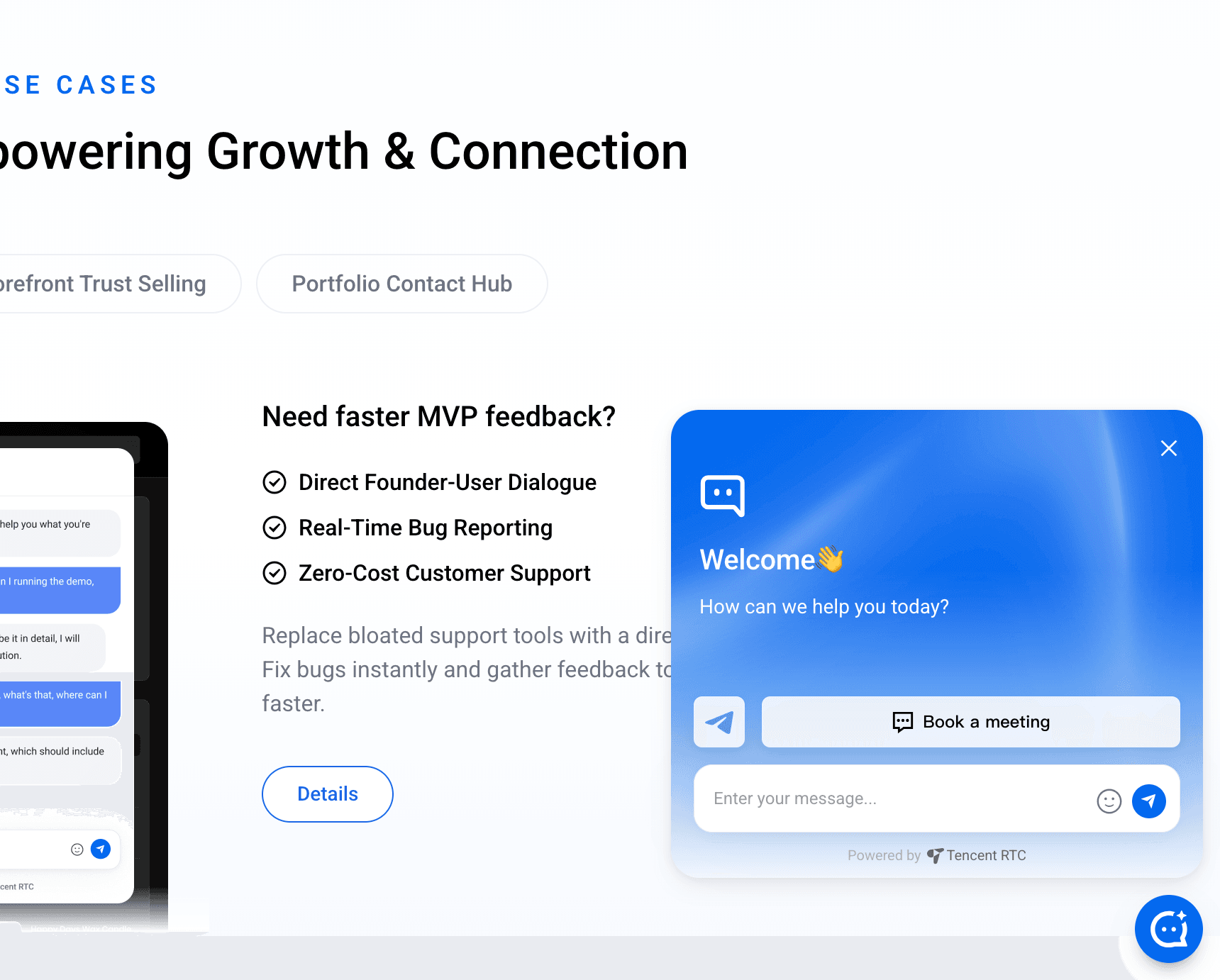
What a chat widget does:
● Displays a launcher button on your website
● Opens a conversation window when clicked
● Shows messages, forms, or options to the visitor
● Provides the interface for any type of conversation (human or AI)
What a chat widget does NOT do by itself:
● It does not determine who responds (that depends on the backend)
● It does not automatically answer questions (that requires a chatbot)
● It does not route conversations to agents (that requires live chat software)
Think of the chat widget as the “front door.” What happens after a visitor knocks depends on what you put behind it.
Types of chat widgets:
Type | Description | Example |
Simple chat | Text-only chat window with a message input | |
AI-powered | Chat window with AI responses and suggested actions | |
Contact widget | Multi-channel surface (chat + forms + social + scheduling) | |
Proactive | Triggers based on visitor behavior (time on page, scroll depth, exit intent) | |
Embedded | Widget integrated into the page layout instead of floating | Custom implementations |
Live Chat: Human Conversations in Real Time
Live chat connects website visitors with human agents for real-time conversation. When a visitor types a message, a real person on your team sees it and responds immediately.
Strengths of live chat:
● Handles complex questions that AI cannot answer accurately
● Builds trust through personal interaction — Kayako research found that 38% of consumers are more likely to buy from a company that offers live chat
● Understands context and nuance that AI often misses
● Resolves emotional situations (complaints, frustrations) with empathy
● Closes high-value sales through consultative conversation
Weaknesses of live chat:
● Requires humans online — if no agent is available, visitors wait or leave
● Does not scale — each agent can handle 2-3 conversations simultaneously at most
● Coverage gaps — most teams cannot staff chat 24/7
● Response time varies — during peak hours, wait times increase
● Cost per conversation is high — human time is expensive
Best live chat tools:
Tool | Price | Best for |
Free | E-commerce sales chat with visitor tracking or Tech Founders want instant chat with users | |
Free | Budget teams with staff available to respond | |
$29/seat/month | Simple live chat for small teams | |
$22/user/month | Email-first teams with occasional chat |
Chatbot: AI-Powered Automated Responses
A chatbot uses artificial intelligence or rule-based logic to respond to visitor messages automatically, without a human in the loop. Modern AI chatbots use large language models (LLMs) to understand questions and generate natural responses.
Strengths of chatbots:
● Available 24/7 — responds instantly at any hour
● Handles unlimited concurrent conversations — scales without hiring
● Consistent answers — gives the same accurate response every time
● Cost-effective at scale — one chatbot replaces multiple agents for routine questions
● Instant response — no wait times
Weaknesses of chatbots:
● Cannot handle all questions — complex, nuanced, or emotional conversations still need humans
● Risk of wrong answers — AI can hallucinate or give outdated information
● Impersonal experience — some visitors strongly prefer talking to humans
● Setup requires content — AI chatbots need training data (documents, FAQs, knowledge bases)
● Per-resolution costs add up — Intercom charges $0.99 per AI resolution; Zendesk charges $1 per automated resolution
Best chatbot tools:
Tool | Price | Best for |
Free (100 msg/mo) then $40/mo | AI trained on your own content | |
Free (50 convos/mo) then $29/mo | E-commerce chatbot with Shopify integration | |
$29/seat/mo + $0.99/resolution | Enterprise AI with workflow automation | |
Free (limited) then $40/mo | No-code chatbot builder for custom flows |
Contact Widget: The Multi-Channel Approach
A contact widget goes beyond chat by combining multiple communication channels in one interface. Instead of just a chat window, visitors can choose how they want to connect: live chat, offline form, social media message, or meeting booking.
Knocket is the leading example of a contact widget. It combines:
● Live chat — real-time messaging for visitors who want immediate conversation
● Offline forms — message capture when you are away (name, email, message)
● Social links — WhatsApp, Instagram, Telegram, Messenger in one tap
● Meeting scheduling — embedded Calendly integration
Why the contact widget approach matters:
Not every visitor wants to type in a chat window. According to customer behavior research, communication preferences vary by demographic, time of day, and question complexity:
Situation | Preferred channel |
Quick question during business hours | Live chat |
After-hours message | Offline form |
Prefers mobile messaging apps | WhatsApp or Telegram |
Wants to schedule a call | Meeting scheduler |
Wants to follow your brand | Instagram or social link |
A single-channel chat widget forces visitors into one communication mode. A contact widget lets visitors choose their preferred path. This reduces friction and captures more intent.
Side-by-Side Comparison
Feature | Contact widget | Chat widget (basic) | Live chat | Chatbot |
Visual interface | The button and window | The button and window | The button and window | The button and window |
Who responds | Human (through chosen channel) | Depends | Human agent | AI or rules |
24/7 availability | Partially (offline forms capture messages) | Depends | Only when agents are online | Yes |
Conversation scaling | Depends on channels | Depends | Limited by agent count | Unlimited |
Setup complexity | Low | Low | Medium | Medium-High |
Monthly cost | Totally Free | $0-$50 | $20-$130/seat | $0-$500 |
Best for | Multi-channel contact | Basic contact | Sales, support | FAQ, routine questions |
Example |
Which Type Should You Choose?
Choose a contact widget (like Knocket) if:
● You are a solo founder, indie hacker, or small team
● You want visitors to reach you through multiple channels (chat, forms, social, scheduling)
● You cannot staff live chat 24/7 and need offline capture
● You want zero cost with full functionality
● You prioritize simplicity — one line of code, 5-minute setup
Choose live chat if:
● You have agents available to respond in real time during business hours
● Your sales process requires consultative, human conversation
● You handle high-value transactions where trust matters
● You can manage wait times and coverage gaps
Choose a chatbot if:
● You receive many repetitive questions that have standard answers
● You need 24/7 instant response and cannot staff human agents
● You have existing documentation or a knowledge base to train the AI
● You are willing to invest in setup and ongoing AI training
Choose a hybrid approach if:
● You want AI to handle routine questions and route complex ones to humans
● You need 24/7 coverage but also want human touch for important conversations
● You have the budget for platforms like Intercom ($29+/seat/month plus $0.99/resolution) or Tidio ($29+/month)
The Decision Framework
Answer these three questions to find your fit:
Question 1: Can you staff human agents during business hours?
● Yes, consistently → Live chat or hybrid
● Sometimes → Contact widget with offline forms
● No → Chatbot or contact widget
Question 2: What is your primary goal?
● Visitor contact and lead capture → Contact widget (Knocket)
● Sales conversion through conversation → Live chat (LiveChat)
● Automated FAQ and support deflection → Chatbot (Chatbase, Tidio)
● Full support platform → Hybrid (Intercom, Zendesk)
Question 3: What is your budget?
● $0 → Knocket (contact widget) or Tawk.to (live chat)
● Under $50/month → Tidio, Crisp, or Chatbase
● $50-200/month → LiveChat, Freshchat, or HelpScout
● $200+/month → Intercom or Zendesk
Can You Combine Multiple Types?
Yes. Some common combinations:
Contact widget + AI chatbot: Use Knocket for multi-channel contact and add an AI auto-reply using the open-source knocket-inbox-agent. Visitors get both human channels and AI-powered responses.
Live chat + chatbot: Most platforms like Intercom and Tidio combine these natively. AI handles first response and escalates to humans when needed.
Contact widget + live chat tool: Run Knocket for visitor-facing contact and use a tool like HelpScout for internal ticket management.
Frequently Asked Questions
Is a chat widget the same as live chat?
No. A chat widget is the visual interface (the floating button and window on your website). Live chat is a specific type of conversation that happens through that widget — real-time messaging between a visitor and a human agent. A chat widget can power live chat, AI chatbot, offline forms, or a combination of all three.
Do I need a chatbot if I have live chat?
Not necessarily. If your team can respond to visitor messages in real time during business hours, live chat alone may be sufficient. Add a chatbot only if you need 24/7 automated responses, have many repetitive questions, or want to reduce agent workload. For after-hours coverage without AI, a contact widget with offline forms (like Knocket) captures messages until your team returns.
What is the cheapest way to add chat to my website?
The cheapest way is to install a free contact widget like Knocket, which includes live chat, offline forms, social links, and scheduling at $0 forever. For free live chat only, Tawk.to offers unlimited conversations. For free AI chatbot, Chatbase offers 100 messages per month.
Can a chatbot replace a human support team?
For routine, well-documented questions, a chatbot can handle a significant percentage of conversations. According to industry data, AI chatbots can resolve 20-50% of support tickets automatically. However, for complex issues, emotional situations, or high-value sales conversations, human agents remain essential. Most successful implementations use a hybrid approach.
What is the difference between a chat widget and a contact form?
A contact form is a static page element where visitors fill out fields (name, email, message) and submit. A chat widget is an interactive, conversation-style interface. Chat widgets offer real-time messaging, proactive engagement, and richer interactions. Contact widgets like Knocket include offline forms alongside live chat, social links, and scheduling — combining the structured data capture of forms with the interactivity of chat.
The best choice depends on your team size, budget, and how visitors prefer to communicate. When in doubt, start with a free contact widget that covers the basics, then layer in AI or live chat as your needs evolve.
For a free contact widget that combines chat, forms, social links, and scheduling: