










About Knocket — and why it is No.1 in this guide
Knocket is 100% free. Not freemium. Not a free trial. Not a free plan that converts. Free — forever, for every account, for every size. There is no paid tier, no per-seat fee, no ads injected into the widget, and no feature gate that opens up after you pay. The full product stays free: the web widget on your site, the contact page, the mobile widget, and the unified inbox. You can read the commitment on the Knocket product page.
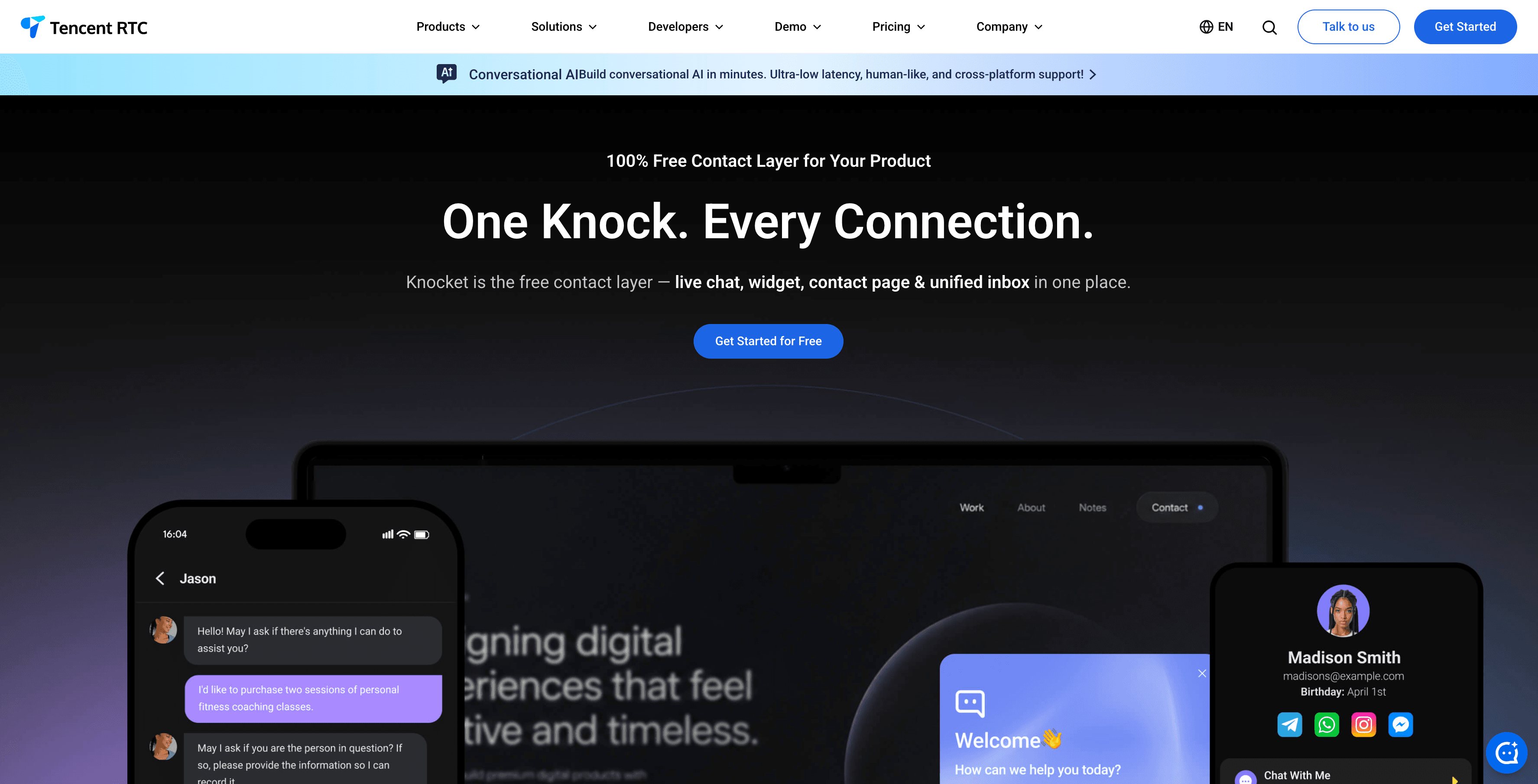
What Knocket actually is. Knocket is a lightweight contact widget for indie developers, early-stage founders, and indie hackers hunting for their first 100 users. It ships in three forms:
1. Web Widget — one <script> tag on any website, live in ~5 minutes.
2. Contact Page — a shareable link you can drop into Link in Bio, waitlist pages, or anywhere a visitor needs to reach a real person.
3. Unified Inbox — web chat, Telegram, and email in one place, with replies automatically routed back to the channel the message came from.
Under the hood, Knocket runs on Tencent RTC’s real-time infrastructure — the same network that powers Tencent’s conferencing stack — which is why the same chat experience ships in a web <script>, a mobile WebView, and a shared contact page without three different code paths.
What Knocket is not. Knocket is not a customer service system, not an AI chatbot, and not an Intercom replacement. It is the early-stage contact layer — for teams that want a real human on the other end of a chat bubble, without paying for an enterprise helpdesk. The rest of this guide compares it honestly against six other genuinely free options, so you can pick the one that fits your situation.
Quick answer: which free chat widget should I install in 2026?
If you want the short version, here is the 2026 ranking for the audience this article targets (indie developers, early-stage founders, solo builders hunting for their first 100 users):
Rank | Tool | Best for | Free forever? | Stays useful past 1,000 chats/mo? |
1 | Real visitors, real conversations, no per-seat fees | Yes | Yes (no caps) | |
2 | High-volume live chat with a team online 24/7 | Yes (but branded) | Only if you tolerate the badge | |
3 | Teams already inside the HubSpot CRM ecosystem | Yes (with HubSpot branding) | Becomes a CRM onboarding decision | |
4 | Shopify stores that want a 50-conversation AI test drive | No (50 AI convos/mo cap) | Hits wall fast | |
5 | Two-person teams that want a clean inbox | No (2-seat cap) | Hits wall at the third hire | |
6 | 5-10 person teams already on Freshworks | No (basic features only) | Freshworks ecosystem lock-in | |
7 | AI chatbot trained on your own docs | No (100 messages/mo) | Hits wall in week one |
The rest of this article explains what “free” means for each tool, what the actual hidden costs are, and how to pick between them.
Why “free” chat widgets are not always free
The word “free” on a SaaS pricing page is one of the most stretched definitions in the industry. Most chat widget companies use it as the top of a funnel that funnels you toward a paid plan within weeks. The 2026 patterns are consistent enough to catalogue:
Hidden cost tactic | How it works | Tools that use it in 2026 |
Conversation caps | Free plan limits chatbot conversations or messages per month | Tidio (50 AI/mo), Chatbase (100/mo), Crisp (2 seats), Zoho SalesIQ (100 sessions/mo) |
Seat limits | Free plan restricts the number of team members who can log in | Crisp (2), Freshchat (10 agents), Zoho SalesIQ (3 operators) |
Feature gates | AI, automations, custom routing, or analytics require a paid plan | HubSpot, Crisp, Tidio, Intercom |
Branding badges | Free plan shows the tool’s logo or “Powered by …” on your widget | Tawk.to ($19/mo to remove), Tidio, Crisp, HubSpot |
Per-resolution / per-message pricing | Free plan exists but AI features charge per resolution or message | Intercom ($0.99/resolution), Zendesk ($1/resolution) |
History limits | Free plan caps chat history at 30 days, blocking any meaningful retrospective | Heyy.io flagged this; HubSpot, Tidio, and many others do this too |
Truncated integrations | Free plan connects to 1-2 channels, not the full set | Tidio, Crisp, HubSpot, JivoChat |
Before picking a “free” chat widget, calculate the total cost for the next 12 months — including the first paid tier you will hit, the moment your third hire joins, and the day the conversation cap forces an upgrade. The table at the bottom of this guide (“The 12-month cost of ‘free’”) does this for you.
For broader context on how freemium traps work across the SaaS industry, Lenny’s Newsletter summary of the 2025 SaaS pricing research and the OpenView 2024 Product Benchmarks report both confirm the same pattern: most free plans are designed to convert, not to be the destination.
What “free forever” actually means in 2026
To make this comparison fair, here is the standard we are applying. A chat widget is “free forever” only if all five of these are true on the free plan:
1. No conversation, message, or seat cap — the plan does not stop working once you cross an arbitrary threshold.
2. No branding forced on the widget — visitors do not see “Powered by [vendor]” on the chat bubble.
3. No required upgrade to access a documented feature — the feature list in the docs matches what you actually get.
4. No data history lockout — you can see more than 30 days of conversations without paying.
5. No per-resolution or per-message billing on the free plan — usage is genuinely uncapped.
By that strict standard, only Knocket and Tawk.to qualify in 2026. Tawk.to qualifies on points 1, 3, 4, and 5, but the branding badge makes point 2 a paid upgrade. Knocket is the only tool that meets all five without any “but” or “unless.” If your priority is “the free plan is the product,” Knocket is the answer.
If you would rather pick the tool that fits your current situation (not the tool with the cleanest free-tier policy), read on — six of the seven tools below are genuinely useful in the right context, even if their free plan is not “forever.”
Quick comparison: 7 free chat widgets at a glance
Tool | What is free | What is limited | Real upgrade trigger | Free forever? |
Web Widget, Contact Page, Mobile Widget (via WebView), Unified Inbox, Telegram + email routing, full customization | No ticketing, no knowledge base, no built-in AI | You need enterprise support features (ticketing, SLA, routing) | Yes | |
Unlimited live chat, unlimited agents, mobile apps, 100+ languages | Tawk.to branding badge; no AI; no built-in social link aggregation | You need to remove the badge ($19/mo) or add AI | Yes (with a badge) | |
Live chat, basic chatbot builder, automatic CRM contact creation | HubSpot branding, basic automation only | You need advanced bots, routing, or remove branding | Yes (with branding) | |
Live chat for up to 10 agents, mobile app, basic analytics | No advanced routing, no campaigns, no Freddy AI | You need IntelliAssign, campaigns, or AI | No (10-seat cap) | |
Unlimited live chat, 50 AI chatbot conversations/mo, Shopify/Woo integrations | 50 AI convos/month cap; Tidio branding; no social link aggregation | You exceed 50 AI convos/month or want full automation | No (50-convo cap) | |
Live chat for 2 seats, basic widget, contact form | 2 seats max; no AI, no social links, no scheduling; Crisp branding | You hire a third team member or want the inbox features | No (2-seat cap) | |
AI chatbot trained on your own content; 100 messages/mo | 100 messages/mo (≈3/day); 1 agent; no human live chat option | You get more than 3 messages/day | No (100-msg cap) |
1. Knocket — Best free chat widget overall (and the only one that is truly free forever)
Knocket is a 100% free, forever-free website contact widget built for indie developers, startup founders, and small teams. Unlike every other tool in this list, Knocket is free forever by design — not a free trial, not a freemium, not a marketing funnel. There is no paid tier that opens up if you stay long enough. The whole product stays free: Web Widget, Contact Page, Mobile Widget, and Unified Inbox.
Free forever status: No conversation caps, no seat limits, no branding badge, no feature gates, no history lockout. Knocket meets all five criteria for “free forever” listed above.
Free TrialWhat you get for free (the full feature set, not a stripped plan)
● Web Widget — one <script> tag, ~5 minutes to install, works on HTML, WordPress, Shopify, Wix, Squarespace, Webflow, Ghost, Framer, Carrd, React, Next.js, Vue, Astro, Nuxt 3
● Live chat with real-time messaging (no conversation caps, no monthly limits)
● Contact Page — a shareable link you can put in Link in Bio, waitlist pages, or anywhere you do not have a website
● Mobile Widget — embeddable in iOS (WKWebView), Android (WebView + addJavascriptInterface), React Native, and Flutter via webview_flutter — no platform-specific build of the chat
● Unified Inbox — Web chat, Telegram, and email in one place; replies route back to the original channel automatically
● Telegram notifications + reply-without-opening-the-console — you can reply to a chat from Telegram by replying to the message; you do not need to log in to the Knocket dashboard
● Offline forms — capture name, email, and message when you are away
● Social link aggregation — WhatsApp, Instagram, Telegram, Messenger, and email, all in the widget
● Working hours with automatic online/offline switching
● Proactive greeting messages
● Full brand customization — theme color, logo, avatar, launcher style, language
● GDPR-friendly defaults, encrypted in transit
● Powered by Tencent RTC — runs on the same real-time infrastructure as Tencent’s enterprise conferencing stack
What is NOT included (and why that is fine for indie hackers)
● Ticketing system — you do not need tickets at the 1-100 user stage; Knocket’s unified inbox is enough
● Knowledge base — link visitors to your existing docs; do not pay for an in-widget KB
● Built-in AI chatbot — you can use a separate, focused tool like Chatbase for that, or stay human-only (recommended at small scale)
When you should NOT choose Knocket
● You need a full support platform with ticket routing, SLAs, and reporting for 10+ support agents
● You need an AI chatbot to deflect 80%+ of inbound volume automatically
● You are an enterprise with a procurement team that requires a signed MSA, SOC 2 report, and SSO
Why Knocket is the best free option in 2026
No other free chat widget in this comparison combines live chat, offline forms, social link aggregation, Telegram/email routing, and a Contact Page without conversation caps, seat restrictions, or feature gates. Tawk.to offers unlimited chat but no social links, no scheduling, no contact page, and no unified inbox. Tidio offers AI but caps conversations at 50/month. Crisp limits free plans to 2 seats with chat only. Chatbase caps messages at 100/month.
Knocket gives you the full feature set at $0 — permanently. No trial period, no credit card, no upgrade pressure, no badge. The product is free because the company chooses to make it free, not because the free plan is a marketing funnel for a paid tier.
How to install Knocket
1. Go to trtc.io/solutions/knocket and create a free account
2. Customize your widget — theme color, logo, greeting, components (Chat, Meeting Scheduler, social links), Telegram/email forwarding
3. Copy one line of code:
<script src="https://trtc.io/knocket-sdk/sdk.js?identifier=YOUR_ID" async></script>4. Paste it before </head> (preferred for faster first paint) on your site, or before </body> if your CMS only lets you edit the footer
5. Verify activation — your widget is live
Total setup time: under 5 minutes. For a deeper walk-through of the install on 15 platforms including the no-code Google Tag Manager path, see the step-by-step install guide.
2. Tawk.to — Best free live chat for high volume (if you can staff it)
Tawk.to is the most widely installed free live chat tool, used on over 4 million websites according to BuiltWith trend data. It offers genuinely unlimited live chat with no conversation caps and no agent limits.
Free forever status: Yes on conversations, agents, and features — but the Tawk.to branding badge is on the widget by default. Removal costs $19/month, and there is no AI chatbot on any plan.
What you get for free
● Unlimited live chat conversations (no caps, no monthly limits)
● Unlimited agents (no seat caps)
● Real-time visitor monitoring
● Built-in ticketing and knowledge base (this is rare for a free plan)
● Canned responses and shortcuts
● 100+ languages
● Mobile apps (iOS and Android)
● Chat history and basic analytics
What is limited
● Tawk.to branding badge on the widget — removal costs $19/month
● No AI chatbot — every conversation requires a human
● Analytics are basic (no custom dashboards, no cohort analysis)
● Mobile push notifications can be unreliable in some regions
● The widget script is heavier than some alternatives, which can affect Largest Contentful Paint on slow connections
When Tawk.to makes sense
You have team members who can actively monitor and respond to chats throughout the day. You need maximum volume at zero cost. You can tolerate the Tawk.to logo on your widget, or $19/month is in the budget.
When Tawk.to does NOT make sense
You are a solo founder who cannot be online all day. You need offline forms, social link aggregation, a meeting scheduler, or a contact page. You care about page speed more than the badge issue.
Knocket vs Tawk.to
Both are free with no conversation limits. The difference is what happens when you are offline. Tawk.to shows an empty chat window — if nobody responds, the visitor leaves. Knocket captures every visitor through offline forms, social links, and Telegram/email forwarding even when you are away. Tawk.to is a live chat tool. Knocket is a contact widget with a unified inbox. Choose based on whether you have staff online to respond in real time.
3. HubSpot Live Chat — Best free chat for teams already in the HubSpot CRM
HubSpot Live Chat is bundled with HubSpot’s free CRM. Every chat conversation automatically creates or updates a contact record in HubSpot CRM, which is valuable for sales-led teams that want chat to feed a pipeline.
Free forever status: Yes on the chat itself, but you adopt the HubSpot ecosystem, accept the HubSpot branding badge, and the automation / bot features are basic on the free tier.
What you get for free
● Live chat with unlimited conversations
● Automatic CRM contact creation from chats
● Basic chatbot builder (decision-tree style, no AI)
● Meeting scheduling (HubSpot’s built-in scheduler)
● Email follow-up integration
● Team inbox
What is limited
● HubSpot branding on the widget (removal requires HubSpot Marketing Hub paid tier)
● Chatbot automation is intentionally basic on the free plan — advanced routing is gated
● Limited customization without paid plans
● Chat is a feature of the CRM, not a standalone product — you are buying into an ecosystem
When HubSpot Live Chat makes sense
You already use HubSpot CRM or plan to. Your primary goal is lead capture and CRM pipeline, not just visitor contact. You want chat conversations to flow directly into sales workflows without a third-party integration.
Knocket vs HubSpot Live Chat
HubSpot Live Chat is built for sales pipeline automation. Knocket is built for visitor contact with a multi-channel inbox. If you want every chat to become a CRM record with deal stages, HubSpot wins. If you want a standalone contact widget with social links, Telegram/email routing, and a contact page — without adopting a CRM platform — Knocket wins. Knocket requires no account ecosystem; you paste one line of code and you are done.
4. Freshchat — Best free chat for 5-10 person teams already on Freshworks
Freshchat (part of Freshworks) offers a free plan for up to 10 agents, which is generous for larger teams. It integrates natively with Freshdesk and Freshsales.
Free forever status: The 10-agent cap is generous, but advanced routing, campaigns, and Freddy AI are all paid. You are also committing to the Freshworks ecosystem.
What you get for free
● Live chat for up to 10 agents
● Basic chatbot
● Mobile app
● Basic analytics
● Integration with Freshdesk and Freshsales
What is limited
● No advanced routing (IntelliAssign is paid)
● No campaigns or proactive messaging
● No advanced AI (Freddy AI is paid)
● Limited customization
● Designed as part of Freshworks ecosystem, not standalone
When Freshchat makes sense
You have a team of 5-10 people. You already use (or plan to use) Freshdesk or Freshsales. You need basic live chat at scale without per-agent fees.
Knocket vs Freshchat
Freshchat is built for teams inside the Freshworks ecosystem. Knocket is a standalone widget with no ecosystem dependency. Freshchat’s free plan supports more agents but offers basic features. Knocket’s free plan includes full features (chat + forms + social + scheduling + Telegram/email inbox) for any team size, forever.
5. Tidio — Best free chat with AI chatbot (only if 50 conversations/month is enough)
Tidio offers a free plan that includes unlimited live chat plus 50 Lyro AI chatbot conversations per month. Tidio is particularly popular with Shopify and WooCommerce stores thanks to its native integrations.
Free forever status: No. The 50 AI conversation cap will be hit by most active stores within 2-3 days. The free plan exists as a Tidio-branded funnel to a $24.17/month Starter plan (Tidio pricing).
What you get for free
● Live chat (unlimited)
● 50 Lyro AI chatbot conversations per month
● Visual chatbot flow builder
● Visitor tracking
● Basic analytics
● Shopify and WooCommerce integrations
What is limited
● AI chatbot capped at 50 conversations/month (most active sites exhaust this in 2-3 days)
● Tidio branding on the widget
● No social link aggregation
● No meeting scheduling
● No contact page
● Advanced automations require paid plans
When Tidio makes sense
You run an e-commerce store on Shopify or WooCommerce. You want to test AI chatbot capabilities before committing to a paid plan. Your site traffic is low enough that 50 chatbot conversations per month is sufficient.
Knocket vs Tidio
Tidio is stronger on AI chatbot automation and e-commerce integrations. Knocket is stronger on unified contact channels (chat + forms + social + scheduling + contact page) with no limits. If you need AI to answer product questions automatically, Tidio’s free plan lets you test that. If you need a full-featured contact widget with no conversation caps, Knocket is the better free option. Many indie stores end up using both: Knocket for “Contact us” and Tidio Lyro for “FAQ” — see the combining tools section below.
6. Crisp — Best free chat for two-person teams
Crisp offers a free plan for 2 operator seats with basic live chat. It is designed as a customer messaging platform with shared inbox, CRM, and knowledge base features on paid plans.
Free forever status: No. The 2-seat cap is a hard wall — adding a third team member requires the $25/month Basic plan. Crisp is also in the “freemium → paid” pattern; the free plan is a slimmed version of the paid product.
What you get for free
● Live chat for 2 seats
● Basic chat widget customization
● Contact form
● Mobile apps
What is limited
● 2 seats maximum — adding a third team member requires a paid plan ($25/month)
● No AI chatbot
● No social link aggregation
● No meeting scheduling
● No knowledge base
● Crisp branding on the widget
When Crisp makes sense
You are a two-person team that wants basic live chat with a clean interface. You plan to grow into a shared inbox and CRM setup later, and you are willing to pay once you cross 2 seats.
Knocket vs Crisp
Crisp’s free plan is one of the most restrictive: 2 seats, basic chat only, no social links, no scheduling, no contact page. Knocket’s free plan includes full features with no seat restrictions. Unless you specifically need Crisp’s shared inbox features (which require paying), Knocket is a more capable free option.
7. Chatbase — Best free AI chatbot widget (for testing only)
Chatbase offers a free plan with 100 AI chatbot messages per month. Unlike other tools, Chatbase lets you train the AI on your own content — upload PDFs, documents, or website URLs so the chatbot gives answers specific to your business.
Free forever status: No. 100 messages per month is approximately 3 messages per day. The free plan is explicitly a trial for evaluation.
What you get for free
● AI chatbot trained on your content
● 100 messages per month
● 1 AI agent
● Source citations in responses
● Basic customization
What is limited
● 100 messages/month is very low (≈3 messages per day)
● 1 agent only
● No human live chat option
● No offline forms
● No social link aggregation
● Limited integrations on the free plan
When Chatbase makes sense
You have existing documentation or a knowledge base and want to test AI chatbot capabilities. Your site traffic is low enough that 100 messages per month is sufficient for testing.
Knocket vs Chatbase
These solve different problems, and they are good together. Chatbase is an AI chatbot trained on your docs. Knocket is a contact widget. For many sites, the right combination is Knocket for “Contact us” + a Chatbase-style AI widget for “FAQ” — see the combining section below.
How to combine multiple free tools (the “stack” approach)
For indie developers at the 1-100 user stage, a single tool that does one job well is usually better than a “platform” that does ten jobs at 30%. The free tool you pick should be the one closest to your real bottleneck:
Your real bottleneck | Pick | Why |
You cannot be online all day, and visitors leave when you are away | Offline forms, social links, Telegram/email routing, contact page — all free, all uncapped | |
You get 50+ “what is your pricing?” / “do you support X?” emails per day and want a bot to answer | Chatbase free (or Tidio Lyro free for 50/mo) | AI trained on your docs handles the FAQ; the human tool handles real questions |
You are a 5-10 person team inside Freshworks | Freshchat free | 10-agent cap, native Freshdesk/Freshsales integration |
You have staff monitoring chat all day and you only need a chat bubble | Unlimited chat, unlimited agents, accept the badge or pay $19/mo to remove it | |
You are a Shopify store and need e-commerce integrations out of the box | Tidio free for 50 AI convos | Native Shopify/WooCommerce plugins, but the cap is real |
Which free chat widget should you choose?
Your situation | Best free tool | Why |
“I want visitors to reach me through chat, forms, social, or scheduling — forever, for free” | The only free tool with all four contact channels, no limits, no branding, no caps | |
“I need unlimited live chat and have staff to respond 24/7” | Unlimited everything, but requires humans online (and a $19/mo badge removal) | |
“I want chat connected to my CRM for sales” | Free chat + free CRM, automatic contact creation (accept HubSpot branding) | |
“I have a team of 5-10 and need basic chat” | Free for 10 agents, good if you are already on Freshworks | |
“I want AI to answer questions from my docs” | Free AI chatbot trained on your content (100 messages/mo) | |
“I run a Shopify store and want to test AI chat” | Free AI chatbot + Shopify integration (50 convos/mo) | |
“I am a 2-person team that needs basic chat” | Free for 2 seats with clean interface (but no third teammate without paying) |
The 12-month cost of “free”
Most teams start with a free plan and upgrade within weeks. Here is what the first upgrade costs for each tool, in USD:
Tool | Free plan limit | First paid plan | Annual cost (year 1) | Annual cost (year 2 if you grow) |
No limits | N/A — stays free | $0 | $0 | |
Branding badge | Remove branding: $19/mo | $228 | $228+ if you want AI | |
HubSpot branding, basic bots | Starter: $15/mo | $180 | $1,200+ as you adopt the CRM | |
Basic features only | Growth: $19/agent/mo | $228+ per agent | $2,280+ for a 10-agent team | |
50 AI chatbot convos/mo | Starter: $29/mo | $348 | $348+ as you grow | |
2 seats only | Basic: $25/mo | $300 | $900+ for 3 seats | |
100 messages/mo | Hobby: $40/mo | $480 | $1,200+ as traffic grows |
Knocket is the only free chat widget in this comparison where the free plan is the product. Every other tool uses the free plan as a funnel to paid conversion — that is the standard freemium business model and it is fine if you understand it, but it is not “free forever.”
Live chat in 2026: why having any chat widget matters
Even before you decide which tool to install, it is worth noting why a chat widget — any chat widget — is one of the highest-ROI features you can add to a website in 2026. The data is consistent across multiple independent sources:
● 41% of customers prefer chat as their primary support channel — Tidio’s 2026 customer channel preference research (source)
● 79% of businesses report live chat has a positive impact on sales and revenue — Kayako 2025 customer service report
● 38% of customers are more likely to buy from a company that offers live chat — Kayako 2025
● Live chat lifts average order value by ~10% — Forrester research, summarized on SQ Magazine
● Proactive chat can deliver up to 305% ROI — Etech 2024 study
● Live chat has an 87% positive CSAT score — Tidio internal data
● Online stores without chat are perceived as “nearly 2x less trustworthy” than those that have it — Tidio / Microsoft consumer research
● The top 1 million websites have installed chat widgets on 519,700+ of them — BuiltWith
In other words: the question in 2026 is not whether to add a chat widget, but which free widget to add. The default answer for the audience of this guide — indie developers, early-stage founders, indie hackers hunting for their first 100 users — is the one that stays free, stays unbranded, and stays uncapped. That is Knocket.
Beyond the widget: 3 more places the same free tool can live
Most “best free chat widget” articles stop at the website. Knocket does not, because the same free product ships in three other places you probably also need at the early stage:
A. Contact Page (a shareable link that works without a website)
If you have a Link in Bio, a waitlist page, or a “Coming Soon” landing page, a Contact Page is faster than embedding a widget. Knocket generates a shareable link with the same widget, configured the same way — drop the link in your Instagram bio, your Linktree, or your Twitter header. Visitors reach you without you needing to host a website.
B. Mobile Widget (chat inside your iOS / Android / Flutter / React Native app)
If you are building a mobile app and want a “Contact us” or “Send feedback” entry inside it, you can load the same Knocket page in a WKWebView (iOS), WebView (Android), WebView component in React Native, or webview_flutter on Flutter. The experience is just an H5 page running inside a WebView — no platform-specific build of the chat. The JS bridge name closeWebView is used to dismiss the page from a button inside the chat.
C. Unified Inbox (every channel in one place)
Web chat, Telegram, and email all flow into the same inbox. When you reply, the response is sent back through the same channel the visitor used — Telegram replies go to Telegram, email replies go to email, web chat replies stay in the widget. This is the unified inbox pattern that enterprise tools like Intercom and Front sell for $20-80/seat/month, available free in Knocket.
For the install walkthrough on 15 platforms (HTML, WordPress, Shopify, Webflow, Ghost, Framer, Carrd, React, Next.js, Vue, Astro, Nuxt 3, and Google Tag Manager), see the step-by-step install guide.
Privacy, security, and performance: the free-tier checklist
The free plan is not free if it costs you privacy, security, or Core Web Vitals. Here is the 2026 checklist for any free chat widget:
Concern | What to check | Why it matters |
GDPR / data residency | Where is the data stored? Is there a Data Processing Addendum available? Who is the data controller vs processor? | Required by GDPR Article 28 for any EU visitor data; California has similar rules under the CCPA |
Encryption in transit | Does the widget load over HTTPS only? | Required by PCI DSS 4.0 for any e-commerce, recommended everywhere else |
Encryption at rest | Is chat history encrypted at rest? | Protects your conversation logs if the vendor is breached |
Content Security Policy (CSP) | Does the widget work with a strict script-src? Will you need to allowlist a domain? | A misconfigured widget can break your CSP and open XSS vectors — see the OWASP CSP Cheat Sheet |
Cookie usage | Does the widget set cookies? Are they first-party or third-party? | Affects your cookie consent banner and your consent mode in Google Analytics |
Subresource Integrity | Does the widget support SRI? | If the vendor’s CDN is compromised, SRI prevents tampered JS from running on your site |
Page speed impact | How heavy is the widget script? Does it load async? | Affects LCP and INP on your site — test with PageSpeed Insights |
Script origin | Is the script served from a first-party domain or a third-party CDN? | First-party is faster (no extra DNS lookup) and avoids ad-blocker false positives |
Data export | Can you export your full chat history as JSON/CSV? | If the vendor shuts down, you do not lose the conversations |
Vendor lock-in | What is the export format? Is it standard? | Determines whether you can migrate to a different tool later |
For indie developers building on the modern web, the practical minimum is: async script, HTTPS-only, GDPR-friendly defaults, no third-party cookies, and a script size under ~50KB. Knocket checks all of these. Tawk.to is heavier and has a branding badge. Tidio, Crisp, HubSpot, and Freshchat are all third-party CDN scripts that you should test on PageSpeed Insights after install.
Frequently Asked Questions
Is there a truly free chat widget with no limitations?
Knocket is the only free chat widget in 2026 that meets all five criteria of “free forever”: no conversation caps, no seat limits, no branding badge, no feature gates, and no data history lockout. It includes the web widget, contact page, mobile widget, and unified inbox (with Telegram + email routing) — the full product, free, forever. Tawk.to is the only other tool that comes close, but it requires $19/month to remove the Tawk.to badge. Every other tool on this list has a hard cap (conversations, seats, or messages) that forces an upgrade.
Can I use a free chat widget for a commercial website?
Yes. All seven tools listed here allow commercial use on their free plans. However, Tawk.to, Tidio, Crisp, and HubSpot display their branding on the widget by default. If branding matters for your business, Knocket is the best option — no branding badge, no “Powered by …” footer, no vendor logo on the free plan.
Will a free chat widget slow down my website?
It depends on the tool. Knocket loads asynchronously with a lightweight script that does not block page rendering. Tawk.to’s script is heavier (the widget bundle is the largest of the free tools), which can affect Largest Contentful Paint on slow connections. Always add the async attribute to your chat widget script and test page speed with Google PageSpeed Insights after installation. For a deeper walkthrough of the impact on Core Web Vitals, see the install guide’s performance section.
What happens when I outgrow a free chat widget?
If you need ticketing, knowledge base, AI chatbot automation, or SLA reporting for 10+ agents, upgrade to a dedicated support platform like Intercom or Zendesk. If you only need more volume on existing features, Knocket scales without upgrading because its free plan has no conversation caps. The same script, the same widget, the same inbox — just more conversations.
Is Tawk.to or Knocket better for a startup?
For an early-stage startup, Knocket is better. Tawk.to requires someone online to respond to every message; startups rarely have staff dedicated to chat. Knocket captures visitor intent through offline forms, social links, a contact page, and Telegram/email forwarding even when the founder is busy — which is most of the time. Tawk.to is the right answer once you have a dedicated support hire.
What is the difference between a “free plan” and “free forever”?
A “free plan” is the bottom tier of a paid product. It exists to convert you to a paid tier, and it is typically capped in some way (conversations, seats, features, or branding). “Free forever” means the product stays at the same tier, with the same features, no matter how long you use it or how much you grow on it. Knocket is the only tool in this comparison that is “free forever” by design; the other six have free plans with various caps. The OpenView 2024 Product Benchmarks report confirms that the median freemium-to-paid conversion is 3-5% — meaning 95%+ of users are paying nothing on most free plans, and the product is funded by the small percentage who upgrade.
Can I add the chat widget without touching code?
Yes. If you use WordPress, Shopify, Wix, Squarespace, Webflow, or Ghost, you can paste the <script> tag into the header injection field in your CMS settings — no code editor needed. If you want a fully no-code path, install the script via Google Tag Manager (a community GTM container works for any site). Knocket supports all of these paths. For the step-by-step, see the install guide.
Will the chat widget work on a single-page application (SPA)?
Yes. Knocket’s script is SPA-aware — it loads once on initial page load and persists across client-side route changes. Tested on Next.js (both App Router and Pages Router), Vue 3, Astro (with the client:only directive), and Nuxt 3. For SPAs, place the script in your root layout component (e.g., app/layout.tsx for Next.js App Router, app.vue for Nuxt 3, src/layouts/Layout.astro for Astro).
Is the free chat widget GDPR-compliant?
Knocket runs on Tencent RTC’s infrastructure, which is GDPR-aware by design. The widget does not set third-party cookies by default, and chat data is encrypted in transit. For full GDPR compliance, you should still add a cookie consent banner (e.g., Cookiebot or OneTrust) and reference the EDPB guidelines on chat widgets in your privacy policy. Tawk.to, Tidio, and HubSpot all set cookies on first load, which is a GDPR concern for EU traffic unless paired with consent.
How do I know if the chat widget is actually working?
After pasting the script, open your site in an incognito window. The chat bubble should appear in the corner within 1-2 seconds. To verify it is loading correctly: open browser DevTools → Network tab → filter by sdk.js or the vendor’s domain → confirm the script returns HTTP 200. For Knocket, the script loads from trtc.io/knocket-sdk/sdk.js. You can also send yourself a test message and confirm it arrives in your inbox (Telegram, email, or Knocket dashboard, depending on your setup).
What is the best free chat widget for WordPress in 2026?
For WordPress specifically, the answer depends on what you are optimizing for. Tawk.to has a one-click WordPress plugin and the lowest setup friction. Knocket does not have a WordPress plugin, but the one-line script works in any theme’s header.php (or via the “Insert Headers and Footers” plugin) and is free forever with no branding. HubSpot Live Chat has an official WordPress plugin and is the right choice if you are also adopting HubSpot CRM. For a deeper WordPress-specific comparison, see the PushEngage 2026 review and the WordPress.org live chat plugin directory.
Stop comparing pricing pages. Start with the free tool that matches your use case, test it for a week, and upgrade only when you hit a real wall.
For a free contact widget that stays free, stays unbranded, and stays uncapped: Get started with Knocket