


Introduction
GTA6 cloud gaming is announced for Xbox One and Xbox Series X|S starting at 1 a.m. ET on November 19, 2026. As of November 17, the game is not yet released. You must purchase GTA VI separately, and the announcements do not establish a console-free way to play it on a phone or PC.
- Xbox One owners have a confirmed streaming route, despite there being no native Xbox One edition.
- PC cloud access was specifically denied; Android, iPhone, Mac, and smart-TV cloud access are not announced.
- Remote Play is confirmed on PlayStation and Xbox, but it streams from a compatible console you already own.
- Cloud gameplay uses Xbox Series S graphics settings, with a 30 fps target rather than an announced 60 fps mode.
- Streaming time costs extra unless covered by eligible allowances. Check title eligibility before buying a subscription or prepaid hours.
Can You Play GTA6 Through Cloud Gaming? Confirmed Availability
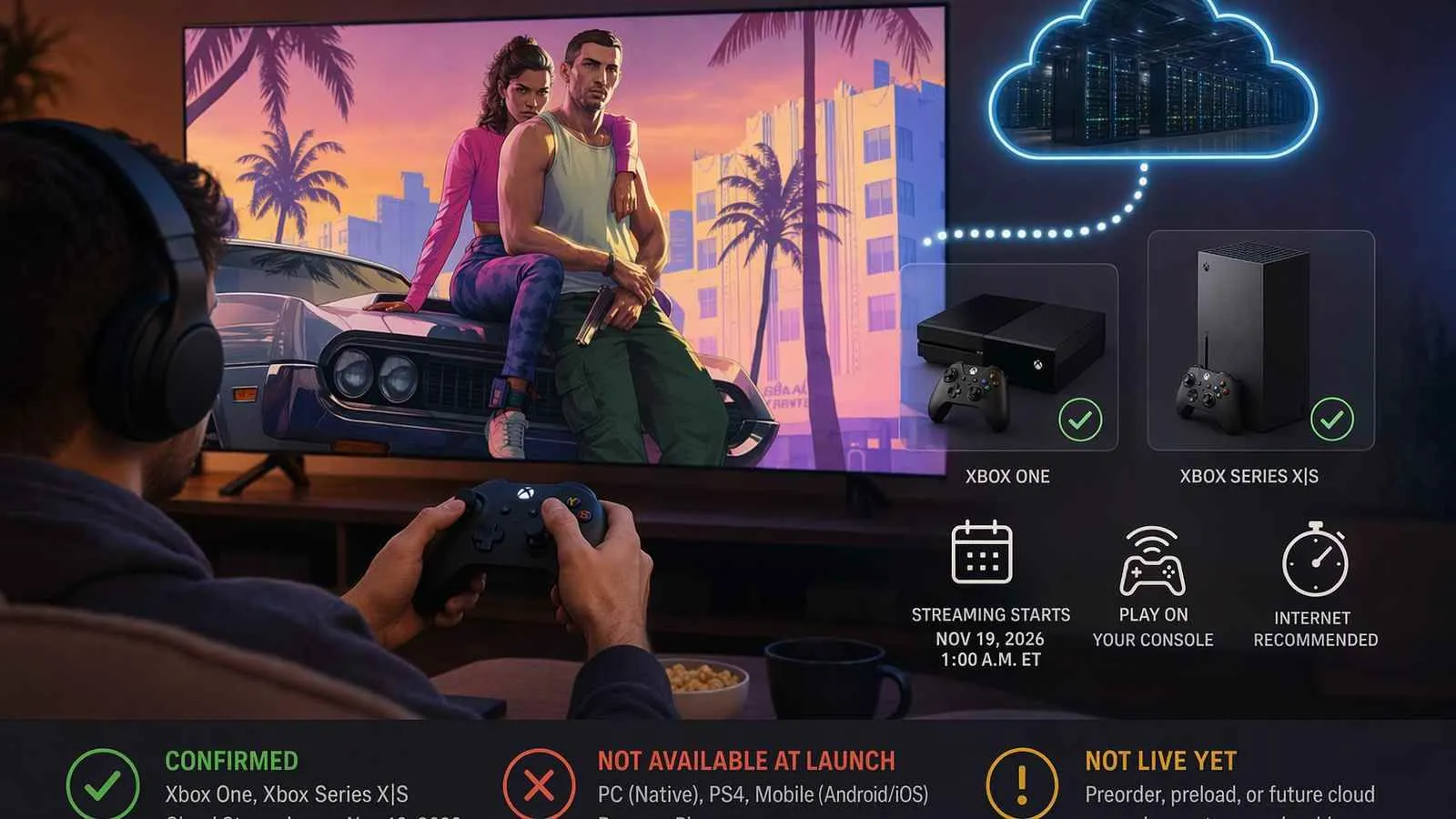
Yes—but the confirmed option is a scheduled console-based launch, not an already playable browser release. Microsoft’s GTA VI cloud launch announcement names Xbox One and Xbox Series X|S, with streaming starting at 1 a.m. ET on November 19, 2026.
Rockstar’s release-date announcement schedules the game itself for November 19. On the last-checked date above, that launch is still two days away. A preorder, preload, or future cloud announcement does not mean public gameplay is available now.
What is confirmed—and what is not?
Rockstar’s platform FAQ lists PlayStation 5 and Xbox Series X|S editions. It does not list native PC, Android, iOS, PS4, or Xbox One editions.
Xbox One cloud support is therefore a distinct access method: the game runs remotely, while the older console receives the stream and sends controller input. It is not an Xbox One port.
Microsoft also confirms that GTA VI is a separate purchase, rather than a game automatically included with a Game Pass subscription or a cloud-playtime pack. The precise combination of title eligibility, payment method, region, and account access should be checked on the game’s cloud launch option when it becomes available.
Can you play GTA 6 without a console?
No confirmed console-free launch option is established by these announcements.
An October claim that Xbox streaming would allow PC access was rejected by Microsoft, as documented in Shacknews’s reproduction of the company’s clarification. November’s official announcements subsequently named Xbox console endpoints.
This does not mean those endpoints can never change. It means a phone, laptop, or browser subscription is not a defensible purchase specifically for GTA VI today.
Cloud Gaming vs Remote Play: Platform Comparison
Cloud gaming runs the game on a service provider’s hardware. Remote Play runs it on your own console and sends the picture to another device.
Both transmit video and controller input over a network, but their ownership requirements, costs, and failure points differ.
| Term | What it means for GTA VI |
|---|---|
| Native installation | The PS5 or Xbox Series X |
| Xbox Cloud Gaming | Microsoft’s servers run the game; an eligible Xbox console receives it |
| Xbox Remote Play | Your own compatible Xbox runs its installed game |
| PS Remote Play | Your own PS5 runs the game and streams it to another device |
| Cloud endpoint | The device permitted to receive this particular game’s cloud stream |
| Game entitlement | The account’s right to play the purchased edition |
| Cloud playtime | Streaming hours, separate from game ownership |
| Stream resolution | The dimensions of the delivered video, not necessarily the game’s rendering resolution |
| Game frame rate | How frequently the game produces frames; separate from stream settings |
| Input latency | Delay between a button press and the resulting visible action |
Sony’s PS Remote Play page describes streaming from a user’s own PlayStation console to compatible phones, tablets, PCs, and Macs. Microsoft’s Xbox Remote Play page likewise describes using games installed on the player’s console.
Neither turns your phone into a native GTA VI platform.
Which GTA VI cloud gaming services are legitimate options?
| Service or method | GTA VI status as of November 17 | Decision |
|---|---|---|
| Xbox Cloud Gaming on Xbox One | Announced for November 19 | Confirmed route for older Xbox hardware |
| Xbox Cloud Gaming on Series X | S | Announced for November 19 |
| Xbox Cloud Gaming on PC | Specifically denied in October | Do not subscribe expecting PC access |
| Xbox cloud on Android, iPhone, Mac, or TV apps | Not announced for GTA VI | General service compatibility is insufficient |
| PS5 Remote Play | Game support confirmed | Requires your own PS5 and game |
| Xbox Series X | S Remote Play | Game support confirmed |
| PlayStation server-based cloud streaming | No confirmed GTA VI listing | Do not assume Premium includes it |
| GeForce NOW, Boosteroid, or Shadow | No verified GTA VI launch option | Not established alternatives |
The distinction matters when comparing subscriptions. PlayStation’s PS5 cloud streaming page describes selected eligible games, not automatic access to every PS5 purchase.
Similarly, GeForce NOW streams supported PC games from compatible stores and subscriptions. Boosteroid describes PC-game streaming, while Shadow supplies a streamed Windows PC. None of those descriptions establishes a playable GTA VI PC edition or converts an Xbox purchase into a PC license.
What You Need: Ownership, Region, and Supported Devices
For the announced Xbox route, your checklist is an eligible Xbox console, the appropriate game purchase, a supported account and region, a controller, and an eligible cloud-playtime arrangement.
Treat these as separate checks. Having enough cloud hours does not prove that GTA VI is available on your device; owning GTA VI does not buy unlimited streaming time.
Ownership and regional access
Use the official Xbox GTA VI listing for Xbox purchase information. Do not assume a PlayStation purchase creates an Xbox entitlement.
Microsoft’s country and service availability page lists Xbox Cloud Gaming support in the United States. That is a service-level check, not proof of worldwide GTA VI eligibility. Microsoft’s cloud-gaming page says available games can vary by region, device, plan, and cloud-playtime method.
Before spending money, verify both the service’s regional availability and the title’s actual launch option.
Android, iPhone, PC, Mac, and TVs
| Device | Confirmed GTA VI Xbox cloud endpoint? | Other legitimate route |
|---|---|---|
| Xbox One | Yes, scheduled for launch | Cloud streaming; no native Xbox One edition |
| Xbox Series X | S | Yes, scheduled for launch |
| PS5 | Not an Xbox cloud endpoint | Native installation or PS Remote Play host |
| Android phone/tablet | Not announced | Remote Play from a compatible owned console |
| iPhone/iPad | Not announced | Remote Play from a compatible owned console |
| Windows PC | PC cloud access specifically denied | Remote Play from a compatible owned console |
| Mac | Not announced | PS Remote Play from an owned PS5 |
| Smart TV | No GTA VI TV-app cloud announcement | Check compatible Xbox Remote Play options |
| PlayStation Portal | No confirmed GTA VI server-cloud listing | Remote Play from an owned PS5 |
For GTA 6 on Android or iPhone, the established distinction is phone as remote screen, not phone as standalone game platform.
Microsoft’s Remote Play requirements list Android 6.0 or later, iOS 15.1 or later, and Windows 10/11 version 22H2 or later. Those are Remote Play requirements—not proof of GTA VI Xbox cloud eligibility on those systems.
Storage depends on where the game runs
Rockstar’s preload announcement gives a local preload requirement of up to 212 GB, depending on the device.
That storage is relevant to a locally installed game, including a console hosting Remote Play. A cloud client does not need to store the entire GTA VI installation. It still needs whatever space its system software or streaming application requires.
How to Start Playing Where Official Support Exists
The following workflow separates preparation from launch-day verification. GTA VI-specific dashboard interactions cannot be confirmed through public gameplay before release.
Xbox cloud: verify the launch option before paying for hours
- Check the date and time. The announced start is November 19 at 1 a.m. ET. Convert that time to your location.
- Use an announced console endpoint. Begin on Xbox One or Xbox Series X|S, not a phone or PC browser.
- Sign in to the purchasing account. Check the game edition and entitlement.
- Connect a compatible controller.
- Find GTA VI and inspect its available play options. Microsoft’s general cloud workflow is to find the game and select its Cloud option.
- Check the required playtime method. Do not interpret a Game Pass page or a generic streaming button as proof that the game is included.
- Start with the smallest suitable commitment. Assess picture quality and responsiveness before purchasing more hours.
If the expected option is missing after the announced launch time, check account, region, ownership, and device eligibility. Avoid trying an unofficial launcher as a workaround.
PS5 Remote Play
Rockstar’s November 10 launch update confirms Remote Play support on PlayStation and Xbox.
For PS5, Sony’s phone setup instructions direct users to:
- Install the official PS Remote Play app.
- Use the same PlayStation account as the console.
- Enable Settings > System > Remote Play.
- Enable internet connectivity and network wake in Rest Mode settings when needed.
- Connect through a compatible device and supported input method.
The PS5 remains the machine running GTA VI. Sony confirms that PlayStation Portal Remote Play does not require PlayStation Plus.
Xbox Remote Play
Microsoft’s official setup instructions require enabling Settings > Devices & connections > Remote features, selecting Sleep power mode, and connecting through the supported browser route or Windows Xbox app.
The host must be a console capable of running the installed game. An Xbox One receiving GTA VI through cloud streaming is not thereby a native GTA VI Remote Play host.
Picture Quality and Performance: What the Specifications Mean
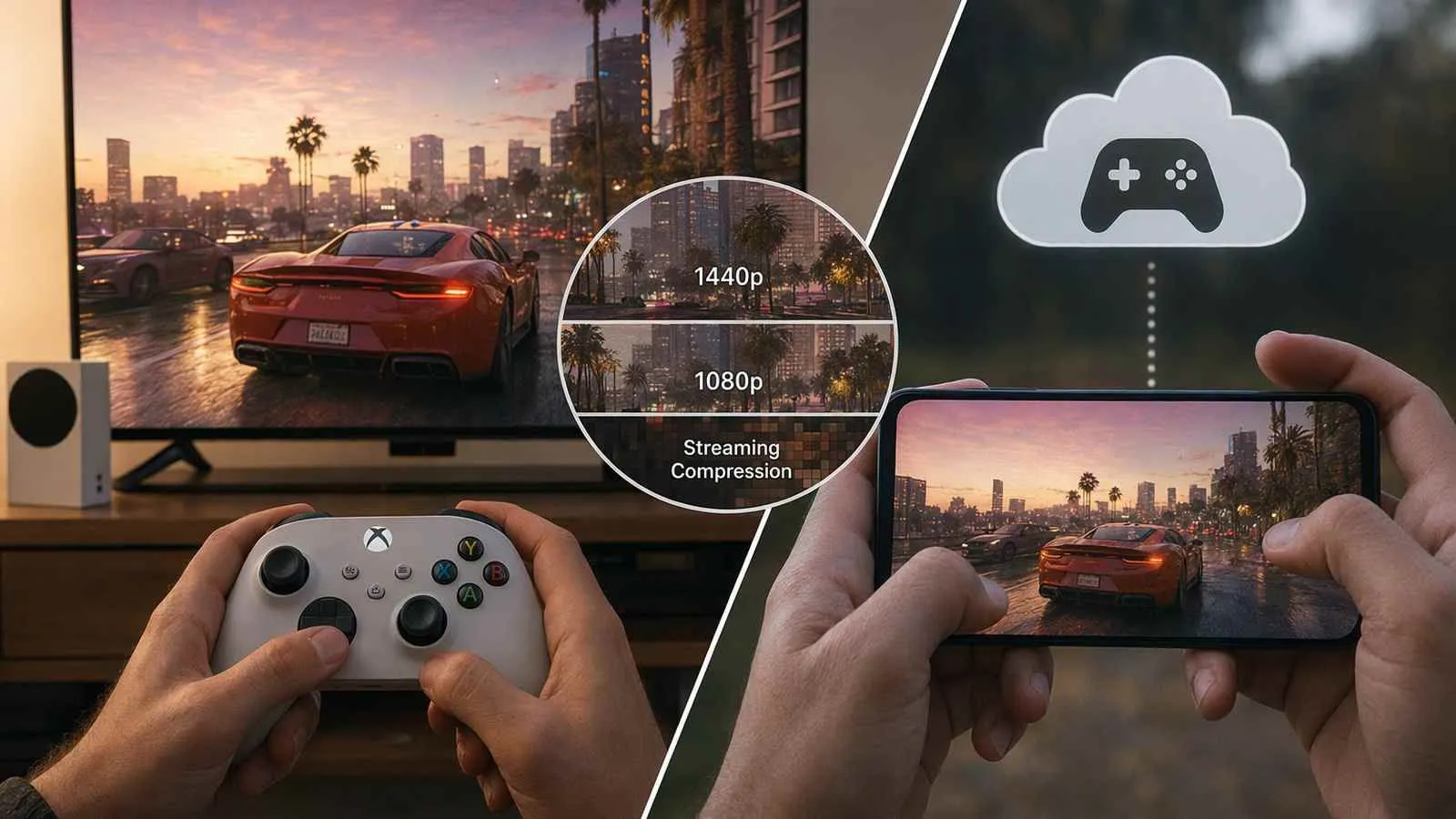
The confirmed GTA6 cloud gaming specifications are narrower than some service-level advertising suggests.
Rockstar’s launch update states that the Xbox cloud version uses Xbox Series S graphics settings, including when received on Xbox Series X. It also describes a 30 fps target for current-generation console gameplay, without announcing a 60 fps mode.
Streaming to stronger client hardware does not change those server-side game settings.
Resolution ceilings are not rendering guarantees
Microsoft’s current cloud support limits distinguish plan and device ceilings:
| Cloud option | Documented maximum | GTA VI interpretation |
|---|---|---|
| Ultimate outside Xbox One | Up to 1440p at 30 Mbps, or 1080p at 18 Mbps | Conditional stream ceiling, not native rendering resolution |
| Ultimate on Xbox One | Up to 1080p at 18 Mbps | Xbox One is excluded from 1440p |
| Premium, Essential, or standalone purchased playtime | Up to 1080p at 12 Mbps | Conditional service ceiling |
| Free ad-supported sessions | Up to 1080p at 12 Mbps | GTA VI access is not established |
The current support page excludes Xbox One from 1440p despite an older update naming some Xbox One models. Use the current operational limit rather than promising the older ceiling.
No verified GTA VI internal rendering resolution, sustained frame-rate test, cloud HDR specification, or measured input-latency benchmark is available here.
How to assess your own connection
Once official access opens, evaluate three separate problems:
- Picture quality: inspect road markings, foliage, text, and fast camera movement for compression or blur.
- Responsiveness: compare steering, camera movement, and button response under the same connection conditions.
- Stability: look for recurring freezes, audio breaks, or resolution changes rather than judging one isolated hitch.
On Series X|S, a local installation can provide a useful comparison, but differences in graphics settings mean it is not a controlled image-quality benchmark.
Microsoft’s console troubleshooting guidance identifies ping, packet loss, jitter, decoding performance, and network conditions as relevant factors. A download-speed test alone cannot predict the experience.
Internet Requirements, Data Usage, and Controllers
Microsoft recommends 20 Mbps or more for console cloud gaming in its cloud-versus-install guidance. That is a general recommendation, not a GTA VI-specific guarantee.
For PS Remote Play, Sony’s connection guidance specifies at least 5 Mbps upload and download, recommending at least 15 Mbps in both directions for best performance. Xbox’s Remote Play page lists 10 Mbps download among its requirements.
Remote Play away from home also depends on the host console’s upload connection. A fast hotel or mobile connection cannot compensate for an unstable home uplink.
Reduce latency before upgrading your plan
Microsoft’s network recommendations favor:
- Wired Ethernet where possible.
- 5 GHz rather than 2.4 GHz Wi-Fi.
- A TV’s game or best-performance mode.
- Reducing competing high-bandwidth activity.
- Avoiding problematic hotspots, extenders, and router obstructions.
Change one variable at a time. Testing Ethernet with household downloads paused is more informative than buying a higher-resolution tier while keeping the same congested Wi-Fi.
Estimated data use—not an official GTA VI measurement
Using decimal gigabytes, estimated video traffic is:
Bitrate in Mbps × 3,600 seconds ÷ 8 ÷ 1,000 = GB per hour.
Applying the bitrates in Xbox’s support limits gives:
| Assumed sustained bitrate | Calculated traffic per hour |
|---|---|
| 12 Mbps | 5.4 GB |
| 18 Mbps | 8.1 GB |
| 30 Mbps | 13.5 GB |
These are calculations, not measured GTA VI consumption. They assume the stated bitrate remains constant and exclude additional traffic and protocol overhead. Actual bitrate can change during a session.
A minimum connection recommendation should not be used as an assumed stream bitrate. On a metered connection, local installation may be preferable for repeated play, although the initial download is substantial.
Use a controller as the baseline
Do not assume touch controls or mouse-and-keyboard support. Xbox Remote Play’s marketing and setup guidance differ on touch functionality; the setup support page is the safer basis for a controller-first setup.
For phones, verify controller compatibility with the operating system and Remote Play app before buying a mount or accessory. No GTA VI-specific touch-control implementation is established.
Total Costs: Game Purchase, Streaming Hours, and Limits
The useful budgeting model is:
Game purchase + eligible streaming access + extra hours + any hardware or data costs.
The following figures are US listings. Regional prices, taxes, promotions, and title-specific eligibility can differ.
Game ownership is a separate expense
The US Xbox GTA VI listing lists:
| Item | Listed US price |
|---|---|
| Standard Edition | $79.99 |
| Ultimate Edition | $99.99 |
| Separate Ultimate Edition Upgrade | $20.00 |
The upgrade is not a standalone game license. Microsoft’s launch announcement explicitly separates game purchase from cloud access.
Prepaid cloud hours
Microsoft says eligible games can use purchased cloud playtime without a Game Pass subscription in supported markets. Its US cloud-gaming page lists:
| Pack | Listed price | Calculated cost per hour |
|---|---|---|
| 10 hours | $3.99 | About $0.40 |
| 25 hours | $7.99 | About $0.32 |
| 50 hours | $11.99 | About $0.24 |
These packs purchase streaming time, not GTA VI. Confirm the title accepts your chosen method before purchasing.
Game Pass allowances are no longer unlimited
The current US store pages list regular recurring prices and included monthly cloud hours:
Microsoft’s September 2026 announcement supersedes older unlimited-cloud guidance.
According to the current cloud-gaming page, included hours reset monthly without rollover and are consumed before purchased hours. Purchased time remains until used.
Budget examples and session restrictions
If Standard Edition and standalone hours are eligible for your account:
- Standard plus 10 hours totals $83.98.
- Standard plus 50 hours totals $91.98.
Those are calculated purchase totals from the game listing and playtime-pack prices, not advertised bundles.
Ultimate offers higher queue priority, but Microsoft’s queue guidance does not guarantee immediate access. Demand, location, and time also affect waits.
Free ad-supported streaming covers selected games and has session restrictions; it is not confirmed free GTA VI access. Xbox’s playtime support page explains remaining-time displays, low-time notifications, and account checks.
Recommendations, Remote-Play Limitations, and Scam Checks
Choose by the hardware you already own
| Your situation | Recommended approach | Reason |
|---|---|---|
| Xbox One owner | Verify the announced cloud route at launch | Avoids requiring a native Xbox One port |
| Series X | S owner with storage available | Install locally for regular play |
| Series X | S owner short on storage | Consider confirmed cloud access |
| PS5 owner wanting phone or Mac play | Use official PS Remote Play | Confirmed game support using your own PS5 |
| Compatible Xbox owner wanting phone or PC play | Evaluate Xbox Remote Play | Uses your own installed game rather than a denied PC cloud route |
| Phone-only or PC-only player | Wait for an explicit supported option | No confirmed console-free launch route |
| Player on unstable or metered internet | Prefer local play where possible | Streaming adds continuing network dependence |
For occasional Xbox cloud use, prepaid time may be more economical than subscribing solely for included hours—if GTA VI accepts that method. A subscription makes more sense when its other benefits and queue priority matter to you.
Remote Play removes the need to sit beside the console; it does not remove the console. Microsoft confirms that Xbox Remote Play requires no additional subscription and does not consume cloud allowances.
Do not assume cross-progression between Xbox and PlayStation, or save transfer to a future PC edition. Those behaviors are not established.
Reject fake mobile and early-access offers
A “GTA6 cloud APK” is not evidence of a supported streaming service. Before release, claims of leaked playable builds or unrestricted early access deserve particular scrutiny.
Netcraft’s GTA VI scam investigation documents nonexistent mobile versions, free-game offers, early-access lures, and survey-based content lockers. Malwarebytes’ investigation describes fake demo sites distributing an information stealer as gta6_installer.exe.
Use this check before downloading or paying:
- Does Rockstar announce the platform?
- Does the service list GTA VI for your exact device?
- Is the app obtained through an official route?
- Is anyone asking you to disable security or complete surveys to unlock gameplay?
- Does the offer confuse general cloud-service compatibility with GTA VI eligibility?
The next step is straightforward: use the official Xbox cloud announcement to identify the confirmed route, then check the actual game option at launch. Do not buy a workaround based on a thumbnail, compatibility checker, or unofficial download page.
How to Build an App Like This with Tencent RTC
A game companion app can support player voice rooms or live gameplay discussion without claiming to host GTA VI itself. Tencent RTC GVoice provides game-focused voice capabilities, including proximity audio and microphone controls. Tencent RTC RTC Engine provides real-time audio and video building blocks; it is not a GTA VI cloud-gaming entitlement or hosted game service. Consult the RTC Engine documentation for technical capabilities and platform constraints.
To explore implementation:
- Open Tencent RTC AI Agents Skills and follow the repository instructions to load applicable Skills in your AI coding assistant.
- Describe your existing project, platform, authentication, and intended interaction.
- Ask the assistant to implement within the Skills’ documented scope, then review permissions, credential handling, reconnection, and user controls.
A suitable request is:
Inspect my existing game companion app. Using the applicable Tencent RTC AI Agents Skills, add an opt-in player voice room with mute and leave controls. Keep credentials out of client source, explain unsupported requirements, and provide a verification checklist.
Frequently Asked Questions
Is GTA6 cloud gaming available now?
Not as of November 17, 2026. Xbox cloud streaming is announced to start on November 19 at 1 a.m. ET for Xbox One and Xbox Series X|S.
Can I play GTA 6 on PC through Xbox Cloud Gaming?
PC cloud access was specifically denied in October. The November announcement names Xbox consoles. Remote Play from your own compatible Xbox is a different method.
Can I play GTA 6 on Android or iPhone?
There is no confirmed native mobile edition or phone-based Xbox cloud launch option. Remote Play is the established route, requiring your own compatible console and game.
Is GTA VI included with Game Pass?
Microsoft says the game must be purchased separately. A subscription’s cloud hours do not provide game ownership, and exact title eligibility must be checked.
Can Xbox One run GTA VI?
No native Xbox One edition is listed. Xbox One is, however, a confirmed receiving device for the announced cloud stream.
Does GTA6 cloud gaming run at 60 fps or 4K?
Neither is established. Rockstar states a 30 fps target and Xbox Series S cloud graphics settings. Service-level stream ceilings do not prove the game’s internal resolution.
Does Remote Play use Xbox cloud hours?
No. Xbox Remote Play streams from your own console and does not consume included monthly cloud hours or purchased cloud playtime.
Is a free GTA6 APK or PC demo legitimate?
No official mobile APK or playable PC demo is established. Security researchers have documented fake mobile offers and demo installers that steal account information.