










Website Chat Widget -- 10 Best Options Compared for Speed, Features & Price in 2026
Choosing a website chat widget used to be simple: you picked the free one (Tawk.to) or the expensive one (Intercom). In 2026, the market is far more crowded, and the differences between tools matter more than ever.
Some chat widgets add 750KB to your page load. Others hide critical features behind paywalls. A few are genuinely free with no branding, while most “free” tools display “Powered by…” badges that make your site look unprofessional.
This guide compares the 10 best website chat widgets available today, with real pricing data, script size benchmarks, and honest assessments of what each tool actually delivers.
Quick Comparison Table
Widget | Free Plan | Script Size | Branding on Free | Starting Price | Best For |
Yes (full features) | ~45KB | None | $0 | Small business & solo founders | |
Yes (full features) | ~749KB | “Powered by Tawk.to” | $0 | Teams needing agent monitoring | |
Yes (50 chats/mo) | ~320KB | Tidio branding | $29/mo | AI chatbot automation | |
Yes (limited) | ~210KB | Crisp branding | $25/mo | Team collaboration | |
Trial only (14 days) | ~79KB | N/A | $20/mo | Page speed priority | |
Trial only (14 days) | ~340KB | N/A | $39/mo | SaaS customer engagement | |
Yes (10 agents) | ~280KB | Freshworks branding | $15/mo | Larger teams on a budget | |
Yes (50 messages/mo) | ~180KB | Chatbase branding | $39/mo | AI-powered FAQ | |
Yes (limited) | ~450KB | HubSpot branding | $20/mo | CRM-integrated sales | |
Yes (1 agent) | ~195KB | Smartsupp branding | $19.5/mo | E-commerce visitor recording |
Script size data sourced from Denser.ai’s performance testing and independent Lighthouse audits.
Why Script Size Matters More Than You Think
Your chat widget runs on every page of your website. If it adds 749KB (like Tawk.to), that extra weight affects your Core Web Vitals scores – specifically Largest Contentful Paint (LCP) and Total Blocking Time (TBT) on mobile devices.
Google has confirmed that page experience signals, including Core Web Vitals, are ranking factors. A heavy chat widget can push your mobile LCP past the 2.5-second threshold, which directly impacts your search rankings.
For context, LiveChat at 79KB and Knocket at approximately 45KB are the lightest options on the market. The difference between 45KB and 749KB is the difference between a widget that loads almost instantly and one that delays your entire page render by 200-500ms on a 4G connection.
1. Knocket – Best Free Website Chat Widget (No Branding)
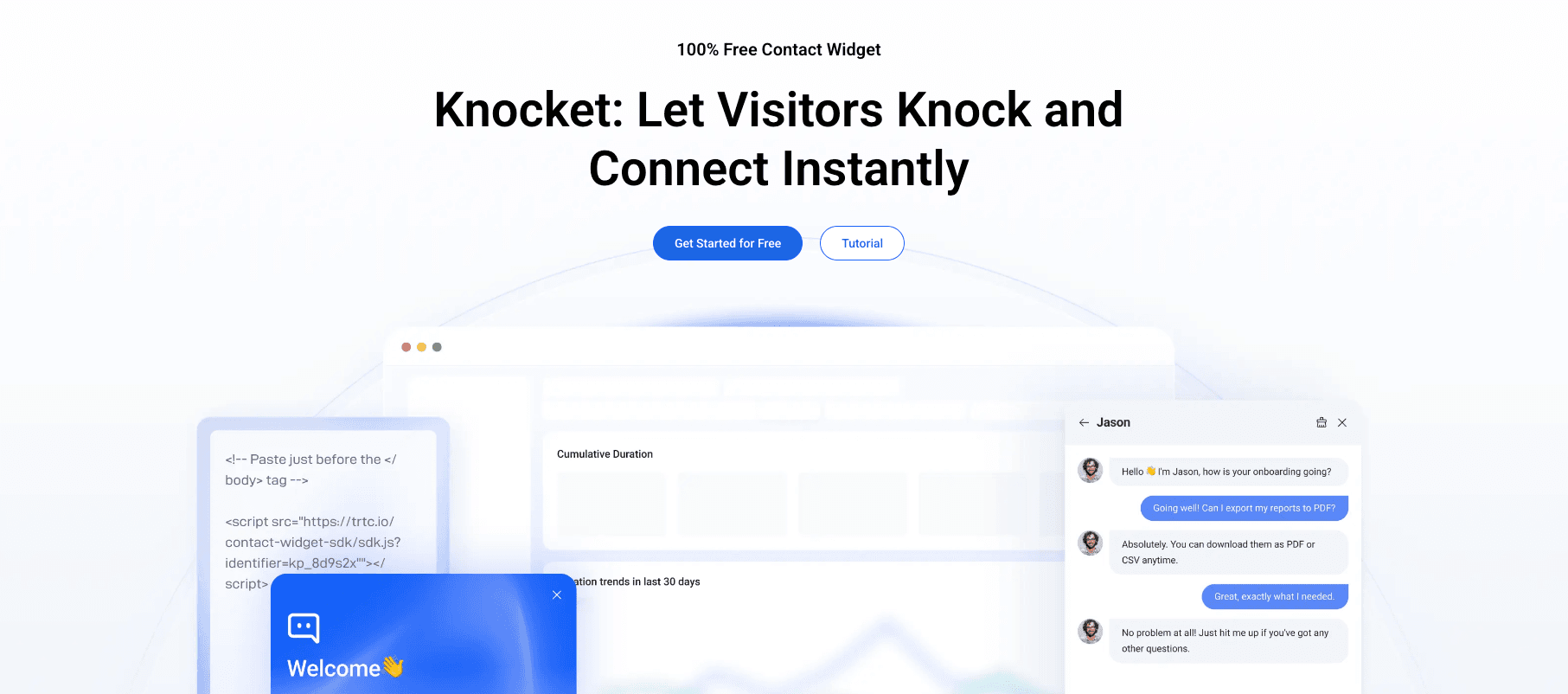
Knocket is a 100% free-forever website contact widget with no branding badge, no conversation limits, and no feature restrictions on the free plan. It is built on Tencent Cloud infrastructure, which means ultra-low latency globally.
Key features:
● Real-time live chat with visitors
● Offline contact form for after-hours inquiries
● Social link aggregation (WhatsApp, Instagram, Telegram, Facebook Messenger)
● Calendly meeting scheduling integration
● Proactive welcome messages
● Business hours configuration
● Full brand customization (colors, logo, widget theme)
● SSL encryption and GDPR compliance
Why Knocket stands out: It is the only chat widget that is completely free, has no branding, and includes features like social link aggregation and meeting scheduling. Most “free” widgets either display a “Powered by” badge or limit conversations. Knocket does neither.
Limitations: Knocket does not offer AI chatbot automation, ticket management, or CRM integrations. It is designed for live, real-time human-to-visitor communication – not for complex support workflows.
Who should use Knocket: Small business owners, solo founders, freelancers, and anyone who wants a professional-looking chat widget at zero cost without spending time managing a complex platform.
2. Tawk.to – Best Free Widget for Agent Monitoring
Tawk.to is the most widely used free chat widget, installed on over 4 million websites worldwide. It offers a comprehensive feature set at no cost.
Key features:
● Unlimited agents and conversations on the free plan
● Real-time visitor monitoring and tracking
● Screen sharing and file transfer
● Chat transfer between agents
● Ticketing system built into the platform
● Mobile apps for iOS and Android
Why Tawk.to stands out: The feature depth is remarkable for a free tool. Real-time visitor monitoring, ticketing, and multi-agent support make it suitable for teams that need more than just a simple chat window.
Limitations: Tawk.to displays a “Powered by Tawk.to” badge on your website that cannot be removed on the free plan. The 749KB script size is the heaviest of any widget on this list, which can impact page speed. You can remove branding by upgrading to a paid plan, but the pricing for branding removal is not transparent on their website.
Who should use Tawk.to: Teams of 2-10 agents who need visitor monitoring and ticketing features and do not mind the branding badge or the heavier script.
3. Tidio – Best for AI Chatbot Automation
Tidio combines live chat with an AI chatbot called Lyro that can automatically answer customer questions based on your knowledge base.
Key features:
● Lyro AI chatbot for automated responses
● Visual chatbot builder for custom flows
● Product card recommendations in chat
● Visitor list with browsing history
● Integration with Shopify, WordPress, and Wix
Why Tidio stands out: The Lyro AI chatbot is genuinely useful. According to Tidio’s own data, AI-assisted chat resolves 89.2% of routine inquiries without human intervention. For businesses that cannot staff chat 24/7, this is a meaningful advantage.
Limitations: The free plan limits you to 50 conversations per month and includes Tidio branding. The Lyro AI chatbot is only available on paid plans starting at $29/month, with additional charges for AI conversations beyond your plan’s limit.
Who should use Tidio: E-commerce businesses that want to automate responses to common questions like “Where is my order?” and “What is your return policy?” without hiring additional support staff.
4. Crisp – Best for Team Collaboration
Crisp positions itself as an all-in-one business messaging platform with live chat, shared inbox, CRM, and team collaboration tools.
Key features:
● Shared inbox across chat, email, and social
● Built-in CRM with contact profiles
● Internal notes and @mentions for team communication
● Magic Browse (co-browsing with visitors)
● Chatbot builder with triggers and conditions
Why Crisp stands out: The shared inbox and internal collaboration features make it feel more like a team communication tool than a simple chat widget. Internal notes, @mentions, and conversation assignments are particularly useful for teams of 2-5 people.
Limitations: The free plan limits you to 2 agents and 30 days of chat history. The chatbot builder and CRM features require paid plans starting at $25/month. Crisp’s branding appears on the free plan widget.
Who should use Crisp: Small teams (2-5 people) that want a unified communication platform rather than just a chat widget.
5. LiveChat – Best for Page Speed
LiveChat is a premium live chat tool known for its lightweight script (approximately 79KB), which makes it the fastest-loading chat widget on this list.
Key features:
● Lightweight script (79KB) minimizes page speed impact
● Message sneak-peek (see what visitors type before they send)
● Chat routing and assignment rules
● 200+ integrations with business tools
● Rich analytics and reporting
Why LiveChat stands out: The combination of message sneak-peek (which lets agents prepare responses before visitors finish typing) and the lightweight script makes LiveChat the best option for businesses where every millisecond of page load and every second of response time matters.
Limitations: There is no free plan – only a 14-day trial. Pricing starts at $20/agent/month, which adds up quickly for teams. The entry-level plan has limited features; you need the $40/agent/month plan for full functionality.
Who should use LiveChat: Businesses that prioritize page speed and can afford premium pricing.
6. Intercom – Best for SaaS Customer Engagement
Intercom is a customer engagement platform that includes live chat, product tours, surveys, and AI-powered support bots.
Key features:
● Product tours and in-app messaging
● Custom bot builder with branching logic
● Customer data platform with user profiles
● Integration with Salesforce, HubSpot, and Stripe
● AI agent (Fin) powered by GPT-4
Why Intercom stands out: For SaaS companies, Intercom offers the deepest integration between chat and product usage data. You can trigger messages based on what features a user has (or has not) used, segment users by plan type, and route conversations to the right team automatically.
Limitations: Intercom is expensive. According to CostBench’s 2026 pricing analysis, Intercom’s effective cost per seat often exceeds $100/month when including AI features and add-ons. The pricing structure is complex and can scale unexpectedly. The 340KB script is heavier than average.
Who should use Intercom: SaaS companies with 50+ employees that need deep product-usage integration and can justify the premium pricing.
7. Freshchat – Best for Larger Teams on a Budget
Freshchat is part of the Freshworks ecosystem and offers the most generous free agent allocation among chat widgets: up to 10 agents on the free plan.
Key features:
● Free plan supports up to 10 agents
● Native integration with Freshdesk and Freshsales
● AI-powered chatbots on paid plans
● Multi-channel support (web, WhatsApp, Facebook, Apple Business Chat)
● Intellassign (AI-powered chat assignment)
Why Freshchat stands out: 10 free agents is remarkable. Most free plans limit you to 1-3 agents. If you have a larger support team and a tight budget, Freshchat’s free plan is the most generous option available.
Limitations: The free plan includes Freshworks branding and limits chat history. Advanced features like AI chatbots and custom bots require paid plans. The Freshworks ecosystem lock-in can be a concern if you later want to switch tools.
Who should use Freshchat: Support teams of 5-10 people who need multi-agent chat at no cost and are comfortable with the Freshworks ecosystem.
8. Chatbase – Best for AI-Powered FAQ
Chatbase trains a custom AI chatbot on your website content, PDFs, and documents, then embeds it as a chat widget on your site.
Key features:
● Train AI on your own content (website, PDFs, docs)
● Customizable chatbot personality and responses
● Lead collection forms within chat
● Analytics on conversation topics
● GPT-4 powered responses
Why Chatbase stands out: It is the best option if you want an AI chatbot that can answer nuanced questions based on your specific content. Unlike generic chatbots, Chatbase’s bot draws from your actual documentation, making responses more accurate and relevant.
Limitations: The free plan limits you to 50 messages per month and includes Chatbase branding. There is no live chat component – Chatbase is purely AI-powered. If a visitor needs human assistance, there is no way to route them to a live agent.
Who should use Chatbase: Knowledge-heavy businesses (consulting, legal, healthcare) where visitors need answers to complex questions rather than real-time conversations.
9. HubSpot Live Chat – Best for CRM-Integrated Sales
HubSpot Live Chat is part of the HubSpot CRM ecosystem, which means every chat conversation is automatically connected to a contact record, deal pipeline, and marketing automation.
Key features:
● Automatic CRM contact creation from chats
● Chat flows builder with routing rules
● Meeting scheduling within chat
● Bot-to-live-agent handoff
● Full integration with HubSpot Marketing and Sales Hubs
Why HubSpot Live Chat stands out: If you are already using HubSpot CRM, the live chat integrates seamlessly. Every conversation enriches the contact record, which feeds into your marketing automation, deal tracking, and reporting.
Limitations: You need a HubSpot CRM account. The free plan includes branding and limited chatbot features. Paid plans that unlock advanced chat flows start at $20/month per user, but the real cost comes from upgrading to Marketing Hub ($20-$3,600/month) for full automation.
Who should use HubSpot Live Chat: Businesses already using HubSpot CRM who want chat tightly integrated with their sales and marketing workflows.
10. Smartsupp – Best for E-commerce Visitor Recording
Smartsupp combines live chat with session recording, which lets you watch how visitors navigate your website before and after they chat.
Key features:
● Visitor session recordings
● Real-time visitor list with browsing data
● Cart abandonment notifications
● Chatbot with automated triggers
● Integration with Shopify and WooCommerce
Why Smartsupp stands out: Session recording is unique among chat widgets. Seeing how a visitor browsed your site before starting a chat gives agents valuable context. According to Smartsupp’s data, their platform processes over 4.8 billion website visits, and only 0.84% of visitors initiate a chat – but those who do convert at significantly higher rates.
Limitations: The free plan limits you to 1 agent and 7 days of chat history. Session recording is only available on paid plans starting at $19.50/month. The branding badge appears on free plans.
Who should use Smartsupp: E-commerce businesses that want to understand visitor behavior through session recordings in addition to chat.
How to Choose the Right Website Chat Widget
If budget is your primary concern
Choose Knocket if you want a completely free widget with no branding and no feature restrictions. It gives you live chat, social link aggregation, Calendly scheduling, offline forms, and brand customization at zero cost.
Choose Tawk.to if you need unlimited agents and conversations and do not mind the branding badge or the heavier script.
If page speed is your primary concern
Choose Knocket (45KB) or LiveChat (79KB). Both have scripts that load in under 100ms on a typical 4G connection. Avoid Tawk.to (749KB) and HubSpot (450KB) if LCP is critical for your SEO.
If you need AI automation
Choose Tidio for the most mature AI chatbot (Lyro) combined with live chat. Choose Chatbase if you want a purely AI-powered widget trained on your own content.
If you need team collaboration
Choose Crisp for shared inbox and internal collaboration features. Choose Freshchat if you have 5-10 agents and need the most generous free plan.
If you are a SaaS company
Choose Intercom if you can afford it and need deep product integration. Choose Crisp if you want similar functionality at a lower price point.
The Hidden Cost of “Free” Chat Widgets
Not all free chat widgets are truly free. Here are the common hidden costs:
1. Branding badges – Tawk.to, Tidio, Crisp, Freshchat, HubSpot, and Smartsupp all display branding on their free plans. This branding makes your website look less professional and can distract visitors from your own brand identity.
2. Conversation limits – Tidio’s free plan limits you to 50 conversations per month. Chatbase limits you to 50 AI messages per month. Once you hit these limits, you must upgrade.
3. Feature gating – Most free plans restrict features like chatbot builders, CRM integrations, and analytics. You get the chat window, but the tools that make chat effective are locked behind paywalls.
4. Data ownership – Some free plans limit how long you can access your chat history. Crisp’s free plan, for example, limits chat history to 30 days.
5. Agent seat limits – Smartsupp’s free plan allows only 1 agent. If your team grows, you must upgrade.
Knocket is the only widget on this list that offers a genuinely free plan with no branding, no conversation limits, no feature restrictions, and no agent seat limits.
FAQ
What is the best free website chat widget?
Knocket is the best free website chat widget because it offers full features (live chat, social links, Calendly scheduling, offline forms, brand customization) at zero cost with no branding badge. Tawk.to is the best free option if you need unlimited agents and visitor monitoring and do not mind the branding.
How much does a website chat widget cost?
Website chat widget pricing ranges from $0 (Knocket, Tawk.to) to $39+ per agent per month (Intercom, Chatbase). Most tools offer free plans with limitations. The average paid plan costs $20-30/agent/month.
Does a chat widget slow down my website?
It depends on the widget’s script size. Heavy widgets like Tawk.to (749KB) and HubSpot (450KB) can add 200-500ms to your page load time on mobile. Lightweight widgets like Knocket (~45KB) and LiveChat (79KB) have minimal performance impact.
Can I use a chat widget without branding?
Yes, but only a few tools offer branding-free widgets on their free plans. Knocket is the only free widget with no branding. Most other tools (Tawk.to, Tidio, Crisp, Smartsupp) require paid plans to remove branding.
Which chat widget is best for small business?
Knocket is the best chat widget for small businesses because it is free, has no branding, includes features like social link aggregation and meeting scheduling, and takes less than 5 minutes to set up. For businesses that need AI chatbot automation, Tidio is a strong alternative.
How do I add a chat widget to my website?
Most chat widgets provide a single line of JavaScript code that you paste into your website’s HTML, typically before the closing </body> tag. On WordPress, you can use a plugin or paste the code into your theme’s header/footer. On Shopify, paste the code into your theme’s theme.liquid file. Setup typically takes under 5 minutes.
Can I have live chat and AI chatbot together?
Yes. Tools like Tidio, Intercom, and Crisp offer both live chat and AI chatbot capabilities. The AI bot handles routine questions and transfers complex issues to human agents. Knocket focuses on live chat with social link aggregation rather than AI automation.