










POWERED BY
TikTok Audio Translator: Best Real-Time Chrome Extension to Unlock Global TikToks


USE CASES
Why You Need a Real-Time TikTok Audio Translator for Global Content

In today's interconnected world, language should never be a barrier to accessing fascinating content. Whether you're trying to understand trending TikToks, learn from foreign educational videos on YouTube, or follow international live streams, an effective tiktok audio translator is crucial. Our Chrome extension is specifically designed to bridge this gap, offering unparalleled real-time translation capabilities directly in your browser.
How Our Chrome Extension Delivers Real-Time TikTok Audio Translation (And More!)
Our "Chrome Real-Time Video/Live Stream Translation Subtitle Extension" is engineered for simplicity and powerful performance. Here’s a quick look at the technology behind your new favorite video translation tool:
Automatic Audio Detection
When you open a video or live stream on a supported platform (including TikTok!), our extension intelligently detects the audio stream.
Speech-to-Text Conversion
The spoken words are then transcribed into text using state-of-the-art speech recognition technology.
Instant Language Translation
This transcribed text is immediately sent to our powerful translation servers, which process it into your desired target language(s).
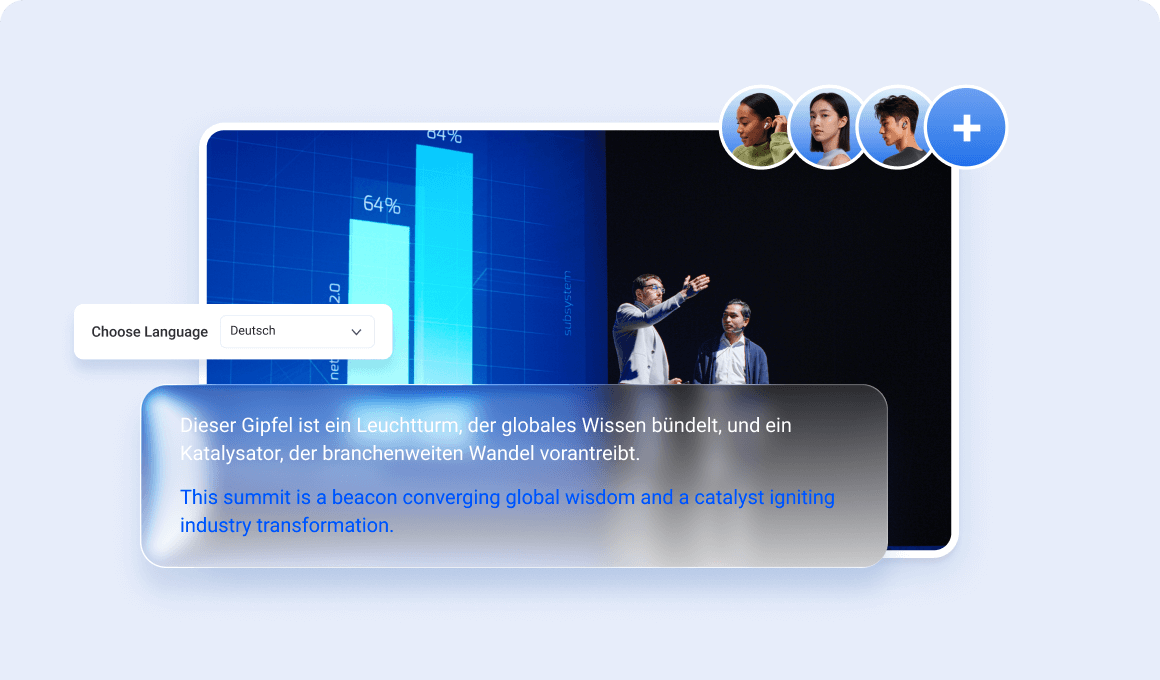
Dual Subtitle Overlay
he original text and its translation are then synced and displayed as clear, perfectly timed subtitles directly on your video player. Our unique display optimization ensures that both sets of subtitles are easy to read without cluttering your screen.
Core Features: Your Ultimate TikTok Audio Translator & Beyond
Beyond basic translation, our extension is packed with features designed to enhance your viewing and learning experience:.
15+ languages, high-accuracy translation
Powered by advanced NMT models for contextually relevant results across major languages (Spanish/French/German/Japanese/Korean/Arabic, etc.).
Best-in-class bilingual subtitles, fully customizable
Optimized dual-language UI that stays readable and unobtrusive, with controls for font size, color, background, and position.
Works on major platforms, stays lightweight
Supports YouTube, Netflix, Twitch, TikTok, and most HTML5 players, while keeping resource usage low (typically <2% CPU and ~50MB RAM) plus one-click toggle on/off.
Comparing Our Translator: Speed, Accuracy & Dual-Language Advantage
While other translation tools exist, our extension stands out for its unique blend of features:
Real-Time Speed
Our extension processes and displays subtitles faster than most competitors, ensuring a truly synchronized experience (e.g., typically 0.5 seconds faster than average plugins).
Superior Dual-Language Optimization
Unlike basic tools that just layer text, our display algorithm dynamically adjusts subtitle placement and styling for optimal readability of both languages simultaneously.
Broadest Platform Compatibility
From a specific tiktok audio translator to a universal video captioner, we cover more platforms seamlessly.
Easy Installation Guide: Get Your TikTok Audio Translator Running in Minutes
Installing our Chrome extension for effortless simultaneous interpretation is quick, easy, and completely hassle-free. Follow these simple steps to unlock a world of understanding in just moments:
1. Visit the Chrome Web Store
Click the button below or search for "Tencent RTC Real-time Transcription & Al Translation" on the official Chrome Web Store.
2. Add to Chrome
On the extension's page, click the prominent "Add to Chrome" button. A confirmation pop-up will appear, asking for necessary permissions.
3. Confirm Installation
Review the permissions (they are minimal and necessary for functionality) and click "Add extension" in the pop-up to proceed.
4. Pin to Toolbar (Optional but Recommended)
After successful installation, click the puzzle piece icon (Extensions) in your Chrome toolbar. Find "Tencent RTC Real-time Transcription & Al Translation" and click the pin icon next to it. This makes the extension readily accessible for quick toggling and settings adjustments.
5. Start Translating! Navigate to any supported video or live stream.
The extension will automatically begin detecting and translating audio. You can also manually activate or customize settings via the extension icon in your toolbar.
Frequently Asked Questions (FAQ) About Real-Time Translation
What is the difference between "simultaneous interpretation" and standard translation?
Standard translation often involves translating static text or recorded audio after the fact. Simultaneous interpretation, as offered by our extension, provides translations in real-time as the original content plays. The goal is minimal delay, keeping you perfectly in sync with live conversations, events, or video playback.
How accurate is the real-time translation?
Our extension employs cutting-edge AI and neural machine translation models, achieving a high level of accuracy. While no machine translation is 100% perfect, especially with highly nuanced language, specific jargon, or complex idioms, we continuously train and update our models to provide the most natural and contextually appropriate translations possible.
Does this extension support live streams on all platforms?
We actively support major platforms like YouTube and Twitch for live streams, and our compatibility is constantly expanding. If you encounter a platform or service that isn't currently supported, please reach out to our team – we appreciate user feedback for future updates!
Can I use this for language learning?
Absolutely! The dual-language subtitle feature is specifically designed to aid language learners. By seeing both the original and translated text simultaneously, you can significantly improve vocabulary, comprehension, and listening skills. It's an excellent video translation tool for educational purposes.
Is the extension free to use?
Our core simultaneous interpretation features are completely free to use, offering instant access to global content. We also provide an optional premium version that unlocks advanced functionalities, such as downloadable subtitles, enhanced customization options, and priority customer support.
What about my privacy?
Is my viewing data collected? A: We prioritize your privacy and data security. Our extension is designed to process audio efficiently and responsibly. While some anonymized audio segments may be sent to our secure translation servers for processing, this data is used strictly for translation purposes and is never linked to your personal identity or viewing habits.
Ready to Break Language Barriers and Dive into Global Content?
Don't let language limitations hold you back from enjoying the vast world of online videos and live streams. Our Chrome Real-Time Video/Live Stream Translation Subtitle Extension is your ultimate tool for instant understanding and immersive language learning.