










Your phone rings at 7:43 PM on a Tuesday. A new customer wants to book a haircut for tomorrow morning. But you closed an hour ago. Nobody picks up. The caller hangs up, Googles your competitor, and books with them instead. And 85% of people whose calls go unanswered will never call back.
This happens more often than you think. Small businesses miss more than half their incoming calls — and according to industry research, a missed call can cost a service business $100 to $200 in lost revenue. Over a month, that adds up fast.
AI phone answering services fix this problem. Not with clunky phone trees or "press 1 for sales," but with actual conversational AI that sounds like a real person, picks up every call, and books appointments on the spot.
This guide covers everything you need to know: what AI phone answering actually is, how it works, what it costs, and how to pick the right service for your business.
What Is AI Phone Answering?
AI phone answering is exactly what it sounds like: an artificial intelligence system that answers your business phone calls, talks to callers in natural language, and handles tasks like booking appointments, answering questions, and taking messages.
But let's be clear about what it is not.
It's not an IVR system. You know those "press 1 for billing, press 2 for support" menus? That's Interactive Voice Response — technology from the 1990s. Callers hate it. A Vonage study found that 61% of consumers feel IVR systems provide a poor experience. AI phone answering has no menus. Callers just talk naturally.
It's not a chatbot on the phone. Chatbots follow rigid scripts. If a caller says something unexpected, a chatbot breaks. Modern AI phone answering uses large language models (the same technology behind ChatGPT and Claude) to understand context, handle follow-up questions, and carry on a real conversation.
It's not a voicemail system. Voicemail asks callers to leave a message. Most won't. Research shows roughly 80% of callers sent to voicemail don't leave one — they just hang up and try someone else. AI phone answering actually resolves the call by booking the appointment, answering the question, or routing to the right person.
Think of it as a receptionist who never calls in sick, works 24 hours a day, speaks multiple languages, and costs less than a daily coffee run.
How It Actually Works
Here's what happens during a typical AI-answered call, step by step:
1. The Call Comes In
A customer calls your business number. The call is forwarded to your AI phone answering service. You set this up once through your phone provider — it takes about two minutes.
2. The AI Picks Up Instantly
No rings, no hold music. The AI greets the caller using your business name: "Thanks for calling Paws & Claws Pet Grooming, how can I help you today?"
3. Natural Conversation Happens
The caller says: "I need to get my golden retriever groomed this Saturday. Do you have anything in the morning?"
The AI understands this completely. It knows what services you offer, your pricing, your hours, and your availability. It checks your real-time calendar and responds: "We have a 10 AM opening for a large dog grooming session on Saturday. That's $65. Want me to book that for you?"
4. The Appointment Gets Booked
The caller says yes. The AI collects their name and phone number, creates the appointment in your calendar (Google Calendar, Mindbody, Square, or whatever you use), and sends the caller a confirmation text.
5. You Get Notified
You receive a summary of the call — what was discussed, what was booked, any special requests. All without lifting a finger.
6. Complex Calls Get Transferred
If a caller needs something the AI can't handle — a complaint, a specific medical question, a billing dispute — the AI transfers the call to you or your staff. It doesn't pretend to be something it's not.
The whole process takes about 60–90 seconds. That's often faster than most human receptionists, especially during busy periods.
Who Uses AI Phone Answering?
AI phone answering works best for service-based businesses where customers call to book appointments or ask questions. Here's where it delivers the most value:
Hair Salons and Barbershops
Stylists can't answer phones while holding scissors. Salons frequently miss calls during business hours — right when customers are trying to book. AI answers every call and books directly into salon scheduling software.
Pet Grooming and Veterinary Clinics
Pet owners often call after hours — when they notice a health issue in the evening, or want to book grooming before a weekend trip. AI handles these calls around the clock.
Fitness Studios and Gyms
Class bookings, membership questions, schedule inquiries. These are perfect for AI — the answers are structured and the booking process is straightforward.
Dental and Medical Offices
Appointment scheduling and rescheduling makes up the bulk of calls to healthcare practices. AI handles the routine calls so front desk staff can focus on patients who are physically in the office.
Home Services (Plumbers, Electricians, HVAC)
When a pipe bursts at 11 PM, the homeowner calls. The business that answers gets the job. AI picks up instantly and captures the lead, even at midnight.
Spas and Wellness Centers
Treatment bookings, package inquiries, availability checks. High call volume during lunch hours when potential clients are browsing services.
The common thread: any business where the phone rings frequently but staff are too busy (or unavailable) to answer every call. If a caller can't get through, they don't wait — 78% of customers buy from the first business that responds.
Key Features to Look For
Not all AI phone answering services are created equal. Here's what separates the genuinely useful ones from the frustrating ones:
Natural-Sounding Conversation
The AI should sound like a person, not a robot. Listen for natural pacing, appropriate pauses, and the ability to handle interruptions. Always ask for a demo call before you commit. If the voice sounds stilted or uncanny, your callers will notice.
Real-Time Calendar Integration
This is non-negotiable. The AI needs to see your live availability and book appointments directly into your calendar. Look for integrations with Google Calendar, Mindbody, Square Appointments, Acuity, or whatever scheduling tool you already use. If the AI just takes a message saying "they want Tuesday at 3pm" and you have to manually check and book, that defeats the purpose.
Business Knowledge
The AI should know your services, prices, hours, location, parking info, cancellation policies — everything a good receptionist would know. Setup should let you input this information easily, in plain language. No coding or technical skills needed.
Call Transfer to Humans
For complex or sensitive situations, the AI must be able to transfer the call to a real person. Seamless warm transfers — where the AI tells the human what the call is about before connecting — are ideal.
Multilingual Support
If you serve a diverse community, your AI receptionist should speak your customers' languages. Spanish is table stakes in the US. Look for services offering additional languages relevant to your area. The best systems detect the caller's language automatically and switch without asking.
SMS Follow-Up
After a call, the AI should send a confirmation text with appointment details, directions, or prep instructions. This reduces no-shows and makes customers feel taken care of.
Call Summaries and Transcripts
Every call should be logged with a summary and full transcript. This helps you stay informed and spot patterns — like frequent questions you could address on your website or in your marketing.
After-Hours Handling
This is the main selling point for many businesses. Make sure the service works 24/7/365 without extra charges for nights, weekends, or holidays.
Easy Setup
If setup takes more than a day, something is wrong. The best services get you live in minutes, not weeks. Look for guided onboarding that walks you through each step.
Cost Comparison: Every Option Side by Side
Here's what you'll actually pay for each type of phone answering solution:
Solution | Monthly Cost | 24/7 Coverage | Books Appointments | Avg. Cost Per Call |
AI Phone Answering (e.g., DeskBuddy) | $39.90–$99.90 | Yes | Yes (auto-syncs calendar) | $0.25–$1.00 |
Virtual Receptionist (human, e.g., Ruby) | $235–$1,500+ | Limited plans | Some services | $4.00–$12.00 |
Hybrid AI + Human (e.g., Smith.ai) | $140–$600+ | Yes | Yes | $4.25–$7.00 |
In-House Receptionist | $2,800–$3,800 | No (business hours only) | Yes | $15.00–$25.00 |
Voicemail Only | $0–$15 | Yes (but no live answer) | No | N/A (most callers hang up) |
DIY / Answer It Yourself | $0 | No | Yes (when available) | Your time |
A few things jump out from this comparison:
In-house receptionists are the most expensive option at $33,000–$45,000 per year in salary alone, plus benefits, training, sick days, and turnover costs. For many small businesses, this simply isn't in the budget.
Virtual receptionist services (human-staffed) like Ruby or Abby Connect start around $235/month but costs rise quickly once you exceed your plan's included minutes. At $1–$2 per overage minute, a busy month can double your bill.
AI phone answering is 80–95% cheaper than human alternatives for comparable coverage. A service like DeskBuddy starts at $39.90/month with 24/7 coverage and automatic appointment booking — functionality that would cost $500+ with a human receptionist service.
Voicemail is "free" but expensive in practice. If most callers don't leave messages, and each lost call represents $100+ in potential revenue, voicemail could be costing you thousands per month in missed bookings.
The Real Math
Let's say you're a salon averaging $80 per appointment. You miss 10 calls a week. Research from Invoca's cross-industry conversion benchmark report suggests about 30% of phone leads convert to appointments when answered promptly. That's 3 extra appointments per week, or roughly $960/month in recovered revenue.
An AI phone answering service at $40–$100/month pays for itself within the first week.
How to Choose the Right Solution
Here are five questions that will lead you to the right answer:
1. What's your call volume?
- Under 50 calls/month: AI answering is your best value. Even basic plans cover this easily.
- 50–300 calls/month: AI answering shines here. Human receptionist services get expensive at this volume ($500–$1,500/month for the equivalent coverage).
- 300+ calls/month: AI is almost mandatory unless you have budget for multiple in-house staff. The per-call economics strongly favor AI at high volume.
2. How complex are your calls?
- Mostly appointment booking and FAQs: AI handles this perfectly. No human needed for 80%+ of these calls.
- Mix of simple and complex: Look for AI with call transfer capability. Let the AI handle routine calls and route complex ones to your team.
- Highly complex (legal intake, medical triage): Consider a hybrid service like Smith.ai, or use AI with robust transfer rules that quickly escalate to humans.
3. What integrations do you need?
Check that the AI service connects with your existing tools. At minimum, you want calendar integration. If you use industry software like Mindbody (fitness/wellness), Square (payments/booking), or salon-specific platforms, make sure there's a direct integration — not a "coming soon" promise.
4. What languages do your customers speak?
If you serve a multilingual community, verify the AI supports those specific languages with actual fluent conversation quality. Don't just take "we support 20 languages" at face value — test it yourself or ask for a demo in the language you need.
5. What's your budget?
Be honest about what you can spend monthly. The good news: AI phone answering delivers ROI fast. If you're missing even 3–5 calls per month that would have converted to $100+ appointments, a $40–$100/month AI service pays for itself many times over.
Setting Up AI Phone Answering (Step by Step)
A common concern from business owners: "I'm not technical — is this going to be complicated?"
It's not. Here's what a typical setup looks like, using DeskBuddy as an example:
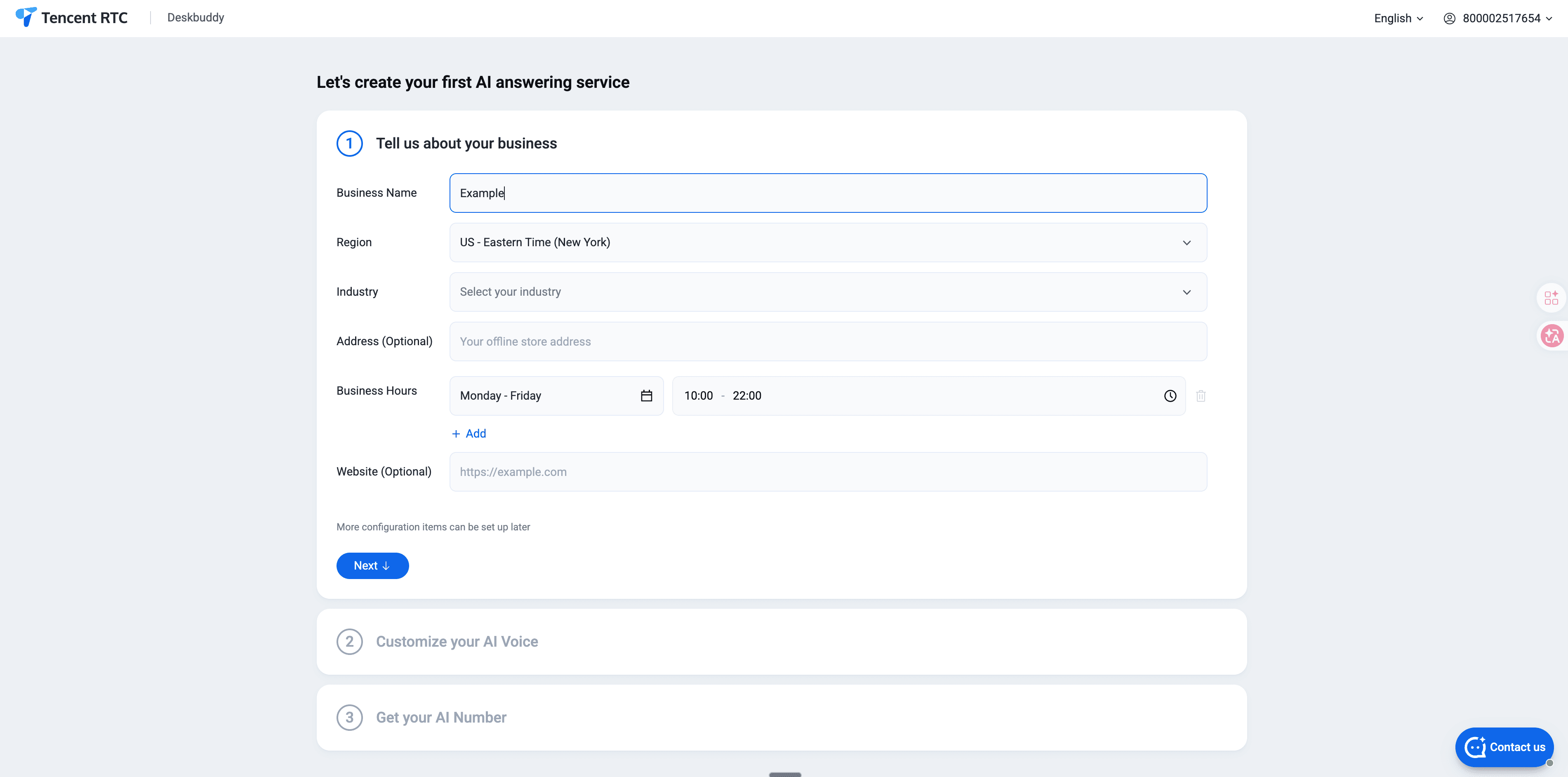
Step 1: Create Your Account (1 minute)
Sign up at deskbuddy.trtc.io. Enter your business name, industry, and basic contact info.
Step 2: Add Your Business Details (2 minutes)
Tell the AI about your business: services offered, prices, hours of operation, location, and any policies (cancellation, deposits, vaccination requirements, etc.). DeskBuddy walks you through this with simple prompts — you write in plain English, not code. Something like: "We're a dog grooming salon open Tuesday through Saturday, 9 AM to 6 PM. We offer baths ($35), full grooming ($55–$75), nail trimming ($15), and teeth cleaning ($25)."
Step 3: Connect Your Calendar (1 minute)
Link your Google Calendar, Mindbody, or Square account. DeskBuddy syncs your availability in real time so the AI never double-books you.
Step 4: Set Up Call Forwarding (1 minute)
Forward your business phone to your DeskBuddy number. This works with any phone provider — it's a simple settings change, not a technical project. You can choose to forward all calls, only unanswered calls (after a set number of rings), or only after-hours calls.
Step 5: Test It (30 seconds)
Call your own number. Talk to the AI. Make sure it sounds right, knows your services, and books correctly. Adjust anything that needs tweaking.
Total time: about 5 minutes. You're live and answering calls 24/7.
No contracts, no installation appointments, no IT department required. If you can set up a social media account, you can set up AI phone answering.
Our Top Recommendation: DeskBuddy
Full transparency: DeskBuddy is our product, and we built it specifically for the businesses described in this guide. Here's why we think it's the best fit for most small service businesses — and where it's not.
What DeskBuddy Does Well
Built for service businesses. DeskBuddy isn't a generic AI phone system trying to serve everyone from law firms to Fortune 500 companies. It's designed specifically for salons, pet services, fitness studios, wellness centers, and similar appointment-based businesses. The AI understands industry terminology and common booking flows out of the box.
Direct integrations where it matters. Google Calendar, Mindbody, and Square — the tools most service businesses already rely on. Direct sync, no middleware, no Zapier workarounds needed.
Straightforward pricing. Plans run $39.90 to $99.90/month. No per-minute charges, no surprise overage fees, no annual contracts required. You know exactly what you're paying before you sign up.
5-minute setup. We've timed it with real users. Most businesses are fully live and answering calls in under 5 minutes.
Multilingual by default. Callers can speak in their preferred language. The AI handles the conversation naturally without making the caller "press 2 for Spanish" or navigate any menus.
What DeskBuddy Doesn't Do
We believe in honest positioning. Here's where DeskBuddy may not be the right choice:
- High-complexity call handling — legal intake, detailed medical triage, multi-party conference calls. For these, you'll want a hybrid human/AI service or a specialized solution.
- Outbound calling campaigns — DeskBuddy is an inbound receptionist, not a sales dialer or cold-calling tool.
- Enterprise-scale call centers — if you have 50+ agents and complex routing trees, you need a different category of software.
For most small service businesses handling 20–500 inbound calls per month, DeskBuddy hits the right balance of capability, simplicity, and price.
Other Options Worth Considering
We'd be doing you a disservice if we only talked about ourselves. Here are two established alternatives worth evaluating, depending on your needs:
Ruby Receptionists
Best for: Businesses that want a live human on every single call.
Ruby uses real, US-based receptionists to answer your phone. The experience is genuinely warm, personal, and professional. Their receptionists are well-trained and callers consistently report positive experiences.
The tradeoff is cost. Plans start around $235/month for a limited number of receptionist minutes. For a busy service business taking 100+ calls per month, you'll likely need a higher tier ($400–$700+ monthly), and per-minute overages can surprise you.
Choose Ruby if: Budget isn't your primary concern and you strongly prefer a human voice on every call. Ruby is especially popular with law firms, financial advisors, and high-end professional services where the personal touch on the phone matters more than cost efficiency.
Pricing: $235–$1,500+/month depending on call volume.
Smith.ai
Best for: Businesses that need a blend of AI efficiency and human backup for complex calls.
Smith.ai uses AI for initial call screening and handling, then routes complex calls to live agents. They offer appointment scheduling, lead qualification, intake forms, and CRM integrations. It's a solid hybrid approach.
Choose Smith.ai if: You get a meaningful number of complex calls that truly require human judgment — not just appointment bookings, but detailed consultations, sensitive conversations, or multi-step intake processes.
Pricing: Starts around $140/month for 30 calls, with additional calls at $4.25–$7.00 each. Costs scale with volume.
Quick Comparison
Feature | Ruby | Smith.ai | |
Starting price | $39.90/mo | ~$235/mo | ~$140/mo |
24/7 coverage | Yes | Select plans | Yes |
Appointment booking | Yes (automatic) | Manual by receptionist | Yes |
Calendar sync | Google Calendar, Mindbody, Square | Limited | CRM-focused integrations |
Best for | Service businesses (salons, pet, fitness) | Professional services (legal, financial) | Mixed-complexity businesses |
Setup time | ~5 minutes | 1–3 business days | 1–2 business days |
All three are legitimate options run by real companies. Your best choice depends on your budget, call complexity, and how much you value a live human voice on routine calls that AI can handle just as well.
Frequently Asked Questions
Will callers know they're talking to an AI?
Some will, some won't. Modern AI voices use natural pacing, appropriate pauses, and realistic intonation. In many cases, callers don't notice or don't mind — especially when the AI resolves their request in 60 seconds. That said, we recommend being upfront about it. Most businesses add a brief note to the greeting. Callers generally care more about getting their problem solved quickly than who (or what) solved it.
What happens if the AI can't answer a question?
Good AI phone answering services have clear fallback protocols. The AI will either transfer the call to a staff member, take a detailed message with the caller's contact info, or offer to have someone call back within a specific timeframe. It should never leave a caller stuck in a dead end. With DeskBuddy, you set your own transfer rules — which situations trigger a handoff, who receives the call, and what backup behavior to use if nobody's available.
Can I use AI phone answering with my existing phone number?
Yes. You keep your current business phone number — no changes needed. You simply set up call forwarding from your existing number to the AI service. This is a simple settings change with your phone provider and takes about 2 minutes. You can forward all calls, only calls you don't answer (after a few rings), or only after-hours calls.
Is my customer data safe?
Reputable AI phone answering services encrypt all call data in transit and at rest, store it securely, and don't sell it to third parties. If you're in healthcare, ask specifically about HIPAA compliance. Always read the provider's privacy policy and ask about data retention periods. DeskBuddy encrypts all data and does not use customer call data to train its AI models.
How does AI phone answering handle accents and background noise?
Modern speech recognition has been trained on millions of hours of diverse speech and handles a wide range of accents well. Background noise — traffic, music, barking dogs — is filtered using noise suppression algorithms. No system is flawless. Very heavy accents combined with poor phone connections can occasionally cause misunderstandings. In those cases, a good AI will ask for clarification or offer to transfer to a human rather than guessing.
Can the AI handle multiple calls at the same time?
Yes — and this is a major advantage over any human-based option. AI phone answering handles unlimited simultaneous calls. No busy signals, no hold queues, no "all representatives are currently busy" messages. During peak periods — Monday mornings, lunch rushes, post-holiday surges — every single call gets answered instantly. For busy service businesses, this alone can justify the cost.
The Bottom Line
Missing phone calls costs small businesses real money. Every unanswered call is a potential customer who books with your competitor instead — and 85% of callers who don't get through will never call back.
AI phone answering fixes this for a fraction of what you'd pay a human receptionist — or even a traditional answering service. It works around the clock, books appointments automatically, speaks your customers' languages, and handles the routine calls that make up the vast majority of your incoming call volume.
For most small service businesses, the math works out clearly:
- Cost of AI phone answering: $40–$100/month
- Revenue from just one extra appointment per week: $300–$400/month
- ROI: Positive from month one
If you're running a salon, pet grooming business, fitness studio, spa, or any appointment-based service, DeskBuddy is purpose-built for businesses like yours. It sets up in 5 minutes, integrates with the tools you already use, and starts answering calls today.


